
The Receipt Scanner App That Actually Saves You Money
Scan receipts in seconds. AI categorizes expenses automatically. Tax-ready reports in one click.
Stop losing receipts and missing tax deductions. SparkReceipt uses AI to scan, extract, and organize your receipts — so you spend less time on paperwork and more time on your business. Start with a 7-day free trial.
Business Owners in 175 Countries Trust SparkReceipt


Still Tracking Receipts Manually?
See what changes when AI handles your receipts

Without a Receipt Scanner
- Receipts stuffed in drawers, wallets, and glove boxes
- Hours spent entering data into spreadsheets
- Missed deductions because receipts got lost or faded
- Scrambling to find documentation before your T2125 deadline
- Paying your accountant to sort through shoe boxes

With SparkReceipt
- Every receipt scanned and stored digitally in seconds
- AI extracts vendor, amount, date, GST/HST, and category
- Never miss a deduction — every expense is tracked
- Tax-ready reports generated in one click
- Invite your accountant or bookkeeper to your account at any time
How AI Receipt Scanning Works
Snap a Photo or Upload Your Receipt
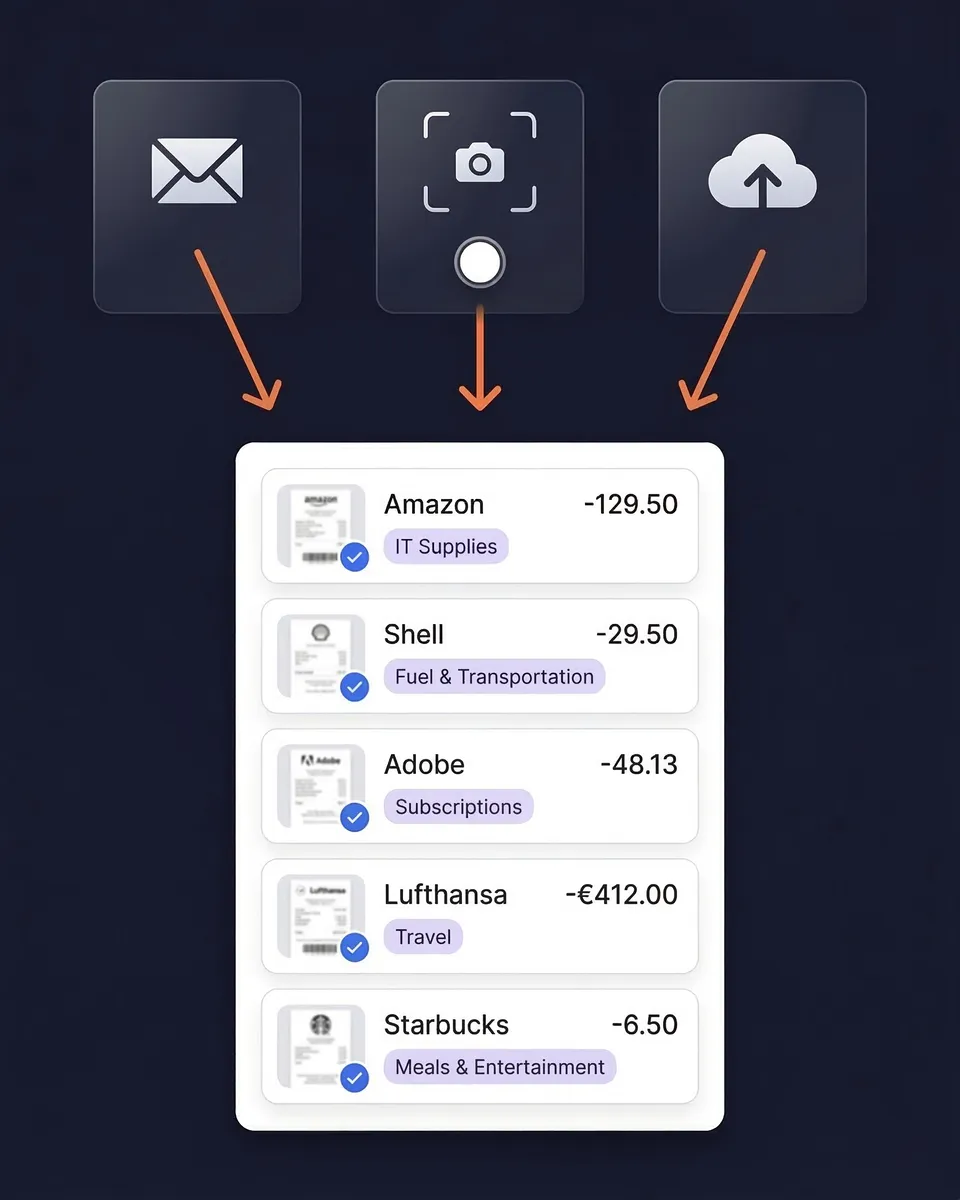
Use your phone camera to scan any paper receipt — even crumpled or faded ones. Upload PDFs, images, or screenshots from your computer. Forward email receipts to your dedicated SparkReceipt address, or connect your inbox for automatic capture. Handles receipts in almost any language and 190 currencies with automatic exchange rate conversion.
AI Reads and Categorizes Every Detail
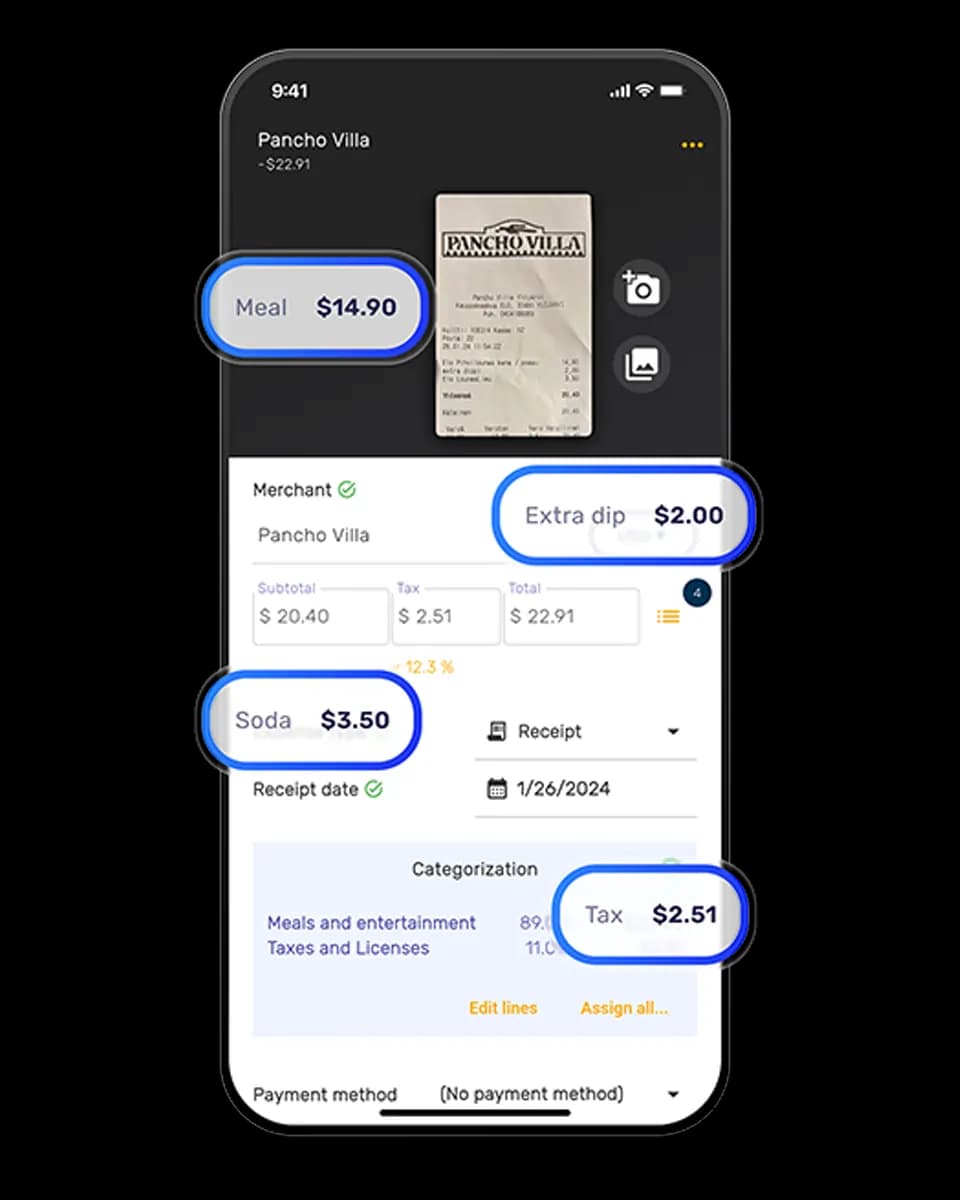
SparkReceipt's AI extracts the vendor name, amount, date, tax breakdown, payment method, and line items from your receipt. No manual data entry needed. Expenses are automatically sorted into tax-relevant categories — meals, travel, office supplies, software subscriptions, and more. The AI learns your patterns and gets smarter over time.
Generate Tax-Ready Reports Instantly
Create clean expense reports in PDF, Excel, or CSV format with one click. Reports include totals, category breakdowns, tax summaries, and links to original receipt images. Sync directly with QuickBooks Online or Xero to eliminate double entry. Or invite your accountant or bookkeeper directly to your account at any time.
Scan any receipt, anywhere
SparkReceipt works on iPhone and Android. Snap a photo of any paper receipt and AI extracts the data in seconds — even from crumpled, faded, or poorly printed receipts.
Got email receipts? Connect your Gmail, Outlook, Microsoft, or any IMAP inbox and SparkReceipt finds and imports receipts automatically. It works backward too: email history extraction pulls receipts out of the mail you already have, as far back as you choose — paper goes forward, your inbox goes backward.
AI that actually understands your receipts
SparkReceipt's AI doesn't just scan — it reads. Every receipt is analyzed to extract the vendor name, total amount, date, tax breakdown, payment method, and individual line items. On receipts scanned since September 2026, SparkReceipt also saves the quantity and unit price on each line where the receipt shows them. For fuel, the quantity is the litres you bought.
Expenses are automatically categorized into tax-relevant groups: meals and entertainment, travel, office supplies, software, professional services, and more. The AI applies local tax rules based on your country and adapts to your spending patterns.

Beyond receipts: bank statement extraction
Upload PDF bank statements and automatically extract every transaction. AI categorizes each transaction and matches it against your scanned receipts — giving you a complete picture of your expenses without entering a single line of data manually.

Built for Sole Proprietors, Not Corporations
Simple, transparent pricing. No hidden fees, no surprise charges.
Loved by Small Business Owners
“I needed a solution to organize and process my personal and business receipts. I'm thrilled I found SparkReceipt. It saves me a lot of time!”

Frédéric Thériault
Productions Locavores · Canada
“SparkReceipt is one of the very few software purchases that exceeded my expectations.”

Robert Connolly
The Internet Design Co. · Scotland
“I used to send my accountant a bag of slips every month. With SparkReceipt I now have a realtime view of how much the business owes me.”

Daniel Esterhuizen
Esterhuizen Consulting · South Africa
Join 38,283 businesses that chose SparkReceipt — 4,620,044 receipts processed and counting.
Start Free TrialFrequently Asked Questions
A receipt scanner app uses your phone camera or file uploads to capture receipt images, then extracts key data like vendor name, amount, date, and tax using AI-powered OCR technology. The best receipt scanner apps — like SparkReceipt — automatically categorize expenses and generate tax-ready reports.
SparkReceipt's AI accurately extracts vendor names, amounts, dates, tax breakdowns, and currencies from receipts. It supports six languages (English, French, German, Spanish, Japanese, Finnish) and handles 190 currencies with automatic exchange rate conversion.
Absolutely. SparkReceipt automatically categorizes your scanned receipts into tax-relevant categories. Generate clean expense reports in PDF or Excel format — ready for your accountant or your T2125. The CRA accepts digital receipts when imaging standards are followed. Consult a qualified tax professional for advice specific to your situation.
Yes. SparkReceipt works on both iPhone and Android devices. Snap a photo of any receipt with your phone camera, and AI extracts the details in seconds. You can also upload receipts from your computer or forward email receipts.
SparkReceipt offers AI-powered receipt scanning at $14.92/month, billed annually — versus $22+ for FreshBooks. SparkReceipt is built specifically for sole proprietors and small businesses — not enterprise teams.
Yes. Connect your Google (Gmail), Microsoft (Outlook, Hotmail, Live), or any IMAP provider (Yahoo, iCloud, ProtonMail, and more), and SparkReceipt automatically finds and processes email receipts — no forwarding required. You can also scan historical emails using date filters to capture past receipts. Email receipt scanning is included in the Elite plan.
SparkReceipt exports your expense data in PDF, Excel, CSV, or ZIP formats. Generate one-click expense reports complete with totals, categories, tax summaries, and links to original receipt images.
Yes. SparkReceipt integrates directly with QuickBooks Online. Your categorized expenses and receipt images sync automatically, eliminating double entry between your receipt scanner and accounting software.
Yes. The AI extracts tax breakdowns from every receipt, including GST, HST, and PST amounts. Tax data is preserved in your reports — ready for Input Tax Credit claims or your T2125 filing.
SparkReceipt offers simple, transparent pricing with no hidden fees or surprise charges. Try the Elite plan with a 7-day free trial.