
Business Owners in 175 Countries Trust SparkReceipt


Never lose another receipt.
Bookkeeping is ten minutes a month.
It still won't be fun. But documents file themselves, and it mostly happens without you.
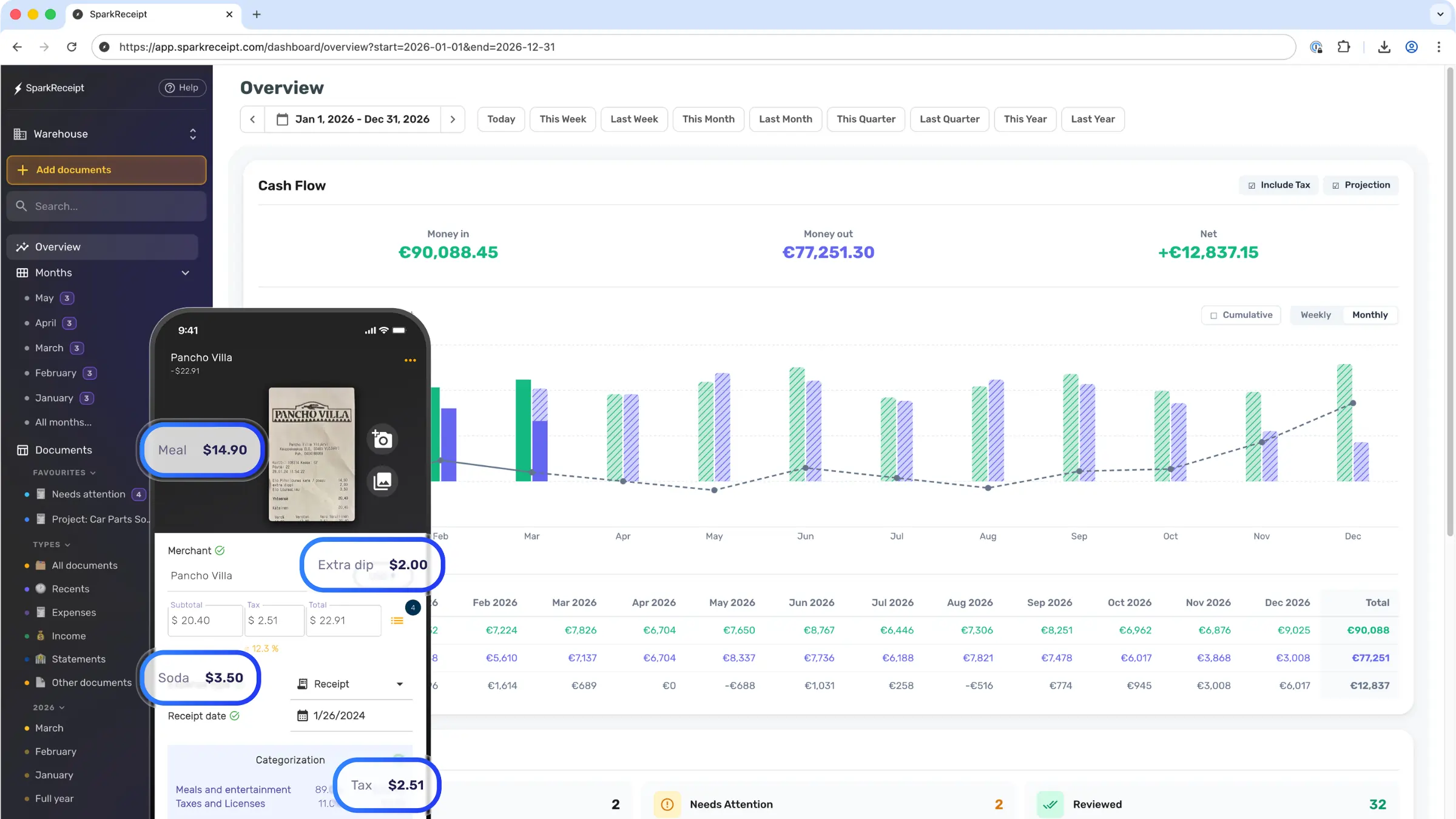
Platform data, September 2026
Where do the ten minutes go?
Set the system up once. After that the month runs on its own, and you show up at the end to confirm and publish.
Set up once, about 15 minutes
- 1
Connect your inbox


Gmail, Outlook or any IMAP mailbox. From then on, receipts and invoices arrive on their own, read and categorised as they land.
- 2
Drop in your bank statement each month
Set a monthly reminder and drop in the statement from FNB, Standard Bank, Absa, Nedbank, Capitec or any bank as PDF, CSV or Excel. SparkReceipt reads every line and pairs it with the receipt that proves it.
- 3
Put the app on your phone
For the paper stuff and the kilometres. Snap a slip at the till, log a trip by GPS, and both are filed before you leave the parking lot.
Then, each month, about ten minutes:
Each month · Min 1–2
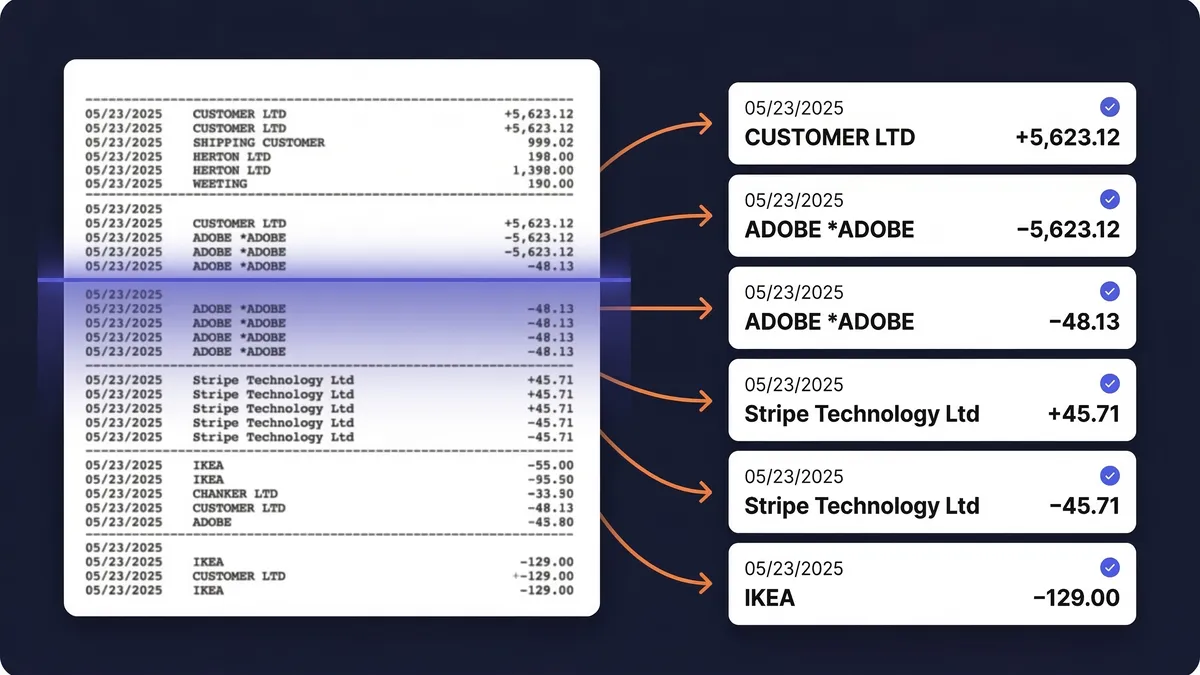
The statement lands. Matching starts on its own.
Drop in the statement as PDF, CSV or Excel. SparkReceipt reads every line and pairs each one with the receipt it already captured for it. Transfers and personal spending stay out of your totals.
Each month · Min 3–7
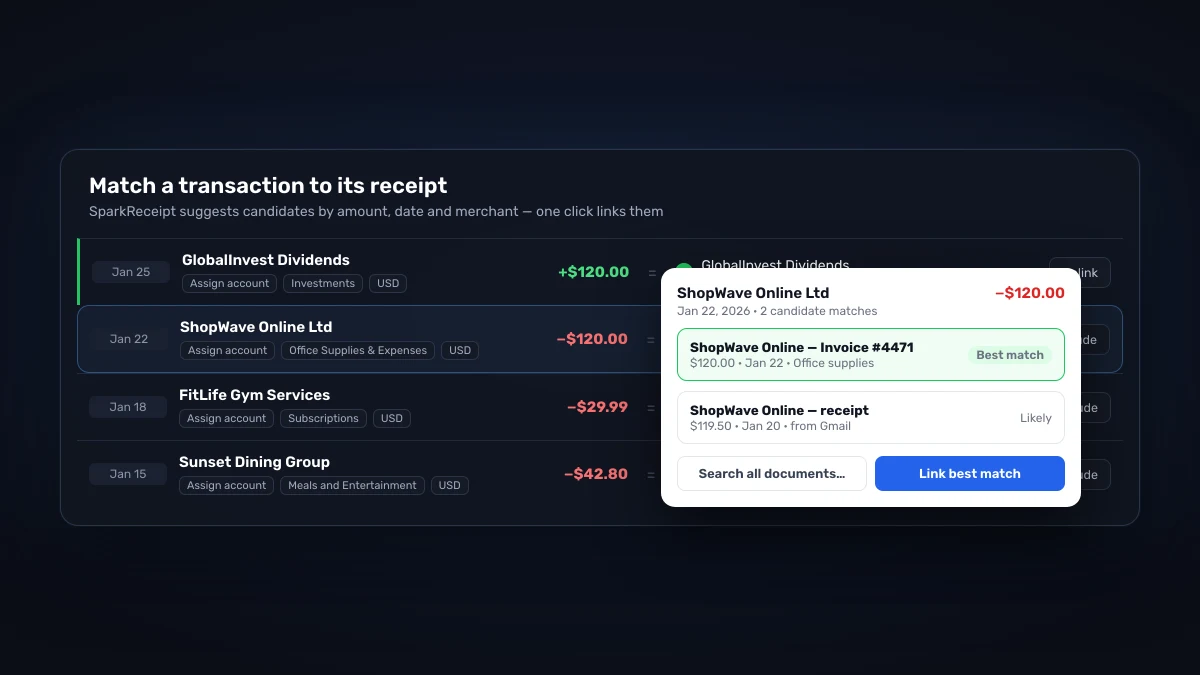
Confirm the matches, or let SparkAgent do it
One click per match, with the best candidate already picked by amount, date and merchant. Or ask SparkAgent to work through the list for you. A progress bar walks you to 100%.
Each month · Min 8–9
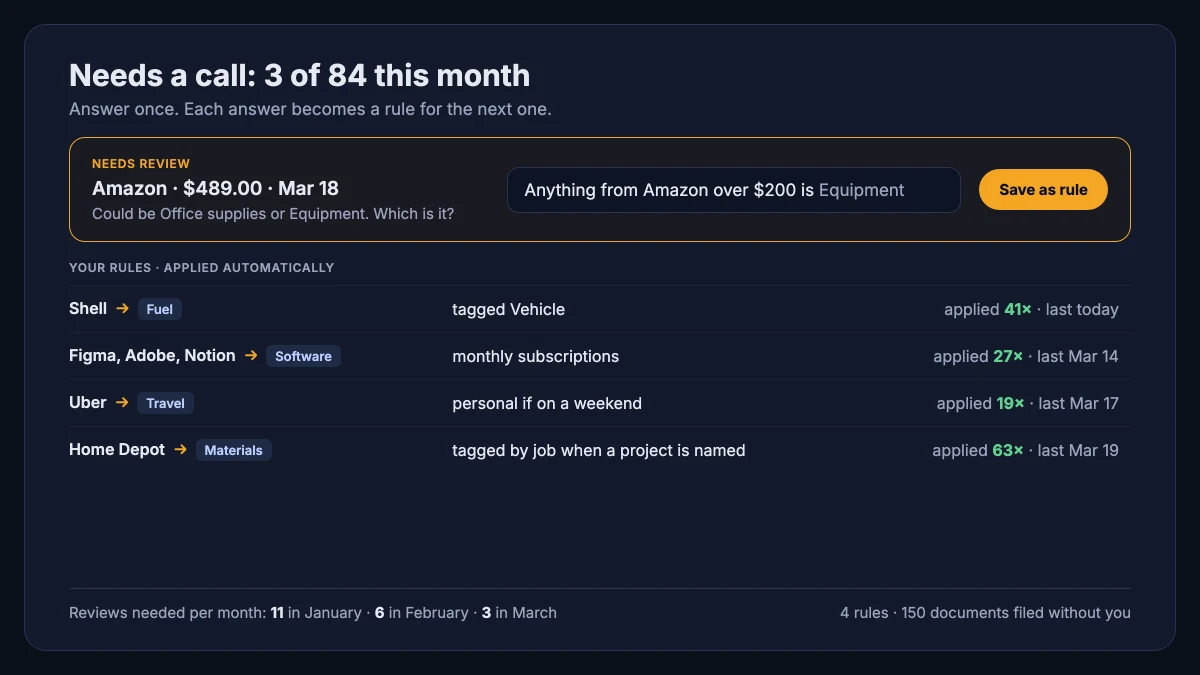
Answer once. The AI files it that way every month after.
A few receipts a month need a call only you can make: the new supplier, the Takealot order that was equipment, the dinner that was a client meeting. Answer in plain English ("Engen is always Fuel", "Anything from Figma is Software") and SparkReceipt turns each answer into a rule that files the next one on arrival. Month by month there is less to answer.
And the backlog
Your last tax year is still sitting in your inbox
Connecting your inbox catches receipts from today onward. Email history extraction goes the other way: pick how far back to go, and SparkReceipt walks through your past Gmail, Outlook, or IMAP mail and pulls out every receipt and invoice it finds. About one email in ten in a business inbox is a receipt, so a typical cleanup surfaces 150 or more you would otherwise hunt down by hand. Most people sweep a full year, some go back twenty, and your first 10,000 historical emails are included with Elite.
60 hours a year vs. 10 minutes a month
Same receipts, same tax return. The difference is who does the reading.

Receipts by hand
- Receipts scattered across emails, wallets and drawers
- Hours spent searching for missing slips
- Missed deductions because receipts got lost or faded
- Scrambling to find documentation before you file your return
- Paying your accountant to sort through shoe boxes

With SparkReceipt
- Snap receipts as you get them (seconds)
- AI extracts and categorises automatically
- Never miss a deduction: every expense is tracked
- Tax-ready reports generated in one click
- Your accountant gets finished books, not a shoebox
Loved by Small Business Owners
“I used to send my accountant a bag of slips every month hoping they capture everything. With SparkReceipt I now have a realtime view of how much the business owes me.”

Daniel Esterhuizen
Esterhuizen Consulting · South Africa
“Excellent software to manage income and expenses, and have the relevant info at your fingertips at any given time.”

Melvin Hoods
MJD Brokers · South Africa
“SparkReceipt has been a game-changer for me! It's made organising my expenses effortless.”

Tracy Duggan
Business Coach · United Kingdom
“SparkReceipt is one of the very few software purchases that exceeded my expectations.”

Robert Connolly
The Internet Design Co. · Scotland
“The scan accuracy is the most precise out there. Just try it!”

Christina Sust
INMIZE · Spain
“Excellent start and amazing team. Looking forward to making SparkReceipt my default expense management and accounting platform.”

Jon Aron
Logic Enterprises · Switzerland
Join 38 283 businesses that chose SparkReceipt — 4 620 044 receipts processed and counting.
Start Free Trial60+ hours a year by hand vs. R 137,46 a month
Most people arrive from a shoebox and a spreadsheet. Here is the cost of doing it by hand, next to ours: less per month than one hour of a bookkeeper's time.
Doing it by hand
Shoebox + spreadsheet
60+ hours a year
Flattening, reading and typing each receipt into a spreadsheet, filing the paper, matching it to the bank statement, and hunting for the ones that went missing.
A catch-up bill before the return
What a bookkeeper charges to turn a year of shoebox records into books a return can be filed from, before the return itself. Catch-up work is quoted as a one-off project, at the top of the rate card.
Deductions you can't substantiate
A faded till slip or a lost email is an expense you pay for twice: once at the till, once at tax time.
Total per year
Your evenings, a catch-up bill, and the deductions you couldn't substantiate.
Basis: about 40 receipts a month at six minutes each by hand, plus a weekend reconstructing the year before provisional tax and year-end.
Frequently Asked Questions
The AI extracts merchant names, dates, totals, taxes, currencies, and line items with high accuracy — typically processing each receipt in 2–3 seconds. It reads receipts in virtually any language and supports 190 currencies.
Yes. You can create multiple linked accounts under your main account to completely separate expenses between different businesses or personal accounts. Every plan includes unlimited linked accounts.
Yes. Connect Google, Microsoft, or any IMAP provider, and the app automatically fetches digital receipts from email. It processes them identically to scanned receipts — extracting data, categorising expenses, and storing documents. It also scans your email history: pick a start date and past receipts are imported too, so a year of backlog is handled in one run.
Yes. Upload bank or credit card statements in PDF, Excel, or CSV format, and the app extracts every transaction. It matches those transactions to receipts already in the account, helping identify missing receipts and duplicates before you file your return.
Yes. The app offers direct QuickBooks Online integration that syncs categorised expenses automatically. You can also export to Excel, CSV, or PDF, and connect with hundreds of other apps through Zapier, Make, and Pabbly.
Yes. Every plan includes 3 users — invite your accountant as one of them, at no extra cost on top of your included users. They get live access to all receipts, expenses, and reports. You can also generate shareable links or export reports directly.
SparkReceipt delivers AI-powered scanning and categorisation at a lower price point than FreshBooks or Dext — starting at R 274,92/month. It's purpose-built for sole traders and small businesses, and every plan includes 3 users so you can invite your accountant and partner.
Yes. Data is encrypted in transit and at rest using industry-standard security. The app is fully GDPR compliant, stores data in EU data centres, and retains receipts for at least 10 years — well beyond the SARS 5-year record-keeping requirement. You can export or delete data anytime.
Yes. SparkReceipt's AI extracts tax breakdowns from every receipt, including 15% VAT. Expenses are categorised and tax amounts are preserved in your reports — ready for your accountant, your VAT201 return, or your income tax return.
Yes. SARS accepts electronic copies of your receipts and tax invoices, provided they are a true and readable copy of the original. Under the VAT Act you keep the records behind your claims for five years from the end of the tax period. SparkReceipt stores every document securely for at least 10 years, so you can safely go paperless and still be ready for a SARS audit.
For an input VAT claim, yes: the deduction rests on the tax invoice, not the bank line. For a purchase over R5,000 you need a full tax invoice showing the supplier's and your own VAT numbers; between R50 and R5,000 an abridged tax invoice is enough; at R50 or less the till slip will do, as long as it shows the VAT. SparkReceipt captures and stores the right document against each expense so the claim is always supported.