Convert Bank Statements to Excel or CSV, Then Match Every Line to a Receipt

A bank statement converter to save you the retyping: upload a PDF from any UK bank and get every transaction in Excel or CSV, matched to your receipts.

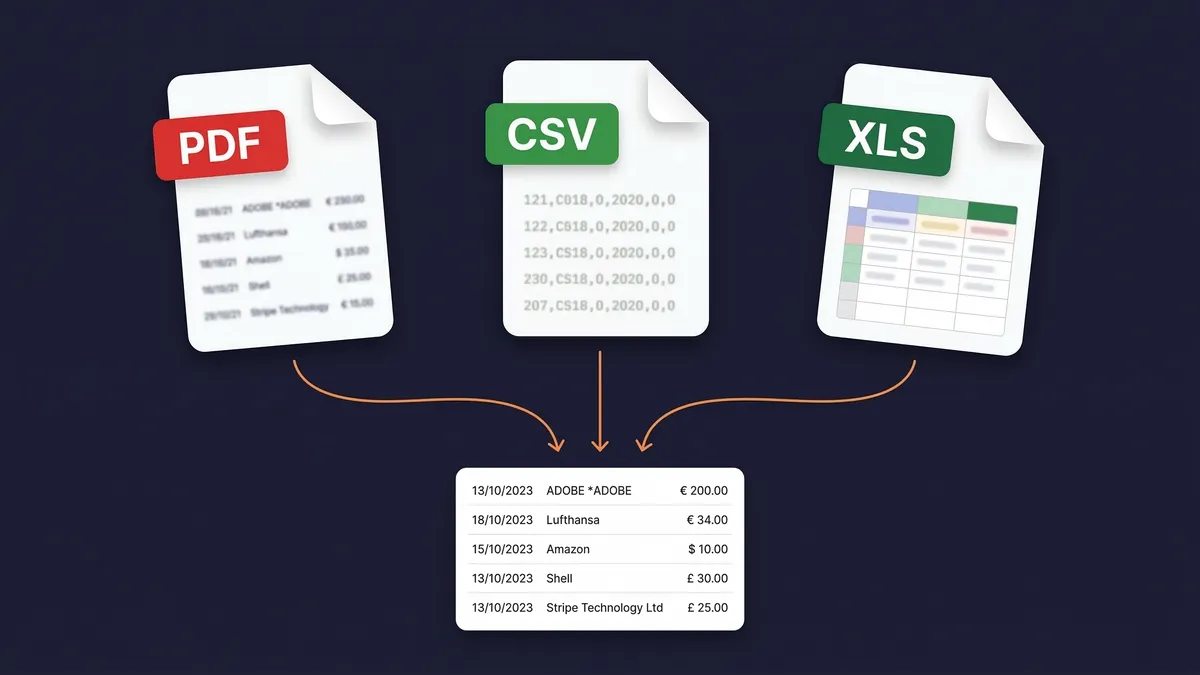
Bank statements tell you what you spent. Receipts prove why. Upload your PDF, CSV or Excel bank statement and the AI extracts every transaction in minutes, ready to export to Excel or CSV. Then it matches each one to the right receipt or invoice from your archive.

7-day free trial

Business Owners in 175 Countries Trust SparkReceipt

Tracy DugganRobert ConnollyRafael RoaFrédéric ThériaultPierce Mooney
4.8on the App Store · 4.6 on Google Play · 2,700+ ratings
99.66%FX Auto-Lock Rate
190Currencies Handled
4,620,044Receipts Processed
175Countries Served

Bank Statement Reconciliation

See what changes when AI handles your bank statements

Woman stressed about bank statement reconciliation

Without SparkReceipt

  • Manually typing transactions from bank statements into spreadsheets
  • Cross-referencing receipts one by one against bank transactions
  • Missing receipts discovered only at Self Assessment time
  • Paying your accountant to sort through unmatched transactions
  • No clear view of which transactions have proof of purchase
Woman happy after using SparkReceipt for bank statements

With SparkReceipt

  • Every transaction extracted automatically from any bank statement
  • AI matches each transaction to the right receipt or invoice
  • Unmatched transactions flagged so you know what's missing
  • Bring your accountant into the account to review matched and unmatched data
  • Complete reconciliation in minutes instead of hours

How Bank Statement Extraction and Matching Works

1

Upload Your Bank or Credit Card Statement

Upload your statement as a PDF, CSV, or Excel file. SparkReceipt handles digital PDFs, scanned paper statements, and exported spreadsheets from any bank: Barclays, HSBC, Lloyds, NatWest, Santander, Monzo, Starling, Tide, or any other. The AI reads statements in any language and processes 190 currencies.

2

AI Extracts Every Transaction Automatically

SparkReceipt's AI reads your bank statement and extracts every transaction: dates, amounts, payees, descriptions and running balances. Each transaction becomes a structured, searchable record. No manual data entry.

3

Transactions Matched to Receipts Instantly

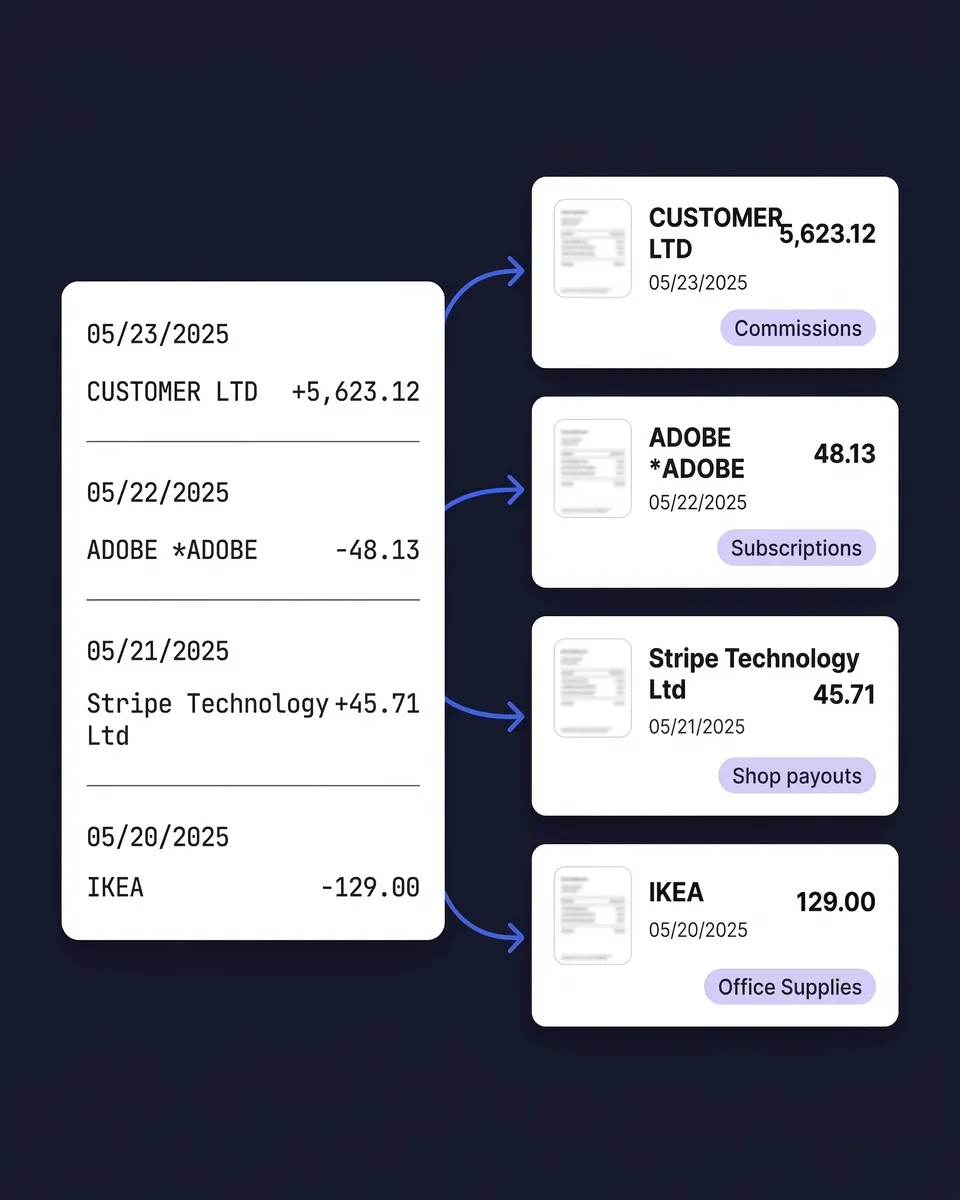
The AI compares each transaction against every receipt and invoice in your archive, matching by amount, date, and vendor name. Matched transactions link to their source documents. Unmatched transactions are flagged so you can see exactly which receipts are missing.

Not Just a Converter: Full Receipt Matching

Most bank statement tools stop at conversion. They turn your PDF into a spreadsheet and hand it back to you. The transactions sit there with no proof attached to any of them.

SparkReceipt does both halves. Upload your bank statement and your receipts, and the AI connects them automatically. Every matched transaction links directly to its proof of purchase. Every unmatched transaction tells you exactly what's missing from your records.

The missing receipts are usually still in your inbox. Email history extraction pulls past email receipts in, as far back as you choose, so they can be matched to the statement too.

That distinction matters more under Making Tax Digital. HMRC expects your income and expense records to be kept digitally, and a bank line on its own isn't a record of what the spend was for. Matching the receipt to the transaction is what turns a bank feed into an actual expense record.

Business owner holding a paper receipt while reviewing a financial dashboard on his desktop monitor

Upload PDF, CSV or Excel From Any Bank

Most bank statement extractors only accept PDF files. That means OCR processing, potential errors, and no support for the CSV or Excel exports your bank already provides.

SparkReceipt accepts all three formats. Upload a scanned PDF statement and the AI-powered OCR extracts every transaction. Upload a CSV or Excel export from your online banking and get perfect, instant extraction with no OCR needed. Upload credit card statements, business current account statements, or savings account statements.

The OCR works in any language, so statements from international banks are processed just as accurately as UK ones. Useful if you bank with a UK challenger for day-to-day trading and hold a separate account abroad for overseas suppliers.

Upload bank statements in PDF, CSV, or Excel format

Extract Bank Statements in 190 Currencies

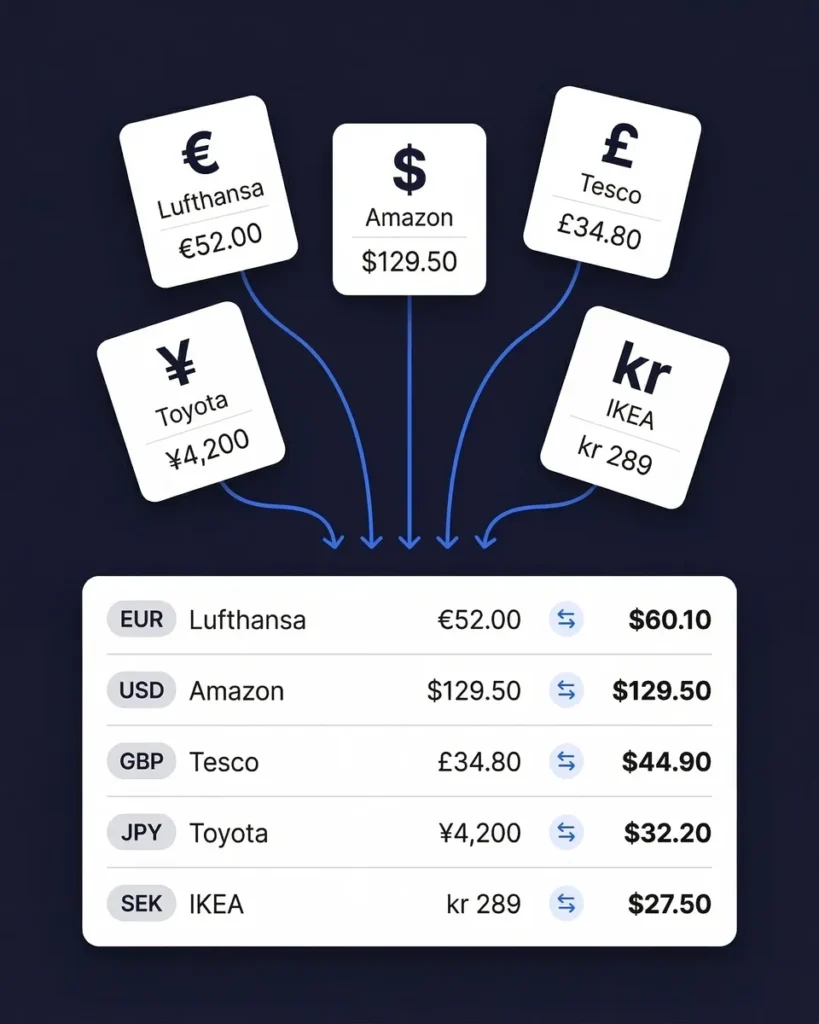
If your business operates across borders, billing in euros, receiving payments in dollars, paying suppliers in yen, you need a bank statement extractor that handles multiple currencies natively.

SparkReceipt processes statements in 190 currencies. Each transaction is extracted with its original currency intact. Exchange rates are applied using the transaction date, so your figures convert to sterling at the rate that applied on the day rather than today's rate.

Upload statements from different banks in different countries and see everything unified in one view. This is particularly valuable for income tracking across international clients and for expense tracking with overseas suppliers.

Bank statement extraction in 190 currencies

How to convert a bank statement to Excel or CSV

Your accountant wants the transactions in a spreadsheet, and your bank gave you a PDF. There are three ways to get from one to the other, and two of them are free.

  1. Download a CSV from online banking. Most UK banks let you export recent transactions as a CSV file next to your transaction history. A file straight from the bank beats any conversion, but how far back you can go varies, and older months, closed accounts and statements your accountant asks for by post are often PDF only.
  2. Import the PDF into Excel. Excel on Windows can read tables out of a digital PDF: Data > Get Data > From File > From PDF. It works on a short statement. It is not in Excel for Mac or Excel for the web, and it can't read a scanned statement, because a scan is a picture of text.
  3. Use a bank statement converter that extracts the transactions. Upload the statement, check the lines, export them. This is what SparkReceipt does, and it is the method that holds up on scanned statements, long statements and several accounts a month.

To convert a bank statement to Excel or CSV in SparkReceipt:

  1. Choose Add new bank / credit card statement in the web app and upload the PDF, CSV or Excel file. Remove any password from the PDF first.
  2. The extraction starts on its own. The AI pulls out every transaction line and checks the lines against the statement's own totals, so a missed row shows up instead of hiding.
  3. Open View transactions to review the lines. Delete transfers between your own accounts, or add a line the statement left out.
  4. Click Export, choose Excel or CSV in the Select export format dialog, and tick Include matched document files if you want the receipts in the same download.

Bank statement converter or bank statement extractor?

A free bank statement converter turns a PDF into rows and stops there. For a one-off job on a clean digital statement, that is often all you need, and your bank's own CSV download is better still.

A bank statement extractor like SparkReceipt does the conversion and then the part a spreadsheet can't: it matches each transaction to the receipt or invoice already in your account and flags the ones with nothing behind them. Under Making Tax Digital that is the difference between a list of payments and a set of expense records. The matched lines can become categorised expenses and income in your reports, or be published to Xero or QuickBooks Online, and your accountant can join your account free to work from the same data.

SparkReceipt is not a free one-off converter. It is paid software with a 7-day free trial, and statement extraction runs on credits, one per extracted transaction line, with credits included in your plan every month. The help centre explains how extraction credits work.

Before you upload a statement to any bank statement converter

A bank statement shows your account number, your balance and everyone you paid. Before you upload one anywhere, find out who runs the service, where the files are stored, how long they are kept and whether you can delete them. For SparkReceipt, the answers are on our security page: data is encrypted in transit and at rest, files are stored in the EU, you can delete your documents, and we do not sell your data.

Bank statement conversion and matching

Convert, match and categorise in one tool, without retyping a single line. Cancel any time.

1 user included
Accountant access is free.

Each extra user: £0.75/month, billed £9 annually. Accountant access is free.

Pro

The essentials for keeping your receipts and expenses organised.

£4.92/mo

Total for 1 user · £59.00 billed annually

+ VAT/GST where applicable

Get Started

7-day free trial

50 documents / month

For receipts and invoices

  • AI scanning and categorisation
  • One connected email inbox
  • One live bank feed connection
  • Bank statement extraction and matching
  • Mileage tracking and expense reports
  • QuickBooks Online, Xero and more
Recommended

Elite

More receipts, more automation. Less to do yourself.

£9.08/mo

Total for 1 user · £109.00 billed annually

+ VAT/GST where applicable

Get Started

7-day free trial

Unlimited documents*

Everything in Pro, plus:

  • Line-item extraction on every receipt
  • Several connected email inboxes
  • Several live bank feed connections
  • AI Fields for the details you need
  • AI rules for categorising and filing
  • Accounting export templates

Founder pack

Elite, with hands-on setup from a SparkReceipt founder.

£459first year

£350 one-time setup + £109.00/year Elite for 1 user

+ VAT/GST where applicable

Get the Founder pack

Annual plan only · No free trial

Everything in Elite

Plus a working session with a founder:

  • Personal walkthrough of your account
  • Connect your email inboxes together
  • Set up your expense categories
  • Configure your integrations
  • Get answers as you work through setup
  • Go live in one working session

Unlimited linked accounts on every plan.

Compare all features

Pro

  • 1 user included. Add teammates any time for a flat fee per user, your accountant joins free on top, unlimited linked accounts
  • 50 documents per month (receipts and invoices, mass upload up to 100 at once)
  • AI scanning and categorisation
  • Automatic email receipt scanning from one connected inbox (Gmail, Outlook, IMAP)
  • Bank statement extraction and receipt matching (PDF, CSV, Excel)
  • One live bank feed connection
  • Mileage tracker: GPS or manual trips
  • SparkAgent AI assistant, or connect your own AI over MCP
  • Integrations: QuickBooks Online, Xero, Zapier, Make, Pabbly, plus webhooks and API
  • Expense reports and exports: PDF, Excel, CSV, ZIP; 190 currencies

Elite

  • Everything in Pro, plus:
  • Unlimited documents: receipts and invoices, mass upload up to 100 at once
  • Line-item extraction on every receipt
  • Several connected email inboxes with automatic scanning
  • Several live bank feed connections
  • AI Fields: tell the AI exactly what to pull from every document
  • Plain-English AI rules: tell the AI how to categorise and file automatically
  • Export templates for Sage 50, DATEV, Wave, and Sage 200

Founder pack

  • Hands-on onboarding with a founder: together we set up your account, inboxes, categories and integrations
  • Everything in Elite, billed annually
  • 1 user included. Add teammates any time for a flat fee per user
  • Skip the learning curve and go live in one working session

Unlimited document scanning on Elite is subject to fair use. Bank statement extraction uses monthly renewable credits. Historical email imports include a free allowance; larger imports use credits, with the cost shown before you start.

Loved by Small Business Owners

“SparkReceipt is one of the very few software purchased that exceeded my expectations. Great product, great features, great value.”
Robert Connolly

Robert Connolly

The Internet Design Co. · Scotland

“With SparkReceipt, organizing and tracking expenses has never been easier. The detailed categorization and expense tracking features make financial management a breeze.”
Jean-Pierre Michael

Jean-Pierre Michael

Artist · France

“Thanks to SparkReceipt I have a quick look to my business accounts status in a glance. It is really impressive.”
Rafael Roa

Rafael Roa

System Arquitectura · Spain

Join 38,283 businesses that chose SparkReceipt — 4,620,044 receipts processed and counting.

Start Free Trial

Frequently Asked Questions

A bank statement extractor reads your bank or credit card statements and automatically pulls out every transaction (dates, amounts, payee names, descriptions and balances) into structured, searchable data. Instead of manually typing transactions into a spreadsheet, you upload the statement file and get organised data in seconds. SparkReceipt goes further than most extractors by also matching each extracted transaction to your receipts and invoices automatically.

SparkReceipt accepts bank and credit card statements in PDF, CSV, and Excel (XLSX) formats. This is more flexible than most competitors, which only handle PDFs. If your bank provides a CSV or Excel export from online banking, you can upload that directly for instant, perfect extraction with no OCR processing needed. For paper statements, scan them to PDF and upload the scanned file. The AI-powered OCR handles both digital and scanned PDFs.

Yes. SparkReceipt processes statements from UK high street banks and challengers alike: Barclays, HSBC, Lloyds, NatWest, Santander, Monzo, Starling, Tide and others, as well as banks worldwide. The AI adapts to different statement layouts automatically, so there are no bank-specific templates to configure and no waiting for your bank to be added.

After SparkReceipt extracts transactions from your bank statement, the AI compares each transaction against every receipt and invoice stored in your account. It matches based on amount, date, and vendor name. Matched transactions are linked directly to the source document, one click away from the original receipt. Unmatched transactions are flagged, so you know exactly which receipts are missing. Upload the missing receipt later and it's matched automatically.

It helps with the record-keeping side of it. MTD for Income Tax requires you to keep digital records of your business income and expenses, and SparkReceipt keeps those records digitally and links each one to the underlying receipt or invoice. SparkReceipt is not HMRC-recognised filing software and does not submit your quarterly updates; you'll use MTD-compatible filing software for that. SparkReceipt keeps the records clean and complete so that submission is straightforward.

SparkReceipt's AI delivers high accuracy across all supported formats. For CSV and Excel uploads, extraction is near-exact because the data is already structured. For PDF statements, the AI-powered OCR handles both digital PDFs (near-perfect accuracy) and scanned paper statements (which depend on scan quality). You can always review, edit, or add notes to any extracted transaction for complete control.

Yes. SparkReceipt handles both bank statements and credit card statements in the same way. Upload your credit card statement as a PDF, CSV, or Excel file, and the AI extracts every transaction. Credit card transactions are then matched to receipts just like bank transactions. This is particularly useful for businesses that put most purchases on a card, because you can quickly identify which charges have receipts attached and which don't.

It's included on both plans, from Pro at £4.92/month billed annually, along with receipt scanning, matching and expense reports. Extraction uses credits, one per transaction line, and every plan includes credits each month. Some competitors sell statement extraction separately. Dext, for example, charges for its Bank Statement Extraction add-on on top of the base subscription. With SparkReceipt there is no separate line item for it.

Yes. Every plan includes 1 user, with more available at a per-user rate, and inviting your accountant is always free. It never uses a paid seat. They can view your extracted transactions, matched receipts, categorised expenses, and reports directly within the app. This makes month-end reconciliation and Self Assessment preparation significantly faster, because your accountant sees organised, matched data instead of boxes of paper.

Download a CSV from online banking if your bank offers one for the period. If you only have a PDF, Excel on Windows can import a digital statement through Data > Get Data > From File > From PDF. For scanned or long statements, upload the file to SparkReceipt, review the extracted lines, then click Export and choose Excel.

Yes. Export the extracted transactions as CSV from the statement's transaction view. You can also skip the file: SparkReceipt publishes categorised expenses and income straight to Xero and QuickBooks Online, with the receipt attached.

Yes. Several websites convert a PDF statement to Excel for free, and your bank's own CSV download costs nothing. They stop at the spreadsheet. A bank statement converter like SparkReceipt is paid, with a 7-day free trial, and adds what a free tool doesn't: matching every transaction to a receipt, flagging what's missing, and keeping the records for Making Tax Digital.

Yes. SparkReceipt integrates with both Xero and QuickBooks Online for direct data transfer. You can also export your extracted and matched transaction data as CSV, Excel, or PDF reports. Whether you need the data in your accounting software, in a spreadsheet for your accountant, or as a formatted report, SparkReceipt works as your bank statement converter and keeps the receipts attached.

Stop Typing Transactions Into Spreadsheets. Use a Bank Statement Converter That Matches Receipts.

Get Started
Start Free Trial