
MTD Needs Digital Records. This Is the Part That Keeps Them Straight.
Every receipt captured, every bank line matched, ready for whichever software files your return.
Making Tax Digital splits into two jobs: keeping digital records of your income and expenses, and submitting them to HMRC. Filing software handles the second. SparkReceipt handles the first — the receipts, the invoices, the bank statements, and the tedious work of making them agree with each other.
Business Owners in 175 Countries Trust SparkReceipt


Where this sits in your MTD setup
Worth being precise, because the two halves are often confused.
SparkReceipt is not HMRC-recognised filing software. It does not send quarterly updates and it does not submit your tax return. For that you need a product from HMRC's software finder.
What it does is the creating digital records half — and specifically the receipt-and-invoice-scanning route that HMRC's own guidance lists as one of the three ways to build those records, alongside bank feeds and manual entry.
HMRC explicitly permits using more than one product: one for creating records and sending quarterly updates, another for submitting the tax return. That is the setup this is built for. You keep the records here, they flow into your filing software digitally, and the numbers you submit have documents behind them.
If your affairs are simple enough that one product covers everything comfortably, use one product. This is for the case where the record keeping is the part that hurts.
Quarterly Updates, Before and After
The difference shows up four times a year now, not once

Records kept the old way
- A quarter's receipts reconstructed the week before the deadline
- Bank lines with no idea what half of them were for
- VAT guessed at rather than read off the document
- Faded till receipts that are no longer legible
- Figures submitted that you could not evidence if asked

Records kept with SparkReceipt
- Receipts captured the day they arrive, by photo or from your inbox
- Every bank transaction matched to the receipt that proves it
- VAT read line by line from the document itself
- Digital copies that stay legible for 10 years
- A quarterly figure you can stand behind, with the evidence attached
How the Record-Keeping Layer Works
Capture Everything, From Wherever It Arrives
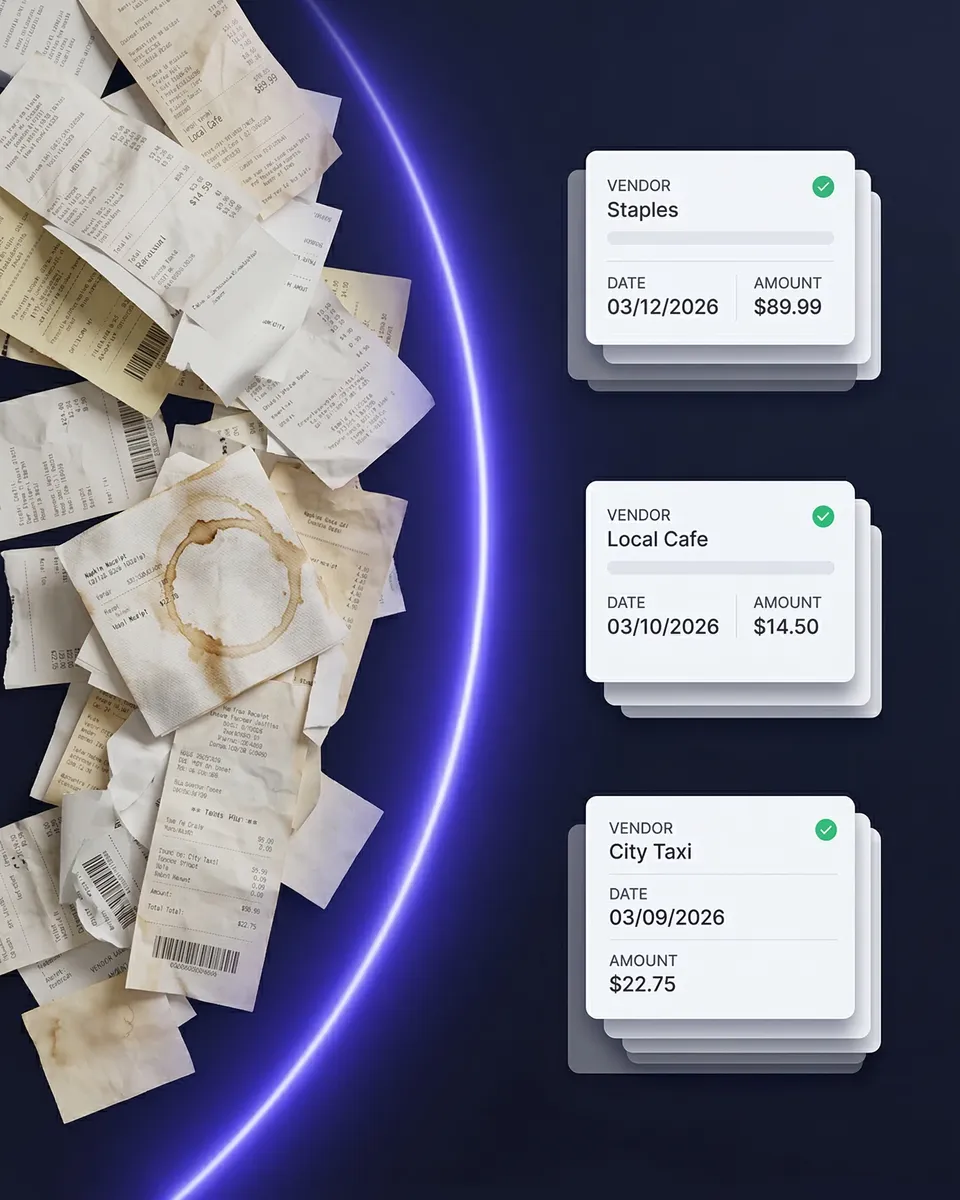
Photograph paper receipts on your phone. Connect Gmail, Outlook, Microsoft, or any IMAP inbox and let digital receipts arrive on their own — no forwarding. Upload PDFs and invoices from your computer. The AI reads printed, handwritten, crumpled, and faded documents in virtually any language.
Match Them Against Your Bank
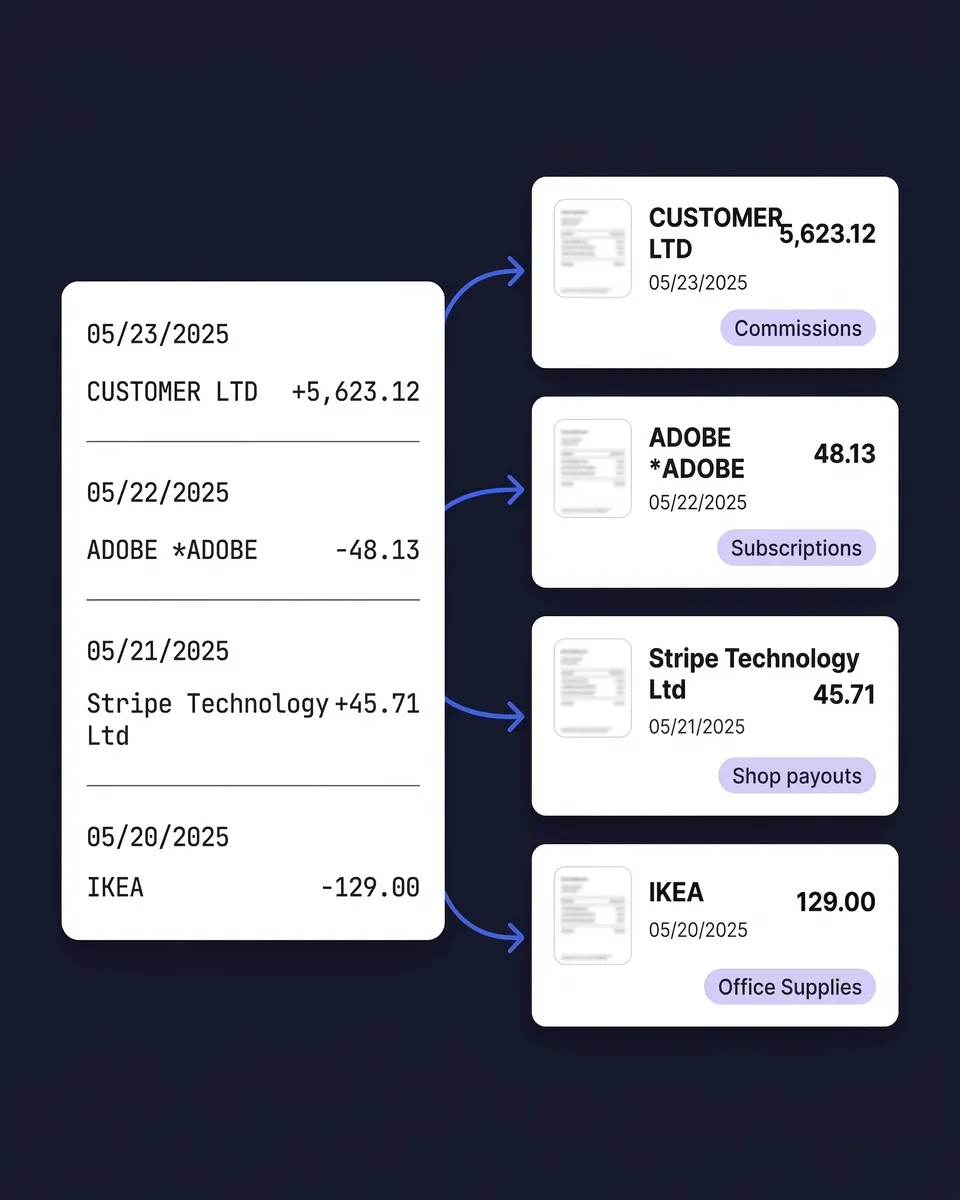
Upload a bank or credit card statement as PDF, CSV, or Excel. Every transaction is extracted and matched to the receipt that supports it. Unmatched transactions are flagged, so you find the gaps in October rather than the night before a deadline.
Hand Clean Figures to Your Filing Software
Sync directly to Xero or QuickBooks Online, or export as CSV or Excel for any other tool. The link is digital rather than re-typed, which is what the MTD digital links rule requires.
A bank line is not a record of what you bought
MTD requires digital records of your income and expenses. A bank feed gives you the amount and the date and a merchant name — it does not tell you what the spend was for, and it carries no VAT breakdown.
That distinction is the whole reason receipts still matter under MTD. Quarterly updates are summary totals, so you are not sending receipts to HMRC. But HMRC can ask for the documents behind those totals during a compliance check, and the retention rule has not changed: at least 5 years after the 31 January filing deadline.
SparkReceipt keeps the figure and the document together, so producing evidence is a search rather than an excavation. Our guides to VAT record keeping and HMRC record keeping requirements cover what counts as adequate.

Cumulative updates reward catching up — if you can find the receipts
Quarterly updates are cumulative year-to-date figures. Anything you missed in Q1 is picked up automatically in Q2 — there is no amendment process to worry about.
That is genuinely forgiving, and it only helps if the missing receipts turn up. A receipt you find in October still lands correctly in the Q2 figures, provided it is in your records by the time you file. Matching each bank line to its document is what tells you which ones are still missing while there is time to do something about it.
Your accountant, in the same account
Quarterly filing means four touchpoints a year with your accountant instead of one. That gets expensive quickly if each one starts with a folder of photographs.
Your plan includes 1 user, with more at a per-user rate, and inviting your accountant is always free. They work in the same account, reviewing categories, checking matched and unmatched transactions, and pulling reports in the format they want, so nobody waits on an email from you.

MTD-Ready Record Keeping
1 user included, more at a per-user rate.
Loved by Small Business Owners
“SparkReceipt has been a game-changer for me! It's made organising my expenses and accounts effortless, saving me loads of time.”

Tracy Duggan
Business Coach · United Kingdom
“SparkReceipt is one of the very few software purchased that exceeded my expectations. Great product, great features, great value.”

Robert Connolly
The Internet Design Co. · Scotland
“Excellent software to manage income and expenses, and have the relevant info at your fingertips at any given time.”

Melvin Hoods
MJD Brokers · South Africa
Join 38,283 businesses that chose SparkReceipt — 4,620,044 receipts processed and counting.
Start Free TrialFrequently Asked Questions
Not in the sense HMRC uses the term. SparkReceipt is not on HMRC's recognised list and does not submit quarterly updates or your tax return. It handles the digital record-keeping side — capturing receipts and invoices, matching them to bank transactions, and categorising them — then hands clean data to whichever recognised product you file with. Check HMRC's software finder for products that submit.
Yes. HMRC's guidance explicitly permits using one product to create records and send quarterly updates and another to submit the tax return, or different products for different businesses. The one restriction is that you cannot use two products for the same submission, and data must move between them digitally rather than being re-typed.
Yes. Quarterly updates are summary totals, so you do not send receipts to HMRC — but you must keep the underlying records, and HMRC can request them during a compliance check. The retention period is at least 5 years after the 31 January filing deadline, and 6 years for VAT records. SparkReceipt stores documents for 10 years.
HMRC's guidance lists scanning receipts and invoices as one of three ways software can let you create digital records, alongside linking to a bank account and manual entry. The digital record itself is the transaction data — date, amount, category — and keeping the source document alongside it is what makes the record defensible if questioned. See MTD digital records explained for the full picture.
Directly to Xero or QuickBooks Online through an integration, or as a CSV or Excel export for other tools. Either satisfies the digital links requirement, which prohibits manually re-keying figures between systems. What is not acceptable is reading a total off one screen and typing it into another.
Quarterly updates are cumulative, so anything missing from an earlier quarter is captured in the next one without an amendment. Practically, the fastest way to catch up is to upload the bank statements for the period and let the matching show you which transactions have no receipt attached — then chase only those.
Possibly not. Most full accounting platforms include some receipt capture, and if it handles your volume and your document quality, one product is simpler and cheaper. This is worth adding when receipts are the part that breaks down — high volume, messy paper, supplier invoices with mixed VAT, or receipts scattered across inboxes.
For the 2026/27 tax year the deadlines are 7 August 2026, 7 November 2026, 7 February 2027, and 7 May 2027, with the tax return due 31 January 2028. Late quarterly updates carry no penalty points during 2026/27, but late payment penalties still apply, with 30 days before the first one in your first year. See our guide to MTD penalties for the detail.
Get the Records Right Before 7 November
Get StartedExplore More Features
Receipt Scanner
AI-powered receipt scanning in seconds
Bank Statement Extractor
Extract and match bank transactions
Email Receipts
Auto-import receipts from your inbox
Data Exports
Export in CSV, PDF, Excel, or ZIP
Expense Reports
Generate reports in PDF, Excel, or CSV
Xero Integration
Sync receipts straight into Xero