
Fetch Email Receipts Automatically
Let AI find receipts and invoices in your inbox. Never miss a receipt or an allowable expense
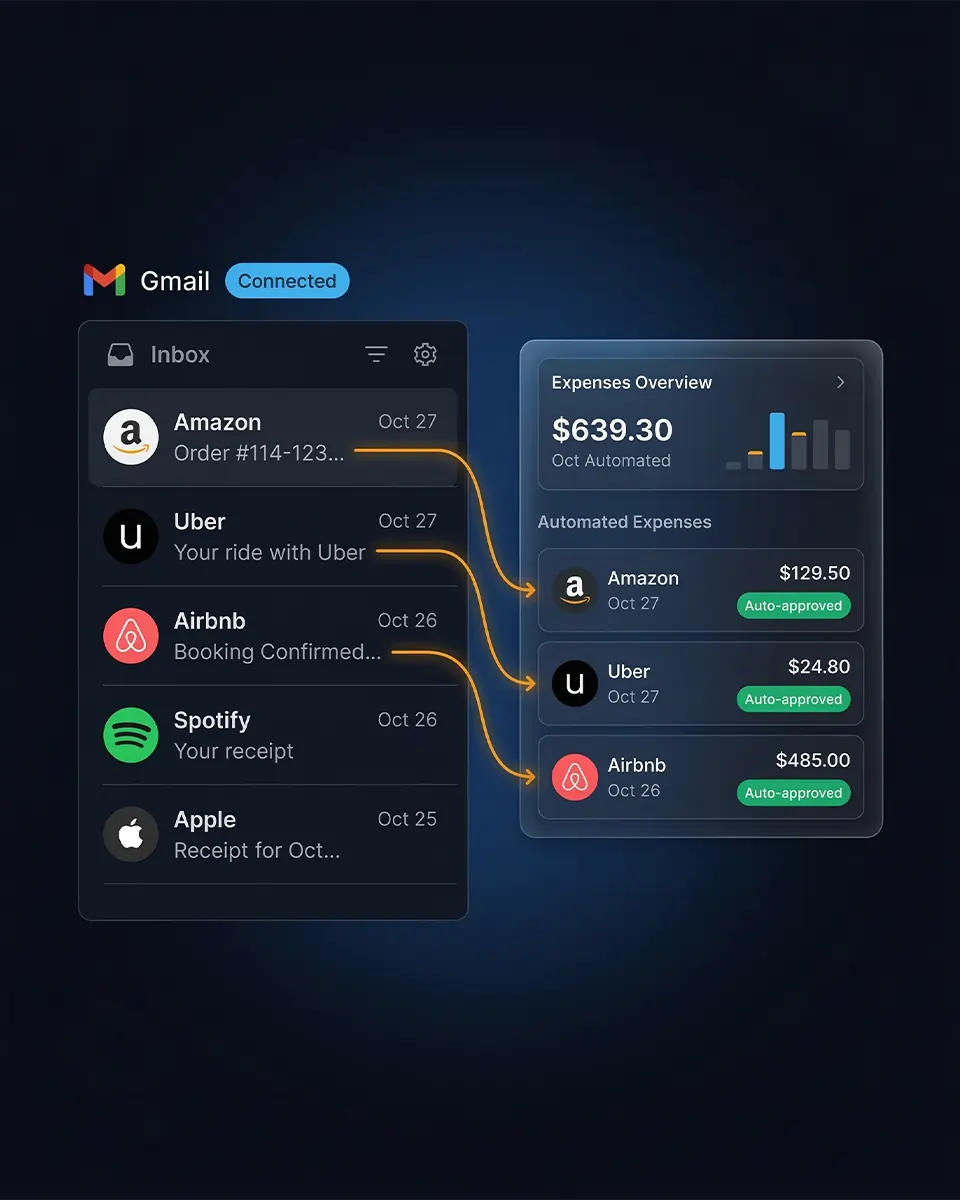
SparkReceipt scans your inbox in the background, capturing every receipt and invoice - so you never miss an allowable expense or lose money due to incomplete records.
Business Owners in 175 Countries Trust SparkReceipt


Two Ways To Handle Email Receipts
Manual forwarding vs. automatic AI scanning

Manual Forwarding
- Forwarding each receipt email one by one
- Missing receipts buried in promotional emails
- No way to catch up on past email receipts
- Manual sorting into personal vs. business accounts
- Receipts lost when emails are deleted or archived

Automatic AI Scanning
- Every receipt found and imported automatically
- AI filters out newsletters, promotions, and spam
- Historical scanning catches past email receipts
- Custom rules route receipts to the right account
- Your accountant or bookkeeper gets clean, organised expense data
How Automatic Email Receipt Scanning Works
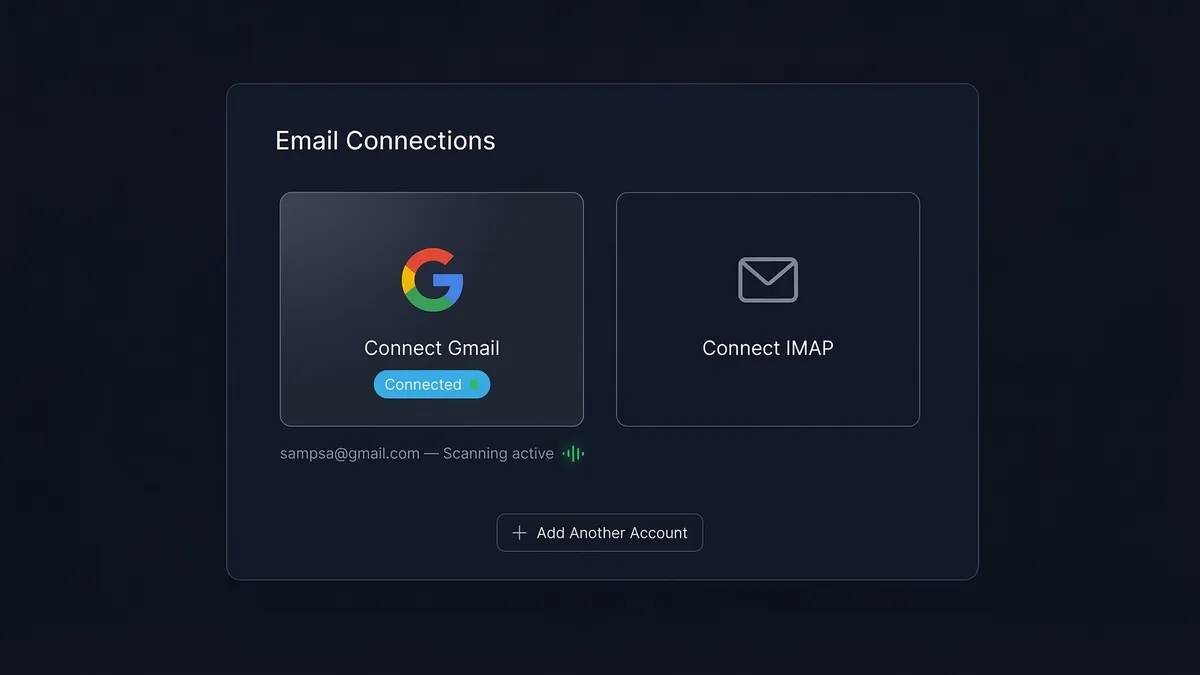
Connect Your Email Accounts
Link your Gmail, Outlook, Microsoft, or any IMAP email account. SparkReceipt scans new incoming emails automatically. Only receipt and invoice emails are imported. Historical email scanning is available with date filters.
AI Finds Receipts and Routes Them Automatically
AI classifies every email that arrives. Non-receipts are discarded immediately. Custom AI processing rules route receipts to the right account. Choose between automatic or manual approval.
Extracted, Categorised, and Tax-Ready
AI extracts vendor, amount, date, tax, and currency from every receipt. Receipts are auto-categorised by expense type. Use AI instructions or manual assignment to fine-tune. Export to Google Sheets, Excel, or CSV — or generate a full expense report — when you're ready.
How to Automatically Save Receipts From Email
There are three ways to save receipts from your email automatically, from most to least hands-off:
- Connect your inbox (most automatic). Link Gmail, Outlook/Microsoft, or any IMAP inbox once. SparkReceipt scans every incoming email in the background, imports only the receipts and invoices, and pulls the vendor, amount, date, tax, and currency from each one. Past emails can be scanned too, using date filters.
- Set a one-time forwarding rule. Create an auto-forwarding rule in Gmail or Outlook that sends receipt emails to your dedicated SparkReceipt address — handy for providers that don't support a direct connection.
- Use native Gmail filters and labels. Gmail can label or file receipt emails with a filter, but it only stores them. It won't read the amounts, categorise the expense, or make the data tax-ready — that is the gap an automatic receipt scanner fills.
Save Gmail and Outlook receipts straight to a spreadsheet
Once your receipts are captured, export them to Google Sheets, Excel, or CSV, or hand your accountant a finished expense report. Every field is already extracted and categorised, so you get a tax-ready spreadsheet instead of a folder full of raw email subject lines.
Your last tax year is still sitting in your inbox
Connecting your mailbox catches every receipt that arrives from today onwards. It doesn't touch the 18 months of receipts already buried in there. Historical scanning does: you pick how far back to go, and SparkReceipt walks backwards through your mail and pulls the receipts out. It's not a rare need — the typical cleanup reaches back around 695 days, and in their first month 55% of active new users pull in a backdated receipt.
How it works. Pick a start date. The picker defaults to 90 days, but there's no cap — set it to 1 January of any year. You see the exact email count and cost before anything runs. Then you watch live counts for emails scanned, receipts found, and duplicates skipped, alongside a coverage timeline showing which date ranges you've already pulled.
It won't double up your books. Deduplication runs within each mailbox and across your other connected inboxes and forwarded receipts. Your approval queue and sender rules apply exactly as they do on live scanning. Non-receipts are discarded on classification, and raw email content is deleted within 30 days.
What it costs. The first 10,000 historical emails are free per account. Beyond that, scanning runs on credits, you see the exact cost before anything runs, and it pauses rather than fails if you ever run out.
Zero manual effort
Connect your Google (Gmail), Microsoft (Outlook, Hotmail, Live), or any IMAP account and SparkReceipt does everything automatically. Scans every incoming email, imports historical receipts with date filters, extracts vendor, amount, date, tax, and currency instantly.
Receipts are routed to the right account based on your AI rules. Newsletters, promotions, and personal emails are discarded. Connect multiple email addresses and manage them all from one dashboard.
Custom rules and approval flows
Tell the AI exactly how to handle your emails. Write rules in plain language: route invoices from specific senders to your business account, send Amazon receipts to personal, reject newsletters and promotional emails.
Choose automatic approval for hands-free processing, or enable manual approval to review each receipt before it's added — perfect for shared accounts where you want to prevent misclassified personal emails from being imported.

Your email data stays private
We only read, never modify your emails. Non-receipts are discarded immediately after classification. Raw email content from receipts is deleted as soon as processing is complete — no later than 30 days.
No selling, no ads, no training on your data. SparkReceipt is an EU-based company (Finland), fully GDPR-compliant, with encrypted data storage and transmission. Disconnect at any time through your account settings.
Loved by Small Business Owners
“Thanks to you, I'm actually looking forward to my year end FOR THE FIRST TIME EVER, when I can surprise my accountant with my completed accounts.”

Abigail Dombey
Net Zero Associates Ltd · United Kingdom
“SparkReceipt has been a game-changer for me! It's made organising my expenses and accounts effortless, saving me loads of time.”

Tracy Duggan
Business Coach · United Kingdom
“SparkReceipt is an excellent alternative to full-fledged accounting software, saving you time and money!”

Pierce Mooney
Legal Services · United States
Join 38,283 businesses that chose SparkReceipt — 4,620,044 receipts processed and counting.
Start Free TrialFrequently Asked Questions
Connect your Gmail, Outlook, Microsoft, or IMAP email account from your SparkReceipt settings. Once connected, SparkReceipt automatically scans every new email that arrives in your inbox. Emails containing receipts and invoices are imported and processed by AI. Everything else — newsletters, personal emails, promotions — is discarded immediately.
Connect your Gmail account to SparkReceipt once. From then on, every new email is scanned in the background, receipts and invoices are imported automatically, and the vendor, amount, date, and tax are extracted from each one. You can also scan your Gmail history with date filters to catch past receipts — no manual forwarding or labelling required.
Every email receipt SparkReceipt captures can be exported to Google Sheets, Excel, or CSV, or included in a one-click expense report. Because the vendor, amount, date, tax, and category are already extracted, your spreadsheet is tax-ready instead of a list of raw email subject lines.
Gmail can label or filter receipt emails, but it only stores them — it can't read the amounts, categorise the expense, or export the data for taxes. To turn Gmail receipts into structured, tax-ready records, connect your inbox to an automatic receipt scanner like SparkReceipt, which extracts every field for you.
SparkReceipt reads receipts wherever they appear — in the email body, as PDF attachments, or as image attachments (JPG, PNG). AI extracts the vendor, amount, date, tax, and currency from all of them automatically, so a receipt written directly into an email is captured just like an attached one.
Yes, you can automatically import receipts from your past emails. We'll scan your email history and find receipts and invoices to get your books up to date. Please note that processing large numbers of historical emails might require purchasing extra credits.
Yes, connect as many as needed. Connected sources are shared across linked accounts; use AI rules to route receipts automatically.
With automatic scanning, you connect your inbox and SparkReceipt finds receipts automatically — no action needed on your part. With email forwarding, you forward individual receipt emails (or set up auto-forwarding rules) to your dedicated SparkReceipt address. Both methods work. Automatic scanning is best for hands-free, complete capture. Forwarding is best for selective capture or email providers that don't support direct connection. You can use both at the same time.
SparkReceipt supports Gmail, Outlook and Microsoft directly and any email provider that supports IMAP — including iCloud Mail, Yahoo Mail, ProtonMail, and custom domain email. For providers that don't support direct connection, you can use email forwarding instead.
Yes, via AI Processing Rules (plain-language instructions) and Approval Settings (automatic or manual approval).
Yes. Digital receipts are accepted by HMRC and tax authorities worldwide. HMRC explicitly allows digital records under Making Tax Digital. SparkReceipt keeps your email receipts organised, categorised, and export-ready — so you're always prepared in case of an enquiry. Consult a qualified tax professional for advice specific to your situation.
Yes. SparkReceipt reads email content solely to detect receipts — we never modify, send, or delete any emails. Non-receipt emails are discarded immediately after classification. Raw email content from receipts is deleted as soon as processing is complete, and no later than 30 days. We do not sell, share, or use email data for advertising, unrelated analytics, or to train machine-learning models. You can disable email integration at any time. SparkReceipt is an EU-based company (Finland), fully GDPR-compliant, with encrypted data storage.
Email receipt scanning is included in the Elite plan at £9.08/month, billed annually, with a 7-day free trial. Your plan covers scanning around 10,000 emails from your inbox — enough to import the full history for most people. If your inbox is larger, you can top up by buying extra credits at any time.
Yes, invite your accountant or bookkeeper to view, download, and manage your categorised expense data.
Yes, SparkReceipt processes receipts in the email body, as PDF attachments, and as images (JPG, PNG). Data is extracted automatically from all formats.