
Extract Bank Statements and Match Every Transaction to a Receipt
Connect your bank or upload a PDF, CSV, or Excel statement. AI extracts every transaction and matches it to your receipts automatically.
Bank statements tell you what you spent. Receipts prove why. SparkReceipt is the only bank statement extractor that does both — upload your PDF, CSV, or Excel bank statement, and AI extracts every transaction automatically. Then it matches each one to the right receipt or invoice from your archive, and the Transaction Manager tracks the reconciliation to 100%.
Business Owners in 175 Countries Trust SparkReceipt


Bank Statement Reconciliation
See what changes when AI handles your bank statements

Without SparkReceipt
- Manually typing transactions from bank statements into spreadsheets
- Cross-referencing receipts one by one against bank transactions
- Missing receipts discovered only at tax time
- Paying your accountant to sort through unmatched transactions
- No clear view of which transactions have proof of purchase

With SparkReceipt
- Every transaction extracted automatically from any bank statement
- AI matches each transaction to the right receipt or invoice
- Unmatched transactions flagged so you know what's missing
- Invite your accountant or bookkeeper to review matched and unmatched data
- Complete reconciliation in minutes instead of hours
How Bank Statement Extraction and Matching Works
Connect Your Bank or Upload a Statement
Connect a bank or credit card account and transactions flow in automatically — or upload a statement as a PDF, CSV, or Excel file. SparkReceipt handles digital PDFs, scanned paper statements, and exported spreadsheets from any bank worldwide. The AI reads statements in any language and processes 190 currencies.
AI Extracts Every Transaction Automatically
SparkReceipt's AI reads your bank statement and extracts every transaction — dates, amounts, payees, descriptions, and running balances. Each transaction becomes a structured, searchable record. No manual data entry.
Transactions Matched to Receipts Instantly
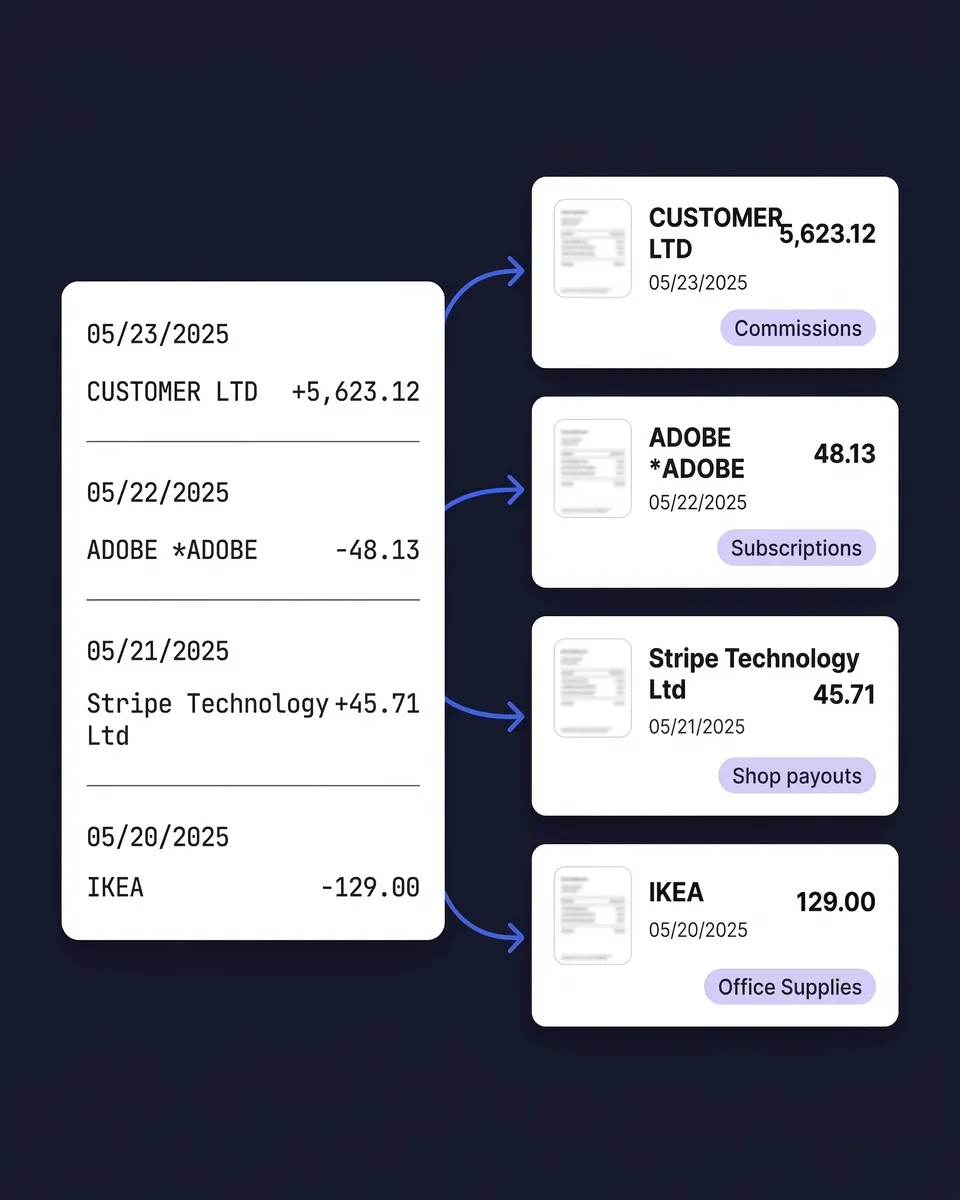
The AI compares each transaction against every receipt and invoice in your archive — matching by amount, date, and vendor name. Matched transactions link to their source documents. Unmatched transactions are flagged so you can see exactly which receipts are missing.
Not Just Extraction — Full Receipt Matching
Statement converters like DocuClipper, Parsio and CapyParse turn a PDF into rows. SparkReceipt starts from those rows and finds the receipt behind each one (SparkReceipt vs DocuClipper).
Upload your bank statement and your receipts, and the AI connects them automatically. Every matched transaction links directly to its proof of purchase. Every unmatched transaction tells you exactly what's missing from your records.
The missing receipts are usually still in your inbox. Email history extraction pulls past email receipts in, as far back as you choose, so they can be matched to the statement too.
This is the difference between a free file converter and business-grade bank statement extraction software: a converter hands you a spreadsheet and stops there; SparkReceipt extracts, matches, categorizes, and reconciles. QuickBooks community forums are full of business owners asking how to match bank transactions to receipts — with SparkReceipt, it happens automatically.

Upload PDF, CSV, or Excel — Any Bank, Any Format
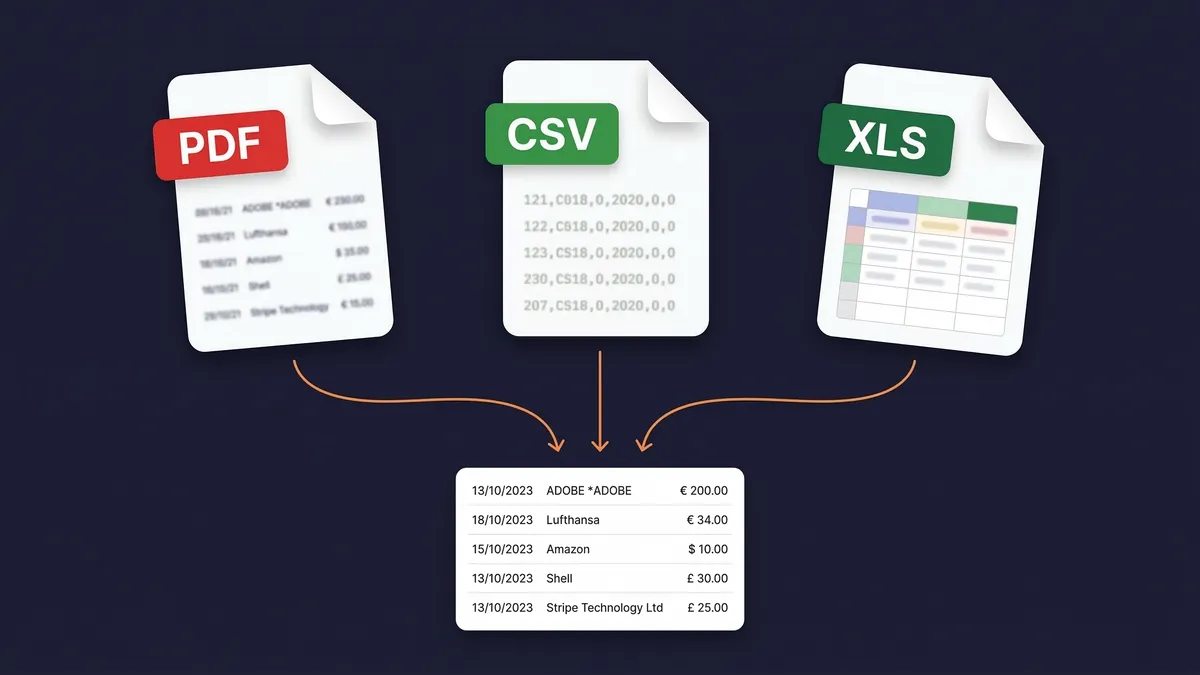
Most bank statement extractors only accept PDF files. That means OCR processing, potential errors, and no support for the CSV or Excel exports your bank already provides.
SparkReceipt accepts all three formats. Upload a scanned PDF statement and the AI-powered OCR extracts every transaction. Upload a CSV or Excel export from your bank's website and get perfect, instant extraction — no OCR needed. Upload credit card statements, savings account statements, or business account statements.
The OCR works in any language, so statements from international banks are processed just as accurately as local ones. Whether your bank is in Helsinki, Houston, or Hong Kong, your statements are supported from day one.
Need the transactions in a spreadsheet? Open the extracted statement, click Export, and choose Excel or CSV. Our guide on how to convert a bank statement to Excel or CSV walks through it step by step, including the free methods and where they stop working.
Extract Bank Statements in 190 Currencies
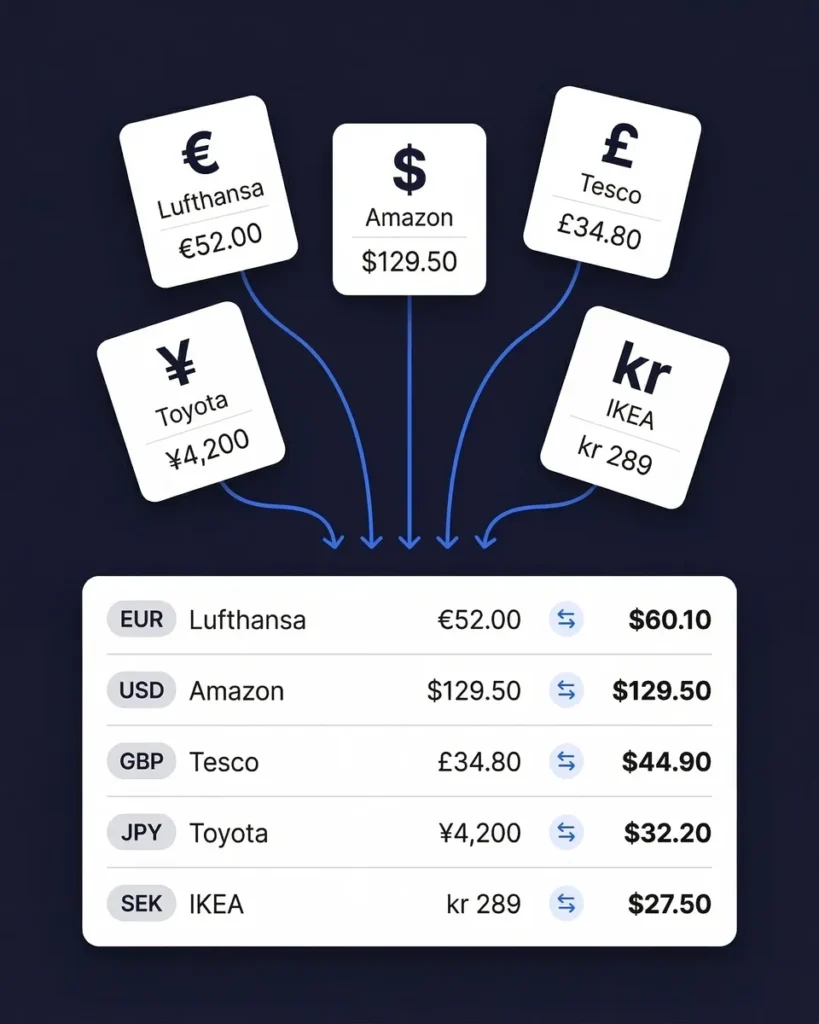
If your business operates across borders — billing in euros, receiving payments in pounds, paying suppliers in yen — you need a bank statement extractor that handles multiple currencies natively.
SparkReceipt processes statements in 190 currencies. Each transaction is extracted with its original currency intact. Exchange rates are applied using the transaction date for accurate reporting in your home currency.
Upload statements from different banks in different countries and see everything unified in one view. This is particularly valuable for income tracking across international clients and for expense tracking with overseas suppliers.
Connect Your Bank — Not Just Upload Files
A file converter can only work with a file you already have. SparkReceipt can go straight to the source: connect a bank or credit card account and transactions flow in automatically — then the AI extracts, categorizes, and matches each one to a receipt, exactly like an uploaded statement.
Prefer to work from a file? Upload a PDF, CSV, or Excel statement and get the same result. Either way you end with reconciled transactions you can export to Excel, CSV, or PDF for your accountant — not a raw spreadsheet dump.

Bank Statement Extraction
Extract, match, and categorize — all in one tool.
Doing it by hand
Shoebox + spreadsheet
60+ hours a year
Flattening, reading and typing each receipt into a spreadsheet, filing the paper, matching it to the bank statement, and hunting for the ones that went missing.
$1,000+ for the cleanup
What a bookkeeper charges to turn a year of shoebox records into books a return can be filed from, before the return itself.
Deductions you can't prove
A faded thermal receipt or a lost email is an expense you pay for twice: once at the counter, once at tax time.
Total per year
Your evenings, a cleanup bill, and the deductions you couldn't prove.
Basis: about 40 receipts a month at six minutes each by hand, plus a weekend reconstructing the year before the return. Bookkeeper rates and cleanup fees from NerdWallet's 2026 bookkeeping price guide (freelance average $43 per hour; cleanup from $1,000).
Loved by Small Business Owners
“With SparkReceipt, organizing and tracking expenses has never been easier. The detailed categorization and expense tracking features make financial management a breeze.”

Jean-Pierre Michael
Artist · France
“I needed a solution to organize and process my personal and business receipts. I'm thrilled I found SparkReceipt. It saves me a lot of time!”

Frédéric Thériault
Productions Locavores · Canada
“Thanks to SparkReceipt I have a quick look to my business accounts status in a glance. It is really impressive.”

Rafael Roa
System Arquitectura · Spain
Join 38,283 businesses that chose SparkReceipt — 4,620,044 receipts processed and counting.
Start Free TrialFrequently Asked Questions
Upload your bank or credit card statement as a PDF, CSV or Excel file, or connect a bank feed, and keep your receipts in SparkReceipt from your phone, email inbox or uploads. The AI extracts every transaction and matches it to a receipt or invoice by amount, date and merchant. The Transaction Manager then shows which lines are matched, which need review and which have no receipt, so you attach the missing ones, create an entry or exclude a personal line until everything is reconciled.
Bank statement extraction and receipt matching are included on both plans, from $5.75/month billed annually. Extraction uses the monthly credits that come with your plan, one credit per extracted transaction line. How statement credits work.
A bank statement extractor is a tool that reads your bank or credit card statements and automatically pulls out every transaction — dates, amounts, payee names, descriptions, and balances — into structured, searchable data. Instead of manually typing transactions into a spreadsheet, you upload the statement file and get organized data in seconds. SparkReceipt goes further than most extractors by also matching each extracted transaction to your receipts and invoices automatically.
No — SparkReceipt is business bank statement extraction and reconciliation software, not a one-off file converter. A free converter just turns a PDF into a spreadsheet and stops there. SparkReceipt extracts every transaction, matches each one to your receipts and invoices, categorizes them for tax, and exports a finished report in Excel, CSV, or PDF — reconciled, accountant-ready books rather than a raw data dump. Start with a 7-day free trial.
Both. You can connect a bank or credit card account and have transactions flow into SparkReceipt automatically, or upload a PDF, CSV, or Excel statement — whichever fits your workflow. Either way, the AI extracts every transaction, matches it to your receipts, and makes it exportable. Direct bank connections are available in the United States, Canada, the UK and supported European countries; statement upload works everywhere.
Yes. SparkReceipt is bank statement extraction software built for freelancers, small businesses, and their accountants. It reads bank and credit card statements from any institution — no per-bank templates — extracts every transaction, matches them to receipts, applies tax categories, and exports clean reports. Beyond extraction, it also scans receipts, connects to your bank, tracks mileage, and integrates with QuickBooks Online and Xero.
SparkReceipt accepts bank and credit card statements in PDF, CSV, and Excel (XLSX) formats. This is more flexible than most competitors, which only handle PDFs. If your bank provides a CSV or Excel export from online banking, you can upload that directly for instant, perfect extraction — no OCR processing needed. For paper statements, scan them to PDF and upload the scanned file. The AI-powered OCR handles both digital and scanned PDFs.
Upload the statement as a PDF, CSV, or Excel file and let the AI extract the transactions. Then open the statement's transactions, click Export, and choose Excel or CSV in the export dialog. You can include the matched receipt files in the same download. Our step-by-step guide to converting a bank statement to Excel or CSV also covers the free methods, such as your bank's own CSV export and Excel's PDF import, and where they stop working.
After SparkReceipt extracts transactions from your bank statement, the AI compares each transaction against every receipt and invoice stored in your account. It matches based on amount, date, and vendor name. Matched transactions are linked directly to the source document — one click to view the original receipt. Unmatched transactions are flagged with an orange indicator, so you know exactly which receipts are missing. Upload the missing receipt later and it's matched automatically.
SparkReceipt's AI delivers high accuracy across all supported formats. For CSV and Excel uploads, extraction is essentially perfect since the data is already structured. For PDF statements, the AI-powered OCR handles both digital PDFs (near-perfect accuracy) and scanned paper statements (which depend on scan quality). You can always review, edit, or add notes to any extracted transaction for complete control.
Yes. SparkReceipt processes bank and credit card statements from financial institutions worldwide. The AI adapts to different statement layouts and formats automatically — there are no bank-specific templates to configure. The OCR works in any language, so statements from international banks are processed just as accurately as local ones. 190 currencies are supported with automatic exchange rate conversion.
Yes. SparkReceipt handles both bank statements and credit card statements in the same way. Upload your credit card statement as a PDF, CSV, or Excel file, and the AI extracts every transaction. Credit card transactions are then matched to receipts just like bank transactions. This is particularly useful for businesses that use credit cards for most purchases — you can quickly identify which card charges have receipts attached and which don't.
Bank statement converters such as DocuClipper (from $20/month billed annually for 60 pages, as of September 2026), Parsio and CapyParse turn your statement into a spreadsheet or an accounting import. SparkReceipt extracts your bank statement and matches each transaction to the receipts and invoices in your archive, flagging the lines that have none (SparkReceipt vs DocuClipper). You also get AI receipt scanning, automatic categorization, expense reports, QuickBooks integration, and accountant access, all from $5.75/month.
Yes. Invite your accountant or bookkeeper to your account at any time. They can view your extracted transactions, matched receipts, categorized expenses, and reports directly within the app. This makes month-end reconciliation and tax preparation significantly faster — your accountant sees organized, matched data instead of boxes of paper.
Yes. SparkReceipt integrates with QuickBooks Online for seamless data transfer. You can also export your extracted and matched transaction data as CSV, Excel, or PDF reports. Whether you need the data in your accounting software, in a spreadsheet for your accountant, or as a formatted report for tax filing, SparkReceipt supports your workflow.
Stop Typing Transactions Into Spreadsheets. Upload and Match Automatically.
Get StartedExplore More Features
Transaction Manager
Reconcile every bank transaction against its receipt
AI Fields
Extract custom data you define from any document
Receipt Scanner
Scan receipts with AI in seconds
Expense Tracker
Track every business expense automatically
Email Receipts
Auto-import receipts from your inbox
Expense Reports
Generate reports in PDF, Excel, or CSV
Receipt Organizer
AI-powered receipt organization
Income Tracker
Track every dollar of business income