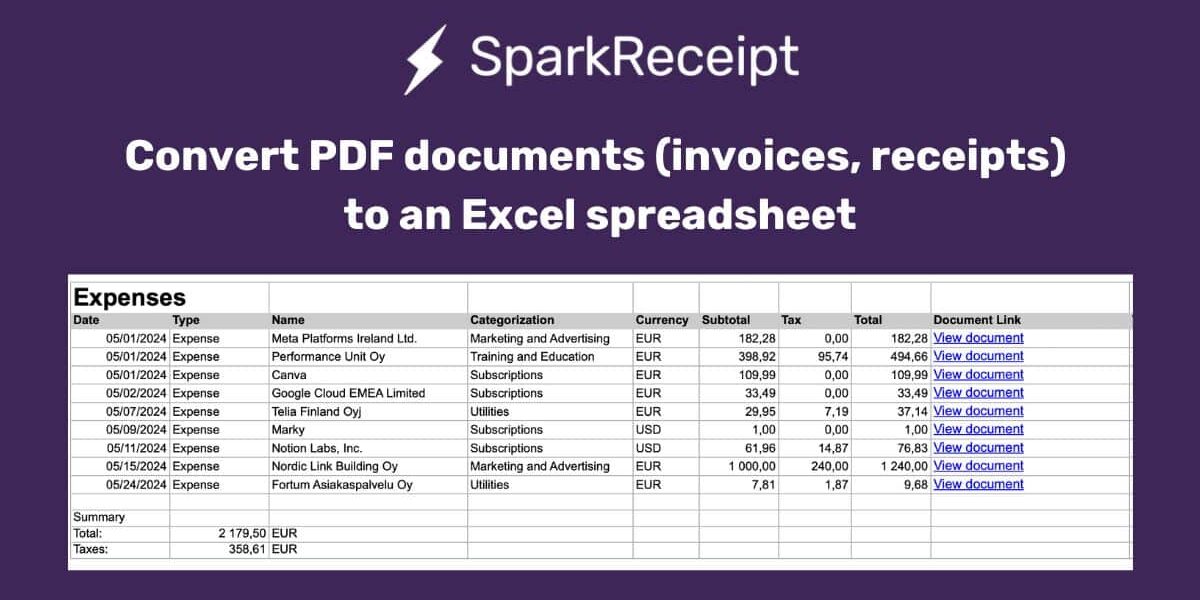
SparkReceipt makes it easy to convert PDF receipts and invoices into organized Excel spreadsheets. Upload your documents, let AI extract amounts, dates, merchants, and taxes automatically, then export everything to Excel with direct links back to the original files — saving hours of manual data entry and reducing errors.
Introduction
For freelancers and small business owners, managing financial documents can be a challenging task, especially when dealing with multiple formats like PDFs. SparkReceipt simplifies this process by enabling the easy conversion of PDF documents to Excel spreadsheets. This transformation is crucial for accurate expense management and streamlined bookkeeping.
Why Convert PDFs to Excel?
1. Enhanced Accessibility: Excel spreadsheets allow for easier manipulation and analysis of data compared to static PDF files. This means quicker access to key financial insights that drive business decisions.
2. Improved Accuracy: Manual data entry from PDFs to Excel is prone to errors. SparkReceipt automates this process, minimizing mistakes and ensuring that the data remains consistent and reliable.
3. Time Efficiency: Converting PDF documents manually is time-consuming. With SparkReceipt, you save valuable time, allowing you to focus more on growing your business rather than getting bogged down by paperwork.
SparkReceipt’s Features for PDF to Excel Conversion
SparkReceipt is equipped with powerful tools designed specifically for freelancers and small businesses:
OCR Technology: Advanced Optical Character Recognition technology accurately extracts data from your PDF files, such as amounts, dates, merchant names, taxes, and currencies.
Easy Export Options: Once your data is processed, exporting it to an Excel spreadsheet is straightforward, providing a well-organized document with all relevant details. SparkReceipt offers flexible data export options including PDF, CSV, and Excel formats.
Direct Links to Original Documents: Each entry in the Excel file includes a direct link to the original PDF document, ensuring you can verify and reference documents as needed.
Step-by-Step Guide to Using SparkReceipt
1. Upload Your PDFs

Start by uploading your PDF documents (invoices, receipts) directly to SparkReceipt via the web interface or mobile app. You can do this simply by adding a new expense, income or business document through the interface. You can also use the receipt scanner to snap photos of paper documents.
2. Automatic Data Extraction
SparkReceipt’s AI-driven system will automatically identify and extract data (such as amount, date, merchant and tax) from the uploaded documents.
3. Reviewing and Editing Data
Before exporting your data, you have the option to review and make any necessary corrections to ensure the accuracy of the information.
4. Exporting to Excel

With a simple click, export your organized data into an Excel spreadsheet. This file will include all critical financial data along with links back to the original PDFs for easy access. Just follow these steps:
- Log in to SparkReceipt via your browser
- Go to Reports in the web interface
- Select which document type the report should be created from (expenses, income, bank statements or other business documents)
- Select the timeframe of your report
- You can even filter documents based on categories, tags and people
- Give your report a name
- Select EXCEL SPREADSHEET as the report type
- Click Generate report to download your spreadsheet
Looking to scan receipts into a spreadsheet format? Check out our detailed guide on how to scan receipts to Excel.
Conclusion
Converting PDFs to Excel doesn’t just streamline bookkeeping; it revolutionizes how small businesses and freelancers manage their finances. SparkReceipt offers a robust solution that saves time, reduces errors, and provides deeper insights into your financial health. Ready to transform your expense management? Try SparkReceipt today and experience the difference for yourself.