
Track Every Dollar of Business Income — Automatically
Client payments arrive from everywhere — bank transfers, PayPal, Stripe, email invoices, cash. SparkReceipt captures it all.
AI extracts amounts, dates, client names, and payment references from invoices, bank statements, and email confirmations — then categorizes everything by client, project, or custom category. Free to start.

Business Owners in 175 Countries Trust SparkReceipt


Business Income Tracking Before and After SparkReceipt
See what changes when AI handles your income tracking

Without SparkReceipt
- Manually entering every payment into a spreadsheet
- No idea which clients have paid and which haven't
- Scrambling to calculate quarterly estimated taxes
- Income records scattered across email, bank apps, and paper
- Overpaying $20–55/month for accounting software you barely use

With SparkReceipt
- AI extracts income data from invoices, bank statements, and emails
- Every payment tracked and categorized by client and project
- Monthly P&L reports ready for quarterly tax calculations
- All income sources in one place — automatically
- Simple, transparent pricing — $16.65/month, billed annually
How AI Income Tracking Works
Capture Income from Every Source
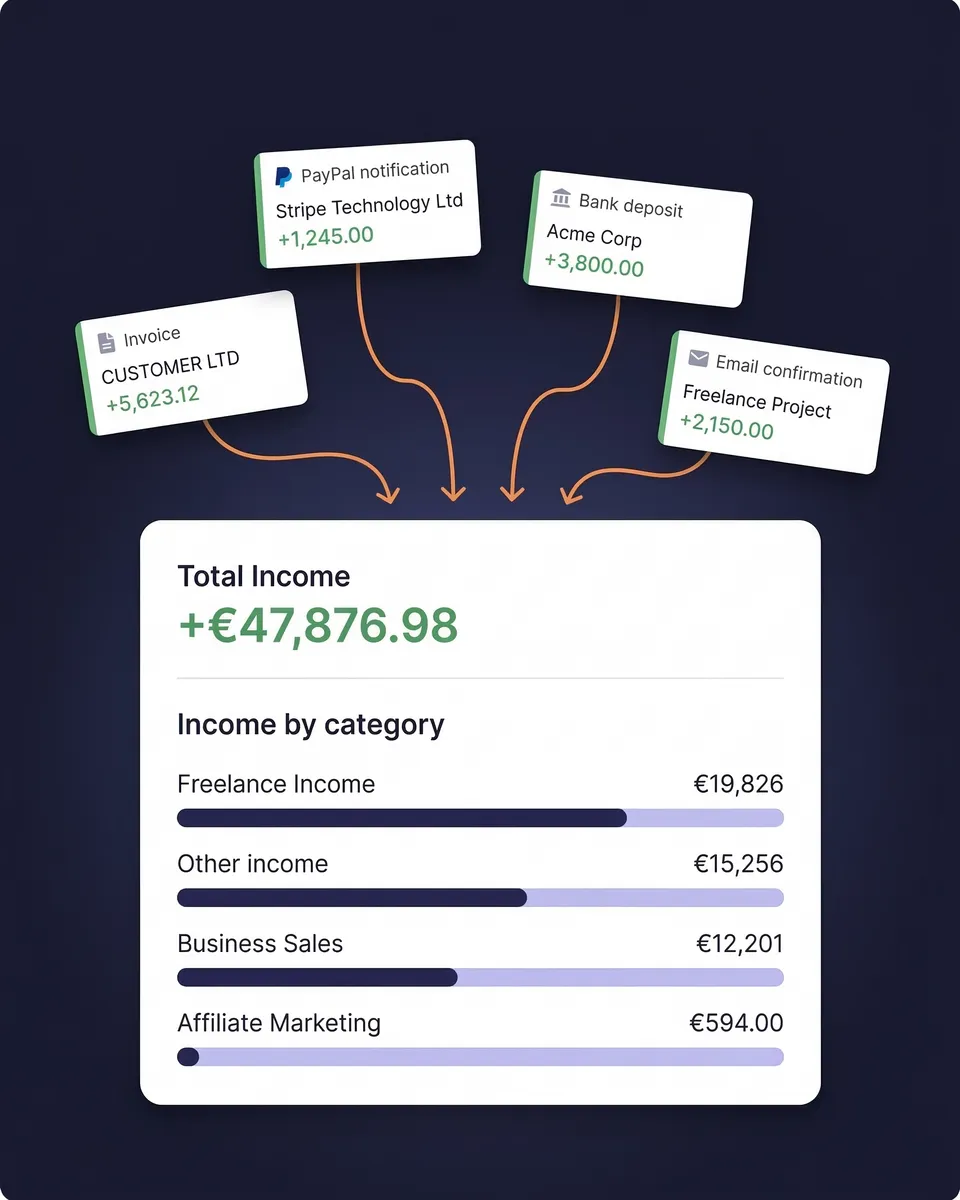
Snap a photo of a paper invoice. Forward payment confirmation emails. Connect your Gmail or IMAP inbox and let SparkReceipt scan for PayPal receipts, Stripe confirmations, bank deposit alerts, and client invoices automatically.
AI Categorizes by Client and Project
SparkReceipt's AI reads every income document and extracts the amount, date, client name, payment reference, and currency. Then it assigns the right income category automatically — consulting fees, product sales, retainer payments, royalties, and more.
Generate P&L Reports and Tax-Ready Summaries
Select any date range and generate a Profit & Loss summary in one click — total income, total expenses, and net profit. Export as PDF or CSV. Sync to QuickBooks Online. Or invite your accountant or bookkeeper to your account at any time.
Income from every source, in one place
Freelance income doesn't arrive in neat, predictable paychecks. Clients pay through bank transfers, PayPal, Stripe, Wise, checks, and sometimes cash. SparkReceipt captures income from all of them.
Upload invoices and the AI extracts the client, amount, and date. Connect your email inbox and payment confirmations are captured automatically. Upload bank statements and every deposit is logged. No more searching through email for payment confirmations.

See exactly what every client has paid you
When you're juggling five, ten, or twenty clients, it's easy to lose track of who's paid and who hasn't. SparkReceipt organizes your income by client name automatically — so you can see at a glance how much each client has contributed to your revenue.
Track income by project to understand which work is most profitable. Spot overdue payments before they slip through the cracks. Identify your highest-value clients and make smarter decisions about where to focus your time.
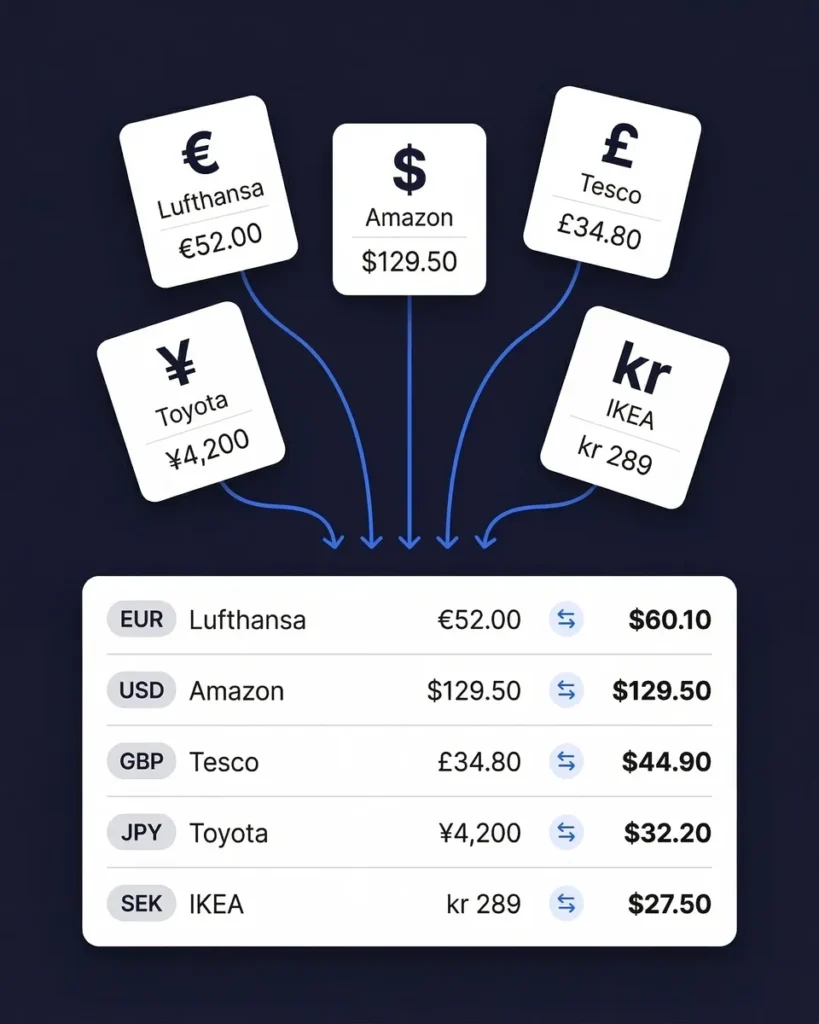
Track income in 190 currencies
If you work with clients in different countries — billing in euros, getting paid in pounds, reporting in US dollars — SparkReceipt handles the conversions automatically.
The AI detects the currency on every invoice and payment confirmation. Exchange rates are applied using the payment date. Your income reports show amounts in your home currency, with the original currency preserved for reference.
Know your real profit, not just your revenue
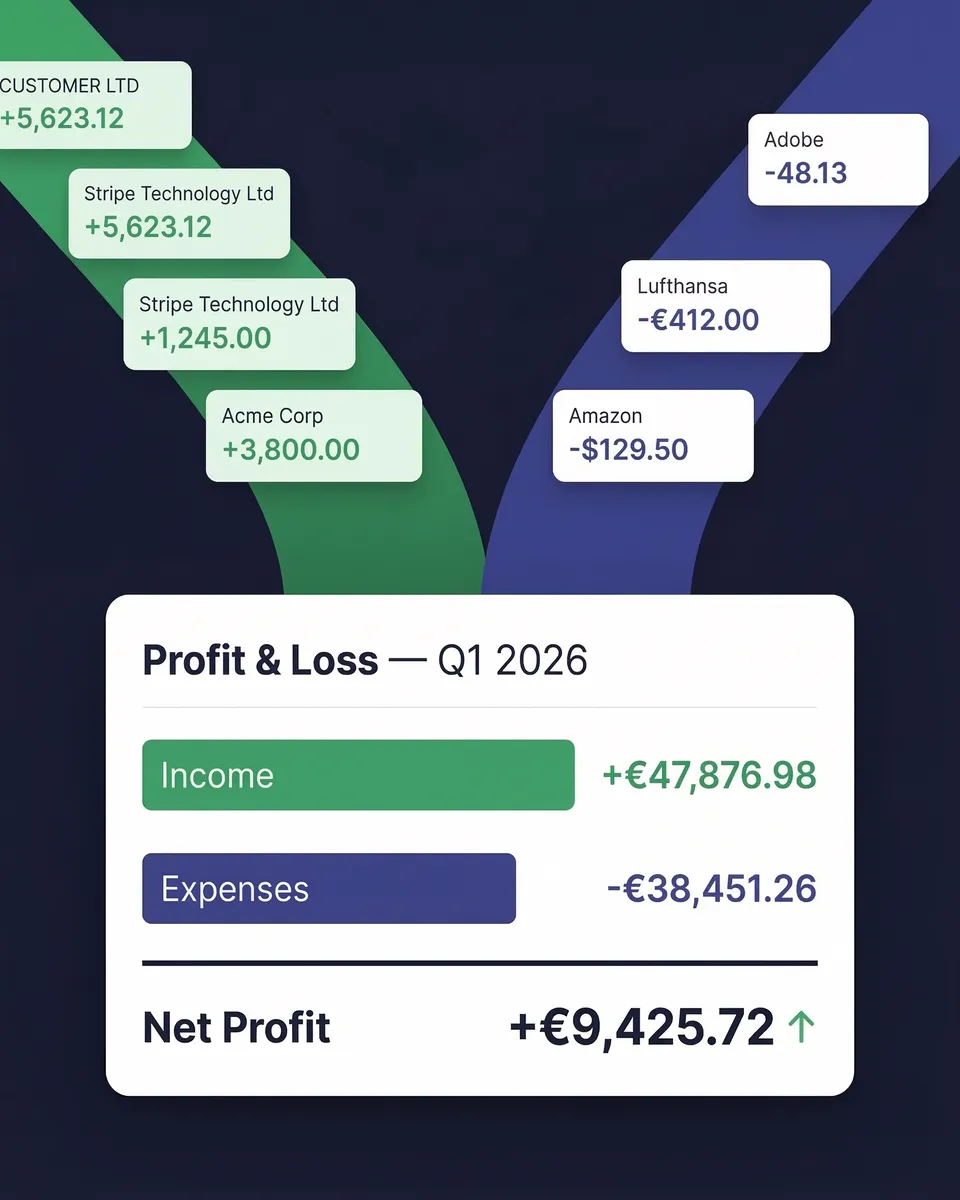
Revenue is vanity. Profit is sanity. SparkReceipt tracks both income and expenses in one place — so you always know what you actually earned after costs.
Your monthly P&L report shows the full picture: total income, total expenses, and net profit — broken down by month, quarter, or any custom date range. Use these reports for quarterly estimated tax calculations, year-end tax filing, or simply understanding your business health.
Business Income Tracking
Simple, transparent pricing. No hidden fees, no surprise charges.
Doing it by hand
Shoebox + spreadsheet
60+ hours a year
Flattening, reading and typing each receipt into a spreadsheet, filing the paper, matching it to the bank statement, and hunting for the ones that went missing.
$1,000+ for the cleanup
What a bookkeeper charges to turn a year of shoebox records into books a return can be filed from, before the return itself.
Deductions you can't prove
A faded thermal receipt or a lost email is an expense you pay for twice: once at the counter, once at tax time.
Total per year
Your evenings, a cleanup bill, and the deductions you couldn't prove.
Basis: about 40 receipts a month at six minutes each by hand, plus a weekend reconstructing the year before the return. Bookkeeper rates and cleanup fees from NerdWallet's 2026 bookkeeping price guide (freelance average $43 per hour; cleanup from $1,000).
Loved by Small Business Owners
“With SparkReceipt, organizing and tracking expenses has never been easier. The detailed categorization and expense tracking features make financial management a breeze.”

Jean-Pierre Michael
Artist · France
“SparkReceipt is an excellent alternative to full-fledged accounting software, saving you time and money!”

Pierce Mooney
Legal Services · United States
“Thanks to SparkReceipt I have a quick look to my business accounts status in a glance. It is really impressive.”

Rafael Roa
System Arquitectura · Spain
Join 38,283 businesses that chose SparkReceipt — 4,620,044 receipts processed and counting.
Start Free TrialFrequently Asked Questions
An income tracker is a tool that helps you log, categorize, and monitor every dollar your business earns. For freelancers and self-employed professionals, income arrives from multiple clients at unpredictable intervals — unlike a regular paycheck. Without an income tracker, it’s easy to miss payments, underestimate quarterly taxes, or lose visibility into which clients are most profitable. SparkReceipt automates this by using AI to extract income data from invoices, payment confirmations, and bank statements, then categorizing everything by client, project, or custom category.
SparkReceipt uses AI-powered OCR to read income documents you upload — invoices, payment receipts, bank statements, and email confirmations. It extracts dates, amounts, client names, and payment references automatically, then categorizes each income entry. You can also connect your Gmail or IMAP email, and SparkReceipt auto-scans for payment notifications from PayPal, Stripe, and bank deposit alerts. No manual data entry required.
Yes. SparkReceipt organizes your income by client, project, or any custom category you define. See at a glance how much each client has paid you, which projects are generating the most revenue, and where payments may be overdue. This is particularly useful for freelancers juggling multiple ongoing contracts or retainer clients.
Accounting software like QuickBooks or FreshBooks is designed for full double-entry bookkeeping — chart of accounts, balance sheets, payroll. An income tracker like SparkReceipt focuses on capturing, categorizing, and reporting your business income alongside expenses. SparkReceipt handles the pre-accounting layer — scanning, extraction, and organization — so your data is clean and ready when your accountant needs it. It integrates with QuickBooks Online for seamless data transfer.
Yes. SparkReceipt supports 190 currencies with automatic exchange rate conversion using the payment date. If you work with clients in different countries — billing in euros, receiving payments in pounds, and reporting in US dollars — SparkReceipt handles the conversions automatically. The AI OCR also processes income documents in any language, making it ideal for international freelancers and digital nomads.
As a self-employed individual, you’re required to pay quarterly estimated taxes. An income tracker gives you an accurate running total of your earnings each quarter, so you know exactly how much to set aside. SparkReceipt generates monthly P&L summaries that show total income minus expenses, making it simple to calculate your estimated tax obligation. Share these reports directly with your accountant by inviting them to your account.
Yes. SparkReceipt is a complete income and expense tracking solution. Upload receipts for expenses and invoices for income — the AI processes both. Your monthly P&L report shows total income, total expenses, and net profit in one view. This gives you real-time visibility into your business profitability, not just your top-line revenue.
Spreadsheets work for very simple businesses, but they require manual data entry, are prone to errors, and become unwieldy as your income sources grow. SparkReceipt eliminates manual entry with AI extraction, automatically categorizes income, and generates reports in seconds. It also captures income from your email automatically. For freelancers earning from multiple clients, the time savings alone make dedicated income tracking software worth the investment.
SparkReceipt’s Elite plan is $16.65/month, billed annually ($199.98/year), with a 7-day free trial. Compare this to QuickBooks at $20+/month or FreshBooks at $19–$55/month.
Yes. Invite your accountant or bookkeeper to your account at any time so they can view your income records, expense data, and reports directly within the app.
Stop Guessing What You Earned. Start Tracking Income Automatically.
Get StartedExplore More Features
Receipt Scanner
Scan receipts with AI in seconds
Expense Tracker
Track every business expense automatically
Expense Reports
Generate reports in PDF, Excel, or CSV
Bank Statement Extractor
Extract and match bank transactions
Receipt Organizer
AI-powered receipt organization
Pre-Accounting
Get your books ready for your accountant