AI Bookkeeping and Pre-Accounting for Small Business

The AI does the groundwork, from receipt to matched bank line, so you save the month-end sort and hand clean records to your accountant or your ledger.

AI bookkeeping, in SparkReceipt, means the work before the ledger: collecting receipts, reading them, categorizing each expense and matching it to its bank line. The AI does that part and hands the result to your accountant, QuickBooks Online or Xero. Your ledger and your tax return stay where they are.

7-day free trial. Cancel any time.

Business Owners in 175 Countries Trust SparkReceipt

Tracy DugganRobert ConnollyRafael RoaFrédéric ThériaultPierce Mooney
4.8on the App Store · 4.6 on Google Play · 2,700+ ratings
4,620,044Receipts Processed
38,283Businesses Worldwide
190Currencies Handled
175Countries

Bookkeeping Prep Before and After SparkReceipt

What changes when AI handles the groundwork

Business owner sorting receipts by hand before handing them to an accountant

Manual Pre-Accounting

  • Receipts stuffed in drawers, wallets and email inboxes all year
  • Expense reports typed up by hand from a pile of paper
  • Paying a bookkeeper by the hour to sort your receipts
  • Deductions missed because receipts were lost or faded by tax time
  • Back-and-forth emails with your accountant about missing documents
  • Evenings spent getting the month ready for the books
Business owner with every receipt read, categorized and matched in SparkReceipt

With SparkReceipt

  • Every receipt scanned, read and stored the moment you get it
  • AI extracts and categorizes each expense in seconds and learns your corrections
  • Every bank line matched to its receipt, with the missing ones flagged
  • Digital receipts that never fade and never get lost
  • Your accountant joins free and sees the same records in real time
  • Month-end prep that takes minutes

How SparkReceipt Automates Pre-Accounting

1

Collect Every Receipt Automatically

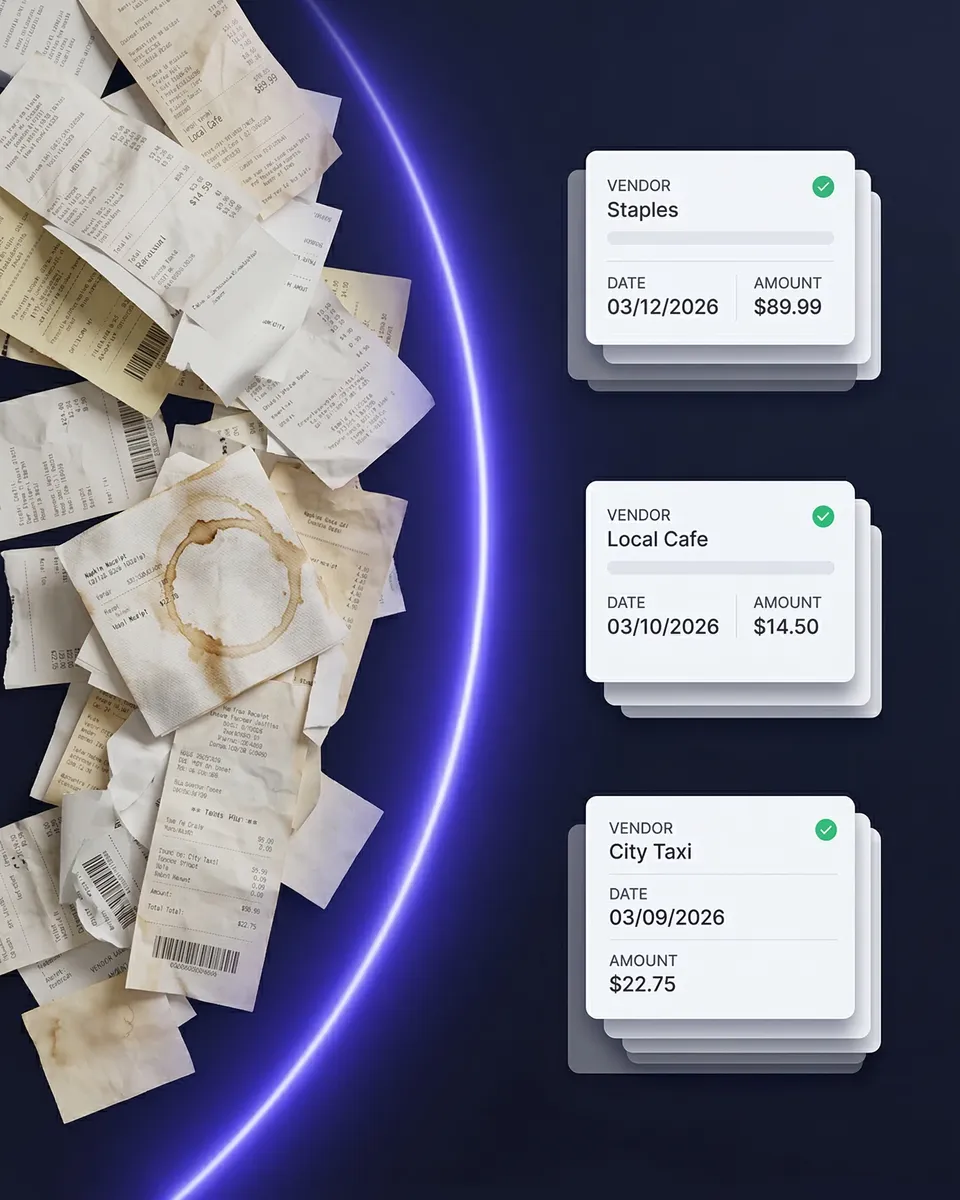
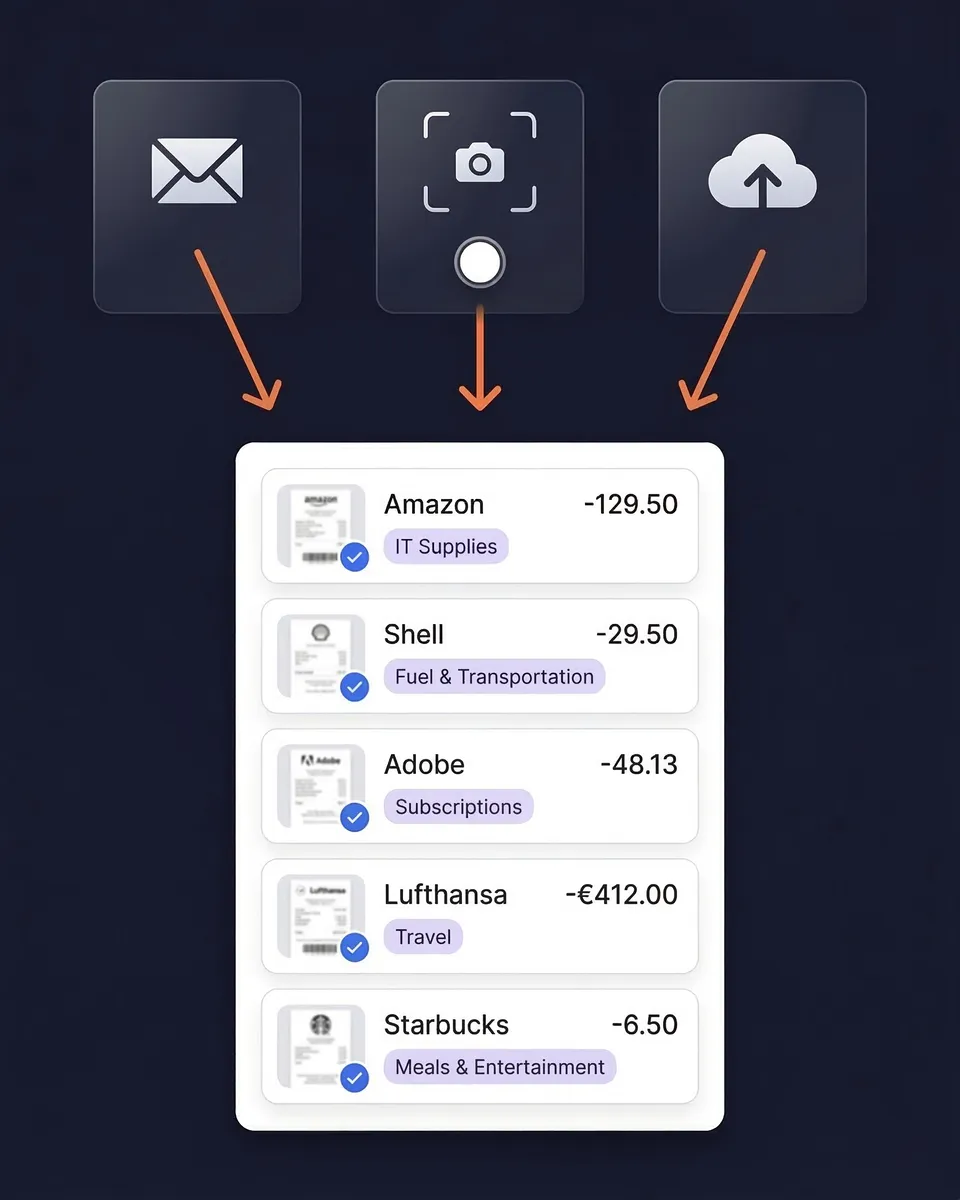
Scan paper receipts with your phone camera. Connect Gmail, Outlook, Microsoft or any IMAP inbox and email receipts come in on their own, including old ones through email history extraction. Upload documents in bulk from the web. The AI reads vendor, date, total, tax and line items, even from crumpled or faded thermal paper.

2

AI Categorizes Every Expense

Every document is sorted into income or expenses and into a tax-relevant category. The AI reads receipts in virtually any language, handles 190 currencies converted at the purchase-date rate, and applies local tax rules (VAT, GST, HST, PST). Set your own rules in plain English with AI Automations.

3

Match Receipts to Bank Statements

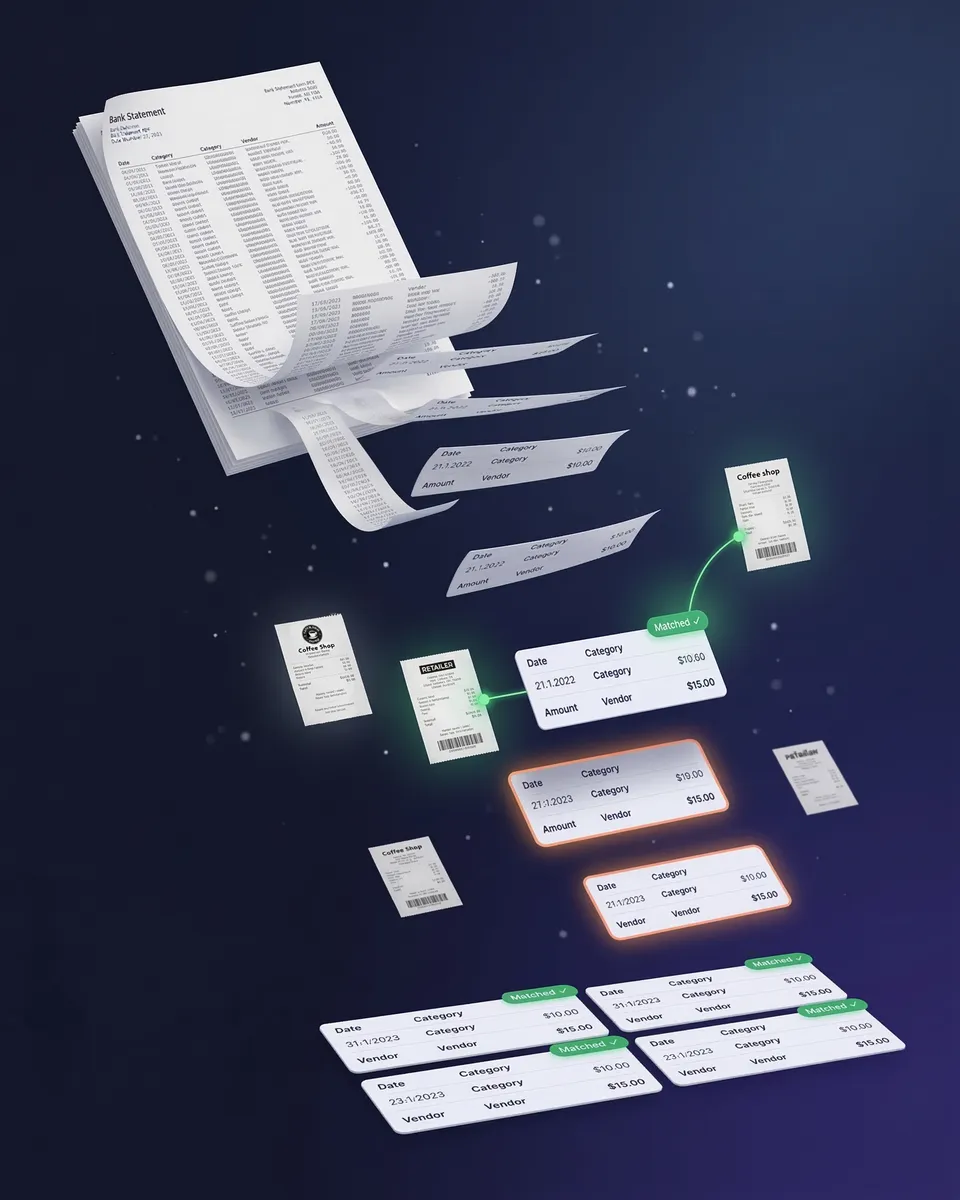
Upload any bank or credit card statement as PDF, CSV or Excel. The bank statement extractor pulls every transaction, and the Transaction Manager proposes the matching receipt for each one and flags the charges with no documentation.

4

Hand Off Clean Data to Your Accountant

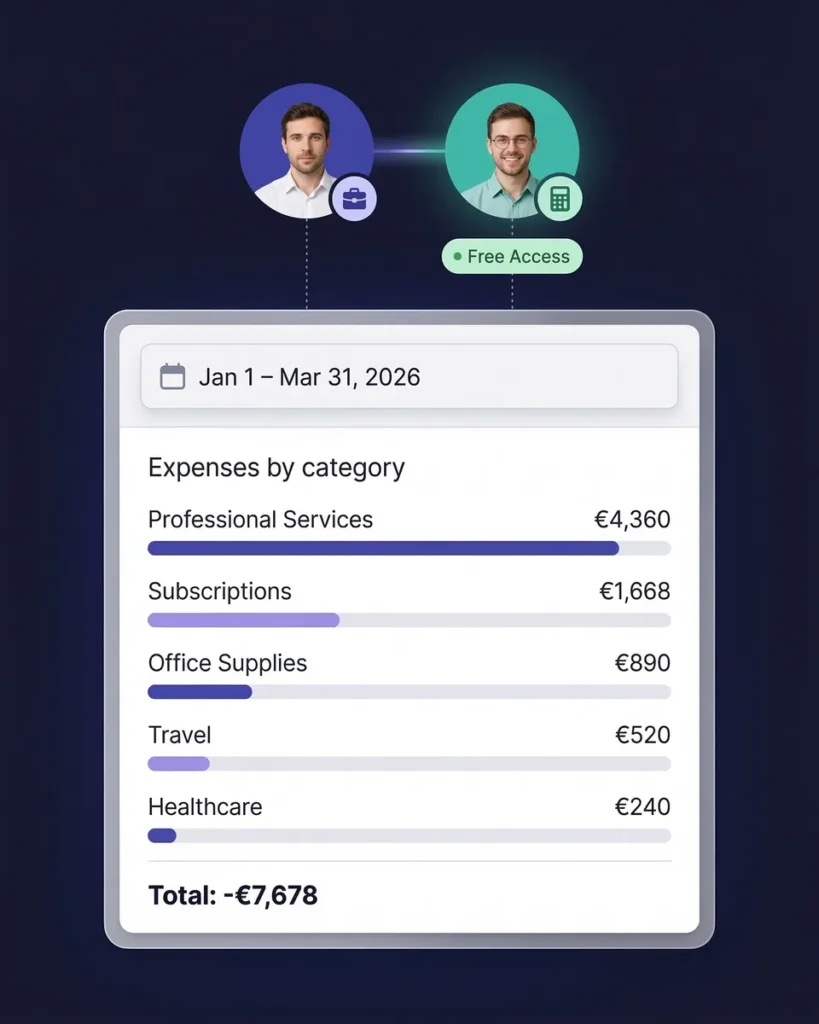
Your accountant or bookkeeper joins free and can view every expense, download receipt images, build expense reports and export data. Or publish straight to QuickBooks Online or Xero with the receipt attached, so nothing is typed twice.

What Is Pre-Accounting?

Pre-accounting is the preparation that happens before financial data is recorded in your books: collecting, scanning, reading, categorizing and organizing receipts, invoices and bank statements so they are clean and ready for your accountant or your accounting software.

Think of it this way: pre-accounting is the messy real-world data collection. Accounting is the formal reporting. Your accountant does not want a shoebox of crumpled receipts. They want organized, categorized, verified expense data, and that preparation is pre-accounting.

Collecting receipts for pre-accounting

Stop the Shoebox: The Real Cost of Manual Pre-Accounting

The shoebox method, where receipts go into a drawer all year and the mess goes to your accountant at tax time, is the most expensive way to handle pre-accounting. Freelance bookkeepers average about $43 an hour and catch-up cleanups start around $1,000, according to NerdWallet's 2026 bookkeeping price guide. Faded receipts get thrown away, small expenses never get claimed, and legitimate deductions slip through.

SparkReceipt replaces the shoebox from $5.75/month billed annually.

Two business partners sorting through a paper receipt together with a phone in hand

Pre-Accounting vs. AI Bookkeeping vs. Accounting

These terms get mixed up. Pre-accounting is the preparation: collecting receipts, reading them and categorizing expenses. Bookkeeping is the recording: entering transactions into a ledger and reconciling accounts. QuickBooks Online and Xero keep that ledger. Accounting is the analysis: financial statements, tax returns and planning, which is your accountant's job.

AI bookkeeping tools automate parts of the first two. SparkReceipt's AI automates the pre-accounting and the reconciliation of bank lines against receipts, then publishes the result to your ledger. It does not replace the ledger itself.

Bank statement extraction for pre-accounting

Invite Your Accountant or Bookkeeper

The last step of pre-accounting is handing clean data to your accountant. Most setups make this painful: exported CSVs, zipped receipt folders, and emails back and forth about missing documents.

In SparkReceipt your accountant or bookkeeper joins free, at any time. They get a live view of your organized records: categorized receipts, matched bank transactions, expense reports and the original receipt images.

Accountant access to organized expense data

What AI bookkeeping does here, and what stays in your ledger

Most AI bookkeeping software promises to keep your whole set of books. SparkReceipt does something narrower, and says so: its AI does the bookkeeping groundwork, the part that eats your evenings, and hands the result to the ledger you already use.

What the AI does in SparkReceipt:

  • Captures every document. Phone scans, connected inboxes (with email history extraction for the receipts already sitting there), bulk uploads, and bank or credit card statements.
  • Reads it. Vendor, date, total, tax breakdown and line items, in virtually any language and 190 currencies. Where a receipt line shows a quantity and unit price, the AI records both, so you can see what each item cost.
  • Files it. Income or expense, a tax-relevant category, tags and AI Fields. Correct a vendor once and an automation files it that way from then on. Duplicate documents are flagged so they are not counted twice.
  • Matches it. The Transaction Manager proposes the receipt for each bank line, marks transfers between your own accounts, and flags the lines with nothing behind them.
  • Answers questions and takes instructions. SparkAgent, the built-in AI agent, can categorize or split documents, match bank transactions and pull a report when you ask it in plain language.
  • Hands it off. Publishes to QuickBooks Online or Xero with the tax codes and the receipt image, or exports reports for your accountant.

What stays with your ledger and your accountant: the general ledger and journal entries, payroll, invoicing (SparkReceipt does not create invoices), financial statements and your tax return.

A month of AI bookkeeping, step by step

What the automation looks like in practice, for a business with one bank account and one card:

  1. During the month, receipts file themselves. You photograph paper receipts at the counter, and email receipts arrive from your connected inbox. Each one is read and filed within seconds. Automations you set up once keep recurring vendors in the right category.
  2. When the statement lands, the bank lines get matched. Upload the statement, or in the United States connect the bank directly, and the Transaction Manager proposes a receipt for each line. You confirm the matches, mark transfers and exclude personal purchases. The Transaction Manager overview shows the screen.
  3. You clear the short review list. Documents the AI was unsure about, possible duplicates and bank lines with no receipt are the only things left for you. Ask SparkAgent to recategorize a batch or pull a summary instead of clicking through them.
  4. The month goes to the books. Publish to QuickBooks Online or Xero, or let your accountant log in and take it from there.

Where the AI stops and you decide

Automated bookkeeping software that never asks is guessing. In SparkReceipt nothing is matched to a bank line until you confirm it, a wrong match can be undone, and documents the AI is unsure about wait in review rather than going straight into your reports. The AI does the reading and the proposing; you and your accountant make the calls.

Can AI replace your bookkeeper?

Not the judgement. What it can replace is the data entry: typing receipts, sorting them into categories and ticking bank lines against paper. That is the part bookkeepers bill for and would rather not do. With the groundwork done, a bookkeeper spends their time reviewing and advising, and they can do it inside your account at no extra cost.

The Bookkeeping Groundwork, Done by AI

Capture, AI categorization, bank matching and handoff in one subscription. Cancel any time.

1 user included
Accountant access is free.

Each extra user: $1.00/month, billed $12 annually. Accountant access is free.

Pro

The essentials for keeping your receipts and expenses organized.

$5.75/mo

Total for 1 user · $69.00 billed annually

+ VAT/GST where applicable

Get Started

7-day free trial

50 documents / month

For receipts and invoices

  • AI scanning and categorization
  • One connected email inbox
  • One live bank feed connection
  • Bank statement extraction and matching
  • Mileage tracking and expense reports
  • QuickBooks Online, Xero and more
Recommended

Elite

More receipts, more automation. Less to do yourself.

$10.75/mo

Total for 1 user · $129.00 billed annually

+ VAT/GST where applicable

Get Started

7-day free trial

Unlimited documents*

Everything in Pro, plus:

  • Line-item extraction on every receipt
  • Several connected email inboxes
  • Several live bank feed connections
  • AI Fields for the details you need
  • AI rules for categorizing and filing
  • Schedule C and accounting templates

Founder pack

Elite, with hands-on setup from a SparkReceipt founder.

$529first year

$400 one-time setup + $129.00/year Elite for 1 user

+ VAT/GST where applicable

Get the Founder pack

Annual plan only · No free trial

Everything in Elite

Plus a working session with a founder:

  • Personal walkthrough of your account
  • Connect your email inboxes together
  • Set up your expense categories
  • Configure your integrations
  • Get answers as you work through setup
  • Go live in one working session

Unlimited linked accounts on every plan.

Compare all features

Pro

  • 1 user included. Add teammates any time for a flat fee per user, your accountant joins free on top, unlimited linked accounts
  • 50 documents per month (receipts and invoices, mass upload up to 100 at once)
  • AI scanning and categorization
  • Automatic email receipt scanning from one connected inbox (Gmail, Outlook, IMAP)
  • Bank statement extraction and receipt matching (PDF, CSV, Excel)
  • One live bank feed connection
  • Mileage tracker: GPS or manual trips
  • SparkAgent AI assistant, or connect your own AI over MCP
  • Integrations: QuickBooks Online, Xero, Zapier, Make, Pabbly, plus webhooks and API
  • Expense reports and exports: PDF, Excel, CSV, ZIP; 190 currencies

Elite

  • Everything in Pro, plus:
  • Unlimited documents: receipts and invoices, mass upload up to 100 at once
  • Line-item extraction on every receipt
  • Several connected email inboxes with automatic scanning
  • Several live bank feed connections
  • AI Fields: tell the AI exactly what to pull from every document
  • Plain-English AI rules: tell the AI how to categorize and file automatically
  • Schedule C export for US tax filing
  • Export templates for Sage 50, DATEV, Wave, and Sage 200

Founder pack

  • Hands-on onboarding with a founder: together we set up your account, inboxes, categories and integrations
  • Everything in Elite, billed annually
  • 1 user included. Add teammates any time for a flat fee per user
  • Skip the learning curve and go live in one working session

Unlimited document scanning on Elite is subject to fair use. Bank statement extraction uses monthly renewable credits. Historical email imports include a free allowance; larger imports use credits, with the cost shown before you start.

Loved by Small Business Owners

“I needed a solution to organize and process my personal and business receipts. I'm thrilled I found SparkReceipt. It saves me a lot of time!”
Frédéric Thériault

Frédéric Thériault

Productions Locavores · Canada

“The scan accuracy is the most precise out there. Just try it!”
Christina Sust

Christina Sust

INMIZE · Spain

“Excellent software to manage income and expenses, and have the relevant info at your fingertips at any given time.”
Melvin Hoods

Melvin Hoods

MJD Brokers · South Africa

“Tax time comes around and I am overwhelmed … Boom, Spark receipt. I bulk uploads mt receipts, and I email the rest to the app. All is sorted with minor changes.”

Val M.

Google Play review, 5★ · United States · Oct 2024

“Has auto upload of bank statement PDF - nobody has it this simple. I run several businesses in EU and USA, it cross correlates everything”

Speedycustoms111

App Store review, 5★ · United States · Jan 2025

“It is very easy and accurate to use. I use it to track reciepts and deposits for multiple organizations and is shared with my bookkeeper”

Leon Y.

Google Play review, 5★ · United States · May 2024

Join 38,283 businesses that chose SparkReceipt — 4,620,044 receipts processed and counting.

Start Free Trial

Frequently Asked Questions

Pre-accounting is the preparation that happens before financial data is recorded in your books: collecting receipts and invoices, digitizing paper documents, extracting the key data (vendor, date, amount, tax), categorizing transactions, matching receipts to bank statements, and organizing everything for your accountant. Pre-accounting is the data collection; accounting is the formal reporting.

AI bookkeeping software uses AI to do bookkeeping tasks that used to be manual: reading receipts and invoices, categorizing transactions, reconciling bank lines, and flagging what is missing. Some tools try to keep your entire ledger. SparkReceipt focuses on the groundwork before the ledger and publishes the result to QuickBooks Online or Xero.

Pre-accounting is the preparation: collecting, scanning and categorizing receipts and financial documents so they are ready to record. Bookkeeping is the recording: entering those transactions into a ledger, reconciling accounts and maintaining the financial records. Accounting is the analysis: financial statements, tax returns and planning. SparkReceipt automates the pre-accounting and the bank-to-receipt reconciliation so your bookkeeper or accountant can focus on the rest.

Pre-accounting software automates the collection, digitization, categorization and organization of financial documents, replacing manual receipt sorting, data entry and spreadsheet tracking. SparkReceipt combines AI receipt scanning, automatic categorization, email receipt import, bank statement extraction and matching, and free accountant access. Plans start at $5.75/month billed annually.

When you hand your accountant clean, categorized records instead of a shoebox, they spend less billable time on data entry and more on advice. For reference, NerdWallet's 2026 bookkeeping price guide puts freelance bookkeepers at about $43 an hour on average and catch-up cleanups from around $1,000, so every hour of sorting you remove shows up on the bill.

You can do it by hand with a folder and a spreadsheet, and many people start that way. The cost is time, typing errors, and a spreadsheet you cannot search by receipt or tie to your bank statement. Software reads and files each document as it arrives and matches it to the bank line, so the month is ready when your accountant asks.

Your accountant or bookkeeper joins free and sees your organized records: categorized receipts, matched bank transactions, expense reports and original receipt images. No more emailing ZIP files or answering follow-up questions about missing documents. You can also publish directly to QuickBooks Online or Xero so nothing is typed twice.

The shoebox problem is the habit of dumping receipts into a drawer, bag or shoebox all year and bringing the pile to your accountant at tax time. Sorting it is slow and billable, faded or illegible receipts get thrown away, and legitimate deductions are missed. SparkReceipt removes the shoebox by digitizing each receipt when you get it.

It can replace the data entry, not the judgement. The AI reads, files and matches your documents; your bookkeeper or accountant reviews the result, handles the ledger and gives advice. In SparkReceipt they join your account free, so they work from the same records you do.

For the groundwork, yes. SparkReceipt's AI bookkeeping covers capture, reading, categorization, duplicate detection and matching every bank line to its receipt, with SparkAgent to act on plain-language instructions. The ledger, payroll, invoicing and tax filing stay in your accounting software and with your accountant. You can try the full product free for 7 days.

Automate the Groundwork. Your Accountant Will Thank You.

Get Started
Start Free Trial