
Bank Reconciliation Software That Saves Your Month End
Every bank line matched to its receipt, marked as a transfer, or excluded. Save the month-end afternoon and reach 100% without the spreadsheet.
Upload statements from any bank, or connect your bank directly in the United States. AI proposes the matching receipt for each transaction, and you confirm it with one click.
Business Owners in 175 Countries Trust SparkReceipt


Bank Reconciliation by Hand vs. in the Transaction Manager
Same bank statement, very different month-end

Spreadsheet reconciliation
- Ticking off bank lines against a folder of receipts, one by one
- No idea which transactions still have nothing behind them
- Transfers between your own accounts counted as spending
- Personal purchases mixed into business totals
- Reconciliation happens once a year, in a panic, before the tax return

Transaction Manager
- AI proposes the matching receipt for each transaction, you confirm it in one click
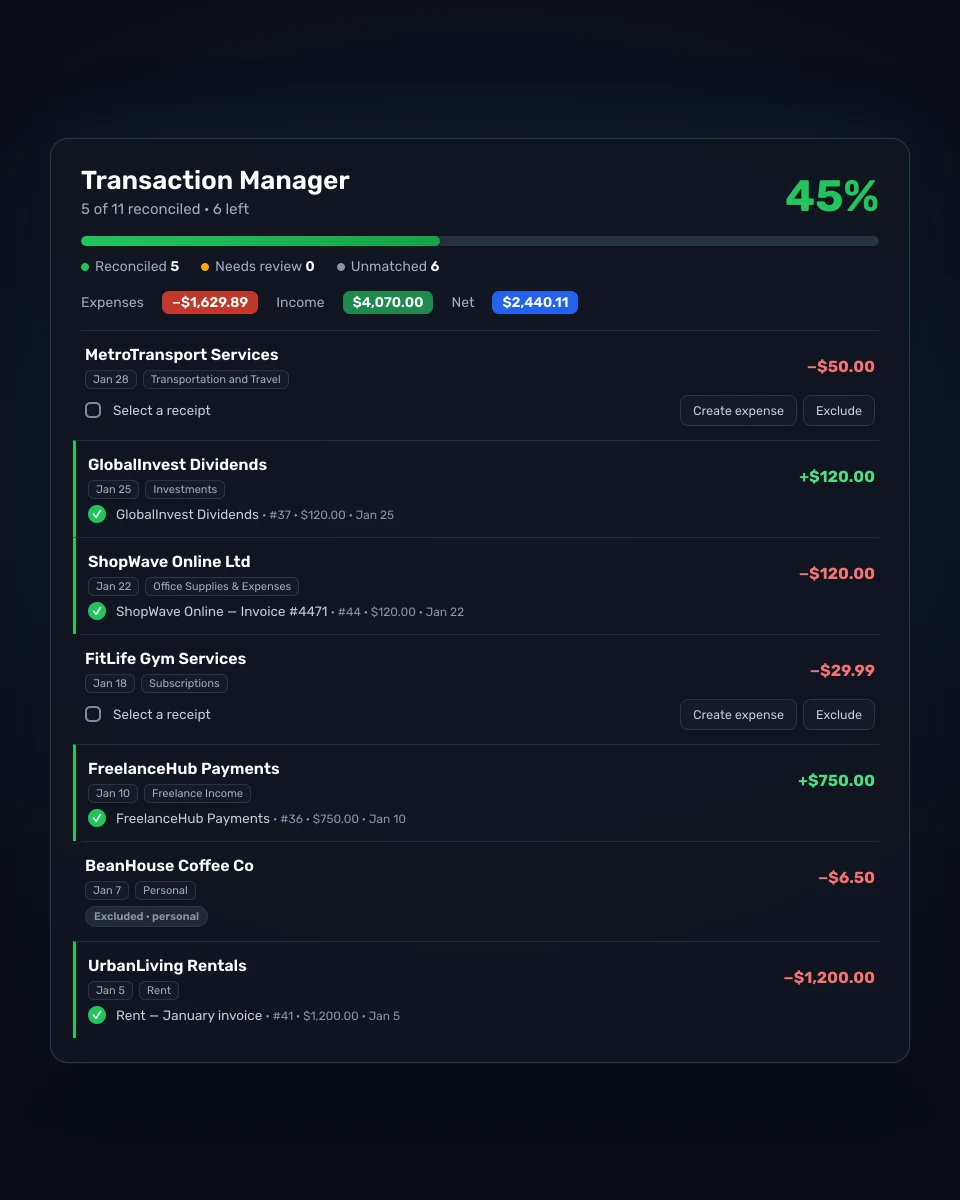
- Unmatched, needs-review, and reconciled counts on one progress bar
- Transfers marked in a click and kept out of income and expenses
- Exclude personal lines; create an entry when no receipt exists
- Reconcile as you go, in minutes, with the totals updating live
How Bank Reconciliation Works in SparkReceipt
Bring In Your Transactions
Upload a bank or credit card statement as PDF, CSV, or Excel and SparkReceipt extracts every transaction. In the United States you can also connect your bank directly and let new transactions flow in on their own.
Match, Mark, or Exclude
For every transaction the AI proposes the receipt or invoice that matches by amount, date, and merchant. One click links them. Lines that are transfers between your own accounts get marked as transfers, personal or non-business lines get excluded, and a transaction with no document becomes a new expense or income entry in one click.
Watch the Bar Reach 100%
The Transaction Manager counts reconciled, needs-review, and unmatched lines and shows your progress. Your expense, income, and net totals update as you go, so the books are ready for your accountant the moment the bar is full.
Every bank transaction, one status, one screen
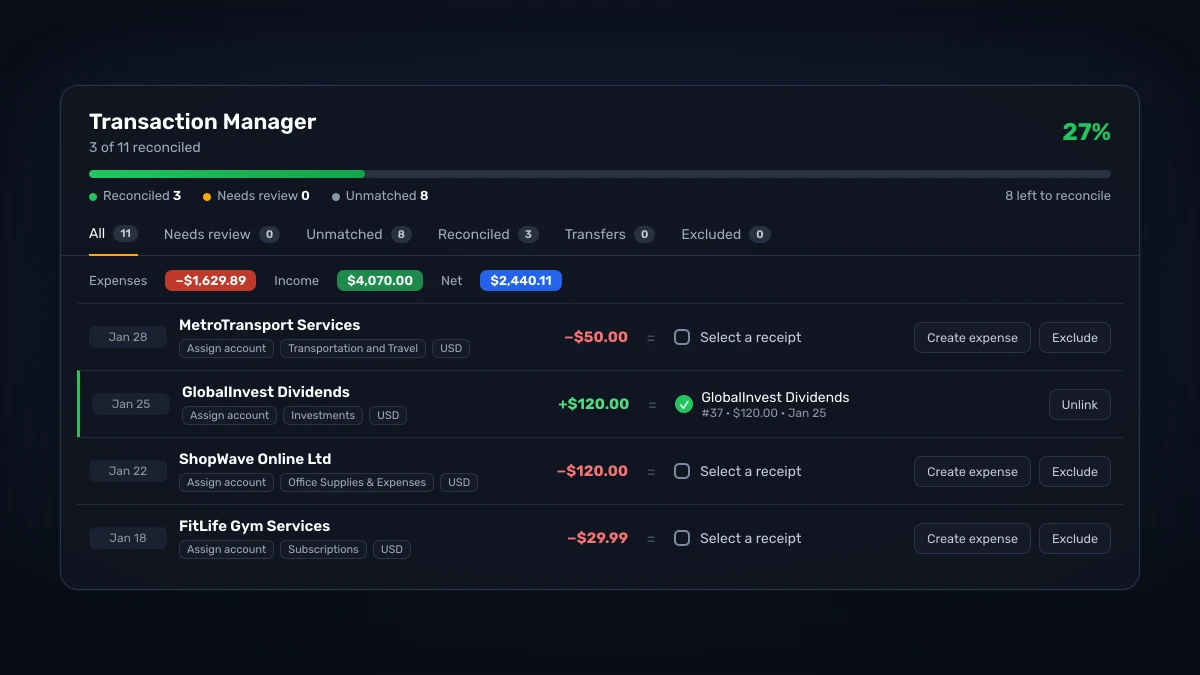
The Transaction Manager lists every bank and card transaction from your statements and feeds, grouped by month, with its category, its currency, and its state. Filter by account or date, jump between Unmatched, Needs review, Reconciled, Transfers, and Excluded, and keep an eye on the running Expenses, Income, and Net totals at the top.
Keyboard shortcuts move you through the list. Approve a match, reject it, exclude a line, find a match, or create an entry without touching the mouse. Reconciling a month stops being a project and turns into a few minutes of review, and you can stop halfway and pick up where you left off, because the counts are saved with every click.
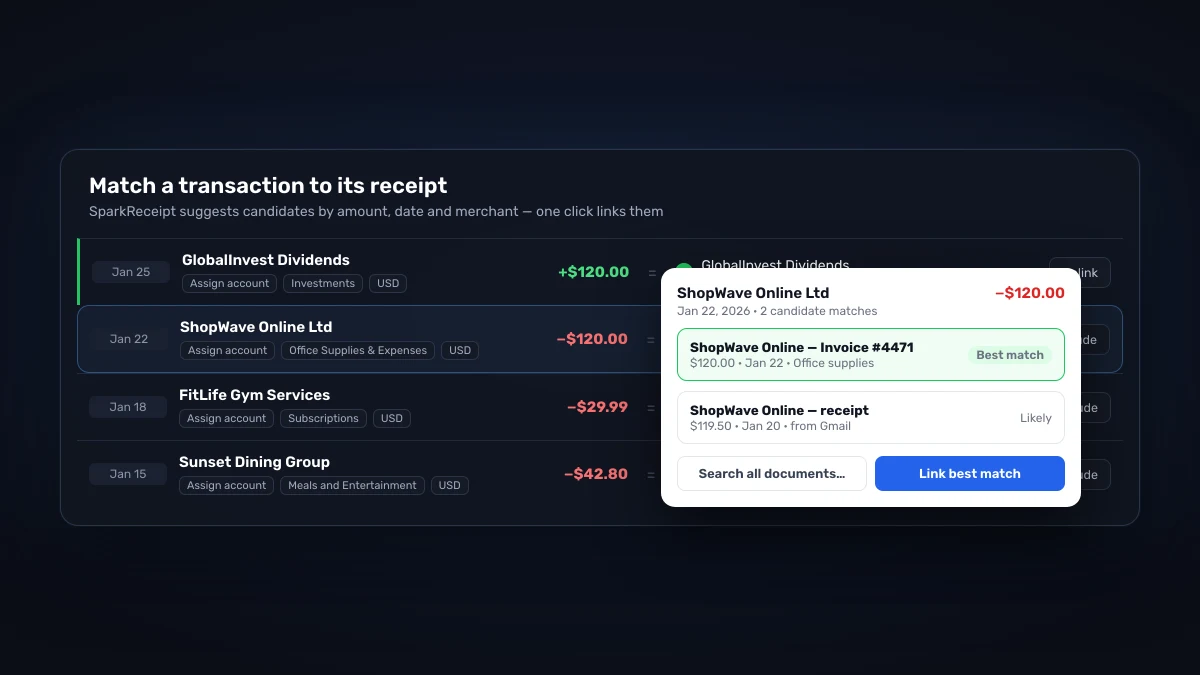
Transaction matching software: AI finds the receipt, you confirm
For each unmatched transaction, SparkReceipt looks through every receipt and invoice in your account and proposes candidates by amount, date, and merchant. The best match sits at the top. Link it in one click, or search all documents when the right one is further away. Nothing is linked until you say so, and a wrong match can be undone at any time.
Because receipts arrive from every direction, scanned on your phone, pulled from your inbox, or uploaded in bulk, the match is usually already waiting. When it is not, email history extraction can go back through your mail and bring the missing receipt in so it can be matched too.
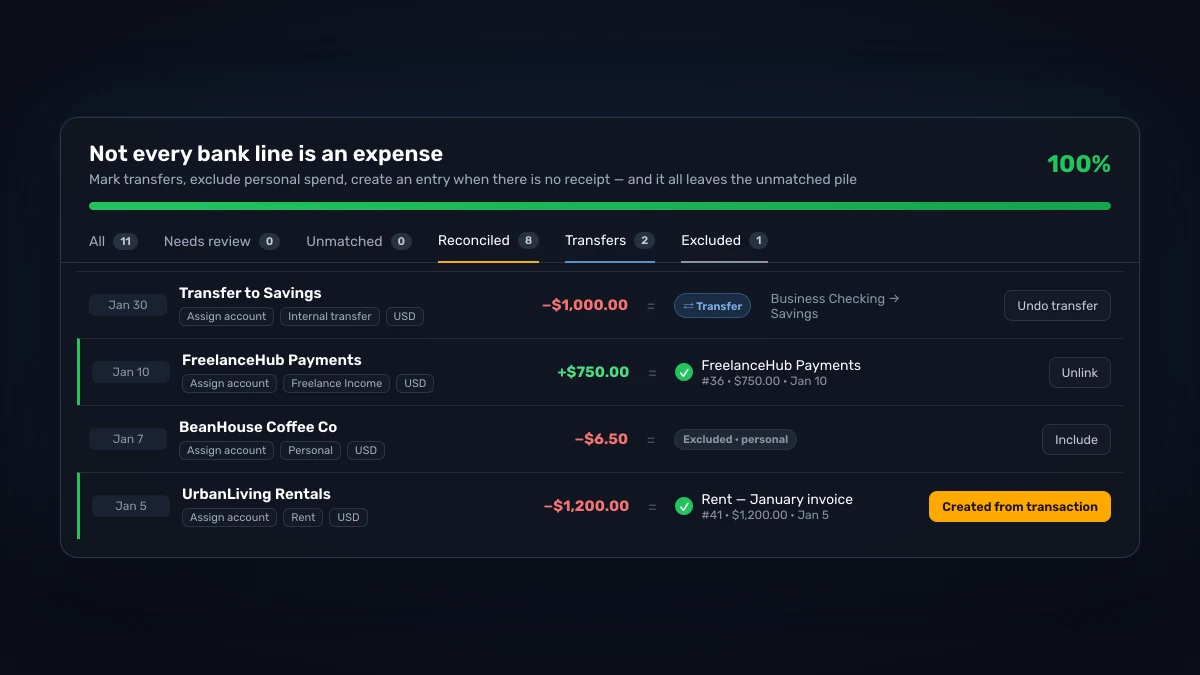
Transfers, exclusions, and new entries
Not every bank line is an expense. A payment to your savings account is not spending, a personal coffee on the business card should stay out of the books, and a supplier who never sent an invoice still needs an entry. The Transaction Manager has a state for each case. Mark a line as a transfer and it leaves your income and expenses. Exclude a personal line and it stays out of your reports. Create an expense or income entry straight from a transaction when there is no document to match.
Everything you mark this way still counts as reconciled, so the progress bar reflects the real state of your books rather than only the lines that happened to have a receipt. The help center covers transfers, exclusions, and creating entries step by step.
Automated bank reconciliation with statements or live bank feeds
The Transaction Manager works with whatever brings transactions in. Upload statements from any bank in the world as PDF, CSV, or Excel with the bank statement extractor. In the United States, connect your bank directly and new transactions arrive on their own, ready to match.
Either way, the reconciled result lands in the same reports and publishes to QuickBooks Online or Xero with the receipt attached, so your accountant gets a bank line, a category, and the proof behind it in one record.

Bank reconciliation software vs. a spreadsheet
A monthly bank reconciliation has three jobs: prove that every transaction on the statement is real and recorded, catch the ones you missed, and keep the two sides of your books in agreement. Done by hand, that means a printed statement, a folder of receipts, and an afternoon of ticking. In bank reconciliation software, the tool holds both sides and does the comparison for you.
What separates the Transaction Manager from a plain bank statement converter is the second half of the job. A converter turns your statement into rows. SparkReceipt turns rows into reconciled transactions, each matched to the document that proves it, classified as a transfer or an exclusion when it is not an expense, and counted on a progress bar you can hand to your accountant. The Transaction Manager overview in the help center walks through the screen field by field.
If you want the method itself, with the reconciling items and a worked monthly example that ties out to the penny, read how to do a bank reconciliation. This page is about the tool that does it.
What to look for in bank reconciliation software
Most small businesses do not need a reconciliation module inside a full accounting suite. They need a tool that closes the gap between the bank statement and the receipts. Six things decide whether a tool does that well:
- It reads the statement you already have. Bank statement reconciliation software should accept PDF, CSV, and Excel exports from any bank, not only the banks that offer a feed. SparkReceipt extracts transactions from statements in 190 currencies.
- It matches against receipts, not only categories. Transaction matching software that only assigns a category leaves the proof in a shoebox. Each match in SparkReceipt links the bank line to the receipt or invoice image, so an auditor or accountant can click through from the transaction to the document.
- It knows a transfer from an expense. Money moving between your own checking, savings, and credit card accounts should never inflate your spending. Transfers get their own state and stay out of the totals.
- It shows you how far you are from done. A count of unmatched and needs-review lines, and a bar that fills as you work, is the difference between a task you finish and one you abandon.
- It runs on your phone as well as your desk. A bank reconciliation app on iPhone and Android lets you snap the receipt at the counter, so it is already in the account when the bank line shows up. SparkReceipt runs on iOS, Android, and the web on one account.
- It hands off cleanly. Your subscription includes 1 user, and your accountant or bookkeeper joins free to review matches in the same account, so the reconciled result publishes to QuickBooks Online or Xero.
The same tool fits three kinds of users. A freelancer with one business card reconciles a month in a few minutes. An owner running several companies keeps each one in its own linked account with its own statements and progress bar. A bookkeeper reconciling for clients works inside each client's account instead of asking for exports. In each case the bank reconciliation software is the same Transaction Manager, and the work is confirming matches rather than hunting for paper.
Bank Reconciliation Is Included
Statement extraction, receipt matching, and the Transaction Manager in one subscription.
Doing it by hand
Shoebox + spreadsheet
60+ hours a year
Flattening, reading and typing each receipt into a spreadsheet, filing the paper, matching it to the bank statement, and hunting for the ones that went missing.
$1,000+ for the cleanup
What a bookkeeper charges to turn a year of shoebox records into books a return can be filed from, before the return itself.
Deductions you can't prove
A faded thermal receipt or a lost email is an expense you pay for twice: once at the counter, once at tax time.
Total per year
Your evenings, a cleanup bill, and the deductions you couldn't prove.
Basis: about 40 receipts a month at six minutes each by hand, plus a weekend reconstructing the year before the return. Bookkeeper rates and cleanup fees from NerdWallet's 2026 bookkeeping price guide (freelance average $43 per hour; cleanup from $1,000).
Loved by Small Business Owners
Join 38,283 businesses that chose SparkReceipt — 4,620,044 receipts processed and counting.
Start Free TrialFrequently Asked Questions
Bank reconciliation software compares the transactions on your bank or credit card statement with the records in your books and shows you which ones are explained and which are not. In SparkReceipt, the Transaction Manager does this by matching each transaction to a receipt or invoice, marking transfers, and excluding non-business lines, until every transaction has a status and the progress bar reads 100%.
No. Upload bank or credit card statements as PDF, CSV, or Excel and every transaction is extracted into the Transaction Manager. Direct bank connections (bank feeds) are available for banks in the United States. Everywhere else, statement upload gives you the same reconciliation.
Most of it. Bank feeds bring transactions in on their own where they are available, a connected inbox brings receipts in on its own, and the AI proposes the match for each transaction. The one step SparkReceipt leaves to you is confirming the match, because a wrong link is worse than an open one. Automated bank reconciliation software that never asks is guessing.
It compares each transaction against every receipt and invoice in your account by amount, date, and merchant name, ranks the candidates, and puts the best match first. You confirm with one click. Nothing is linked without your approval, and you can unlink a match at any time.
Mark them as transfers. A transfer is neither income nor an expense, so it leaves your totals and reports, and it still counts as reconciled. The same goes for excluded lines, such as personal purchases on a business card.
Create an expense or income entry directly from the transaction. It becomes a normal document in your account, categorized like everything else, and the transaction is reconciled. If the receipt is somewhere in your email, email history extraction can go back through your inbox and bring it in so it can be matched instead.
Yes. SparkReceipt runs on iPhone, Android, and the web on one account, and the Transaction Manager is available on all three. Scan receipts on the phone as you spend, upload statements from wherever you are, and confirm matches on whichever screen is in front of you.
Yes. Upload or connect as many bank and credit card accounts as you have. The Transaction Manager filters by account, and SparkReceipt processes statements in 190 currencies using the exchange rate of the transaction date, so bank account reconciliation works the same way whether you bank in one country or several.
Accounting software reconciles bank lines against journal entries. SparkReceipt reconciles them against the receipts and invoices that prove them, then publishes the result to QuickBooks Online or Xero with the receipt image attached. Most small businesses use it in front of their accounting software, not instead of it.
Yes. Your subscription includes 1 user, and your accountant or bookkeeper joins free to review matches, resolve the needs-review queue, and see the reconciliation progress in the same bank reconciliation software, in the same account. No exports needed.
Reconcile Every Transaction. Prove Every Expense.
Get StartedExplore More Features
Bank Statement Extractor
Extract every transaction from PDF, CSV, or Excel statements
Bank Feed
Connect your bank in the US
Receipt Scanner
Scan receipts with AI in seconds
Email Receipts
Auto-import receipts from your inbox, past and present
Expense Reports
Generate reports in PDF, Excel, or CSV
QuickBooks Online
Publish reconciled expenses with receipts attached
Pre-Accounting
Clean records before they reach your accountant