Skip to content

Expense Reimbursement Software for Small Teams

Save the end-of-month chase for receipts. Your team puts receipts and mileage on one claim, you approve it once, and the bill lands in QuickBooks or Xero.

SparkReceipt is expense reimbursement software for small teams. Whoever paid for a business cost with their own money puts the receipts and business trips on an expense claim, a Supervisor, Admin, or Owner approves it, and you mark it paid once the money has gone out.

Try expense claims in the 7-day free trial. Cancel any time.

Business Owners in 175 Countries Trust SparkReceipt

Tracy DugganRobert ConnollyRafael RoaFrédéric ThériaultPierce Mooney
4.8on the App Store · 4.6 on Google Play · 2,700+ ratings
4,620,044Receipts Processed
38,283Businesses Worldwide
190Currencies Handled
175Countries

Paying People Back by Spreadsheet vs. With Expense Claims

Same receipts, same team, a very different end of the month

Business owner sorting through receipts sent by her team

Spreadsheet and forwarded photos

  • Receipts arrive as photos in chat, email, and a pocket
  • Someone retypes every amount into a spreadsheet
  • Mileage is a guess written on the back of an envelope
  • It is unclear which claims are approved or already paid
  • Your accountant gets a total with no proof behind it
Business owner relaxed after approving her team's expense claims

Expense claims in SparkReceipt

  • Each person adds the receipts they paid and their business trips
  • AI reads every receipt, so amounts aren't retyped
  • Trips are priced at your mileage rate on the claim
  • Draft, Submitted, Approved, Paid: every claim has a status
  • One bill per claim in QuickBooks Online or Xero, receipts attached

How Employee Expense Reimbursement Works in SparkReceipt

1

Add Expenses and Trips

The person who paid opens a new claim and adds the expenses they paid themselves and their completed business trips. Expenses marked as paid by the company stay off claims, so nothing gets paid back twice.

2

Submit, Approve, or Send Back

They submit the claim and everyone who can approve it gets a push notification and an email. A Supervisor, Admin, or Owner approves it in one step, or rejects it with a reason the claimant can fix.

3

Pay, Mark Paid, Publish

Pay the person back by bank transfer or through payroll, then mark the claim paid with the date and a reference. Publish the approved claim to QuickBooks Online or Xero as one bill, or export it as PDF, Excel, or CSV.

One claim for every receipt and mile someone paid for

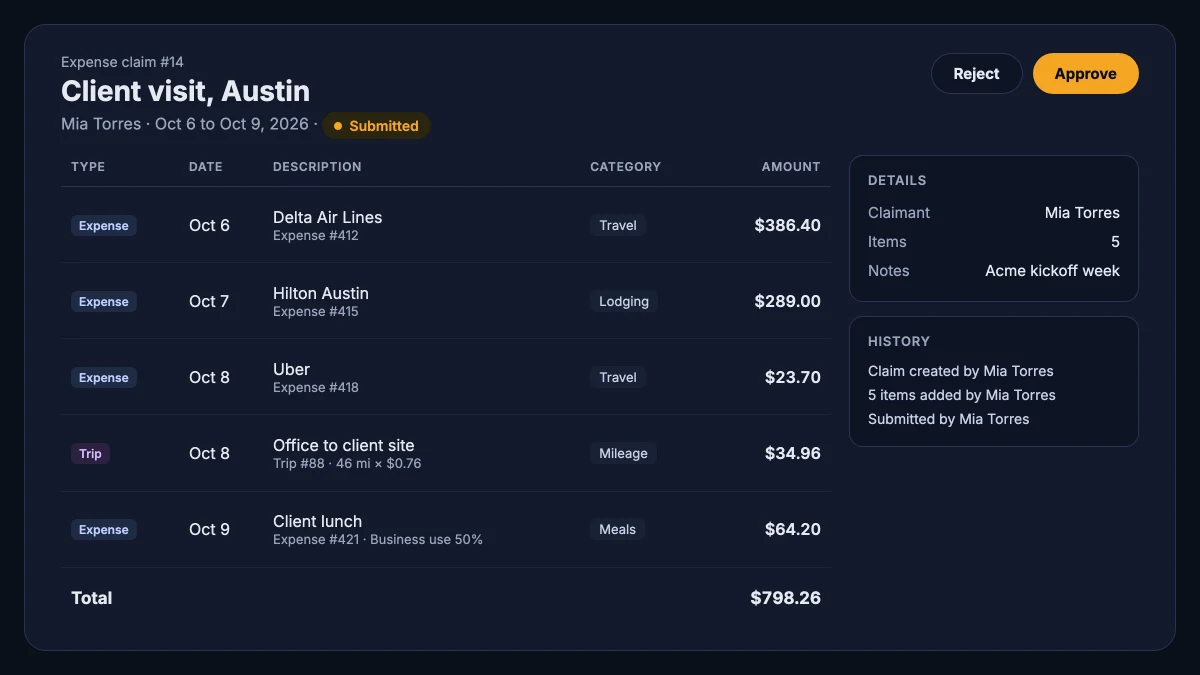
An expense claim collects everything one person is owed for a trip, a project, or a month. Add the receipts they paid with their own card or cash, scanned on a phone or pulled from their inbox, and add the business trips they drove from the mileage tracker. Each trip is priced at your mileage rate, and the claim shows the distance and the rate behind the amount.

A claim can mix currencies, with a separate total for each one, so a conference abroad doesn't need a conversion by hand. An expense that is only partly for business shows its business use, so the approver sees the split before saying yes. Each receipt can be on one claim only, which keeps duplicate reimbursement out of the picture.

An expense claim with flights, a hotel, a ride, a business trip priced per mile, and a total

Expense approval in one step, without a chain

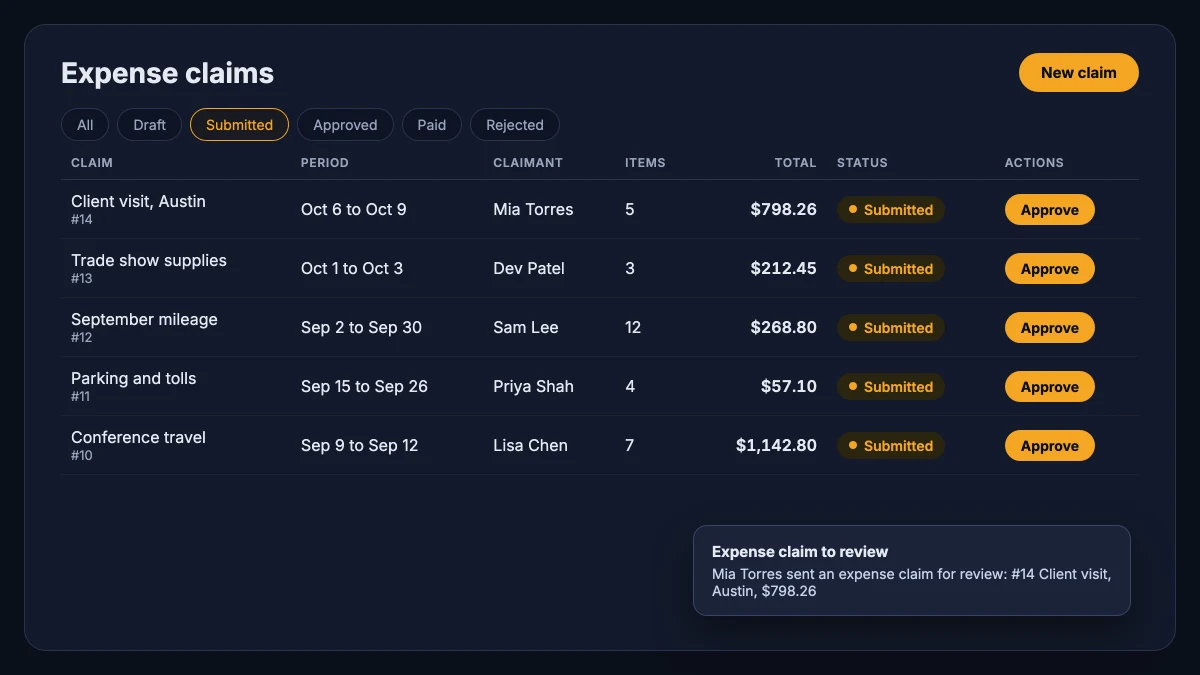
Small teams don't need a three-level approval chain in their expense reimbursement software. They need someone with the authority to say yes, and a record of who said it. In SparkReceipt a Supervisor, Admin, or Owner approves each claim, from the claim itself or straight from the list. If something is off, they reject it with a reason, and the claimant reopens it, fixes it, and submits again.

Every claim keeps a history of who created it, submitted it, approved it, sent it back, and marked it paid. Admins and the Owner can approve their own claims. A Supervisor can't, so another approver signs off on theirs. Contributors see only their own claims, and your accountant joins free and sees all of them.

The expense claims list on the Submitted tab with an Approve button on each claim and a review notification

Paid back, recorded, done

Each claimant saves their payout details once: account holder, account number or IBAN, routing number or sort code, and bank name. The claim keeps a copy when it is submitted, and only the claimant and the people who review the claim can see it. Account numbers are stored encrypted.

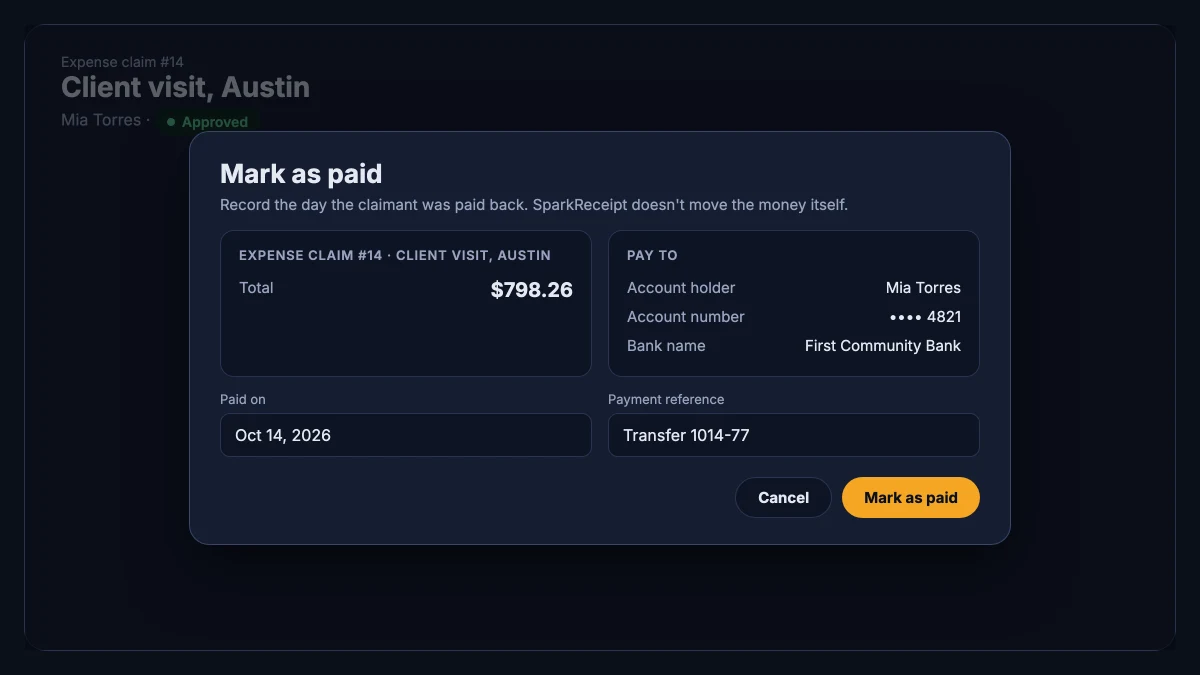
When you have paid the person back, through your bank or with the next payroll run, open the claim and mark it paid with the date and a payment reference. The claimant gets a notification, and the claim moves to Paid. SparkReceipt doesn't move the money itself. It keeps the record of what was owed, who approved it, and when it was settled.

The Mark as paid dialog with the claim total, the payee's bank details, the paid-on date, and a payment reference

Reimbursements in QuickBooks Online and Xero, as one bill

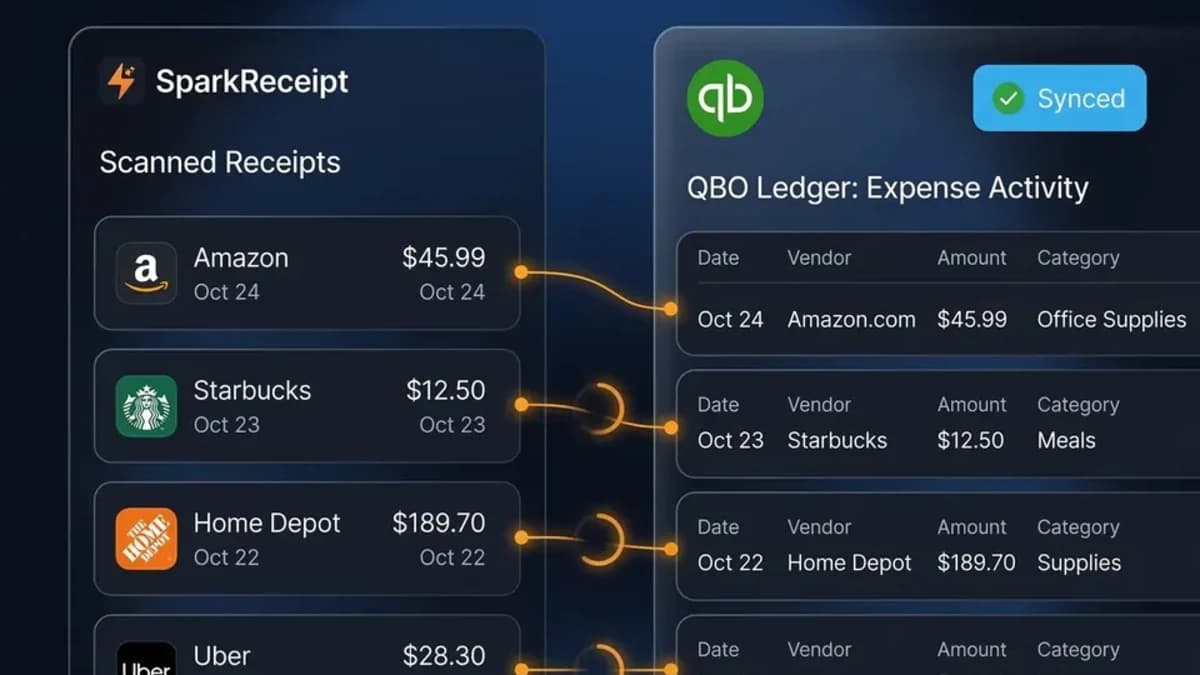
An approved claim publishes to QuickBooks Online or Xero as one unpaid bill, payable to the person who made the claim. Each receipt goes on its own line with its category and tax, the receipt images are attached, and trips are booked to the mileage expense category you choose. The bill carries the claim number, so your accountant can trace it back. Claims also publish to Procountor and SimplBooks.

Using different accounting software? Export the claim as a PDF with every receipt after the summary, or as Excel or CSV, and record it there. The expense reports you already run are unaffected: reports cover your spending, and claims cover what you owe the people who paid for it.

Publishing to QuickBooks Online from SparkReceipt with categories mapped and receipts attached

If you are the business: pay yourself back

Owners pay for business costs with a personal card all the time. An expense claim gives you a clean record of what the business owes you: add those receipts and the business miles you drove, submit the claim, approve it yourself as the Owner, and mark it paid once the business has transferred the money. The claim's PDF and its history show exactly what was paid back and when.

If you run an S corporation in the United States, reimbursing yourself under an accountable plan has its own rules about substantiation and timing. SparkReceipt keeps the receipts, dates, and approvals those rules ask for, and your accountant decides how the plan is set up.

A self-employed consultant relaxed with his laptop because his expenses are already tracked

What expense reimbursement software does for a small team

Expense reimbursement is how a business pays back someone who covered a business cost with their own money: the flight booked on a personal card, the client lunch, the miles driven in their own car. The process has four steps everywhere. Someone collects the proof, someone approves the claim, someone pays the money, and the books record it. Expense reimbursement software holds all four in one place so nothing depends on memory or a shared spreadsheet.

In a team of three to twenty people, the hard part is rarely the approval. It is the paper. Receipts get lost before anyone asks for them, mileage gets estimated after the fact, and the owner pays back a total without knowing what is in it. SparkReceipt starts with the receipt: every expense is scanned and read by AI the moment it is captured, every trip is logged with its distance, and an expense claim gathers the ones a person paid for. The approval and the payment record sit on top of proof that already exists.

How to reimburse employees for expenses

A simple employee expense reimbursement process works for most small businesses:

  1. Write down the rules once. Which costs you pay back, the mileage rate you use, and how quickly people should submit. An expense reimbursement policy can be one page.
  2. Collect the proof as it happens. Ask each person to capture the receipt at the counter. With SparkReceipt they snap it in the app or forward the email, and it lands in the account with their name on it.
  3. Submit one claim per trip, project, or month. The claimant adds their own expenses and trips to a claim and submits it.
  4. Approve once. The owner or a manager checks the claim against the receipts and approves it, or sends it back with a reason.
  5. Pay and record. Pay the person back by bank transfer or with payroll, mark the claim paid, and publish the approved claim to your accounting software as a bill.

Reimbursements under an accountable plan generally stay out of the employee's taxable wages in the United States, which is why the proof matters. Ask your accountant how your plan is set up. SparkReceipt doesn't decide tax treatment. It keeps the receipts, the dates, the business purpose, and the approval together so the paperwork holds up.

What to look for in expense reimbursement software

Large companies buy travel and expense suites with corporate cards, policy engines, and payout rails. A small team needs less, and the things it needs are easy to check:

  • It starts from the receipt. Expense reimbursement software that asks people to type amounts into a form recreates the spreadsheet. SparkReceipt reads every receipt with AI and puts the image on the claim.
  • Mileage goes on the same claim. Driving is often the biggest reimbursable cost in a small business. Trips from the mileage tracker go on the claim next to the receipts, priced at your rate.
  • Approval is one step with a record. Look for a clear approver, a reason when a claim is sent back, and a history of every step.
  • Company spending stays separate. Purchases made with the company card should stay off claims. Expenses marked as paid by the company are left out.
  • The bill reaches your books. An approved claim should arrive in QuickBooks Online or Xero as one bill to the person, with the receipts attached, so your accountant doesn't rebuild it.
  • Pricing doesn't punish small teams. Every plan includes 1 user, extra users are a flat fee, and your accountant joins free. Sending and approving claims costs nothing extra.

What SparkReceipt leaves out is deliberate. There are no multi-level approval chains, spending limits, policy rules, per diem calculations, or corporate cards, and SparkReceipt doesn't send payouts. If your team needs those, a spend-management platform is the better fit. Our comparison with Expensify sets out the difference.

Expense claims and expense reports

The two are related and easy to mix up. An expense report in SparkReceipt is an export: a PDF, Excel, or CSV of any set of expenses, for your accountant, a client, or your records. An expense claim is a request to be paid back. It belongs to one person, holds only what they paid for, goes through approval, and ends when it is marked paid. Use reports to see where the money went. Use claims, the expense reimbursement software side of SparkReceipt, to settle what the business owes the people who spent it.

Expense claims come with Pro and Elite

Claims, approval, mileage, and publishing to QuickBooks Online or Xero on both plans. Try them in the 7-day free trial and cancel any time.

Your accountant joins free

Your first user is included. Each extra user: $1.00/month, billed $12 annually.

Your accountant joins free

Pro

For side hustles.

$5.75/mo

Total for 1 user · $69.00 billed annually

+ VAT/GST where applicable

Get Started

7-day free trial

50 documents / month

For receipts and invoices

  • AI scanning and categorization
  • One connected email inbox
  • One live bank feed connection
  • Bank statement extraction and matching
  • Mileage tracking and expense reports
  • QuickBooks Online, Xero and more
Recommended

Elite

For small businesses with 1 to 40 people.

$10.75/mo

Total for 1 user · $129.00 billed annually

+ VAT/GST where applicable

Get Started

7-day free trial

Unlimited documents*

Everything in Pro, plus:

  • Line-item extraction on every receipt
  • Several connected email inboxes
  • Several live bank feed connections
  • AI Fields for the details you need
  • AI rules for categorizing and filing
  • Schedule C and accounting templates

Founder-led setup

Joel Ojala

Joel Ojala, co-founder, sets up SparkReceipt with you, tailored to how you work.

$400one-time setup

+ Elite for 1 user: $10.75/mo, billed annually

$529.00 today, then $129.00 a year

+ VAT/GST where applicable

Get set up with Joel

Annual plan only · No free trial

Everything in Elite

Plus a 60-minute session with Joel and one follow-up. In the session:

  • Your process, mapped at a high level
  • Logins for your team, and any extra users you need
  • Set up inbox scanning for receipts and invoices
  • Connect bank / upload your first statement
  • The phone app for paper receipts
  • Expense categories and your accounting integration
  • Anything else you'd like to go through

Unlimited linked accounts on every plan.

Compare all features

Pro

  • 1 user included. Add teammates any time for a flat fee per user, your accountant joins free on top, unlimited linked accounts
  • 50 documents per month (receipts and invoices, mass upload up to 100 at once)
  • AI scanning and categorization
  • Automatic email receipt scanning from one connected inbox (Gmail, Outlook, IMAP)
  • Bank statement extraction and receipt matching (PDF, CSV, Excel)
  • 100 credits a month per user. Bank statements use 1 credit per transaction
  • One live bank feed connection
  • Mileage tracker: GPS or manual trips
  • Expense claims: submit receipts and trips, approve, mark paid
  • SparkAgent AI assistant, or connect your own AI over MCP
  • Integrations: QuickBooks Online, Xero, Zapier, Make, Pabbly, plus webhooks and API
  • Expense reports and exports: PDF, Excel, CSV, ZIP; 190 currencies

Elite

  • Everything in Pro, plus:
  • Unlimited documents: receipts and invoices, mass upload up to 100 at once
  • 200 credits a month per user. Bank statements use 1 credit per transaction
  • Line-item extraction on every receipt
  • Several connected email inboxes with automatic scanning
  • Several live bank feed connections
  • AI Fields: tell the AI exactly what to pull from every document
  • Plain-English AI rules: tell the AI how to categorize and file automatically
  • Schedule C export for US tax filing
  • Export templates for Sage 50, DATEV, Wave, and Sage 200

Founder-led setup

  • A 60-minute setup session with Joel, co-founder, plus one follow-up session
  • Together we set up your process, team logins, inboxes, bank statements, categories and integrations
  • Everything in Elite, billed annually
  • 1 user included. Add teammates any time for a flat fee per user

Unlimited document scanning on Elite is subject to fair use. Bank statement extraction uses monthly renewable credits. Historical email imports include a free allowance; larger imports use credits, with the cost shown before you start.

Loved by Small Business Owners

“I used to send my accountant a bag of slips every month hoping they capture everything in order for me to be refunded for business expenses. With SparkReceipt I now have a realtime view of how much the business owes me and I have a clear picture for what business expenses I pay for.”
Daniel Esterhuizen

Daniel Esterhuizen

Esterhuizen Consulting · South Africa

“It is very easy and accurate to use. I use it to track reciepts and deposits for multiple organizations and is shared with my bookkeeper”

Leon Y.

Google Play review, 5★ · United States · May 2024

“my accountant is happy as he now has full access to everything.”

Semi J.

Google Play review, 5★ · United States · Aug 2025

Join 38,283 businesses that chose SparkReceipt — 4,620,044 receipts processed and counting.

Get Started

Frequently Asked Questions

An expense claim is a request from one person to be paid back for business costs they covered with their own money. In SparkReceipt it holds the receipts they paid themselves and their business trips, goes to an approver, and is marked paid once the money has been paid back.

Have each employee capture receipts as they spend, then submit the ones they paid themselves on an expense claim, together with their business trips. A Supervisor, Admin, or Owner approves the claim, you pay the employee by bank transfer or through payroll, and you mark the claim paid. The approved claim can go to QuickBooks Online or Xero as one bill.

No. SparkReceipt doesn't move money. You pay the person back the way you already do, by bank transfer or with payroll, and then record the payment on the claim with the date and an optional reference. The claimant gets a notification when the claim is marked paid.

Not necessarily. Many small businesses pay claims by bank transfer, and others add them to the next payroll run. In the United States, reimbursements under an accountable plan are generally kept out of taxable wages either way. Ask your accountant how your business should handle it. SparkReceipt records the claim, the approval, and the payment date whichever way you pay.

A Supervisor, Admin, or the Owner can approve, reject, and mark as paid other people's claims. Admins and the Owner can also approve their own. A Supervisor can't approve their own claim, so someone else signs off on it.

Yes. Completed business trips from the mileage tracker go on the claim next to the receipts. Each trip is priced at your vehicle or account mileage rate, plus any passenger rate, and the claim shows the distance and the rate behind the amount.

Publish the approved claim from SparkReceipt. It arrives as one unpaid bill payable to the employee, with each receipt as a line and the receipt images attached, and trips booked to your mileage expense category. When you pay the employee, record the payment against that bill in QuickBooks Online or Xero. Marking the claim paid in SparkReceipt doesn't create the payment there.

Creating and submitting expense claims is included in Pro and Elite, and you can try it in the 7-day free trial. Every plan includes 1 user, you add teammates for a flat fee per user, and your accountant joins free.

Yes. Invite your accountant with the Accountant role at no cost. They see every claim in the account, can export claims as PDF, Excel, or CSV, and can publish approved claims to your accounting software.

It fits small teams and owners who want receipts, mileage, approval, and a bill in QuickBooks Online or Xero in one place, with one approval step and nothing extra to pay per claim. If you need multi-level approvals, spending policies, corporate cards, or payouts inside the tool, a larger spend-management platform suits you better than this expense reimbursement software.

Expense Reimbursement Software With Proof Behind Every Dollar

Get Started
Get Started