Expense Management Software for Small Business Teams of 5 to 20
Stop chasing your team for receipts. Everyone captures on their own phone, you see one feed, and you save the month-end week without an expense-report ceremony.
At five people the receipts stop being yours: they are in the van, in the shop, and on a card statement with no paper behind it. SparkReceipt is expense management software for small business teams that puts a receipt app on every phone and gives you and your bookkeeper one feed. No approval chains, no reimbursement rails, no corporate cards.
Business Owners in 175 Countries Trust SparkReceipt
The Month-End Chase vs. One Shared Feed
Same team, same card statement, a very different last week of the month.

Chasing receipts
- The card statement arrives with twenty lines and eleven receipts
- "Whose receipt is this?" goes out to the whole team by text
- Someone retypes every receipt into the accounting software
- Expense-report forms nobody fills in on time
- Your accountant gets a folder of photos the week before the deadline

With SparkReceipt
- Every person snaps their receipts at the counter, and the AI files them
- Each receipt carries the name of the person who added it
- Contributors see only their own receipts; you and your bookkeeper see all of them
- The statement lands and matches itself to receipts already captured
- One export, or a direct publish to QuickBooks Online or Xero, and the month is closed
How Expense Management Works on a Team of Ten
The Team Captures
Everyone on the crew gets their own login as a Contributor. They snap paper receipts in the app at the counter, forward email receipts, or upload PDFs. They see their own receipts and nothing else, so nobody is handed the company's books to help with the paperwork.
AI Files Every Receipt
SparkReceipt reads the merchant, date, total, tax, and line items, assigns a category from your chart of accounts, keeps the currency and the exchange rate, and flags duplicates when two people capture the same receipt. Nothing is retyped by anyone.
You Review One Feed and Close the Month
You or your bookkeeper filter one list by person, category, or date, upload the card statement so each line matches its receipt, and export the month as PDF, Excel, or CSV, or publish it to QuickBooks Online or Xero with the images attached.
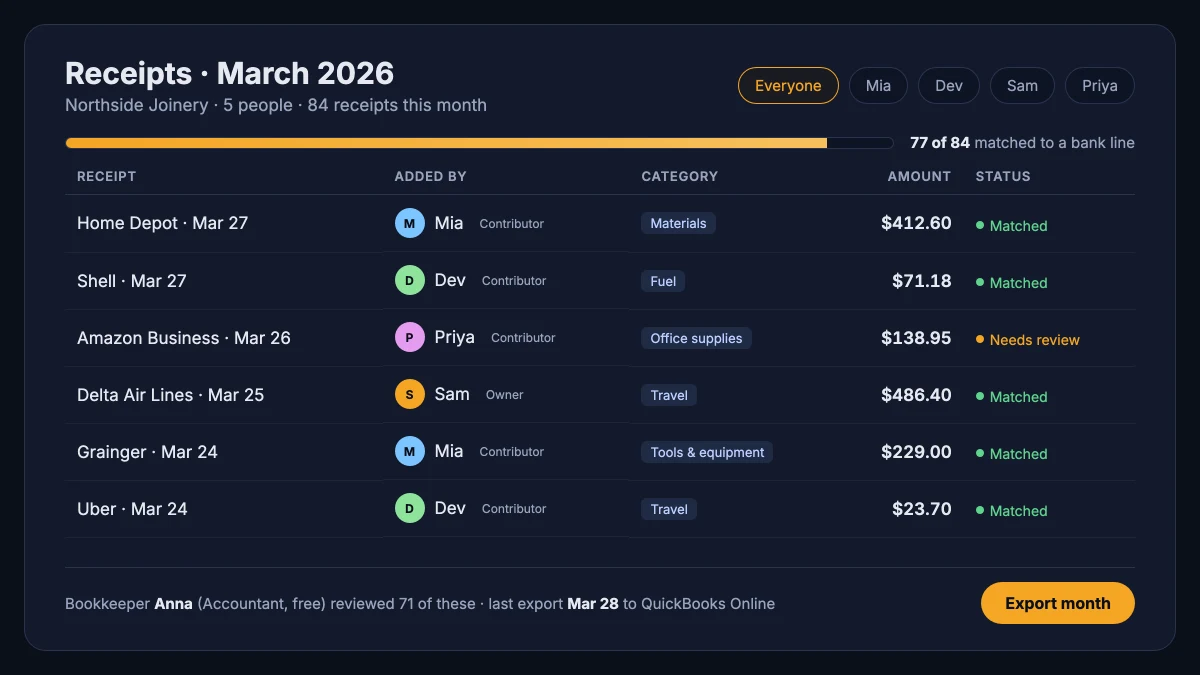
Everyone's receipts in one feed, with a name on each
The question that eats month end on a growing team is not "where is the receipt?" but "whose is it?". In SparkReceipt every receipt records who added it, so the list filters by person as easily as by category or date. A contributor sees their own receipts. The owner, an admin, and the accountant see everyone's, in one feed, with the receipt image one click away.
That is how you track employee expenses without asking anyone to fill in a form. Receipts that need a human decision, a missing category, a possible duplicate, or a total the AI was not sure about, sit in their own queue, so the review is a short pass over the exceptions rather than a read-through of everything. That is the whole of the approval process on a team this size, and it takes minutes rather than a form per person.

Field capture: the crew snaps it at the counter
On teams of five to twenty, most receipts arrive from a phone camera. The person who bought the lumber, the fuel, or the client lunch is the person holding the paper, and the only expense process that survives contact with a job site is the one that fits in the thirty seconds after paying.
The receipt scanner reads faded and crumpled paper, works in virtually any language, and handles 190 currencies. A crew member who prefers email can forward receipts to the account instead. Either way, the receipt is in the feed before the person is back in the van, with their name on it.

Month end: the statement lands, and matches itself
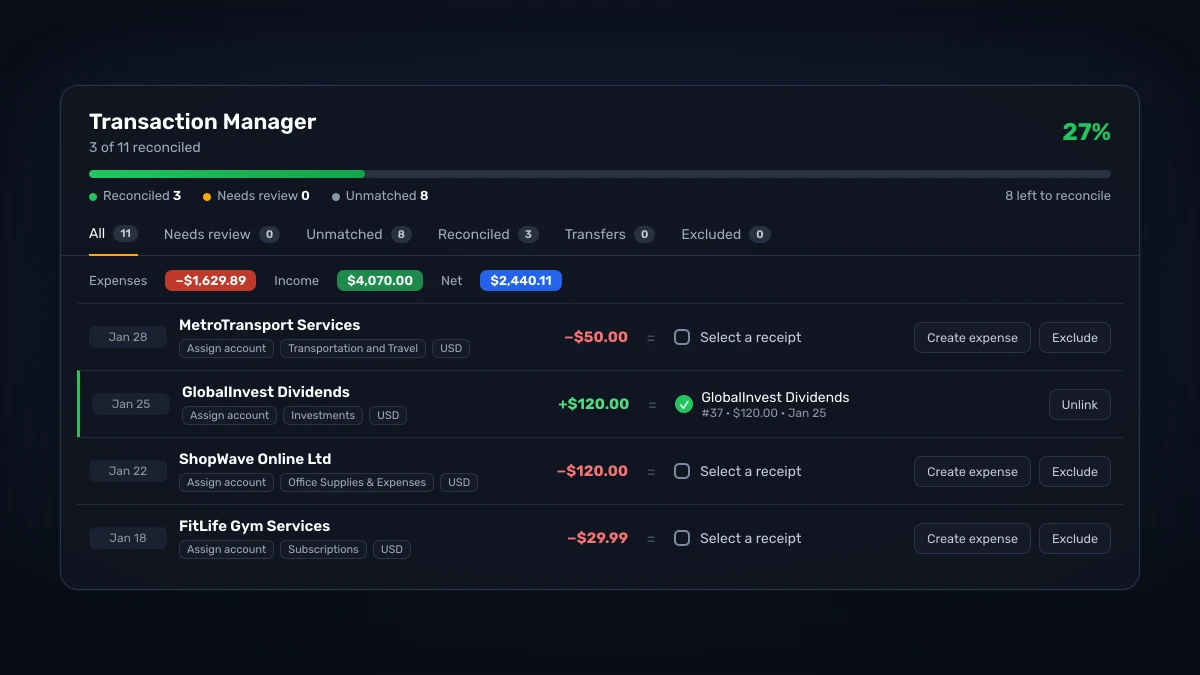
Upload the card or bank statement as PDF, CSV, or Excel, or connect your bank in the United States, and the Transaction Manager pairs each line with the receipt that proves it, whoever captured it. Lines with no receipt behind them show up at once, with the card and the date, so the "whose receipt is this?" message goes to one person instead of the whole team.
A progress bar counts matched, needs-review, and unmatched lines. Mark transfers as transfers, exclude the personal coffee on the company card, and create an entry for the supplier who never sent an invoice. When the bar reads 100%, the month is closed and the books are ready for whoever does the accounting.

Your bookkeeper works inside the account, for free
Almost half of the growing teams on SparkReceipt have their accountant or bookkeeper inside the account (46% as of September 2026), and the Accountant role costs nothing on any plan. Invite your accountant and they see every receipt, statement, and report the moment it exists, instead of a folder of photos the week before the deadline.
When the review is done, publish to QuickBooks Online or Xero with the receipt image attached and the categories mapped to your chart of accounts, or send an expense report as PDF, Excel, or CSV. Bookkeeping firms that work with several clients this way use the accountant program.

Expense management software for small business: what a team of ten needs
Search for expense management software for small business and the first page is built for a different company: one with a finance team, an approval hierarchy, corporate cards to issue, and reimbursements to pay through the platform. Those tools charge per user for machinery a fifteen-person business never switches on.
What a growing team needs is smaller and harder: every receipt captured by the person holding it, filed without retyping, visible to the owner and the bookkeeper and to nobody else, matched to the card statement at month end, and handed to the accountant in the format the accounting software wants. SparkReceipt is built for exactly that slice of expense management, which is why it works for teams of five to twenty without an implementation project.
What this expense management software for small business is, and what it is not
It is a receipt app on every phone, an AI that reads and categorizes each receipt on arrival, roles that keep contributors to their own documents, bank statement extraction with receipt matching for month end, exports in PDF, Excel, CSV, and ZIP, a direct publish to QuickBooks Online and Xero, a free seat for your accountant, and per-user pricing with 3 users included and no minimum beyond that.
It is not an approval workflow, a reimbursement rail, a corporate card, a spend-policy engine, or a travel booking tool. If those are on your requirements list, you are shopping for a different category, and SparkReceipt compared with Expensify sets out the difference plainly. Most teams under twenty people that think they need approvals actually need visibility, and visibility is what one shared feed with a name on every receipt provides.
How to track employee expenses without expense reports
This is the part of expense management software for small business that matters most on a growing team. The expense report exists so a finance department can see spending it did not witness. To collect receipts from employees on a team of ten, you do not need it. On a team of ten, the owner or the office manager already knows who bought what; the missing piece is the paper. So the process that works is the one that captures the paper at the moment of purchase and skips the form:
- Every employee gets a login, not a shared one. Each person is a Contributor, sees only their own receipts, and cannot reach the books, the integrations, or billing. The access levels are enforced on the server, not only hidden in the app.
- Capture happens on the phone, on the day. A receipt snapped at the counter is filed before it can fade, get lost, or be claimed twice. Duplicates are flagged when two people capture the same one.
- Categories are yours. Rename the defaults to match your chart of accounts, add tax rates, and write plain-English rules so the AI files a recurring supplier the same way every time.
- Review is by exception. The needs-review queue holds the handful of receipts that need a human call. Everything else was categorized on arrival.
- Month end is a match, not a hunt. Upload the statement and the Transaction Manager pairs lines with receipts. The unmatched lines are the only receipts you have to ask for, which is how expense management software for small business earns its keep.
Receipt management software vs. expense management software
Receipt management software collects and organizes the documents. Expense management software, in the enterprise sense, controls the spending itself. A growing small business sits between the two: it needs the receipts organized by person and matched to the bank, and it needs the result in the accountant's hands, but it does not need to control spending through software because the person approving the purchase is usually standing next to the person making it.
SparkReceipt covers the receipt management software side completely and the part of expense management software for small business that a team actually uses: categorization, statement matching, reporting, and the handoff to QuickBooks Online or Xero. Nearly every growing-team account on SparkReceipt exports or publishes for its books, as of September 2026.
Expense management software for small business teams: seats and what it costs to add people
The Elite plan includes 3 users. Every additional person on the crew is one more user, added from the account settings in a minute, at $58 a year. Your accountant never counts. There is no plan change at ten people or twenty, no per-user tier, and no "business" edition to migrate to; a team of fifteen is the same account as a team of three with twelve more logins in it.
If the business runs several entities, each gets its own linked account under the same owner login, with its own receipts, statements, and integrations. Bookkeepers who look after several such businesses work across them from one login.
When you outgrow it
Past twenty people, or when a second location starts running its own purchasing, most businesses want a spend-control layer: approvals by amount, company cards with limits, reimbursement runs. SparkReceipt does not do those, and this page will not pretend otherwise. What this expense management software for small business does do is keep every receipt captured and matched up to that point, so whatever tool comes next inherits clean books rather than a shoebox. Teams of one to five have their own page, and if you are still the only person spending, the expense tracker for the self-employed is where to start.

One Account for the Whole Team
3 users included, then one more user per person on the crew. Your accountant never counts.
Loved by Small Business Owners
Join 38,283 businesses that chose SparkReceipt — 4,620,044 receipts processed and counting.
Start Free TrialFrequently Asked Questions
Give each employee their own login as a Contributor. They snap paper receipts in the app, forward email receipts, or upload files, and every receipt lands in the account with their name on it. You and your bookkeeper review one feed. There is no form to fill in and no report to submit; capturing the receipt is the whole task on the employee's side.
Not unless you want them to. A Contributor sees only the receipts they added: no other documents, no income, no reports, no bank statements, no integrations, no billing. Members, admins, the owner, and the accountant see everything. The restriction is enforced on the server, so it holds in the app, on the web, and through the API.
At five to twenty people, almost never. Approvals exist so a finance team can control spending it cannot see. In a business this size the owner or the office manager already knows who bought what, and what is missing is the receipt. SparkReceipt gives you the receipt, the name of who captured it, and a needs-review queue for the exceptions. If your reality is multi-level sign-off by amount, that is a spend-management tool, not this one.
It documents them and gets them ready; it does not pay them. Filter the feed by person and by a reimbursable tag or category, export the list with the receipt images, and pay through payroll or your bank as you do today. SparkReceipt does not move money.
Yes. Publish reviewed expenses to QuickBooks Online or Xero with the receipt image attached and categories mapped to your chart of accounts, in one click or on a schedule. Teams on other accounting software export PDF, Excel, or CSV, or use Zapier, Make, Pabbly, webhooks, or the API.
Nothing breaks. Add users as you hire and keep the same roles, exports, and integrations in the same expense management software for small business you started with. If you reach the point of wanting approvals by amount, company cards, or reimbursement runs, SparkReceipt hands over clean, matched books to whatever spend-control tool comes next. Until then it stays the simplest way to keep every receipt captured.
For a business of five to twenty people, the best expense management software for small business is the one every employee will use on the day of the purchase, which means a receipt app on every phone, AI that files each receipt without retyping, roles that keep staff to their own receipts, statement matching at month end, and a free seat for the accountant. SparkReceipt does that in one account with 3 users included, and leaves out the approval chains and corporate cards that tools for larger companies charge for.