
Expense Tracker for Self-Employed
Save every deduction without the shoebox. Receipts file themselves, bank lines match themselves, and tax time is one export.
The best expense tracker for self-employed workers is the one that captures each receipt the moment it exists and hands your accountant a Schedule C-ready report at the end. SparkReceipt scans paper receipts on your phone, pulls email receipts out of your inbox, matches bank statement lines to what it already captured, and categorizes all of it. Built for freelancers, 1099 contractors, and sole proprietors who do their own books.
Business Owners in 175 Countries Trust SparkReceipt



Key takeaways
Capture beats reconstruction
A receipt scanned at the counter or pulled from your inbox on the day is a deduction you keep. One reconstructed in April is usually a deduction you lose.
Three ways in, one account
Snap paper receipts, forward or connect your email, and upload bank statements. SparkReceipt reads each one, assigns a category, and flags duplicates.
1 in 5 solo receipts arrives by email on its own
As of September 2026, solo businesses on SparkReceipt get about a fifth of their receipts from a connected inbox, without touching the phone.
Tax time is an export
Reports map to Schedule C-relevant categories, include the receipt images, and go to your accountant as PDF, Excel, or CSV, or straight into QuickBooks Online.
Your accountant joins free
The Accountant role never uses a paid seat, on any plan.
Every deduction captured, every receipt organized
Self-employed people lose deductions the same way every year: a faded thermal receipt in a glovebox, a software subscription paid on a personal card, a client lunch nobody wrote down. SparkReceipt fixes that at the moment of purchase.
Snap a photo of any receipt and the AI extracts the vendor, amount, date, tax, and line items in seconds, then assigns a category. The receipt scanner reads crumpled and faded paper, works in virtually any language, and handles 190 currencies. Every document is stored for at least ten years, searchable by vendor, date, amount, or category.
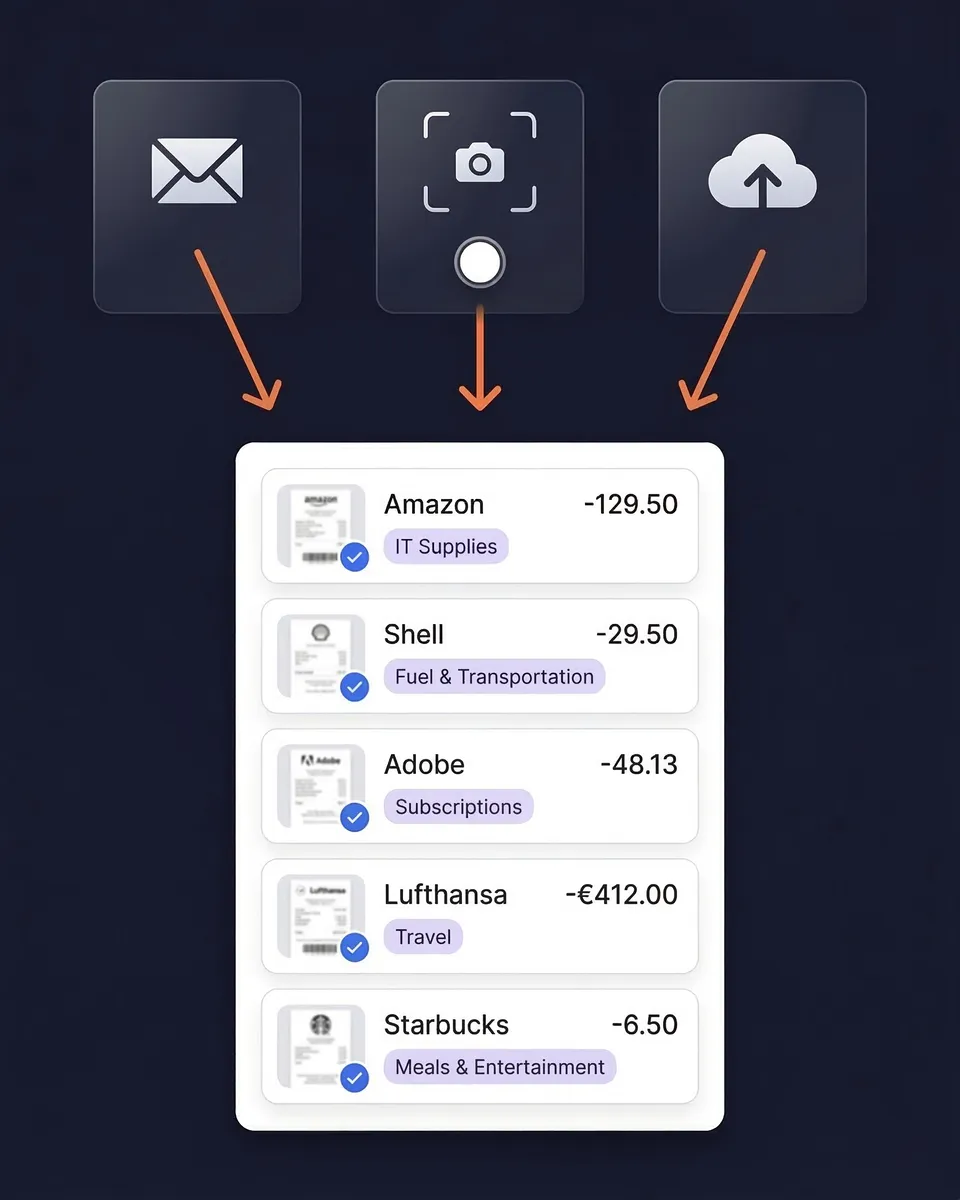
Your inbox is already an expense tracker. Connect it.
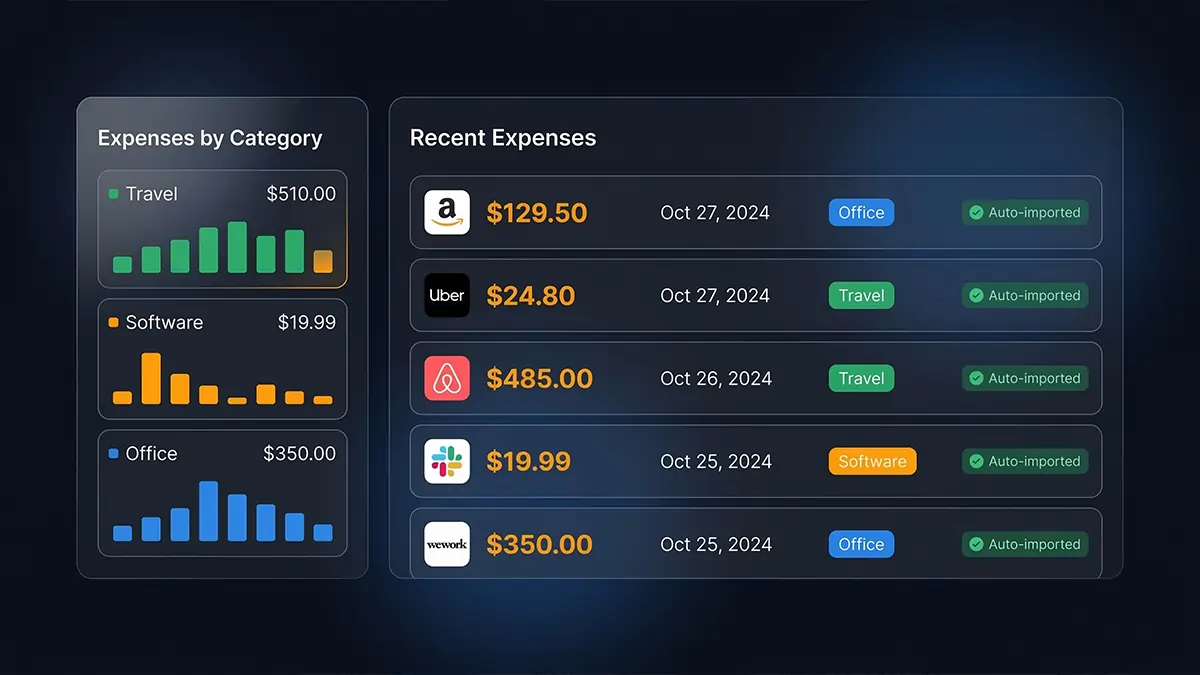
Most of a freelancer's spending arrives by email: SaaS subscriptions, online orders, hosting, stock images, the coworking invoice. Connect Gmail, Microsoft, or any IMAP inbox once and SparkReceipt picks each receipt up as it lands, reads it, and files it. Nothing to forward, nothing to download.
Then point it backwards. Email history extraction walks through your past mail from any start date you choose and pulls out every receipt and invoice it finds. The typical cleanup reaches back about two years, which for most people means the tax year they have not filed yet. Your first 10,000 historical emails are included on both plans.
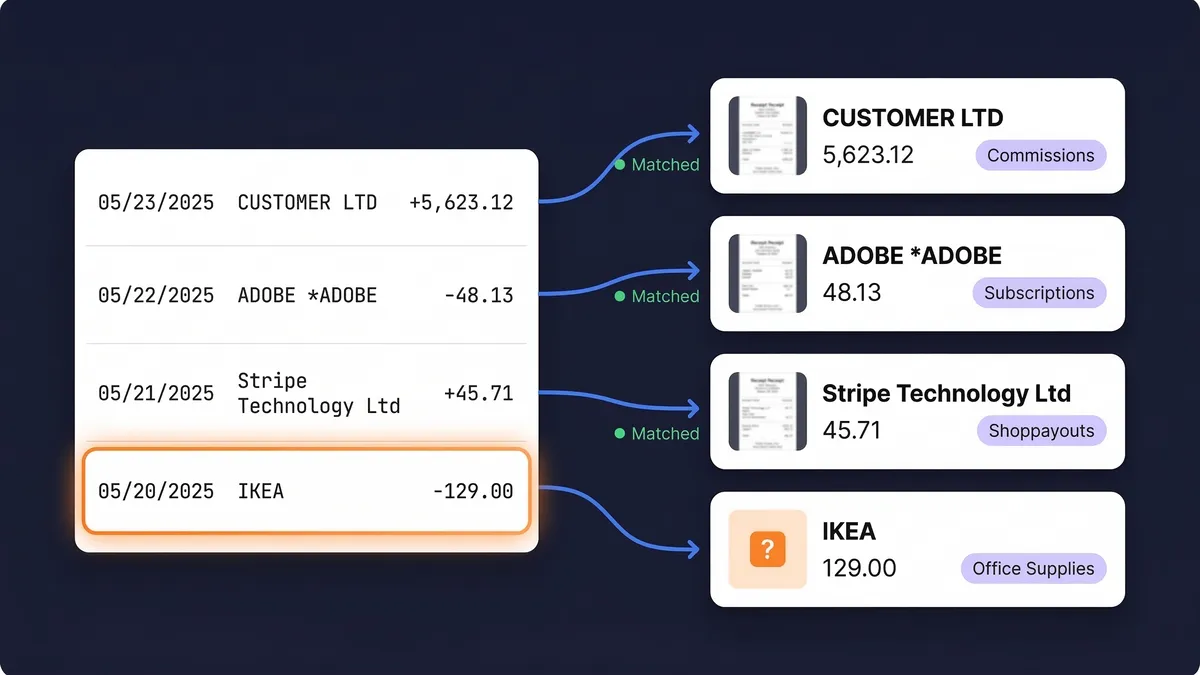
Bank statement matching finds what you missed
Upload your bank or credit card statement as PDF, CSV, or Excel, or connect your bank in the United States, and the Transaction Manager pairs each line with the receipt that proves it. What is left over is the list of expenses you have no receipt for yet, with the merchant and the date, so you know exactly which ones to chase before the return.
Transfers between your own accounts stay out of your totals, personal purchases on the business card get excluded in one click, and a progress bar shows how far you are from a fully reconciled month.
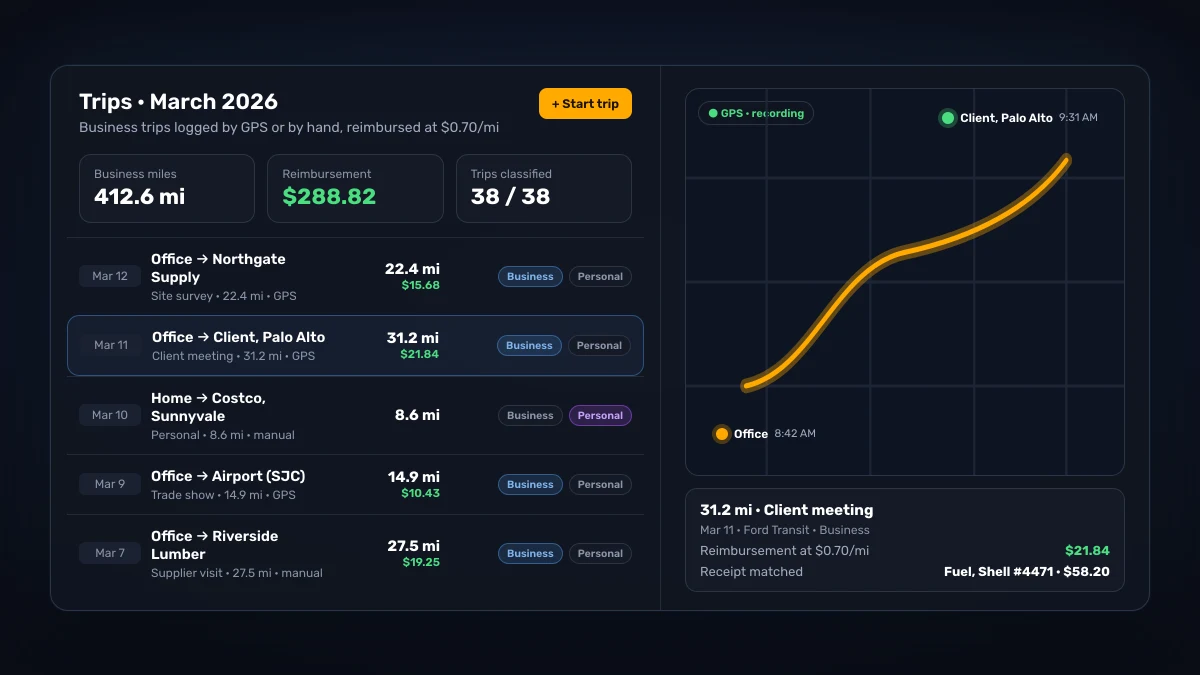
Miles, receipts, and expenses in one app
Self-employed deductions go beyond receipts. The mileage tracker records trips by GPS or by hand, classifies each as business or personal, and keeps your miles next to the fuel, parking, and toll receipts they belong with.
The IRS business rate is 72.5 cents per mile for the first half of 2026 and 76 cents per mile from July 1, 2026, so 200 business miles a month is well over a thousand dollars of deduction a year that a notebook in the door pocket rarely captures in full.
Your accountant gets a free seat. Your first hire gets a login.
Almost a third of solo owners who sign up say their accountant will use SparkReceipt too. Invite your accountant with the Accountant role and they see every receipt, statement, and report as it happens, without using a paid seat. No bag of slips, no end-of-year folder of photos.
When you hire your first person, or your partner starts spending for the business, nothing changes. Add them as a user with their own login; a contributor sees only the receipts they added, and you see everything. SparkReceipt for small teams covers how a team of two to five shares one account.

How the Self-Employed Expense Tracker Works
Scan Receipts and Import From Email
Snap photos of paper receipts on your phone. Forward email receipts, or connect your inbox so they arrive on their own. Upload bank statements to catch anything you missed. SparkReceipt captures everything and flags duplicates.
AI Sorts Into Schedule C Categories
Every expense is categorized into Schedule C-relevant categories: advertising, car and truck expenses, insurance, office expenses, supplies, travel, meals, professional services, and more. Rename categories to match your accountant's chart, and write a plain-English rule so a recurring vendor files the same way every time.
Generate Tax-Ready Reports
When tax time comes, or your accountant asks, generate a complete expense report in one click: category breakdowns matching Schedule C lines, receipt images for documentation, and totals your accountant can use directly. Export as PDF, Excel, or CSV, or publish to QuickBooks Online or Xero.
What to look for in an expense tracker for self-employed workers
Most expense tracker apps are built for one of two people: a household budgeting, or an employee filing expense reports to a finance department. A self-employed person is neither. You are the buyer, the bookkeeper, and the person who answers to the IRS, and the tool has to work for all three without a finance department in the middle. Six things decide whether it does:
- Receipt capture that fits the moment. A receipt app for taxes has to work at the counter, on the phone, in the seconds after paying. Snap it and it is read, categorized, and stored before the paper reaches your pocket.
- Email receipts without forwarding. As a 1099 expense tracker, the app should watch the inbox where most of your spending already arrives, and go back through the past year when you connect it. Forwarding every receipt by hand is the step people stop doing in February.
- Bank statement matching. The only way to know what you have missed is to compare the bank statement with the receipts. An independent contractor expense tracker that matches lines to documents turns "did I get everything?" into a list.
- Schedule C-shaped categories. Categories should map to the lines on the form your accountant fills in, and the AI should learn how you file a recurring vendor rather than asking every time.
- A way in for your accountant. A bookkeeping app for self-employed people should let your accountant work in the account for free, not through a monthly export.
- Honest pricing. One subscription, 1 user included, more at a per-user rate, no corporate card. Expensify starts at $5 per member per month and saves its lowest Control price for its own card; Ramp requires a corporate card; QuickBooks Online starts at $38 a month, and even QuickBooks Solopreneur leaves your accountant out until you upgrade. Those are built for companies with employees and finance departments.
Business and personal on the same card
Plenty of sole proprietors run the business through a personal card for the first year or two. SparkReceipt handles that without a second account: exclude the personal lines when you match a statement, tag the business ones, and report on business expenses only. If you run more than one business, or want a clean wall between business and personal, each one gets its own linked account under the same login, with its own receipts, statements, and reports.
What tax time looks like with an expense tracker for self-employed
By the time the return is due, every receipt has been captured for months, every bank line has been matched or excluded, and every expense sits in a Schedule C-relevant category. Tax time is one export: a PDF or Excel report with category totals and the receipt images behind them, or a direct publish to QuickBooks Online or Xero for the accountant who prefers to work there. The free tax calculators on this site cover the self-employment tax, the home office deduction, and the mileage deduction, so you can see what the numbers mean before you hand them over.
If you have already hired someone, or your partner spends for the business too, SparkReceipt for small teams is the version of this page for two to five people. Same account, same categories, more logins.
Pricing for the Self-Employed
Receipts, email history extraction, bank matching, mileage, and reports in one subscription. 1 user included, add your first hire at a per-user rate, and your accountant joins free on top.
Doing it by hand
Shoebox + spreadsheet
60+ hours a year
Flattening, reading and typing each receipt into a spreadsheet, filing the paper, matching it to the bank statement, and hunting for the ones that went missing.
$1,000+ for the cleanup
What a bookkeeper charges to turn a year of shoebox records into books a return can be filed from, before the return itself.
Deductions you can't prove
A faded thermal receipt or a lost email is an expense you pay for twice: once at the counter, once at tax time.
Total per year
Your evenings, a cleanup bill, and the deductions you couldn't prove.
Basis: about 40 receipts a month at six minutes each by hand, plus a weekend reconstructing the year before the return. Bookkeeper rates and cleanup fees from NerdWallet's 2026 bookkeeping price guide (freelance average $43 per hour; cleanup from $1,000).
Loved by Small Business Owners
“I used to send my accountant a bag of slips every month hoping they capture everything. With SparkReceipt I now have a realtime view of how much the business owes me.”

Daniel Esterhuizen
Esterhuizen Consulting · South Africa
“Excellent start and amazing team. Looking forward to making SparkReceipt my default expense management and accounting platform.”

Jon Aron
Logic Enterprises · Switzerland
“With SparkReceipt, organizing and tracking expenses has never been easier. The detailed categorization and expense tracking features make financial management a breeze.”

Jean-Pierre Michael
Artist · France
Join 38,283 businesses that chose SparkReceipt — 4,620,044 receipts processed and counting.
Start Free TrialFrequently Asked Questions
The best expense tracker for self-employed workers captures receipts the moment they happen (from the phone, the inbox, and the bank statement), categorizes them for Schedule C without retyping, and hands your accountant a report with the receipt images behind it. SparkReceipt does all three in one account, with a free seat for your accountant and more users at a per-user rate if you ever hire.
Capture them as you go rather than in April. Snap paper receipts in the app, connect your inbox so email receipts arrive on their own, and upload bank statements so any expense without a receipt is flagged. Each receipt is read and categorized on arrival, so at tax time you export one report instead of sorting a year of paper.
Common deductible expenses include home office costs, software subscriptions, professional services, advertising, supplies, travel, business meals, vehicle expenses and mileage, insurance, phone and internet, and professional development. SparkReceipt categorizes all of these automatically and lets you rename categories to match your accountant's chart of accounts.
SparkReceipt categorizes expenses into Schedule C-relevant categories and generates expense reports with category breakdowns that map to Schedule C lines, with the receipt images attached. Your accountant uses the report directly, or you publish the expenses to QuickBooks Online or Xero.
Yes. Exclude personal lines when you match a bank statement, tag business expenses, and report on business only, even on a card you use for everything. For a full separation, keep each business in its own linked account under the same login.
Yes. Invite your accountant with the Accountant role and they get full access to your receipts, expense categories, statements, and reports as they happen. The Accountant role is free on every plan and never uses a paid seat.
QuickBooks Online is full accounting software (from $38/month) designed for bookkeepers, and QuickBooks Solopreneur (Free, or $20/month for Lite) leaves your accountant out. SparkReceipt is a pre-accounting tool (Pro from $5.75/month, billed annually) that captures and organizes your receipts and expenses, then publishes to QuickBooks Online when you are ready. Most self-employed people use it in front of their accounting software, or instead of it until an accountant asks for more.
SparkReceipt's Elite plan is $10.75/month, billed annually ($129.00/year), with a 7-day free trial and 1 user included, plus more at a per-user rate. It is the same expense tracker for self-employed workers and for small teams, so nothing changes when you hire.
Stop Losing Business Expenses. Start Saving on Taxes.
Get StartedExplore More Features
For Small Teams
Hired your first person? The same account, with more logins
Receipt Scanner
Scan any receipt with AI in seconds
Email Receipts
Connect your inbox, past and present
Expense Reports
Generate reports in PDF, Excel, or CSV
Mileage Tracker
Track business miles by GPS or by hand
Receipt Tracker for Taxes
Keep tax-ready records all year