Wave Receipts Alternative: The Short Answer
- You invoice clients through Wave and only need your expenses in it. Its own receipt scanning is the simplest choice: C$11 a month on Starter, or included if you already pay for Pro.
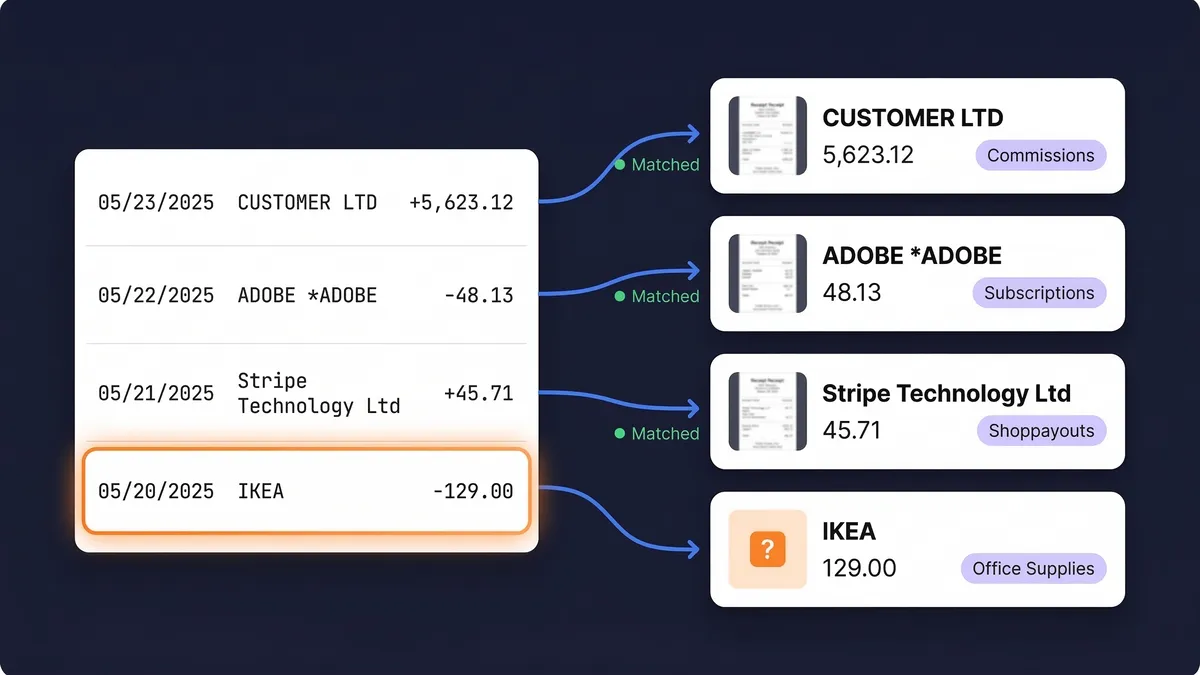
- You want each bank line matched to a receipt without paying for Pro. Wave only merges a receipt with a bank transaction on Pro, and only when the account and amount match exactly. SparkReceipt matches every line of an uploaded bank or card statement to its receipt on both of its plans.
- Your bills arrive by email. Wave takes the ones you forward, one at a time. SparkReceipt connects to Gmail, Outlook or any IMAP inbox, picks up new ones on its own, and can go back through your past emails. Try it free for 7 days on last month's paperwork.
- You buy in more than one currency. Wave's business currency is CAD or USD, and foreign receipts are converted one at a time. SparkReceipt reads receipts in 190 currencies and converts each at the rate on its date.
| Wave | SparkReceipt |
|---|
| Built for | Canadian and US small businesses that want free invoicing and simple accounting | Sole proprietors, small businesses and the accountant who works with them |
| Receipt scanning price | Starter: C$11/month or C$96/year add-on. Pro: included at C$25/month or C$250/year | Pro from $8.25/month billed annually; Elite $14.92/month billed annually |
| Receipt limit | Unlimited scans on the add-on and on Pro | Pro: 50 documents a month. Elite: unlimited documents (fair use) |
| Documents come in by | Mobile app, web upload (10 files at a time, 5 MB each), email forwarding | Mobile app, connected Gmail, Outlook or IMAP inbox (including past emails), upload of up to 100 documents at once |
| Line items | Not mentioned on its receipt pages | Every line read on Elite |
| Bank transactions | Automatic import through Plaid on Pro; manual statement upload on Starter | Upload bank and card statements (PDF, CSV, Excel); live bank feeds for Canadian banks |
| Matching receipts to bank lines | Pro only: merges once a day when a receipt and an imported transaction share the account and amount | Every statement line matched to its receipt, unmatched lines flagged, on Pro and Elite |
| Invoicing | Yes, on Starter and Pro | No. SparkReceipt doesn't create invoices |
| Sales tax on receipts | Not described on its receipt pages | GST, HST, PST and QST read from each receipt |
| Free trial | No free trial of Pro; Starter is free | 7 days, full access |
Wave Pricing in Canada in 2026: What Receipts Cost
Wave has two plans in Canada. Starter is free and covers invoices, estimates and bills, manual bank statement uploads, categorizing and reconciling transactions, and the mobile app. Pro is C$25 a month, or C$250 a year billed annually, and adds receipt scanning, automatic bank transaction imports, and automatic merging and categorization of transactions. There's no free trial for Pro. US prices are lower (US$19 a month for Pro), so make sure you're reading the Canadian page.
On Starter, receipt scanning is an add-on at C$11 a month or C$96 a year in Canada. Both the add-on and Pro include unlimited receipt scans. You can photograph a receipt in the app, uploaded in the browser (up to 10 files at a time, JPG, GIF, PNG or PDF, up to 5 MB each) or forwarded by email, and each receipt becomes an expense transaction where you can edit the date, amount, account and category.
Automatic bank imports through Plaid are a Pro feature. If you want your bank transactions in Wave without uploading statements, the real price is C$250 a year. Wave's payroll add-on starts at C$25 a month on either plan.
Wave Receipts Cost vs SparkReceipt: A Worked Example
Take a Canadian sole proprietor who invoices five clients a month through Wave and collects about 40 expense documents a month: 25 photographed, 15 arriving by email, all paid from one business chequing account.
| What the month needs | List price |
|---|
| Starter + receipt add-on | Invoices free; 40 scans; statement uploaded by hand; no automatic receipt-to-bank merging | C$96 a year (C$11 a month billed monthly) |
| Pro | Invoices, 40 scans, bank feed through Plaid, merging with transactions that share account and amount | C$250 a year (C$25 a month billed monthly) |
| Starter + SparkReceipt Pro | Invoices free; 40 of 50 SparkReceipt documents; email bills picked up from the inbox; every statement line matched to its receipt | $99.00 a year for SparkReceipt, Starter free |
| Starter + SparkReceipt Elite | As above, unlimited documents, line items, and an import file | $179.00 a year for SparkReceipt, Starter free |
If all you need is expenses inside Wave, the add-on is the cheapest route. The difference shows when the paperwork has to prove something: which bank line each document belongs to, which charges have nothing behind them, and what your inbox adds up to.
How Wave Receipts and SparkReceipt Differ
Matching. Wave's matching is a merge rule. On Pro, once every 24 hours, it merges an uploaded receipt with an imported bank transaction when they share the same account and amount, and it leaves the transaction alone when there is more than one possible match. SparkReceipt starts from the statement instead: you upload a bank or credit card statement, it reads every line, matches each one to its receipt, and lists the lines that have nothing behind them. That list is what an accountant asks for at year end.
Email. Wave accepts what you forward to it. SparkReceipt connects to the inbox itself, through Gmail, Microsoft or IMAP, so new bills and invoices are picked up as they arrive. Email history extraction also goes back through older mail, which is where a year of software subscriptions and online orders usually sits.
Detail on the receipt. Its receipt pages describe capturing the date, amount, account and category of each one. SparkReceipt reads the merchant, date, total and GST/HST on every plan, and every line item on Elite, so a mixed purchase can be split across categories. AI Fields on Elite pull out anything else you name, such as a project code or a client.
Where the records go. Wave keeps the receipt inside its own books. SparkReceipt publishes to QuickBooks Online and Xero, exports PDF, Excel and CSV reports with the images, and on Elite builds an import file for Wave, Sage 50, Sage 200/300 or DATEV. Your accountant joins your account free and never takes a paid seat.
Using SparkReceipt With Wave
Most people looking for a Wave receipts alternative don't want to leave. Invoicing is free there, and the books already live there. A setup that works:
- Keep Starter for invoices, estimates and your chart of accounts.
- Capture expenses in SparkReceipt: photos from the app, bills picked up from your inbox, and your monthly bank or card statement uploaded so every line gets matched.
- On Elite, export the import file for the period. It's a CSV in the three-column format the transaction upload accepts (date, description, amount), with money out as a negative amount and foreign-currency amounts converted to your business currency.
- Go to Accounting, then Transactions, then More, then Upload transactions, choose the account, and upload the file. The lines come in as transactions on that account. The images stay in SparkReceipt, where your accountant can see them.
If you don't need the transactions there at all, the PDF or Excel report with the images is often what your accountant wants anyway.
Wave Review: When Its Scanner Is Enough
Wave, which started in Toronto, is a good deal for a small Canadian business that invoices clients and wants simple books for free. Its receipt scanner does the basic job: photograph a receipt, forward an email, and a categorized expense appears. If you already pay for Pro, scanning costs nothing extra, and its daily merge handles the simple case of one receipt for one bank charge.
It's less of a fit when your records need to stand up on their own: when you want to see which card charges still have no receipt, when bills arrive in your inbox faster than you can forward them, when a purchase mixes business and personal items, or when you buy in several currencies. That is the part SparkReceipt is built for. If you need a full Wave alternative for invoicing and accounting, look at an accounting suite instead; SparkReceipt replaces only the receipts part.
Switching From Wave Receipts Without Losing Records
The CRA expects you to keep business records for at least six years from the end of the last tax year they relate to (see CRA record retention). Changing tools doesn't change that.
- Keep your Wave account. Anything already attached to its transactions stays there, and Starter is free.
- Start new expenses in SparkReceipt. Use the app for paper and connect your inbox for email. Mass upload takes up to 100 documents at once if you have a backlog.
- Upload last month's bank statement to see which charges already have a receipt and which don't.
Prices, plans and features come from the Wave pricing page, its receipts page and its help center articles on the receipts add-on, bank imports, transaction merging, statement uploads and the June 2026 plan changes, read on 5 October 2026 (Canadian prices in CAD). Prices and features change, so check before you buy. SparkReceipt is not affiliated with or endorsed by Wave Financial.