AutoEntry Alternative: The Short Answer
- You run a practice and process documents for many clients. AutoEntry is built for that. Unlimited users and unlimited clients come with every plan, there's a partner portal, and it publishes to Sage, Xero, QuickBooks, FreeAgent, KashFlow, SortMyBooks and ClearBooks.
- You keep the books for your own business. Credits make the monthly cost hard to predict, and a bank statement page costs three times a receipt. SparkReceipt charges a flat plan, reads your receipts and statements, and shows which bank lines still have no receipt. Try it free for 7 days on last month's statements.
- You need both. An accountant can run AutoEntry for the practice while each small-business client keeps receipts in SparkReceipt. Clients invite their accountant free, and the accountant never takes one of their paid seats.
| AutoEntry | SparkReceipt |
|---|
| Built for | Accountants and bookkeepers, plus SMEs, sole traders and landlords | Sole traders, small company directors and the accountant who works with them |
| Price | From £15.45/month excl. VAT for 50 credits; monthly billing only | Pro from £4.92/month billed annually; Elite £9.08/month billed annually |
| What the price buys | Credits: receipt or invoice 1, invoice with line items 2, supplier statement 2, bank statement 3 per page | Pro: 50 documents a month. Elite: unlimited documents (fair use). Statement lines use the monthly credits in the plan |
| Unused allowance | Credits expire 90 days after purchase, including while paused | A monthly document allowance; statement credits renew each month |
| Users | Unlimited | 1 included, more at a per-user rate; your accountant joins free |
| Documents come in by | Mobile app, a dedicated email address, desktop upload | Mobile app, connected Gmail, Outlook or IMAP inbox (including past emails), upload of up to 100 at once |
| Matching | Publishes documents to your ledger, where bank reconciliation happens | Each bank line matched to its receipt, with unmatched lines flagged |
| Publishes to | Sage, Xero, QuickBooks, FreeAgent, KashFlow, SortMyBooks, ClearBooks | Xero and QuickBooks Online; PDF, Excel, CSV and ZIP reports; Zapier, Make, webhooks |
| Free trial | 25 free credits, valid for three months | 7 days, full access |
AutoEntry Pricing in the UK
AutoEntry sells monthly plans in pounds, priced by credits. These are the prices on its pricing page in October 2026, all excluding VAT:
| Plan | Credits a month | Price a month (excl. VAT) |
|---|
| Bronze | 50 | £15.45 |
| Silver | 100 | £27.65 |
| Gold | 200 | £51.95 |
| Platinum | 500 | £119.35 |
| Diamond | 1,500 | £331.50 |
| Sapphire | 2,500 | £518.25 |
A few details matter when you compare AutoEntry cost with a flat plan:
- Documents use different numbers of credits. A receipt or invoice uses 1 credit, an invoice with line items 2, a supplier statement 2, and a bank or credit card statement 3 per page.
- Credits expire after 90 days. Unused credits roll forward for up to 90 days, then lapse. Since June 2026, pausing your subscription no longer stops them expiring, and a pause carries a small monthly fee instead of the plan price.
- Overage is allowed. You can go up to 200% of your plan's credits by default. The extra is billed on your next invoice, pro rata, with a 10% fee.
- Monthly only. There's no annual plan or annual discount. You can cancel up to 24 hours before renewal, payment is by card, and your data is kept for 13 months after you cancel.
AutoEntry Cost vs SparkReceipt: A Worked Example
Take a sole trader with one business current account and one business credit card. Each statement runs to 4 pages, and the month brings 40 receipts and supplier invoices.
| What the month uses | List price |
|---|
| AutoEntry | 40 documents at 1 credit + 8 statement pages at 3 credits = 64 credits, more than Bronze's 50 | Silver: £27.65/month excl. VAT, or Bronze plus overage |
| SparkReceipt Pro | 40 of 50 documents; the statement lines use the monthly credits in the plan | £4.92/month billed annually |
| SparkReceipt Elite | Unlimited documents and line items; the statement lines use the monthly credits in the plan | £9.08/month billed annually |
The two tools also finish the month in different places. AutoEntry publishes each document into your ledger, and reconciling the bank happens there. SparkReceipt hands you the month's bank lines with each one linked to its receipt, and a short list of lines that still need one. Under Making Tax Digital, that link turns a bank line into a record of what the money was for. To see the difference, try it free for 7 days on one month of your own statements.
Catching up on a whole year before the 31 January Self Assessment deadline is where credits show. Twelve months of the same paperwork is about 770 credits, and with a 90-day expiry you can't buy them in advance and draw down slowly. On SparkReceipt Elite the number of documents doesn't change the price (the statement lines still use credits), and email history extraction finds last year's receipts in your inbox so you don't have to upload them one by one.
How AutoEntry and SparkReceipt Differ
AutoEntry is a data-entry service for your ledger. Its job is to read bills, receipts and statements and post them into your accounting software with the right supplier, account and VAT code. It does that across seven accounting packages, which is why practices that serve clients on different software use it.
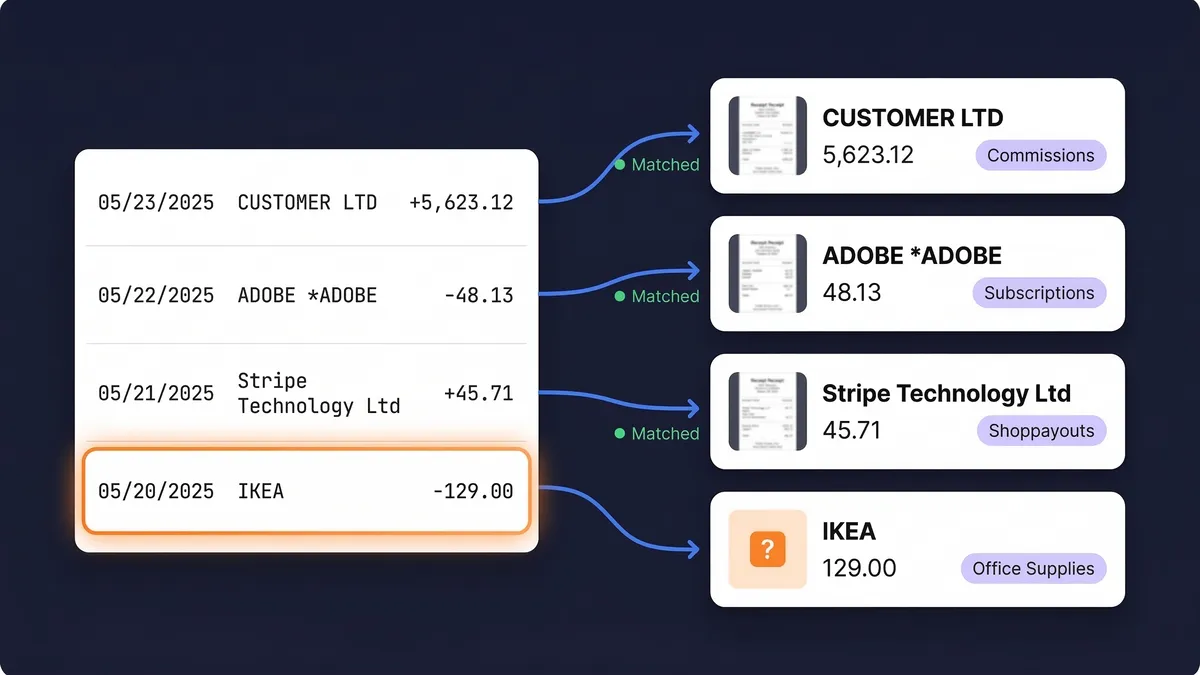
SparkReceipt starts from the bank line. Upload a statement as PDF, CSV or Excel and the bank statement converter reads every line, then looks for the receipt or invoice behind it by amount, date and merchant. Each statement shows how many lines are reconciled, how many need review and how many have no receipt yet, so month-end is a short list to finish.
SparkReceipt collects the receipts too. AutoEntry reads what you send to it by app, email or upload. SparkReceipt also connects to your inbox and picks up new receipts as they arrive, scans paper with the receipt scanner in the mobile app, and goes back through past emails to find the receipts a statement line is missing.
Flat price instead of credits. You don't need to work out whether this month's statements tip you into the next tier, or use your credits before they lapse.
When SparkReceipt Is the Better AutoEntry Alternative
- Every bank line matched to a receipt. Matching runs across the whole statement, and unmatched lines are flagged. (How matching works)
- Receipts from your inbox, including old ones. Connect Gmail, Outlook or any IMAP inbox and new receipts come in on their own. Email history extraction searches past emails back to a date you choose, with the first 10,000 historical emails included. (Guide)
- No credits to expire. Pro covers 50 documents a month and Elite is unlimited under fair use. Statement extraction uses the monthly credits in your plan. (How statement credits work)
- VAT read from each receipt. SparkReceipt reads the VAT on every receipt and every line on Elite, so mixed standard-rated and zero-rated items are split correctly.
- Income as well as expenses. SparkReceipt tells a sales invoice from a purchase receipt and files each one on the right side of the books.
- Your accountant joins free. Invite your accountant or bookkeeper at no cost on every plan. Extra teammates are billed per user.
- 190 currencies, each converted to sterling at the rate on the purchase date.
AutoEntry Review: What It Does Well
AutoEntry is a mature data-entry tool with Sage behind it. It publishes to more UK accounting packages than we do, including Sage, FreeAgent, KashFlow, SortMyBooks and ClearBooks, and its unlimited users and clients suit a practice where several staff process paperwork for many businesses. It reads line items and bank statements, handles mileage expenses, and converts foreign-currency invoices at the invoice-date rate.
If you are an accountant posting clients' bills into several ledgers, AutoEntry is likely the better fit. If you keep the records for your own business, or you want clients to arrive with receipts already matched to their bank lines, SparkReceipt covers that part at a flat price.
Moving to an AutoEntry Alternative Without Losing Records
HMRC expects sole traders and partnerships to keep business records for at least 5 years after the 31 January submission deadline for the tax year, and limited companies for 6 years from the end of the financial year (see HMRC record-keeping requirements). Changing tools doesn't change that. Before you cancel anything:
- Use or export what you've paid for. Credits expire 90 days after purchase, and after cancelling you have 30 days to use what's left. AutoEntry keeps your data for 13 months after you cancel.
- Keep what's already in your ledger. Documents AutoEntry published into Xero, QuickBooks or Sage stay there.
- Upload your statements and receipts to SparkReceipt. Mass upload takes up to 100 documents at once, and email history extraction brings in the receipts still sitting in your inbox. New documents sync to Xero or QuickBooks Online with the receipt image attached.
AutoEntry prices, plans and terms come from AutoEntry's own pricing page and its help centre articles on credits, pausing and overage, as of October 2026 (GBP, excluding VAT). Prices and terms change, so check before you buy. SparkReceipt is not affiliated with or endorsed by AutoEntry or Sage.