


Zoho Expense Is Built for Enterprises — You Deserve Simpler
Standalone AI receipt scanning — no ecosystem lock-in, no Zoho Books required.
Zoho Expense looks affordable at $4/user/month — until you realize you also need Zoho Books ($15/month) for bank statements and proper accounting, plus patience for an interface with 47 G2 mentions of 'steep learning curve.' That's $19+/user/month all-in. SparkReceipt is the standalone AI receipt scanner built for small businesses who want fast scanning, automatic email receipt fetching, and zero ecosystem baggage. $16.65/month, billed annually, with a 7-day free trial. No Zoho account required.





Zoho Expense vs SparkReceipt
See the real differences side by side
Zoho Expense
- Standard plan starts at $4/user/month with a 3-user minimum
- Needs Zoho Books ($15/mo) for bank statements and full accounting
- Real all-in cost is $19+/user/month with Zoho Books
- Only 20 autoscans/month on Free AND Standard plans
- No native Gmail/IMAP auto-fetch — requires manual email forwarding
- Cannot process HTML email receipts (airline bookings, SaaS invoices)
- 47 G2 mentions of 'not intuitive' and 'steep learning curve'
- Camera app doesn't focus before capturing — blurry scans reported
- Enterprise plan requires 500-user minimum
- No money-back guarantee on paid plans
SparkReceipt
- $16.65/month, billed annually — everything in one product
- Standalone tool — no ecosystem add-ons required
- Bank statement extraction included, no Zoho Books needed
- Unlimited documents included — no autoscan caps
- Automatic email receipt fetching from Gmail and IMAP inboxes
- Processes HTML receipts, PDFs, images, and forwarded emails
- Simple interface — as easy as posting on social media
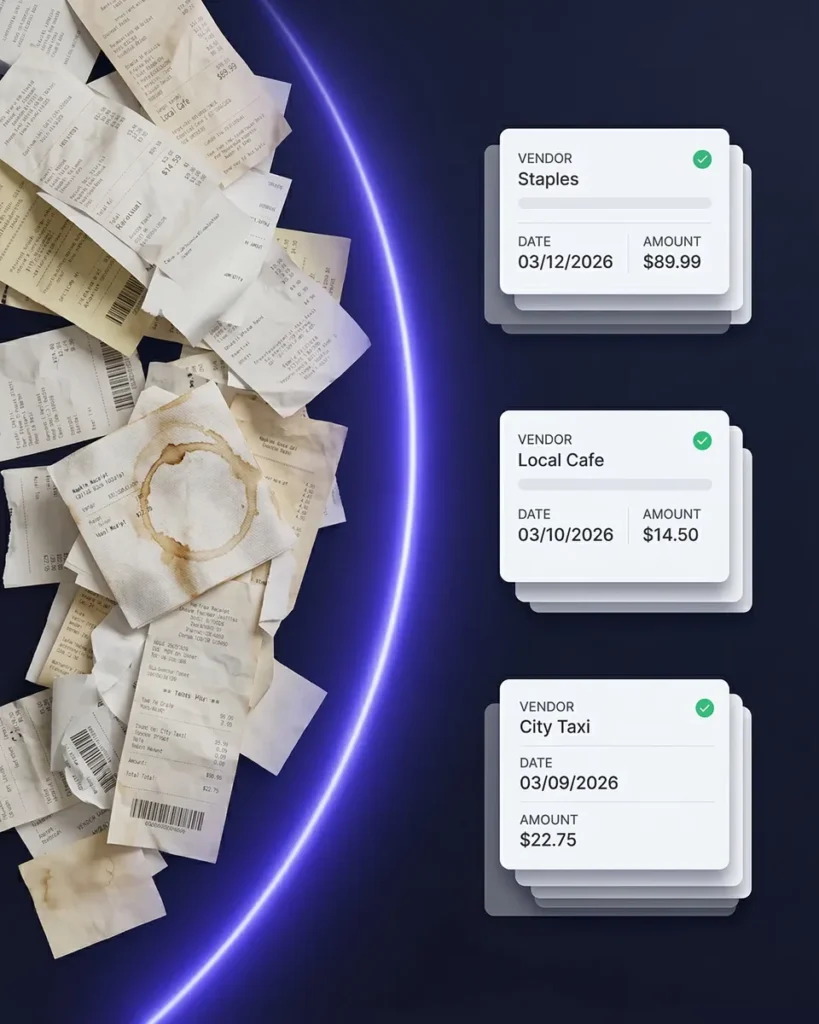
- AI-powered camera scans crumpled, faded, and handwritten receipts
- Reads receipts in nearly any language with 150+ currencies
- 7-day free trial included
What Makes SparkReceipt Different?
Zoho Expense is an enterprise tool squeezed into small-business packaging. SparkReceipt is purpose-built for freelancers and small teams.
No ecosystem required — Zoho Expense works best with Zoho Books, Zoho CRM, and the Zoho One suite. SparkReceipt is a standalone AI receipt scanner that integrates with the tools you already use. Instant AI scanning — every receipt is processed in seconds with vendor, amount, date, tax, and category extracted automatically. No 20-autoscan monthly cap holding you back.
True email receipt capture — SparkReceipt’s automatic email receipt fetching connects directly to Gmail and IMAP inboxes to pull receipts automatically. Zoho Expense requires manual forwarding to a dedicated email address and cannot process HTML email receipts. Simple pricing — $16.65/month, billed annually, with a 7-day free trial. No $15/month Zoho Books requirement bolted on top. Cancel anytime.
Feature Comparison
A detailed look at what each platform offers
| Feature | Zoho Expense | SparkReceipt |
|---|---|---|
| Receipt scanning | OCR-based scanning with only 20 autoscans/month on Free and Standard plans. Users report camera focus issues on mobile. | Scan receipts in seconds with instant AI extraction. No monthly autoscan caps. |
| Expense categorization | Rule-based categorization with manual policy setup. 47 G2 mentions cite a steep learning curve for configuration. | Lightning-fast AI categorization that gets it right the first time. No manual rules needed. |
| Line-item categorization | Basic line-item support available on higher plans only. Requires manual mapping of expense types. | Break down each receipt by line automatically with AI. |
| Email receipts | Requires manual forwarding to yourprefix@expense.zoho.com. Cannot process HTML email receipts like airline confirmations or SaaS invoices. | Automatic email receipt fetching from Gmail and IMAP inboxes. Processes HTML receipts, PDFs, and images automatically. |
| Bank statement extraction | Requires separate Zoho Books subscription ($15/month). PDF bank statements need third-party converters for processing. | Upload any bank statement (PDF, Excel, or CSV). AI extracts transactions and matches them to receipts in minutes. |
| Pricing structure | Standard at $4/user/month but requires 3-user minimum ($12/month floor). Enterprise requires 500-user minimum. Real cost with Zoho Books: $19-23/month. | $16.65/month, billed annually ($199/year). No ecosystem add-ons required. |
| Document limits | Free plan limited to 20 autoscans/month. Standard plan also capped at 20 autoscans/month. Manual entry unlimited but defeats the purpose. | Unlimited documents included with full AI processing. |
| Accountant access | Accountant access counts as a paid user seat. Each seat adds to your 3-user minimum cost. | Invite your accountant or bookkeeper to your account at any time. |
| Expense reports | Multi-level approval workflows designed for enterprise teams. Complex setup for simple freelancer needs. | One-click reports with totals, taxes, and receipt images. Instantly compiled and ready to export. |
| Data exports | Export options tied to plan level. Full reporting requires Zoho Analytics or Zoho Books integration. | Export instantly in Excel, CSV, PDF, or ZIP with full control over categories, taxes, and receipt links. |
| Mobile app | iOS and Android available but users report the camera doesn't focus before capturing, resulting in blurry receipt scans. | Full-featured mobile app with instant AI scanning, offline support, and real-time sync across devices. |
| Integrations | Deep integrations within the Zoho ecosystem (50+ products). Limited third-party integrations outside Zoho. | Direct QuickBooks sync plus automation with Zapier, Make, Pabbly, and Google Drive. Works with any accounting software. |
| Currencies and languages | Multi-currency support with automatic conversion. Interface available in multiple languages. | Reads almost any language. Supports 150+ currencies with daily and historical exchange rates. |
| Document management | Receipt storage within Zoho Expense. Full document management requires additional Zoho products. | Secure 10-year storage for all receipts, invoices, and documents. Always accessible and exportable. |
| Income tracking | Not supported. Zoho Expense handles expenses only — income tracking requires Zoho Books or Zoho Invoice. | Upload any income document and SparkReceipt's AI extracts and categorizes it instantly. |
| Mass upload | Bulk upload available but subject to autoscan limits (20/month on Free and Standard). Excess scans require manual entry. | Upload up to 100 documents at once. AI detects and categorizes every document in seconds. |
| AI agent | Zia AI assistant available across Zoho suite but not purpose-built for expense management. | SparkAgent is built in. Search, summarize, tag, and update documents with simple natural language prompts. |
| Sharing receipts | Sharing requires Zoho account access or PDF exports. No direct link sharing for quick collaboration. | Share receipts or full collections instantly with secure, time-limited live links. No downloads needed. |
| Automations | Policy-based automation with approval workflows designed for enterprise compliance teams. | AI Automations understand natural language. Write a rule once and SparkReceipt handles it forever. |
| Customer support | Email and chat support. Capterra reviews cite support complaints during peak periods. | Instant in-app AI help with SparkAgent, plus direct human support from our founder Joel. |
| Free trial | Free plan for up to 3 users with 20 autoscans/month. No money-back guarantee on paid plans. | 7-day free trial — try every feature with no limits before you pay. |
| Multiple workspaces | Separate organizations require separate Zoho accounts and billing. No unified multi-business view. | Create unlimited subaccounts for different businesses or projects under one login. |
This comparison is based on information publicly available from Zoho Expense's website and other online sources as of March 2026. Features, pricing, and details may change over time. SparkReceipt is not affiliated with or endorsed by Zoho.
Simple Pricing That Scales With You
No hidden fees, no surprise charges. $16.65/month, billed annually with a 7-day free trial.
Elite
For you, your accountant, and your partner.
$199.98/year
- Unlimited documents
- Automatic email receipt fetching (Gmail, Outlook, IMAP)
- Mass upload (up to 100 documents at once)
- Upload documents from anywhere
- Bank statement extraction
- Line-item categorization
- Expense reports (PDF, Excel, CSV)
- AI Automations
- Integrations (QuickBooks Online, Zapier, Make)
- Invite your accountant and partner
- Unlimited linked sub-accounts
7-Day Free Trial
- You Included
- Your accountant Included
- Your partner / co-founder / team member Included
Each additional user: $58/year
Why Thousands Chose SparkReceipt Over Zoho Expense
Hear from freelancers and business owners who made the switch
I needed a solution to organize and process my personal and business receipts. I'm thrilled I found SparkReceipt. It saves me a lot of time!

Excellent start and amazing team. Looking forward to making SparkReceipt my default expense management and accounting platform.

Thanks to you, I’m actually looking forward to my year end FOR THE FIRST TIME EVER, when I can surprise my accountant with my completed accounts with a week or so off the end of the year!
Frequently Asked Questions
Is Zoho Expense good for freelancers and solopreneurs?
Zoho Expense is designed for team-based expense management with multi-level approval workflows, policy enforcement, and enterprise compliance features. The interface has 47 G2 mentions citing a ‘steep learning curve,’ and to get bank statement extraction or proper accounting sync you also need Zoho Books at $15/month — bringing the all-in cost to $19+/user/month. SparkReceipt is purpose-built for small businesses with fast AI receipt scanning and expense tracking in one product, at $16.65/month, billed annually, with a 7-day free trial.
How much does Zoho Expense really cost?
Zoho Expense Standard starts at $4/active user/month with a 3-user minimum ($12/month floor). To get bank statement extraction, accounting sync, and proper financial reporting, you also need Zoho Books at $15/month — bringing the real cost to $27/month or more. SparkReceipt is $199/year ($16.65/month, billed annually) with bank statement extraction, email receipt fetching, and expense reports all included in one subscription. No add-ons required. See SparkReceipt pricing.
What is better than Zoho Expense for receipt scanning?
If you want fast AI scanning without ecosystem lock-in, SparkReceipt outperforms Zoho Expense. Zoho limits autoscans to 20/month on Free and Standard plans, while SparkReceipt offers unlimited documents. SparkReceipt’s AI receipt scanner processes receipts in seconds, handles crumpled and faded receipts, and automatically categorizes every expense. No Zoho Books subscription, no extra ecosystem add-ons, no approval workflow setup required.
Can Zoho Expense automatically fetch email receipts?
Zoho Expense does not natively connect to Gmail or IMAP inboxes. Instead, you must manually forward receipts to a dedicated email address (yourprefix@expense.zoho.com). It also cannot process HTML email receipts like airline confirmations or SaaS subscription invoices. SparkReceipt’s automatic email receipt fetching connects directly to your Gmail or IMAP inbox and pulls receipts automatically — including HTML email receipts — with no forwarding required.
Do I need Zoho Books to use Zoho Expense properly?
While Zoho Expense works on its own for basic receipt scanning (limited to 20 autoscans/month on Standard), key features like bank statement extraction, proper accounting sync, and advanced reporting require a separate Zoho Books subscription at $15/month. SparkReceipt includes bank statement extraction, QuickBooks Online sync, and comprehensive reporting in a single subscription — no ecosystem buy-in required.
Can I invite my accountant to SparkReceipt?
Yes. You can invite your accountant or bookkeeper to your SparkReceipt account at any time. Accountants count toward your seat count, just like any other team member. In Zoho Expense, every user including accountants counts as a paid seat against your 3-user minimum, plus you typically need Zoho Books on top for full collaboration. Learn more about tax tracking.
What about Zoho Solo — is that better for freelancers?
Zoho created a separate product called Zoho Solo for solopreneurs at $9.99/month — which is a different product from Zoho Expense entirely. This fragmentation means freelancers must choose between products and potentially migrate later if their needs change. SparkReceipt serves small businesses and growing teams with one product at $16.65/month, billed annually, with unlimited documents included. No product switches needed.
Can I cancel SparkReceipt anytime?
Yes. SparkReceipt has no long-term contracts and no cancellation hoops. Cancel anytime via app store or support. A 7-day free trial is included so you can verify everything before paying. Zoho Expense does not offer a comparable free trial. SparkReceipt also offers simple, transparent pricing — no hidden fees or surprise charges. See pricing.