Skip to content

Truck Driver Tax Deductions, Kept From the Cab

Fuel, scales, motels and every day on the road are recorded as they happen, so you save the year-end receipt hunt and claim each deduction with the proof behind it.

Owner-operators and independent truckers file on Schedule C, and the truck driver tax deductions you can prove lower both income tax and self-employment tax. SparkReceipt scans fuel and scale receipts from the cab, matches fuel card charges, and keeps the record behind every deduction.

7-day free trial. Cancel any time.

Business Owners in 175 Countries Trust SparkReceipt

Tracy DugganRobert ConnollyRafael RoaFrédéric ThériaultPierce Mooney
4.8on the App Store · 4.6 on Google Play · 2,700+ ratings
4,620,044Receipts Processed
38,283Businesses Worldwide
190Currencies Handled
175Countries

Truck driver tax deductions: the owner-operator checklist

If you own or lease your truck and haul under your own authority or on lease to a carrier, you are self-employed: your revenue and your business expenses go on Schedule C, and you pay income tax plus self-employment tax on the profit. Company drivers paid on a W-2 can't deduct unreimbursed job expenses on their federal return, so this checklist is for owner-operators and independent truckers.

Below are the truck driver tax deductions claimed most often, grouped the way the money goes out, with how SparkReceipt keeps the records for each group. Each card names the Schedule C line (from the IRS instructions for the 2025 Schedule C) and the record that proves the expense.

The five biggest truck driver tax deductions

  1. Fuel

    Diesel and DEF for the truck, usually the largest single cost. Line 9. Keep every fuel receipt or the fuel card statement.

  2. Per diem

    $80 a day in the continental US for meals on the road, 80% deductible under DOT hours-of-service rules. Line 24b.

  3. The truck

    Depreciation or Section 179 on a truck you buy, or the lease payments on one you lease. Lines 13 and 20a.

  4. Insurance

    Primary liability, cargo, physical damage, bobtail and occupational accident cover. Line 15.

  5. Repairs and tires

    Maintenance, repairs and tires for the truck and trailer. Line 21.

The truck: the biggest of the truck driver tax deductions

The IRS standard mileage rate is for cars, vans, pickups and panel trucks. If you run a tractor, you deduct what the truck actually costs: fuel, repairs, insurance, and depreciation or lease payments. That makes the receipts themselves the deduction, which is why the fuel stop is where most owner-operators lose money.

Fuel and DEF

Diesel, DEF and reefer fuel for the business. Line 9 (car and truck expenses). Keep: each fuel receipt, or the fuel card statement plus the receipts behind it.

Repairs, maintenance and tires

Oil changes, service, repairs, tires and parts for the truck and trailer. Line 21 (repairs and maintenance). Keep: the shop invoice with the unit number.

Buying the truck

A tractor or trailer you buy is depreciated, or expensed sooner under Section 179 or bonus depreciation. Line 13 (depreciation and section 179). Keep: the bill of sale and the date it went into service.

Leasing the truck

Lease payments on a tractor or trailer you lease for the business. Line 20a (rent or lease of vehicles, machinery and equipment). Keep: the lease agreement and payment records.

Truck loan interest

Interest on a loan used to buy the truck or trailer. Line 16b (other interest). Keep: the lender's annual interest statement.

Tolls, scales, parking and washes

Tolls, CAT scale tickets, truck stop parking and truck washes on business runs. Usually line 9 or line 27b. Keep: the receipt or the toll account statement.

The fuel card statement shows the charge; the receipt shows what it was

Match Every Fuel Card Charge to Its Receipt

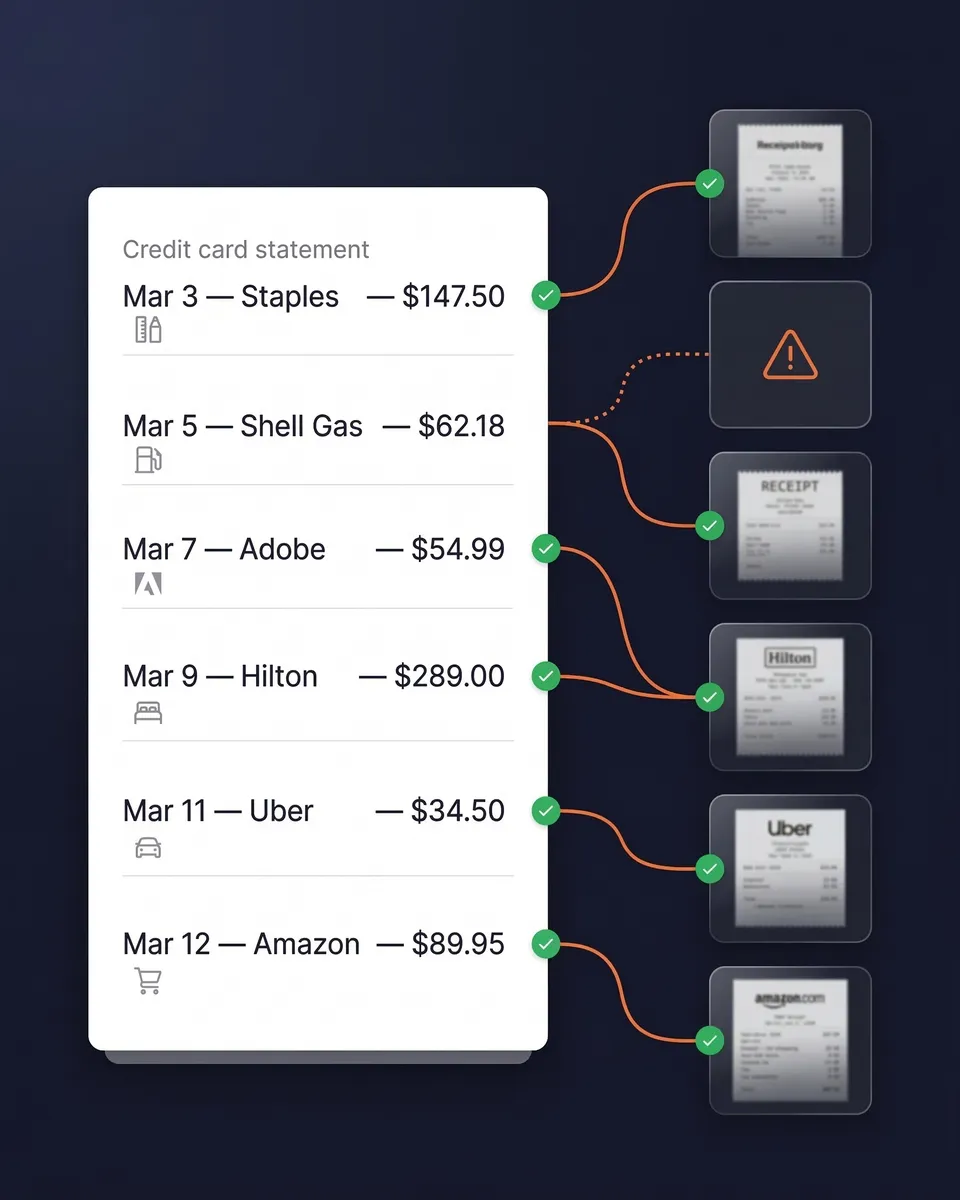
Fuel is the largest of the truck driver tax deductions for most owner-operators, and a fuel card statement alone doesn't show gallons, location or what was bought at the counter. Upload your fuel card or bank statement as a PDF, or connect a live bank feed, and SparkReceipt matches each charge to the receipt you scanned at the pump. The charges left without a receipt are the ones to chase while you still remember the stop.

Card statement transactions matched to receipts in SparkReceipt

Fuel receipts read line by line, gallons included

A fuel receipt in the US shows the gallons pumped. If you pay for diesel, DEF, and a coffee at the counter, each item gets its own line. SparkReceipt reads each line, so the coffee can go under a different category from the diesel.

On receipts scanned since September 2026, the diesel line also keeps the gallons printed on the receipt as its quantity. Lines on receipts scanned before then show a quantity of one.

In Reports, pick "One row per line item" when you export to Excel or CSV. Each line becomes its own row with the date, vendor, item, quantity, and currency, so you can filter to diesel and add up the gallons. You can also ask SparkAgent, the AI assistant built into SparkReceipt, "How many gallons of diesel did I buy this month?" Canadian stations sell fuel by the liter, so leave the rows in Canadian dollars out of the sum and tell SparkAgent to skip those receipts.

On the road: the truck driver per diem and lodging

Drivers away from home overnight can deduct meals with the special per diem rate for the transportation industry instead of keeping every meal receipt: $80 a day in the continental US and $86 outside it, the rate in IRS Notice 2025-54 and kept in Notice 2026-60 from October 1, 2026. Self-employed drivers can use it too. Drivers subject to the Department of Transportation's hours-of-service rules deduct 80% of it rather than the usual 50%, and the day you leave and the day you return count at three-quarters of the rate. Lodging is deducted at actual cost. IRS Publication 463 has the full rules; the per diem records guide covers what to keep.

Per diem for meals

The special transportation rate for each day away from home overnight, 80% deductible for drivers under hours-of-service rules. Line 24b (deductible meals). Keep: a record of each trip's dates, places and business purpose.

Motels and lodging

Motel and hotel stays on the road, at actual cost; there is no standard lodging allowance. Line 24a (travel). Keep: the folio or receipt.

Local runs: no per diem

If you are home each night, or you don't stop to sleep or rest on the run, meals aren't deductible travel expenses. Keep: logs that show which nights you were away.

Fuel stops, scales and motels, captured before the paper fades

Scan Receipts From the Cab, Even Across the Border

Take a photo at the pump, the scale or the motel desk and SparkReceipt reads the vendor, date and amount and files the receipt under a category. The app captures receipts offline and processes them when you are back in signal. Runs into Canada or Mexico are covered: receipts in another currency are converted at the exchange rate automatically. Tag a receipt to a truck or a load when you want per-unit totals.

SparkReceipt capturing a receipt on a phone

Licenses, permits, insurance and dispatch

CDL and DOT medical

CDL renewal and endorsements, your DOT physical and drug and alcohol testing. Line 23 for license fees, line 27b for the medical and testing costs. Keep: the receipts and the medical card invoice.

Heavy highway use tax

The Form 2290 Heavy Highway Vehicle Use Tax on a truck of 55,000 pounds or more. Line 23 (taxes and licenses). Keep: the stamped Schedule 1 and the payment record.

Registration, IFTA and permits

IRP plates, IFTA decals, oversize and state permits, and UCR fees. Line 23 (taxes and licenses). Keep: each registration or permit receipt.

Truck insurance

Primary liability, cargo, physical damage, bobtail or non-trucking liability, and occupational accident cover. Line 15 (insurance, other than health). Keep: each policy invoice.

Dispatch and factoring fees

Fees a dispatcher or factoring company takes from your loads. Line 10 (commissions and fees). Keep: the settlement statements showing each fee.

ELD, load boards and apps

ELD service, load board subscriptions and trucking apps you pay for. Usually line 18 (office expense) or line 27b. Keep: the subscription invoices from your inbox.

Insurance, ELD and permit invoices already sit in your inbox

Catch Every Insurance, ELD and Permit Invoice

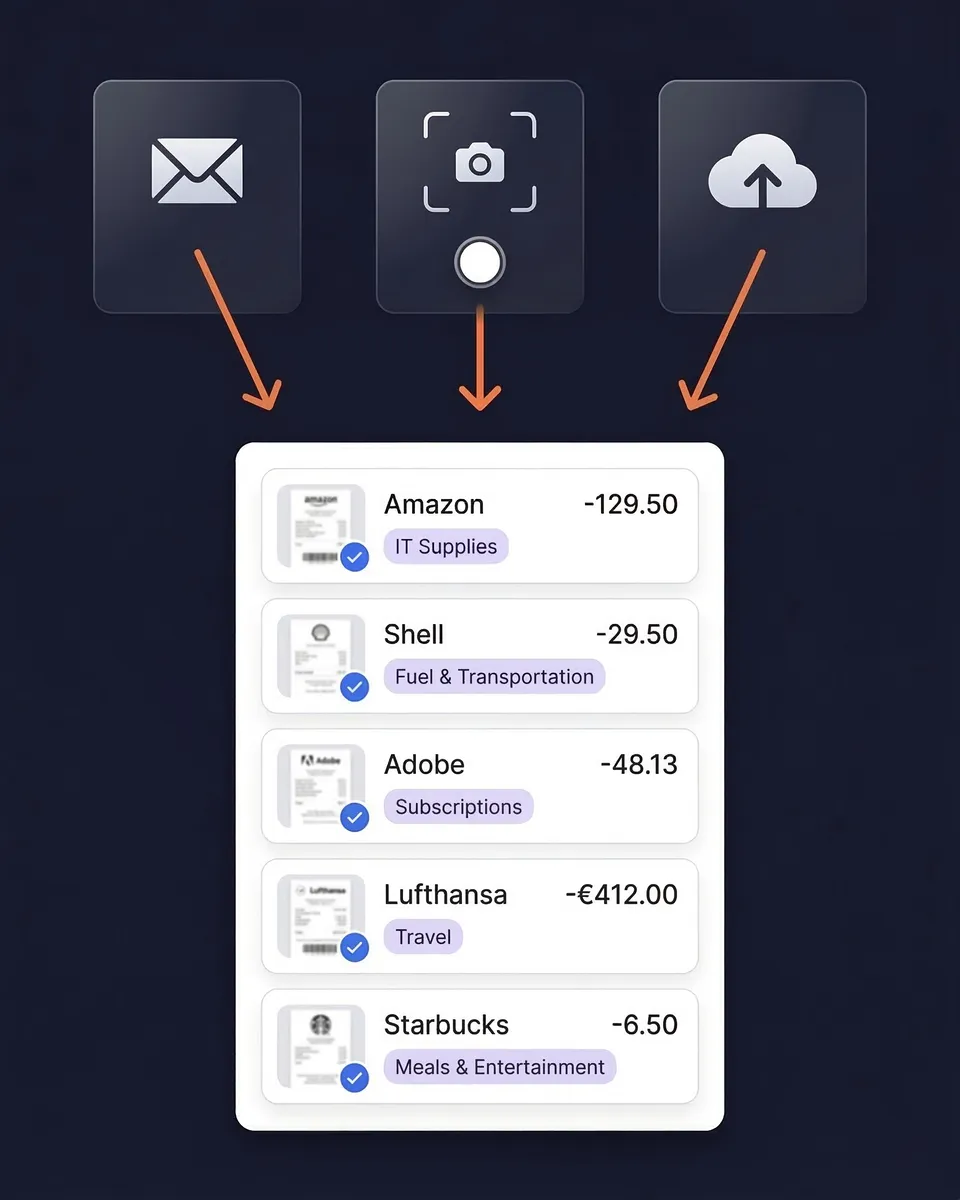
Insurance renewals, ELD bills, load board subscriptions and permit confirmations arrive by email and are easy to miss at tax time. Connect Gmail or Microsoft and SparkReceipt pulls each receipt and invoice out of your inbox, reads the vendor, date and amount, and files it under the right category. Email history extraction also goes back through older mail, so last year's invoices turn up too.

Receipts found in a Gmail inbox and imported into SparkReceipt

Cab gear, phone and the office

Phone and data

The business share of your phone and data plan, which runs your ELD, load boards and dispatch. Line 25 (utilities). Keep: the monthly bill and how you worked out the business share.

Electronics in the cab

An ELD tablet, GPS unit, CB radio or dash camera bought for the business. Up to $2,500 per invoice can be expensed under the de minimis safe harbor. Line 22 or line 13. Keep: the purchase receipt.

Tools and safety gear

Straps, chains, tarps, load locks, gloves, safety vests and boots made for the work. Line 22 (supplies). Keep: the receipts.

Association dues

Dues to a trucking association. Line 27b (other expenses). Keep: the dues invoice.

Home office

A part of your home used regularly and only for running the business, such as billing and paperwork. Simplified method of $5 per square foot up to 300 square feet, or Form 8829. Line 30. Keep: the square footage and, for actual costs, your home bills.

Tax and accounting help

Your tax preparer's fee for the business part of your return, and bookkeeping software. Line 17 (legal and professional services). Keep: the invoice.

Hand your preparer a finished year

Give Your Accountant Schedule C-Ready Records

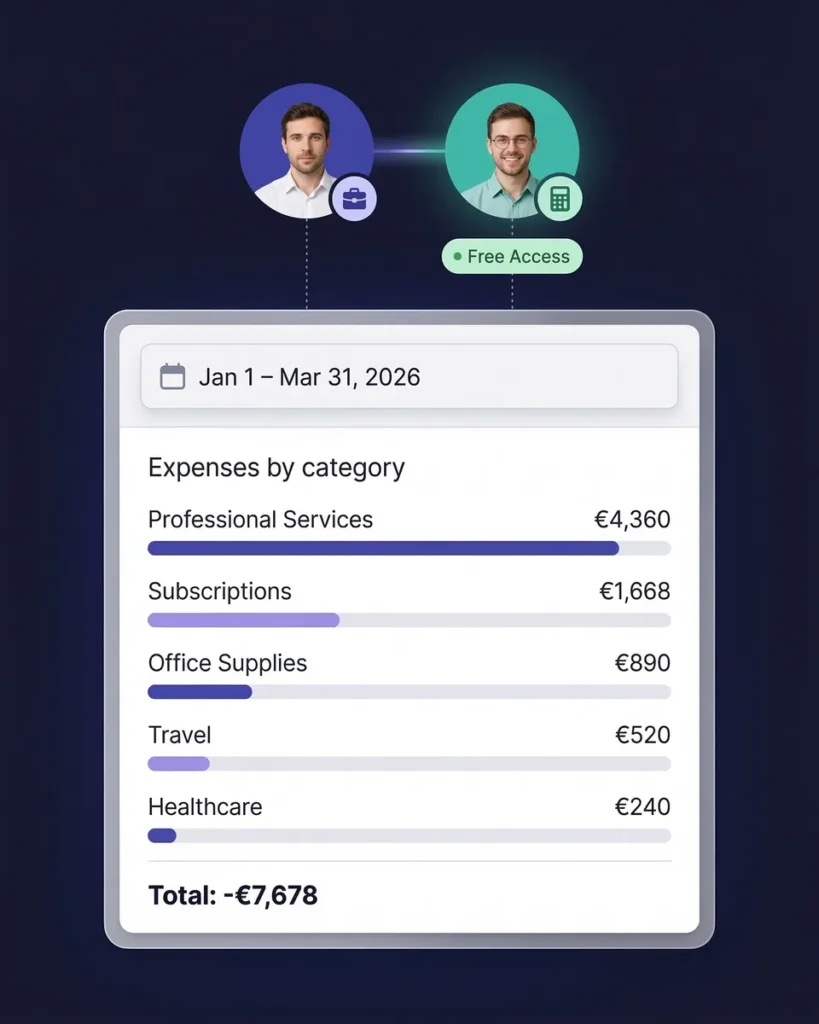
Invite your accountant to your account at no extra cost; the accountant does not take one of your user seats. They see every expense with its receipt image. On Elite, the Schedule C worksheet maps each of your categories to a Schedule C line and shows any category that still needs a line, so your truck driver tax deductions arrive as the totals your preparer files from. You can also export to Excel, CSV or PDF, or publish to QuickBooks Online.

An accountant viewing organized expense records in SparkReceipt

Truck driver tax deductions that are not on Schedule C

Three more deductions lower your tax but are claimed elsewhere on your return: self-employed health insurance premiums (Schedule 1), retirement contributions to a SEP-IRA or solo 401(k), and half of your self-employment tax. Most owner-operators also qualify for the QBI deduction of up to 20% of qualified business income. Because no tax is withheld from settlements, most also need to pay quarterly estimated taxes.

Owner operator tax deductions follow the same Schedule C rules as any other self-employed business; what differs is the mix, with more fuel, travel and equipment than most. Line numbers follow the IRS instructions for the 2025 Schedule C. Rules for your own return depend on your facts, so treat this checklist as a guide to what to track and confirm the details with a tax professional.

How the Trucking Expense Tracker Works

1

Capture From the Cab

Snap the fuel, scale or motel receipt on the spot, even without signal, and let SparkReceipt read the invoices that arrive in your inbox.

2

AI Files It by Category and Truck

The AI reads the vendor, date and amount and files each expense under a category. Tag a cost to a truck or a load when you want per-unit totals.

3

Hand Off a Finished Year

Invite your accountant or export the year. Every expense arrives with the receipt that proves it, sorted the way your Schedule C needs it.

Loved by Small Business Owners

“After months of looking for a solution like this, SparkReceipt became my go-to tool for managing receipts and expenses.”
Rafael Roa

Rafael Roa

System Arquitectura · Spain

“I needed a solution to organize and process my personal and business receipts. I'm thrilled I found SparkReceipt. It saves me a lot of time!”
Frédéric Thériault

Frédéric Thériault

Productions Locavores · Canada

“With SparkReceipt, organizing and tracking expenses has never been easier. The detailed categorization and expense tracking features make financial management a breeze.”
Jean-Pierre Michael

Jean-Pierre Michael

Artist · France

Join 38,283 businesses that chose SparkReceipt — 4,620,044 receipts processed and counting.

Get Started

Truck Driver Tax Deductions Without the Glove Box

What changes when your receipts are captured from the cab

Without SparkReceipt

  • Fuel receipts faded or lost in the cab
  • Fuel card charges with no receipt behind them
  • Insurance and ELD invoices buried in your inbox
  • Days on the road pieced together for per diem in April
  • Paying your preparer to sort a year of paper

With SparkReceipt

  • Receipts scanned at the pump, even offline
  • Every fuel card charge matched to its receipt
  • Inbox invoices found and filed automatically
  • Costs tagged by truck or load
  • Your accountant gets Schedule C-ready records

Every Load's Costs, Documented

Receipts, inbox invoices and fuel card matching in one subscription.

Your accountant joins free

Your first user is included. Each extra user: $1.00/month, billed $12 annually.

Your accountant joins free

Pro

For side hustles.

$5.75/mo

Total for 1 user · $69.00 billed annually

+ VAT/GST where applicable

Get Started

7-day free trial

50 documents / month

For receipts and invoices

  • AI scanning and categorization
  • One connected email inbox
  • One live bank feed connection
  • Bank statement extraction and matching
  • Mileage tracking and expense reports
  • QuickBooks Online, Xero and more
Recommended

Elite

For small businesses with 1 to 40 people.

$10.75/mo

Total for 1 user · $129.00 billed annually

+ VAT/GST where applicable

Get Started

7-day free trial

Unlimited documents*

Everything in Pro, plus:

  • Line-item extraction on every receipt
  • Several connected email inboxes
  • Several live bank feed connections
  • AI Fields for the details you need
  • AI rules for categorizing and filing
  • Schedule C and accounting templates

Founder-led setup

Joel Ojala

Joel Ojala, co-founder, sets up SparkReceipt with you, tailored to how you work.

$400one-time setup

+ Elite for 1 user: $10.75/mo, billed annually

$529.00 today, then $129.00 a year

+ VAT/GST where applicable

Get set up with Joel

Annual plan only · No free trial

Everything in Elite

Plus a 60-minute session with Joel and one follow-up. In the session:

  • Your process, mapped at a high level
  • Logins for your team, and any extra users you need
  • Set up inbox scanning for receipts and invoices
  • Connect bank / upload your first statement
  • The phone app for paper receipts
  • Expense categories and your accounting integration
  • Anything else you'd like to go through

Unlimited linked accounts on every plan.

Compare all features

Pro

  • 1 user included. Add teammates any time for a flat fee per user, your accountant joins free on top, unlimited linked accounts
  • 50 documents per month (receipts and invoices, mass upload up to 100 at once)
  • AI scanning and categorization
  • Automatic email receipt scanning from one connected inbox (Gmail, Outlook, IMAP)
  • Bank statement extraction and receipt matching (PDF, CSV, Excel)
  • 100 credits a month per user. Bank statements use 1 credit per transaction
  • One live bank feed connection
  • Mileage tracker: GPS or manual trips
  • Expense claims: submit receipts and trips, approve, mark paid
  • SparkAgent AI assistant, or connect your own AI over MCP
  • Integrations: QuickBooks Online, Xero, Zapier, Make, Pabbly, plus webhooks and API
  • Expense reports and exports: PDF, Excel, CSV, ZIP; 190 currencies

Elite

  • Everything in Pro, plus:
  • Unlimited documents: receipts and invoices, mass upload up to 100 at once
  • 200 credits a month per user. Bank statements use 1 credit per transaction
  • Line-item extraction on every receipt
  • Several connected email inboxes with automatic scanning
  • Several live bank feed connections
  • AI Fields: tell the AI exactly what to pull from every document
  • Plain-English AI rules: tell the AI how to categorize and file automatically
  • Schedule C export for US tax filing
  • Export templates for Sage 50, DATEV, Wave, and Sage 200

Founder-led setup

  • A 60-minute setup session with Joel, co-founder, plus one follow-up session
  • Together we set up your process, team logins, inboxes, bank statements, categories and integrations
  • Everything in Elite, billed annually
  • 1 user included. Add teammates any time for a flat fee per user

Unlimited document scanning on Elite is subject to fair use. Bank statement extraction uses monthly renewable credits. Historical email imports include a free allowance; larger imports use credits, with the cost shown before you start.

Frequently Asked Questions

The most common truck driver tax deductions are fuel and DEF, repairs and tires, depreciation or lease payments on the truck, truck loan interest, insurance, tolls and scales, per diem for meals on the road, lodging, CDL and permit fees, the heavy highway use tax, dispatch and factoring fees, ELD and load board subscriptions, and your phone's business share. Each one needs a record that shows the amount and the business purpose.

Not on the federal return. Company drivers paid on a W-2 can't deduct unreimbursed job expenses, including meals on the road. Owner-operators and independent truckers who file Schedule C can.

Instead of keeping every meal receipt, you deduct the special transportation rate for each day away from home overnight: $80 a day in the continental US and $86 outside it. Drivers under DOT hours-of-service rules deduct 80% of it, and the days you leave and return count at three-quarters. Keep a record of each trip's dates, places and purpose.

Not for a tractor. The standard mileage rate is for cars, vans, pickups and panel trucks. Owner-operators running a tractor deduct actual costs instead: fuel, repairs, insurance, and depreciation or lease payments.

Yes. The Form 2290 tax you pay on a truck of 55,000 pounds or more is a business tax, deducted on line 23 of Schedule C along with your registration and permit fees.

Yes. The SparkReceipt mobile app captures receipts offline. Photos are stored on your device and uploaded and processed when you are back online, so a fuel stop without signal doesn't cost you a receipt.

Yes. Receipts from runs into Canada or Mexico are read in their own currency and converted at the exchange rate automatically, so every cost lands in your books in dollars.

SparkReceipt scans receipts from the cab, matches fuel card charges to receipts, reads the invoices in your inbox and, on Elite, maps your categories to Schedule C lines, so every truck driver tax deduction you claim has the record behind it. Start with a 7-day free trial and cancel any time.

Claim Every Deduction With the Receipt Behind It

Get Started
Get Started