Uber Driver Tax Deductions, Tracked Mile by Mile

Every business mile, parking fee and platform charge is recorded as you drive for Uber, Lyft, DoorDash or Instacart, so you save the year-end scramble and keep the proof for each deduction.

Rideshare and delivery drivers are independent contractors: you report your earnings on Schedule C and pay income tax and self-employment tax on the profit. The Uber driver tax deductions you can prove lower both. SparkReceipt logs your trips, reads your receipts and keeps the record behind each one.

7-day free trial. Cancel any time.

Business Owners in 175 Countries Trust SparkReceipt

Tracy DugganRobert ConnollyRafael RoaFrédéric ThériaultPierce Mooney
4.8on the App Store · 4.6 on Google Play · 2,700+ ratings
4,620,044Receipts Processed
38,283Businesses Worldwide
190Currencies Handled
175Countries

Uber driver tax deductions: the Schedule C list

Uber, Lyft, DoorDash, Instacart and Grubhub treat drivers as independent contractors, so the platform withholds no tax. You report every dollar the platform paid you on Schedule C, subtract your business expenses, and pay income tax plus self-employment tax on what is left. A platform sends a Form 1099-K once your payments pass $20,000 and 200 transactions, and some send a 1099-NEC for bonuses and other pay; either way, all of your earnings are taxable whether or not a form arrives.

Below are the Uber driver tax deductions claimed most often, grouped the way the money goes out, with how SparkReceipt keeps the records for each group. Each card names the Schedule C line (from the IRS instructions for the 2025 Schedule C) and the record that proves the expense. The same list works for Lyft and for delivery drivers, since rideshare tax deductions follow one set of rules.

The five biggest Uber driver tax deductions

  1. Business miles

    72.5 cents a mile January to June 2026 and 76 cents from July 1, or actual car costs. Line 9. Needs a trip log.

  2. Platform fees

    The service fees and commissions the platform keeps, when your 1099-K shows gross fares. Line 10.

  3. Phone and data

    The business share of your phone plan and the phone itself. Lines 25 and 13 or 22.

  4. Parking and tolls

    Paid on business trips, deductible on top of the standard mileage rate. Line 9.

  5. Rider and delivery supplies

    Water, chargers and cleaning supplies for riders; insulated bags and carts for deliveries. Line 22.

Your car: the biggest of the Uber driver tax deductions

For most drivers the car is the largest deduction. You can use the IRS standard mileage rate even for a car used for hire: 72.5¢ per mile for miles driven January to June 2026 and 76¢ from July 1, 2026 (70¢ for 2025 returns). Or deduct your actual car costs times your business-use share. Choose the standard rate in the first year you use the car for business to keep both options open later. IRS Publication 463 sets out the rules and the records each method needs; the self-employed mileage deduction guide walks through them, and the mileage deduction calculator works out the number.

Business miles

Miles driven to pick up a rider or an order, with the rider or order in the car, and between trips while you are working. Line 9 (car and truck expenses). Keep: your own log with date, miles and purpose; the platform's mileage summary is a cross-check, not a log.

Parking and tolls

Parking and tolls paid on business trips, including airport pickup fees you pay yourself. Deductible on top of the standard mileage rate. Line 9. Keep: the receipt or the toll account statement.

Actual car costs

If you use actual costs instead: gas, oil changes, tires, repairs, insurance, registration, car washes, lease payments and depreciation, all times your business-use share. Line 9, depreciation on line 13. Keep: every car receipt plus the mileage log for the business share.

The record behind your mileage deduction

Log Every Business Mile, Not Just the Paid Ones

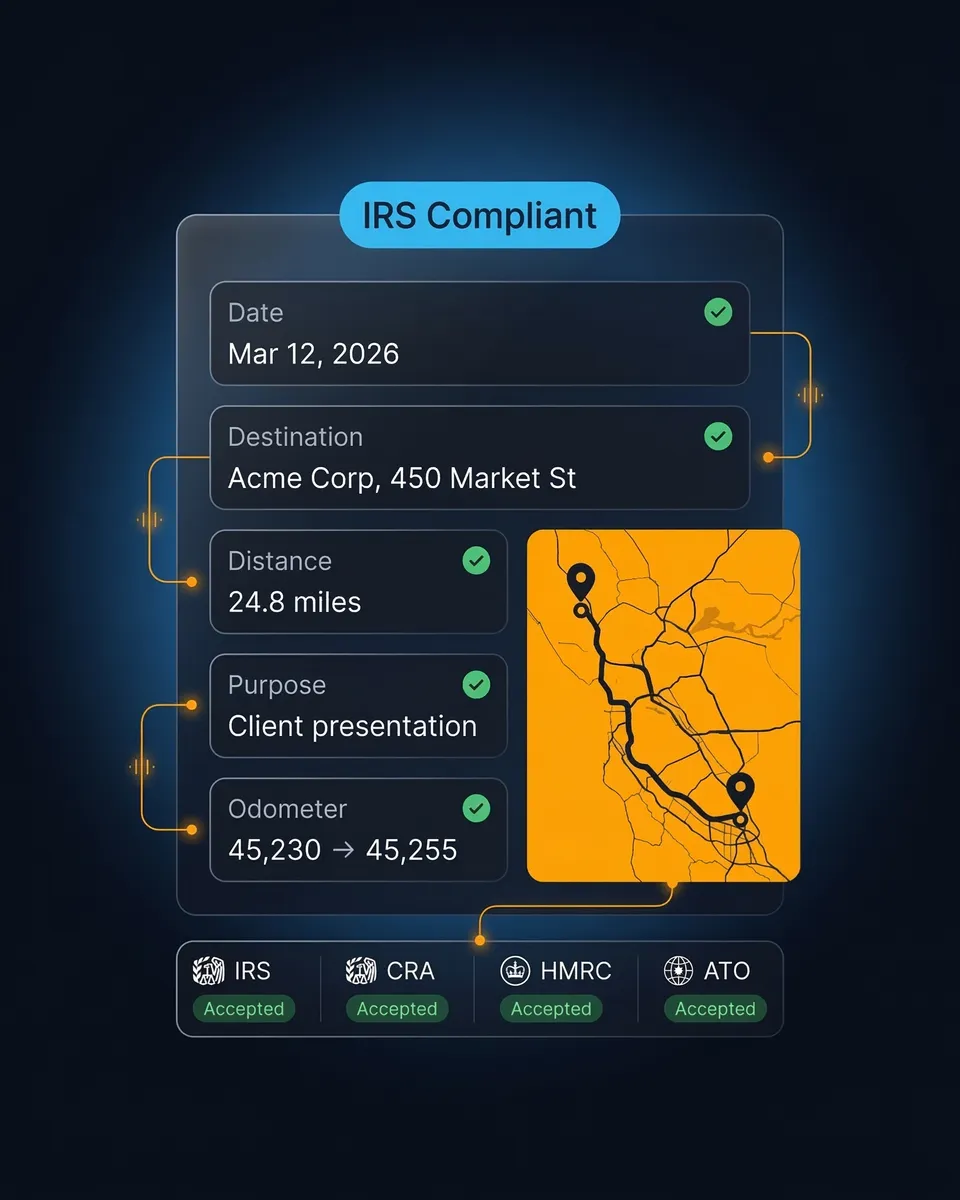
Mileage is the largest deduction for most drivers, and a log rebuilt in April is the first thing an examiner questions. The SparkReceipt mileage tracker records each trip with its date, distance and purpose, so the drive to a pickup counts as well as the ride itself. Mark each trip as business or personal and the business total is ready at tax time. On Elite, the Schedule C worksheet prices every trip at the IRS rate in force on the day you drove it, which matters in a year like 2026 with two rates.

A logged trip in SparkReceipt with route, distance and business purpose

Platform fees, phone and apps

Platform fees are among the Uber driver tax deductions drivers miss most often. The 1099-K reports gross fares, before the platform takes its cut, so if you report the 1099-K figure as income without deducting the fees, you pay tax on money you never received. The platform's annual tax summary lists both numbers.

Platform service fees

When the 1099-K reports your gross fares, the service fees, booking fees and commissions the platform kept are a business expense. Line 10 (commissions and fees). Keep: the platform's annual tax summary, which lists gross pay and fees.

Phone and data plan

The business share of your monthly phone and data bill. Line 25 (utilities). Keep: the monthly bill and a note of how you worked out the business share.

The phone itself

The business share of a phone bought for driving. Up to $2,500 per invoice can be expensed under the de minimis safe harbor; otherwise depreciate it. Line 22 or line 13. Keep: the purchase receipt.

Apps and subscriptions

Mileage, navigation, accounting and other apps you pay for to run the business. Usually line 18 (office expense) or line 27b. Keep: the subscription invoices from your inbox.

Roadside assistance

The business share of a roadside assistance membership. Line 27b (other expenses), or within actual car costs on line 9. Keep: the membership invoice.

Tax and accounting help

Your tax preparer's fee for the business part of your return, and bookkeeping software. Line 17 (legal and professional services). Keep: the invoice.

Your phone bill and app invoices already sit in your inbox

Catch Every Phone Bill and App Invoice

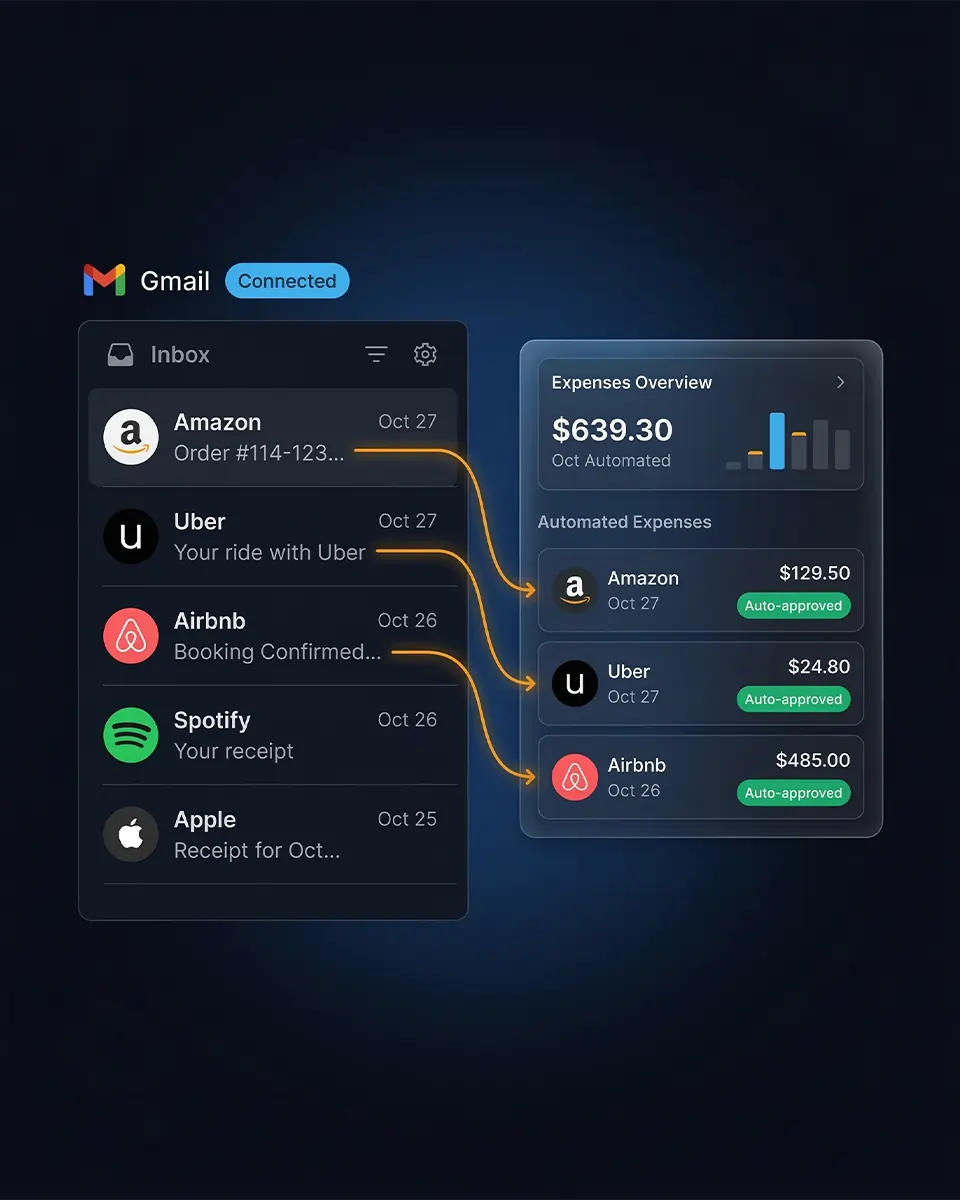
Phone bills, app subscriptions and roadside memberships arrive by email and are easy to miss at tax time. Connect Gmail or Microsoft and SparkReceipt pulls each receipt and invoice out of your inbox, reads the vendor, date and amount, and files it under the right category. Email history extraction also goes back through older mail, so the bills from earlier in the year turn up too.

Receipts found in a Gmail inbox and imported into SparkReceipt

Supplies, gear and what doesn't count

Rider supplies

Bottled water, mints, phone chargers and cables for riders, tissues and cleaning supplies for the car. Line 22 (supplies). Keep: the receipts, marked as for riders.

Delivery gear

Insulated bags, hot and cold bags, a folding cart, and a phone mount. Line 22 (supplies). Keep: the receipts.

Safety gear

A dash camera, a first-aid kit and similar equipment bought for the work. Line 22, or line 13 for larger items. Keep: the receipt.

Meals during a shift: no

Food you eat while driving locally is a personal expense, even on a long shift. Meals are only deductible when you travel away from home overnight for work.

Commuting and personal miles: no

Miles between home and a regular work location, and any personal errands, are not business miles. A log that separates them is what protects the rest.

Tickets and fines: no

Parking tickets, speeding tickets and other fines are not deductible, even when you got them while working.

Snap the receipt before it goes in the door pocket

Scan Gas, Parking and Supply Receipts Between Trips

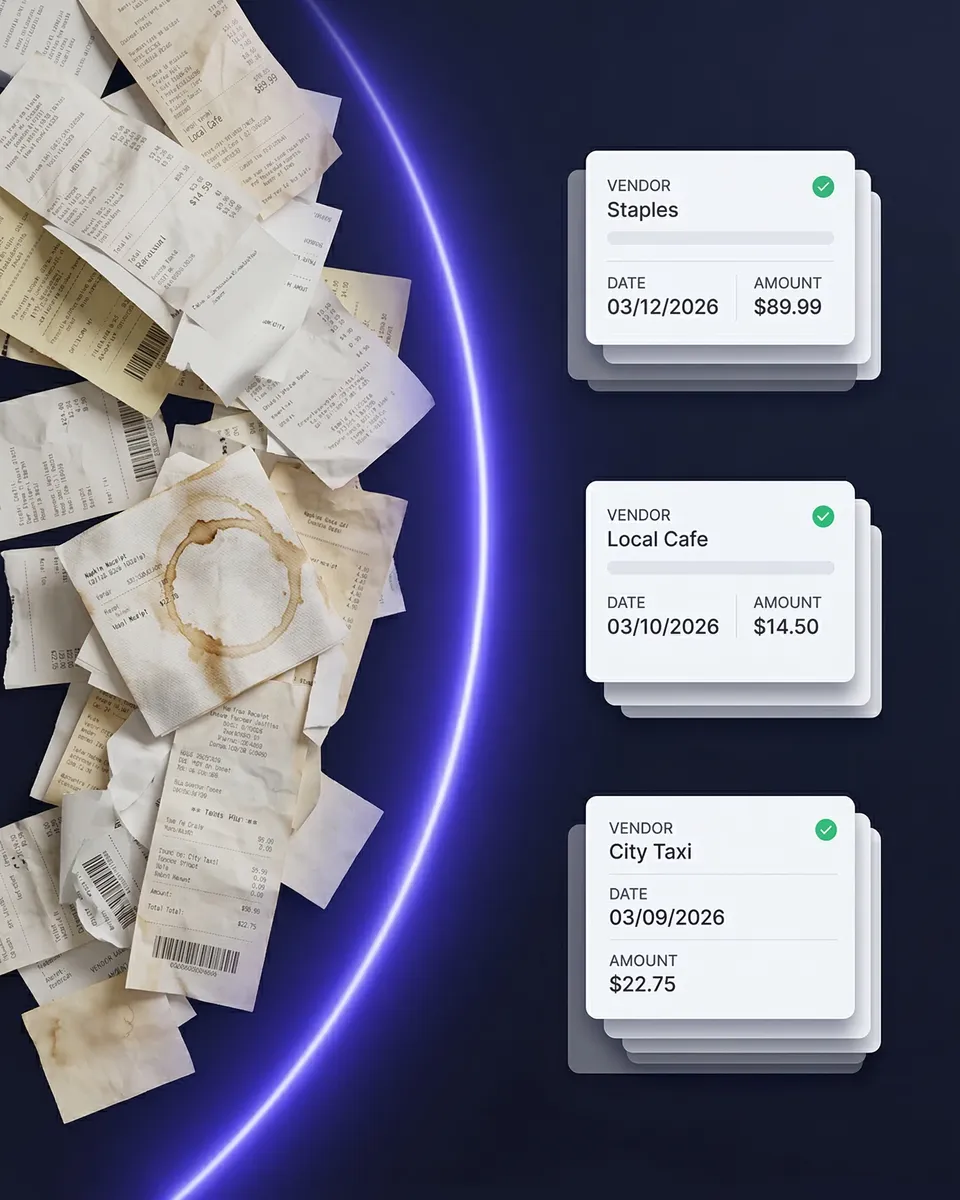
A gas station receipt left in the door pocket is a deduction you lose in April. Take a photo between trips and SparkReceipt reads the vendor, date and amount, and files it under a category. Drive for more than one platform? Tag receipts by platform to see what each one costs you to run. Upload a bank or card statement and each charge is matched to its receipt, so the charges with nothing behind them are easy to spot.

SparkReceipt scanning a receipt

Hand your preparer a finished year

Give Your Accountant Schedule C-Ready Records

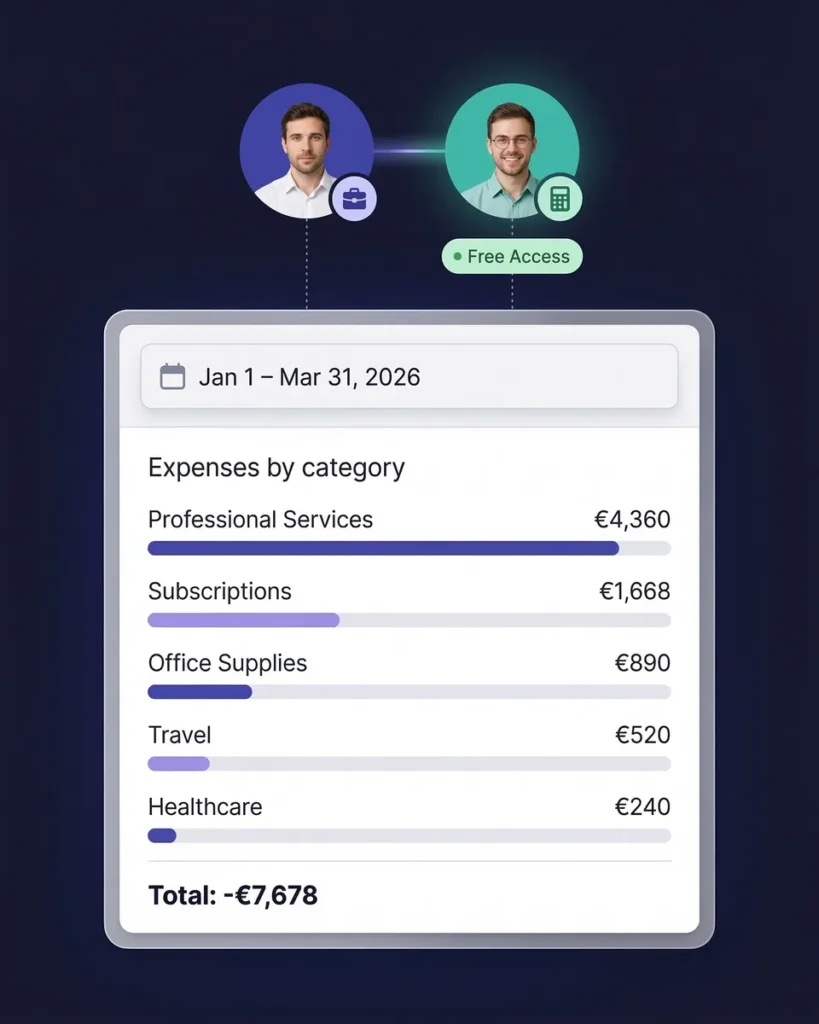
Invite your accountant to your account at no extra cost; the accountant does not take one of your user seats. They see every expense with its receipt image. On Elite, the Schedule C worksheet maps each of your categories to a Schedule C line and shows any category that still needs a line, so your rideshare tax deductions arrive as the totals your preparer files from. You can also export to Excel, CSV or PDF, or publish to QuickBooks Online.

An accountant viewing organized expense records in SparkReceipt

Uber driver tax deductions that are not on Schedule C

Three more deductions lower your tax but are claimed elsewhere on your return: self-employed health insurance premiums (Schedule 1), retirement contributions to a SEP-IRA or solo 401(k), and half of your self-employment tax. Most drivers also qualify for the QBI deduction of up to 20% of qualified business income. Because no tax is withheld, most drivers also need to pay quarterly estimated taxes.

Delivery driver tax deductions follow the same rules as Uber driver tax deductions: the same mileage rate, the same supplies and the same records. Line numbers follow the IRS instructions for the 2025 Schedule C. Rules for your own return depend on your facts, so treat this list as a guide to what to track and confirm the details with a tax professional.

How the Expense Tracker for Rideshare Drivers Works

1

Capture as You Drive

Log each trip, snap the gas or parking receipt between rides, and let SparkReceipt read the bills that arrive in your inbox.

2

AI Files It by Category and Platform

The AI reads the vendor, date and amount and files each expense under a category. Tag a cost to Uber, Lyft or DoorDash when you want per-platform totals.

3

Hand Off a Finished Year

Invite your accountant or export the year. Every expense arrives with the receipt that proves it, sorted the way your Schedule C needs it.

Loved by Small Business Owners

“SparkReceipt is an excellent alternative to full-fledged accounting software, saving you time and money!”
Pierce Mooney

Pierce Mooney

Legal Services · United States

“Thanks to you, I'm actually looking forward to my year end FOR THE FIRST TIME EVER, when I can surprise my accountant with my completed accounts with a week or so off the end of the year!”
Abigail Dombey

Abigail Dombey

Net Zero Associates Ltd · United Kingdom

“After months of looking for a solution like this, SparkReceipt became my go-to tool for managing receipts and expenses.”
Christina Sust

Christina Sust

INMIZE · Spain

Join 38,283 businesses that chose SparkReceipt — 4,620,044 receipts processed and counting.

Start Free Trial

Uber Driver Tax Deductions Without the Glove Box

What changes when your miles and receipts are captured as they happen

Without SparkReceipt

  • Mileage rebuilt from the platform's summary in April
  • Gas and parking receipts lost in the car
  • Phone bills and app invoices buried in your inbox
  • No idea what each platform costs you to run
  • Paying your preparer to sort a year of paper

With SparkReceipt

  • Trips logged with date, purpose and miles
  • Receipts scanned and filed between rides
  • Inbox bills found and filed automatically
  • Costs tagged by platform
  • Your accountant gets Schedule C-ready records

Every Mile and Receipt, Documented

Mileage, receipts, inbox bills and bank matching in one subscription.

1 user included
Accountant access is free.

Each extra user: $1.00/month, billed $12 annually. Accountant access is free.

Pro

The essentials for keeping your receipts and expenses organized.

$5.75/mo

Total for 1 user · $69.00 billed annually

+ VAT/GST where applicable

Get Started

7-day free trial

50 documents / month

For receipts and invoices

  • AI scanning and categorization
  • One connected email inbox
  • One live bank feed connection
  • Bank statement extraction and matching
  • Mileage tracking and expense reports
  • QuickBooks Online, Xero and more
Recommended

Elite

More receipts, more automation. Less to do yourself.

$10.75/mo

Total for 1 user · $129.00 billed annually

+ VAT/GST where applicable

Get Started

7-day free trial

Unlimited documents*

Everything in Pro, plus:

  • Line-item extraction on every receipt
  • Several connected email inboxes
  • Several live bank feed connections
  • AI Fields for the details you need
  • AI rules for categorizing and filing
  • Schedule C and accounting templates

Founder pack

Elite, with hands-on setup from a SparkReceipt founder.

$529first year

$400 one-time setup + $129.00/year Elite for 1 user

+ VAT/GST where applicable

Get the Founder pack

Annual plan only · No free trial

Everything in Elite

Plus a working session with a founder:

  • Personal walkthrough of your account
  • Connect your email inboxes together
  • Set up your expense categories
  • Configure your integrations
  • Get answers as you work through setup
  • Go live in one working session

Unlimited linked accounts on every plan.

Compare all features

Pro

  • 1 user included. Add teammates any time for a flat fee per user, your accountant joins free on top, unlimited linked accounts
  • 50 documents per month (receipts and invoices, mass upload up to 100 at once)
  • AI scanning and categorization
  • Automatic email receipt scanning from one connected inbox (Gmail, Outlook, IMAP)
  • Bank statement extraction and receipt matching (PDF, CSV, Excel)
  • One live bank feed connection
  • Mileage tracker: GPS or manual trips
  • SparkAgent AI assistant, or connect your own AI over MCP
  • Integrations: QuickBooks Online, Xero, Zapier, Make, Pabbly, plus webhooks and API
  • Expense reports and exports: PDF, Excel, CSV, ZIP; 190 currencies

Elite

  • Everything in Pro, plus:
  • Unlimited documents: receipts and invoices, mass upload up to 100 at once
  • Line-item extraction on every receipt
  • Several connected email inboxes with automatic scanning
  • Several live bank feed connections
  • AI Fields: tell the AI exactly what to pull from every document
  • Plain-English AI rules: tell the AI how to categorize and file automatically
  • Schedule C export for US tax filing
  • Export templates for Sage 50, DATEV, Wave, and Sage 200

Founder pack

  • Hands-on onboarding with a founder: together we set up your account, inboxes, categories and integrations
  • Everything in Elite, billed annually
  • 1 user included. Add teammates any time for a flat fee per user
  • Skip the learning curve and go live in one working session

Unlimited document scanning on Elite is subject to fair use. Bank statement extraction uses monthly renewable credits. Historical email imports include a free allowance; larger imports use credits, with the cost shown before you start.

Frequently Asked Questions

The most common Uber driver tax deductions are business miles (or actual car costs), parking and tolls, the platform's service fees and commissions when your 1099-K shows gross fares, the business share of your phone and data plan, apps and subscriptions, rider and delivery supplies, and safety gear. Each one needs a record that shows the amount and the business purpose.

Yes. The IRS lets you use the standard mileage rate for a car used for hire, such as a rideshare car. For 2026 it is 72.5 cents per mile January to June and 76 cents from July 1. Choose it in the first year you use the car for business to keep both methods open later.

No. Gas, oil, repairs, insurance and depreciation are built into the standard rate, so you can't deduct them on top. Parking fees and tolls on business trips are the exception: you deduct those in addition to the rate.

Miles driven to pick up a rider or an order, miles with the rider or order in the car, and miles between trips while you are working. Commuting and personal errands don't count. Keep your own log; the mileage on the platform's tax summary is a useful cross-check, not a log.

DoorDash tax deductions follow the same rules as rideshare: business miles or actual car costs, parking and tolls, phone and data, insulated bags and other delivery gear, and apps you pay for. Meals you eat during a shift are not deductible.

No. All of your earnings are taxable whether or not you receive a form. Platforms send a Form 1099-K when payments pass $20,000 and 200 transactions, and some send a 1099-NEC for other pay; the platform's annual tax summary shows your gross pay and fees either way.

Yes. Whether you drive for Uber, Lyft, DoorDash, Instacart or Grubhub, your trips and receipts go into one account. Tag expenses by platform to see what each one costs you.

SparkReceipt logs your trips, scans receipts between rides, reads the bills in your inbox, matches card charges to receipts and, on Elite, maps your categories to Schedule C lines, so every Uber driver tax deduction you claim has the record behind it. Start with a 7-day free trial and cancel any time.

Claim Every Mile With the Record Behind It

Get Started
Start Free Trial