
Try the Receipt Scanner Free for 7 Days
Scan receipts with AI and categorize expenses automatically.
Stop losing receipts. SparkReceipt lets you scan receipts with your phone, extract vendor, amount, date, and tax with AI, and organize everything in one place. Try every feature with a 7-day free trial. Cancel anytime.
Business Owners in 175 Countries Trust SparkReceipt


Every Feature, Unlocked for 7 Days
Try every feature with a 7-day free trial:
- Unlimited AI-powered scanning
- Automatic categorization
- 190 currencies
- Cloud storage
- Data exports (CSV, PDF, Excel, ZIP)
- Bank statement extraction and email receipt fetching

Scan Any Receipt From Your Phone
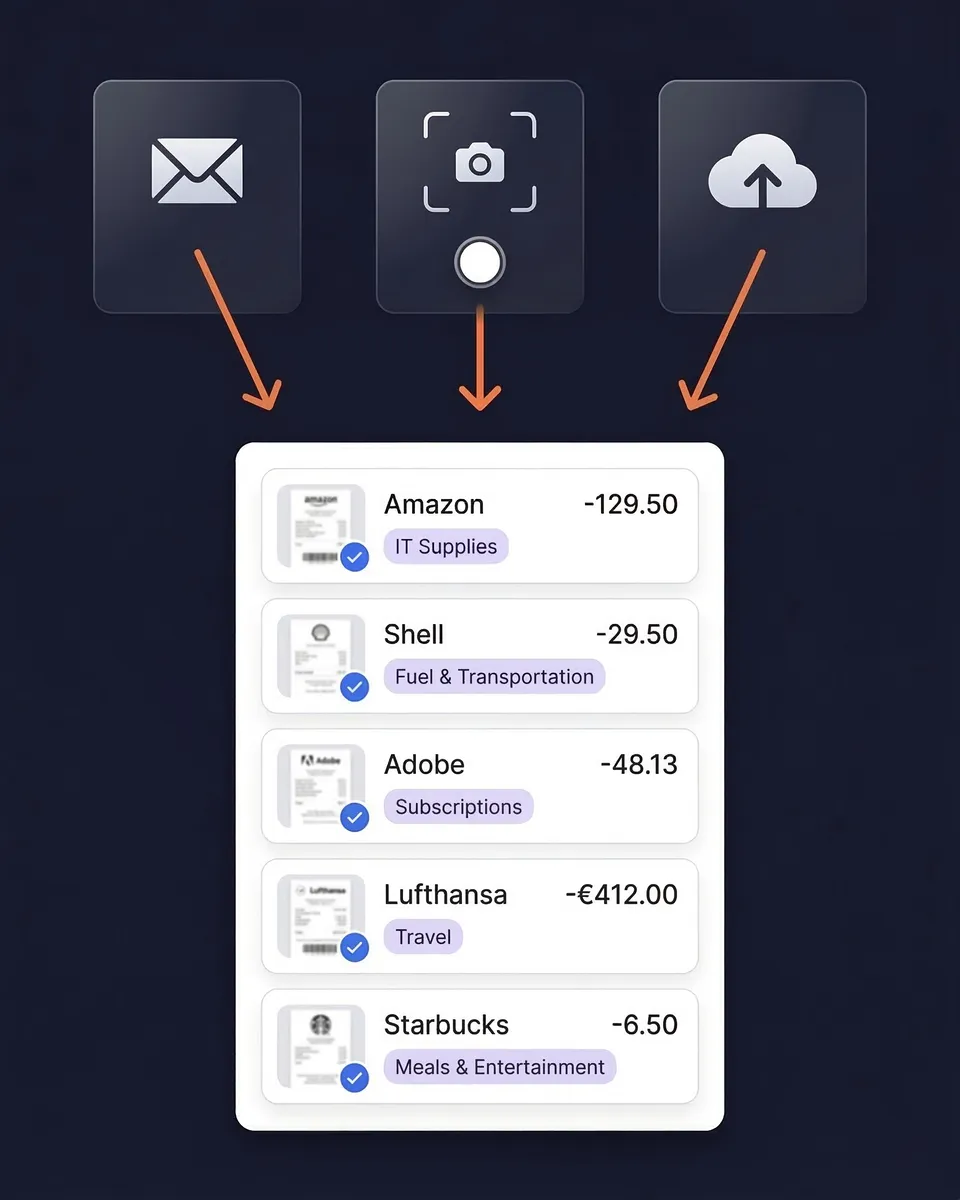
Point your phone at any receipt and SparkReceipt's AI reads it in seconds. Paper receipts, printed invoices, handwritten notes, thermal paper — the AI handles them all. Works offline too — receipts sync when you're back online.
For digital receipts, forward email receipts to your SparkReceipt inbox and they're processed automatically. Or connect your Gmail, Outlook, Microsoft, or any IMAP inbox for automatic email receipt fetching — including historical emails.
What Happens After the Trial?
If you keep the subscription, you continue with the Elite plan at $16.65/month, billed annually ($199.98/year). Cancel anytime before the trial ends and you won't be charged.
How Free Receipt Scanning Works
Snap a Photo or Upload a File
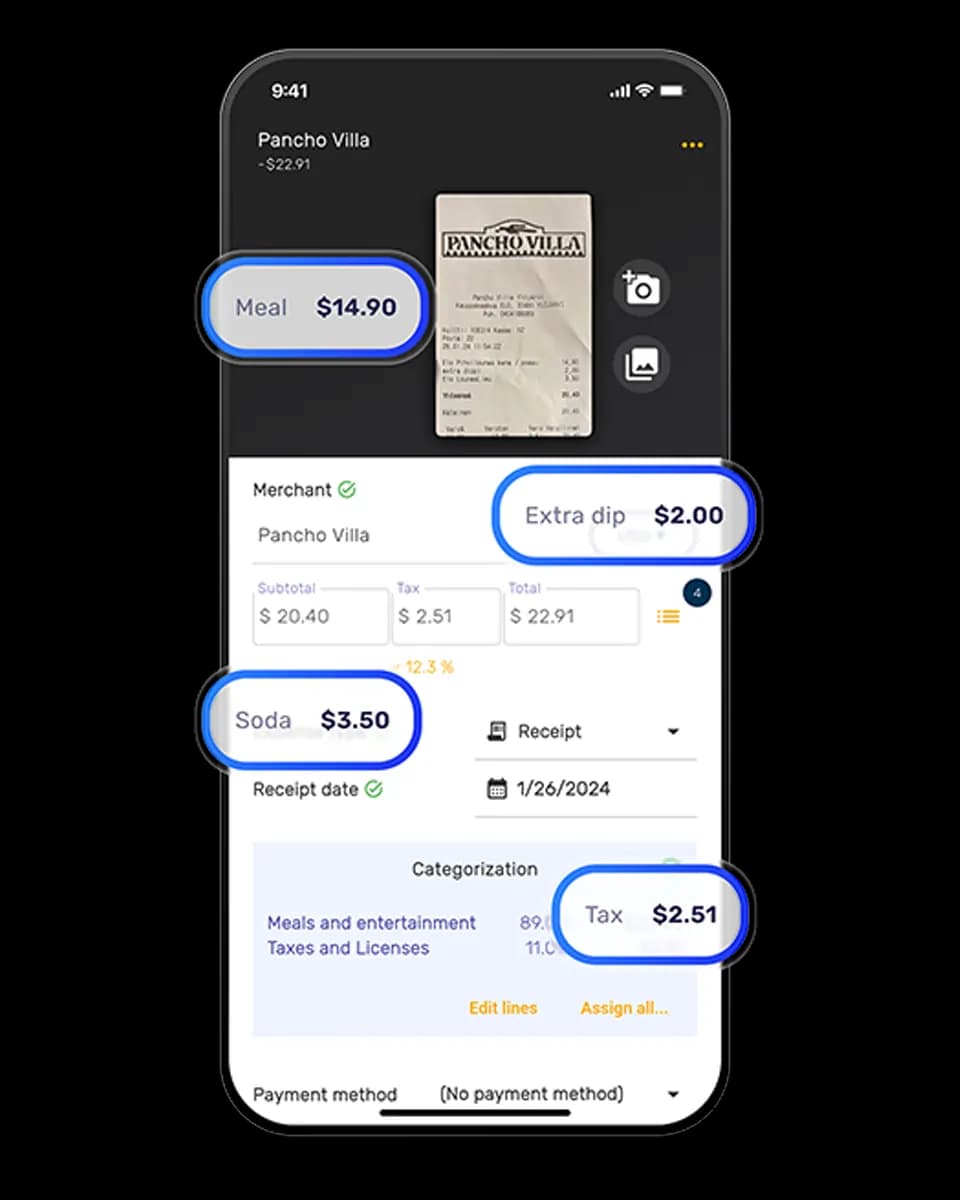
Open SparkReceipt on your phone (iPhone or Android) and snap a photo of any receipt. You can also upload PDFs, images, or documents from your computer. The AI reads any format — printed, handwritten, crumpled, or faded.
AI Reads Every Detail Automatically
SparkReceipt's AI extracts the vendor name, total amount, date, tax, currency, and line items from your receipt in 2–3 seconds. No typing. No manual data entry.
Expenses Categorized and Searchable
Every receipt is automatically categorized and stored in your cloud archive. Search by vendor, date, amount, or category. Generate expense reports in one click when you need them.
Loved by Small Business Owners
“I needed a solution to organize and process my personal and business receipts. I'm thrilled I found SparkReceipt. It saves me a lot of time!”

Frédéric Thériault
Productions Locavores · Canada
“Thanks to SparkReceipt I have a quick look to my business accounts status in a glance. It is really impressive.”

Rafael Roa
System Arquitectura · Spain
“Excellent software to manage income and expenses, and have the relevant info at your fingertips at any given time.”

Melvin Hoods
MJD Brokers · South Africa
Join 38,283 businesses that chose SparkReceipt — 4,620,044 receipts processed and counting.
Start Free TrialStill Stuffing Receipts in a Drawer?
See the difference SparkReceipt makes

Without SparkReceipt
- Receipts lost in pockets, wallets, car consoles
- Thermal paper fading before filing
- Hours of manual spreadsheet data entry
- Missing tax deductions due to lost receipts
- Tax-time panic searching for receipts

With SparkReceipt
- Every receipt scanned and stored digitally in seconds
- AI automatically extracts vendor, amount, date, tax
- Expenses automatically categorized for taxes
- Every deduction captured before fading
- Tax-ready reports generated instantly
Frequently Asked Questions
Sign up and you get full access to SparkReceipt's Elite plan for 7 days — AI receipt scanning, automatic categorization, bank statement extraction, email receipt fetching, and unlimited document scanning. Cancel anytime before the trial ends and you won't be charged.
If you keep the subscription, you continue with the Elite plan at $16.65/month, billed annually ($199.98/year).
Yes — a credit card is required to start the 7-day free trial. You won't be charged until the trial ends, and you can cancel any time before then.
Yes. SparkReceipt works on both iPhone and Android. You can also upload receipts from your computer via the web app.
Yes. You can export your receipts and expense data in CSV, PDF, Excel, or ZIP format. Generate expense reports with category breakdowns and receipt images.
SparkReceipt's AI reads receipts in any condition — printed, handwritten, crumpled, faded, or in any of 190 currencies. It extracts vendor name, amount, date, tax, and line items with high accuracy. The AI improves over time as it learns your vendors and spending patterns.
Yes. Invite your accountant or bookkeeper to your account at any time.
Explore More Features
Receipt Scanner
AI-powered receipt scanning for any receipt
Expense Tracker
Track every business expense automatically
Expense Reports
Generate reports in PDF, Excel, or CSV
Bank Statement Extractor
Extract and match bank transactions
Receipt Organizer
AI-powered receipt organization
Email Receipts
Auto-import receipts from your inbox