
Receipt OCR That Reads Every Field
Turn any receipt into structured data — vendor, amount, date, tax, and line items — without typing a thing.
SparkReceipt's AI-powered OCR doesn't just read the text on a receipt — it understands it, sorting every value into the right field so your expenses are captured, categorized, and export-ready in seconds.
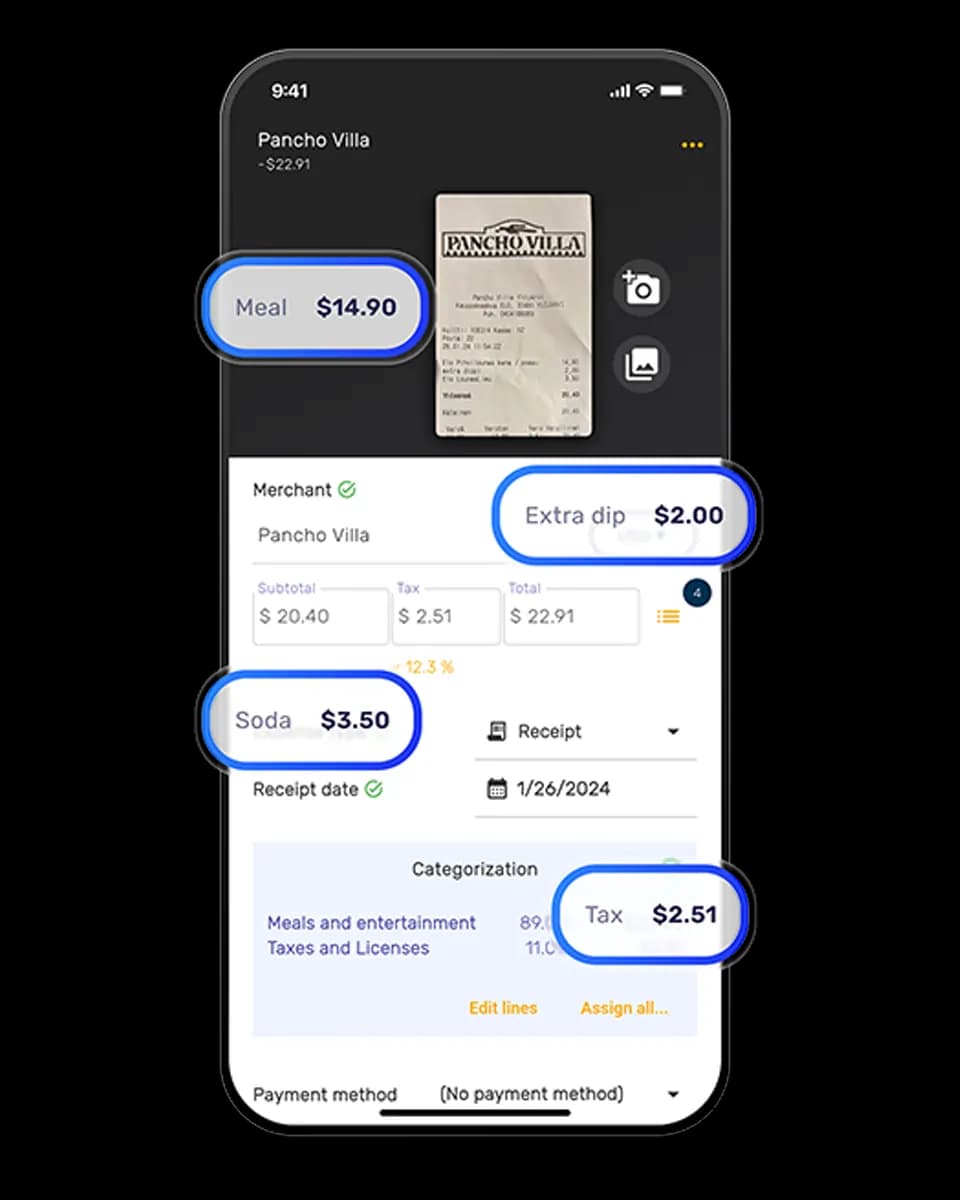
Business Owners in 175 Countries Trust SparkReceipt


What an OCR receipt scanner does
An OCR (optical character recognition) receipt scanner turns the image of a receipt into structured, editable data. Instead of retyping the vendor, date, and total from a paper slip, you photograph or upload the receipt and the software reads it for you.
Traditional OCR just converts pixels to raw text — you still have to work out which number is the total and which is the tax. SparkReceipt's AI-powered OCR goes further: it understands receipts and extracts each value into its own field:
- Vendor name, even from an abbreviated or stylized header
- Total, subtotal, and tax, correctly separated
- Date of purchase
- Currency, detected from the symbol and number formatting (190 supported)
- Line items, itemized where the receipt lists them, with quantity and unit price when printed
- Payment method, where shown
The result is a clean, categorized record you can search and export — not a wall of text you still have to sort by hand. For a wider look at how OCR is reshaping bookkeeping workflows, see our guide to OCR in accounting.
Line items, each with its own category
The OCR records each item on an itemized receipt as its own line and suggests a category for each line. Printer paper and cleaning supplies from one warehouse-club receipt can get separate categories. You can change the category on any line.
When you publish the receipt to QuickBooks Online or Xero, each line goes to the account mapped to its category. For a spreadsheet, open Reports and set the row format to "One row per line item". Each row in the Excel or CSV file has the quantity and unit price where the receipt shows them.
OCR for every receipt format
Point your phone at a paper receipt, upload a PDF or screenshot, or forward an email receipt — the OCR handles them all. It reads crumpled, faded, and thermal receipts, handwritten notes, and receipts in virtually any language.
Connect your Gmail, Outlook, Microsoft, or any IMAP inbox and SparkReceipt runs OCR on your email receipts automatically, including the historical backlog.
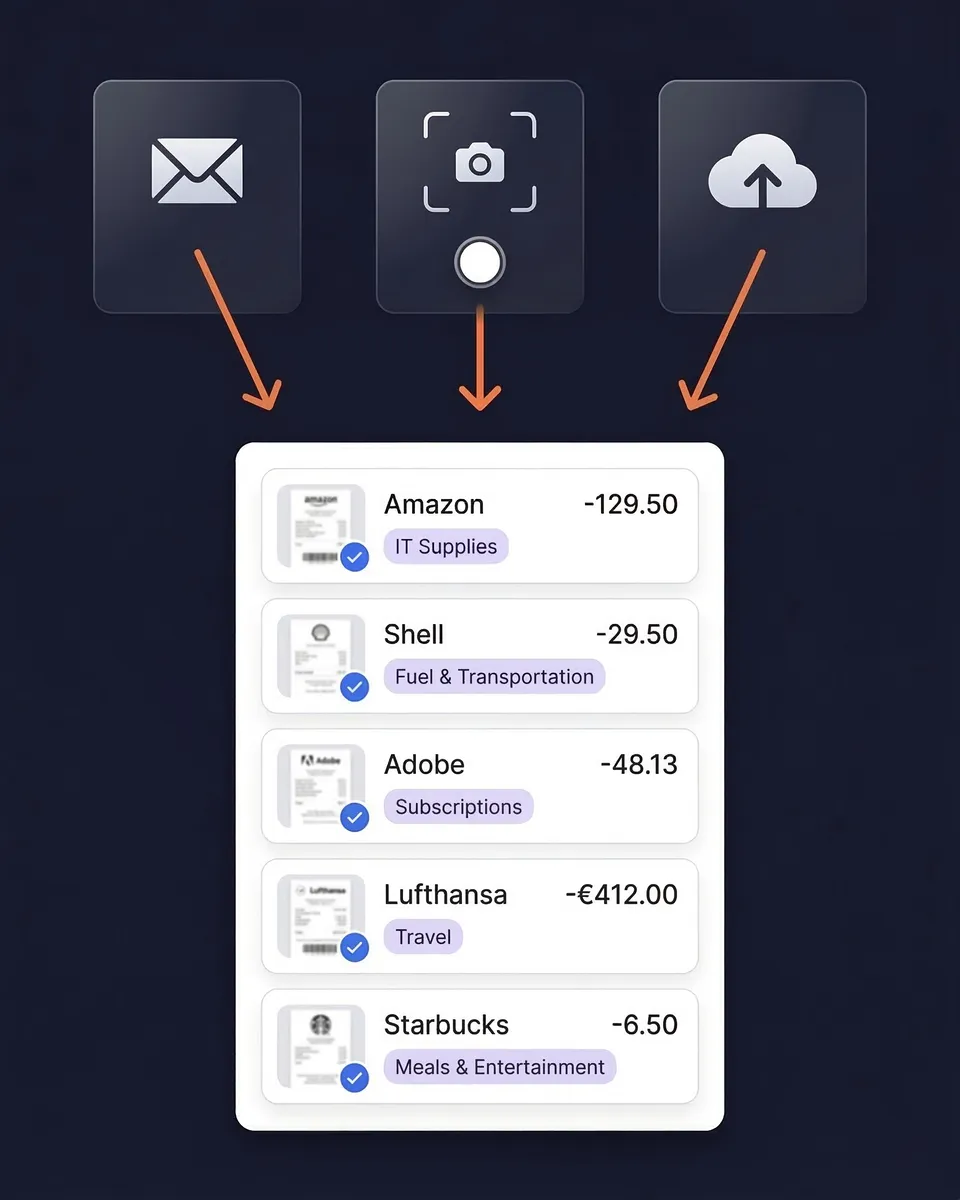
From raw scan to structured data
SparkReceipt's AI reads past the header. It separates subtotal, tax, and total, captures individual line items, detects the currency and applies the historical exchange rate, and recognizes the payment method — all in one pass.
Every extracted field is editable, so on the rare occasion the AI misreads a smudged total, a one-tap correction fixes it and the AI learns your vendors over time.

How Receipt OCR Works
Capture the Receipt
Snap a photo with your phone, upload a PDF or image from your computer, or forward an email receipt. Any format, any language, 190 currencies.
AI OCR Extracts Every Field
In 2–3 seconds, the AI reads the vendor, total, subtotal, tax, date, currency, payment method, and line items — sorting each value into its own field, not just dumping raw text.
Categorized, Searchable, and Export-Ready
Each receipt is auto-categorized and stored in your cloud archive, searchable by vendor, amount, date, or category. Export to CSV, Excel, or PDF, or sync to QuickBooks Online.
OCR that flows straight into your books
Extracted data doesn't just sit there. SparkReceipt categorizes each receipt into tax-relevant buckets, generates expense reports in PDF, Excel, or CSV, and syncs to QuickBooks Online — so the same scan that captured your receipt also finishes your bookkeeping.
Need to reconstruct records from statements instead? The bank statement extractor runs the same OCR on PDF statements, pulling out every transaction line.

Receipt OCR, Included in Every Plan
Simple, transparent pricing. No hidden fees, no surprise charges.
Doing it by hand
Shoebox + spreadsheet
60+ hours a year
Flattening, reading and typing each receipt into a spreadsheet, filing the paper, matching it to the bank statement, and hunting for the ones that went missing.
$1,000+ for the cleanup
What a bookkeeper charges to turn a year of shoebox records into books a return can be filed from, before the return itself.
Deductions you can't prove
A faded thermal receipt or a lost email is an expense you pay for twice: once at the counter, once at tax time.
Total per year
Your evenings, a cleanup bill, and the deductions you couldn't prove.
Basis: about 40 receipts a month at six minutes each by hand, plus a weekend reconstructing the year before the return. Bookkeeper rates and cleanup fees from NerdWallet's 2026 bookkeeping price guide (freelance average $43 per hour; cleanup from $1,000).
Loved by Small Business Owners
“SparkReceipt is an excellent alternative to full-fledged accounting software, saving you time and money!”

Pierce Mooney
Legal Services · United States
“Thanks to SparkReceipt I have a quick look to my business accounts status in a glance. It is really impressive.”

Rafael Roa
System Arquitectura · Spain
“I needed a solution to organize and process my personal and business receipts. I'm thrilled I found SparkReceipt. It saves me a lot of time!”

Frédéric Thériault
Productions Locavores · Canada
Join 38,283 businesses that chose SparkReceipt — 4,620,044 receipts processed and counting.
Start Free TrialFrequently Asked Questions
OCR (optical character recognition) receipt scanning converts a photo or file of a receipt into structured digital data. A basic OCR tool extracts raw text; an AI-powered OCR scanner like SparkReceipt goes further and sorts each value into its own field — vendor, total, tax, date, currency, and line items — so the receipt becomes a clean, categorized record instead of a block of text.
SparkReceipt's AI OCR reliably extracts vendor names, amounts, dates, tax breakdowns, and currencies from receipts in any condition — printed, handwritten, crumpled, faded, or thermal — and across 190 currencies and virtually any language. No OCR is perfect, so every field is editable and the AI learns your vendors over time to improve.
For anything beyond a handful of receipts, yes. Manual entry is slow and error-prone; OCR reads the whole receipt in 2–3 seconds, keeps the original image attached for your audit trail, and categorizes the expense automatically. The time saving compounds the more receipts you process.
Yes. Where a receipt lists individual line items, SparkReceipt's OCR captures them alongside the vendor, subtotal, tax, and total — useful for splitting mixed business-and-personal purchases or tracking spending at the item level. If the receipt shows a quantity and unit price on a line, such as three boxes of printer paper and the price per box, SparkReceipt keeps both.
Photos, PDFs, screenshots, and email receipts, in virtually any language, across 190 currencies with automatic exchange-rate conversion. It reads paper, thermal, and handwritten receipts as well as digital ones.
SparkReceipt is a ready-to-use app rather than a raw developer OCR API. For automation, you can connect it through its MCP integration and via Zapier, Make, and Pabbly webhooks to push extracted receipt data into your own workflows.
OCR receipt scanning is included in the Elite plan at $10.75/month, billed annually, with a 7-day free trial.
Stop Retyping Receipts. Let OCR Read Them.
Get StartedExplore More Features
AI Fields
Extract custom data you define from any document
Receipt Scanner
AI-powered receipt scanning for any receipt
Free Receipt Scanner
Scan receipts free for 7 days
Email Receipts
Auto-import receipts from your inbox
Bank Statement Extractor
Run OCR on PDF bank statements
Expense Reports
Generate reports in PDF, Excel, or CSV
Receipt Organizer
AI-powered receipt organization