
99% Accuracy Is the Floor, Not the Ceiling
 Written by Joel Ojala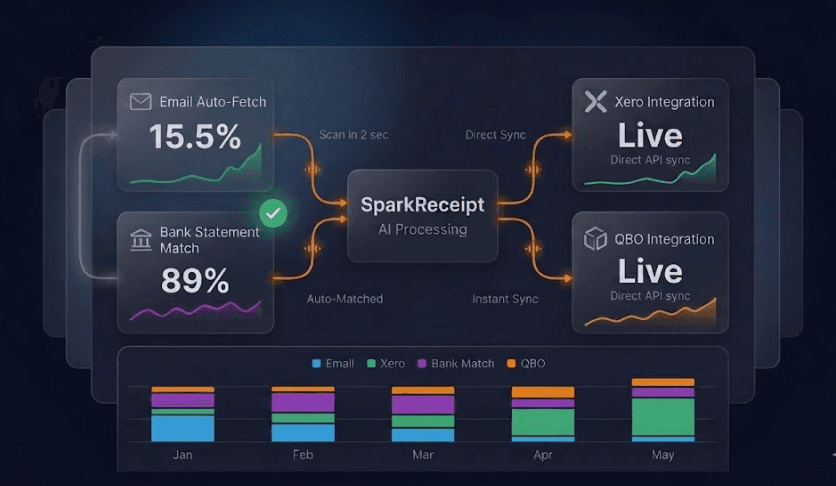
Every AI tool now hits 95-99% accuracy on receipt extraction. ChatGPT does. Claude does. Gemini does. SparkReceipt does. This number is the cost of entry, not the differentiating feature.
The real question isn't "can AI read this receipt?" The real question is: what happened to the $250 receipt you got at the gas station three weeks ago?
If you can't answer that question in five seconds, no amount of extraction accuracy matters. This is the workflow gap that AI chatbots don't address, and it's the reason small business owners who try ChatGPT for expenses eventually give up.
What 660,000 Small Business Receipts Actually Look Like
Before getting into the workflow argument, it's worth grounding this in real data. We analyzed 660,777 receipts captured by 9,667 US small businesses on SparkReceipt's platform. A few patterns matter for the rest of this piece.
Where small businesses actually shop
| Merchant | Receipts | Distinct businesses |
|---|---|---|
| Amazon | 18,027 | 797 |
| Walmart | 14,304 | 1,728 |
| The Home Depot | 10,062 | 1,038 |
| Lowe's | 7,380 | 819 |
| McDonald's | 5,253 | 716 |
| Circle K | 4,985 | 473 |
| Shell | 4,876 | 686 |
| Costco | 4,793 | 638 |
| Uber | 4,221 | 319 |
| Target | 3,808 | 762 |
These aren't enterprise procurement patterns. They're contractors at Home Depot and Lowe's, drivers at Shell and Circle K, field crews picking up lunch at McDonald's, real businesses buying supplies at Walmart and Costco. More than 1,700 distinct businesses log Walmart receipts. More than 1,000 log Home Depot. This is American small business, not abstract personas.
How those receipts arrive
| Capture method | Share of receipts |
|---|---|
| Mobile photo at point of purchase | 60.9% |
| Email inbox auto-fetch | 15.5% |
| Other automation (integrations, samples) | 16.2% |
| Manual web upload | 7.4% |
The implication: mobile capture is dominant, email auto-fetch is meaningful, and only 7.4% of small business receipt activity is manual web upload, the only mode a chatbot can plausibly handle.
How they're paid
| Payment method | Share |
|---|---|
| Credit card | 67.1% |
| Debit card | 21.8% |
| Cash | 6.4% |
| Bank transfer | 3.2% |
| Other | 1.6% |
89% of small business receipts are paid by card. That means bank statement reconciliation, matching every transaction against your captured receipts to find missing ones, applies to nearly nine in ten receipts in your stack. Any tool that doesn't do this is missing the most reliable safety net for catching what you forgot to capture.
Methodology note at the end of this article.
A Note on Which AI We Mean
When we say "AI assistants" in this piece, we mean the general-purpose chat tools small businesses are most likely to consider for expense workflows: ChatGPT, Claude, Gemini, Microsoft Copilot, and Perplexity. All five hit comparable receipt extraction accuracy. None of them, at the time of writing, offer the workflow infrastructure that purpose-built receipt management requires. The critique that follows applies to all of them, though we use ChatGPT as the running example because it's what most readers are evaluating.
The Actual Monthly Receipt Workflow for a Small Business
The data above describes the shape of the problem. The workflow is the lived experience.
A typical solopreneur or small business owner generates receipts from these sources every month:
| Receipt source | Typical monthly volume | Where it lives by default |
|---|---|---|
| Paper receipts (gas, lunch, supplies) | 8-25 | Wallet, glove box, jacket pocket |
| Email receipts (SaaS, Amazon, Stripe) | 15-40 | Buried in inbox |
| PDF invoices (vendors, subcontractors) | 3-10 | Email attachments |
| Credit card statements | 1-3 | Bank app or email |
| Foreign-currency receipts | 0-15 | Mixed across all of the above |
| Mileage logs | Daily entries | Often forgotten |
| Total monthly capture events | ~30-90 receipts | 5-7 separate inboxes |
Now compare what each tool does with this.
ChatGPT's workflow: You manually find the receipt. You upload it. You ask "extract this." It extracts. The chat ends. Tomorrow you have to do it again. The conversation history is fragmented across separate chats. There's no database. There's no search. There's no way to ask "show me all my March software receipts in EUR" because each receipt lived in a different chat that's now scrolled into history.
A purpose-built receipt system's workflow: Receipts arrive automatically and get processed in real time.
- Paper receipt: Snap with phone. Cropped, scanned, extracted, categorized in 2-3 seconds. Done.
- Email receipt: Inbox connection automatically fetches it. AI confirms it's a receipt (not a newsletter), extracts the data, files it. You approve with one tap when notified, or it auto-approves based on your rules.
- PDF invoice: Same email connection handles attachments. Same workflow.
- Foreign-currency receipt: Scanned the same way. Historical FX rate at the date of purchase locked in automatically.
- Bank statement: Upload monthly. The bank statement extractor matches every transaction to existing receipts and flags missing ones in orange. You can see exactly what you're missing.
This is the difference between a tool that can read a receipt and a system that handles a receipt's entire lifecycle. And it has to happen in real time, not in a batch at month-end.
The math from our platform data: AI chatbots plausibly handle 7.4% of how small business receipts actually arrive. The other 92.6% happen in places chatbots don't live -- on phones at the moment of purchase, in inboxes, in automated integrations, in bank statements.
Why "Real-Time" Is the Actual Differentiator (and Why ChatGPT Can't Do It)
The dominant failure mode in expense tracking is not extraction accuracy. It's batch processing.
Every freelancer who tries to "do receipts" once a month at tax time experiences the same five problems:
-
Faded thermal receipts. Shell, Circle K, McDonald's, Home Depot -- every one of those merchants in our top 10 prints on thermal paper. Thermal paper fades with exposure to light, heat, and humidity, and most receipts become significantly harder to read within a few months of purchase. ChatGPT can't read what isn't there. By tax time, half your gas station and credit card receipts can be illegible.
-
Forgotten purchases. Was that $77 charge a client lunch or personal? You no longer remember.
-
Missing receipts. Your bank statement shows charges with no documentation. Without bank-to-receipt matching, you'll never find what you forgot.
-
Categorization drift. A receipt processed one week looks identical to one processed three weeks later, but you classified them differently.
-
Tax season panic. 200+ receipts to process at once with no time to do it right.
ChatGPT can't fix any of these. Even at 100% extraction accuracy, ChatGPT requires you to do the manual labor of bringing each receipt to it. The receipt that already faded? Still faded. The Amazon order from week 2? Still buried in your inbox.
The design philosophy of a purpose-built tool is the opposite: capture every receipt the moment it arrives, when it's still readable, when you still remember the context, when fixing categorization takes 5 seconds.
This is structural. It's not a feature you can bolt onto a chatbot.
The 14 Things Real Receipt Management Requires
Beyond extraction, here's what an SMB actually needs every month, and how each tool handles it.
| # | Capability | AI Chatbots (ChatGPT, Claude, Gemini) | Purpose-Built Receipt System |
|---|---|---|---|
| 1 | OCR extraction accuracy | Reportedly ~95-98% on clean PDFs, drops on thermal/crumpled | +98% across all receipt types, including faded thermal |
| 2 | Real-time mobile capture with auto-cropping | Manual photo upload to chat | Native iOS/Android apps with auto-crop and edge detection |
| 3 | Email inbox auto-fetch | None, manual upload required | Direct Gmail/Outlook/IMAP connection, receipts pulled automatically as they arrive |
| 4 | AI inbox classification | None | Distinguishes receipts from newsletters/promos automatically |
| 5 | Approval workflow on incoming receipts | None | Review or auto-approve based on custom rules |
| 6 | Persistent searchable database | Each chat is isolated, no cross-receipt search | Searchable by vendor, date, amount, category, or text in image |
| 7 | Bank statement extraction + receipt matching | None | Upload bank statement, AI matches every transaction to existing receipts, flags missing ones |
| 8 | 190 currencies with historical FX | Generic conversion at chat time | Locked-in FX rate at receipt date, audit-trail compliant |
| 9 | Local tax rule detection (VAT, GST, HST, PST) | Generic responses | Country-specific tax rule applied automatically |
| 10 | QuickBooks Online native sync | None, manual export to CSV | Direct API sync of expenses + receipt images |
| 11 | Accountant collaboration | None, share full account or screenshot | Add your accountant as a team seat; they see everything in your account |
| 12 | Multi-business / linked accounts | One account, manual separation | Unlimited linked accounts, separate per business |
| 13 | Audit-defensible storage | Mutable chat history, no immutable receipt record | 10-year retention, encrypted, EU GDPR-compliant data centers |
| 14 | One-click tax reports | "Build me a report" returns text, not export | PDF/Excel/CSV/ZIP exports with category breakdowns and original receipt links |
The honest read: AI chatbots win zero items clearly. Purpose-built tools win on items 2-14. Items 2-14 are where receipts actually live and die.
The "Real-Time Approval" Workflow That No AI Chatbot Offers
This is worth its own section because it's the operational hinge of doing receipts well.
When an email receipt arrives in your inbox, here's what happens with a purpose-built system:
- The email connector detects it within minutes
- AI classifies it as a receipt (not a newsletter, not a shipping notification)
- Data is extracted: vendor, amount, date, tax, currency, line items
- Receipt is queued for your review on mobile or web
- You see a notification, review and approve in about 5 seconds
- OR if you've set up custom rules ("Amazon -> personal account, AWS -> business"), it auto-approves and files itself
The same flow happens for paper receipts via the mobile app: snap -> AI extraction -> 5-second review -> done.
Why this matters: the cognitive load of expense tracking lives in batches. 5 seconds of review at the moment a receipt arrives is trivial. 5 seconds x 50 receipts at month-end is 4 minutes, but the context-switching and re-remembering costs are 30 minutes. The real-time workflow eliminates the worst part of the job.
No general-purpose AI assistant -- ChatGPT, Claude, Gemini, Copilot, Perplexity -- can do this. They have no continuous connection to your inbox, no notification system, no native mobile capture, and no approval queue. Each receipt requires you to bring it to the AI. A purpose-built tool brings the receipts to you.
Where ChatGPT Genuinely Is Enough
ChatGPT is a fine choice if:
- You have 5 or fewer receipts per month
- You have no accountant
- You file your own taxes via a simple consumer-facing tool
- You're a single-currency, single-country operation
- You don't need historical search
- You're willing to do month-end batch processing
- You don't carry the tax-deduction risk of missing receipts ($2,000-$5,000 annually for typical freelancers)
For everyone else -- anyone running an actual business with recurring receipts, an accountant, multiple currencies, or audit exposure -- ChatGPT is the wrong tool. Not because it's a bad AI. Because it's not built for this job.
This is structurally similar to using a chatbot for spreadsheets vs. using Excel. A chatbot can do spreadsheet operations. Excel is built for them. The differentiator isn't intelligence, it's purpose.
What It Costs You to Ignore the Workflow Gap
Industry surveys consistently estimate that freelancers and small business owners lose $2,000-$5,000 per year in unclaimed tax deductions because receipts go missing or fade before tax time. The math on a typical solopreneur lines up:
- 30-50 receipts per month = 360-600 receipts per year
- Industry estimates suggest 15-30% of paper receipts are lost or unreadable by tax time
- Average small business expense per receipt: $35-$80
- Tax bracket average: 25-30%
- Missing deductions per year: $945 - $4,800
SparkReceipt starts at $69.00 per year for a small business, billed annually. ChatGPT Plus runs $240 per year per user. The cheaper option, by an order of magnitude, is the one actually designed for this workflow -- and the one that captures the receipts in the first place.
Frequently Asked Questions
Can ChatGPT actually scan receipts accurately?
Yes, for clean PDF invoices, ChatGPT's extraction accuracy is comparable to purpose-built receipt scanners. The accuracy gap appears with phone-shot paper receipts, faded thermal paper, and crumpled receipts, where purpose-built tools maintain ~95% accuracy and ChatGPT drops noticeably. But accuracy is only step 1 of the workflow. Extraction without storage, search, categorization, and accounting sync is incomplete.
Why isn't 99% accuracy enough?
99% accuracy assumes you've already brought the receipt to the AI. The actual problem with expense tracking is getting the receipt captured at all, before it fades, gets lost, or is forgotten. Real-time capture matters more than high-accuracy extraction.
Can ChatGPT save my receipts for tax time?
ChatGPT does not provide persistent receipt storage. Each conversation is independent, and there's no searchable database of past receipts. You cannot ask ChatGPT "show me all my March software expenses" because it has no record across chats. Purpose-built tools maintain receipts for 7-10+ years in encrypted cloud storage.
Can ChatGPT match receipts to my bank statement?
No. ChatGPT cannot ingest bank statement PDFs and automatically reconcile them against your receipts. This requires a tool with both bank statement parsing and a persistent receipt database.
Can my accountant access my ChatGPT receipts?
No. To share receipts processed via ChatGPT, you'd need to share your ChatGPT account login (a security violation) or manually export each receipt's chat. Purpose-built tools let you add your accountant as a team seat so they see every receipt, expense, and report inside your account -- no separate subscription, no credential sharing, no export juggling.
Will ChatGPT eventually replace receipt scanning apps?
ChatGPT's underlying AI capability is already comparable to purpose-built scanners on extraction. What it lacks, and likely will continue to lack, is the workflow infrastructure: native mobile capture, email inbox connections, persistent databases, accountant access, accounting software sync, audit-defensible storage. These are product surfaces, not AI capabilities. A chatbot interface is structurally different from a receipt management system.
Can I use Claude for receipt management?
Claude (made by Anthropic) has receipt extraction accuracy comparable to ChatGPT. Both use vision-capable language models that read receipts well. The same workflow limitations apply: Claude has no native mobile receipt capture app, no email inbox auto-fetch, no persistent searchable receipt database, no QuickBooks/Xero sync, and no built-in way for your accountant to collaborate on your receipts. Claude is excellent for one-off receipt questions; it is not a receipt management system.
What about Gemini, Copilot, or Perplexity for tracking expenses?
All three have similar capabilities and limitations. Gemini (Google) integrates with Gmail, which sounds promising, but it doesn't have a structured workflow for classifying receipts, approving them, syncing to accounting software, or matching against bank statements. Copilot (Microsoft) is positioned as a productivity assistant inside Microsoft 365; it can summarize a receipt but cannot manage them as a system. Perplexity is research-focused and not designed for transactional document workflows. The structural critique in this article -- "extraction is not management" -- applies equally to all of them.
What's the cheapest way to track business receipts properly?
SparkReceipt offers a 7-day free trial with every Elite feature so you can see the workflow before you pay. Plans start at $129.00 per year for a small business, billed annually. ChatGPT Plus is $240 per year per user and only provides extraction -- no persistent storage, no inbox auto-fetch, no bank statement matching. The purpose-built tool is also the cheaper one for any business running a real receipt workflow.
The Verdict
ChatGPT, Claude, and Gemini are powerful AIs. SparkReceipt is a receipt management system that uses AI inside it.
These are categorically different tools, and the difference compounds every month you operate a business. Extraction accuracy at 95-99% is now table stakes. Every modern receipt tool meets this bar. The differentiator is the system around the extraction:
- Real-time capture before receipts fade
- Email inbox auto-fetching with intelligent classification
- Persistent searchable storage
- Bank statement matching to flag missing receipts
- Multi-currency with historical FX
- Native accounting software sync
- Accountant collaboration inside the same account
- Audit-defensible compliance
If you only need to extract data from one receipt today, ChatGPT works fine. If you need to manage receipts as an ongoing process across a year of business operations, you need a system designed for that job.
99% accuracy is the floor. The ceiling is whether the receipt makes it into your books at all, and whether it's there next March when the tax authority asks. For the broader playbook, see our guide on receipt management and the best receipt scanner apps.
Methodology Note
Data in this article is drawn from analysis of receipts processed through SparkReceipt's platform during the 12 months preceding May 2026.
- Total platform receipts: ~3.74 million across all geographies. Documents tagged as invoices (~12% of activity) are excluded from the receipt-specific figures throughout.
- US-specific dataset: 660,777 receipts captured by 9,667 US small businesses (filtered to billing_kind = 'receipt').
- Top merchant analysis: Receipts ranked by volume across 5+ distinct organizations to filter out single-business anomalies.
- Capture method classification: Inferred from receipt input source -- mobile camera uploads classified as in-store / point-of-purchase; email-forwarded receipts classified as online; web uploads marked ambiguous. Approximately 7.4% of receipts fall into the ambiguous "web upload" category.
- Payment method data: Available on 18.3% of US receipts (~127,000 documents). Sample is meaningful but not exhaustive; figures presented as percentages within receipts that have payment method assigned.
- Analysis date: May 2026. Patterns are descriptive of SparkReceipt platform users; they do not necessarily generalize to all US small businesses, but the user base is broad enough to indicate directional truth about how SMBs capture and pay for purchases.