DocuClipper Alternative: The Short Answer
- You convert statements for clients, lenders or investigations. DocuClipper is built for that work. It handles bank, credit card and brokerage statements, checks and tax forms, exports Web Connect (.qbo), IIF, OFX, QFX and QIF files for QuickBooks Desktop and Quicken-style imports, and adds cash-flow analysis and fraud detection on its Business plan.
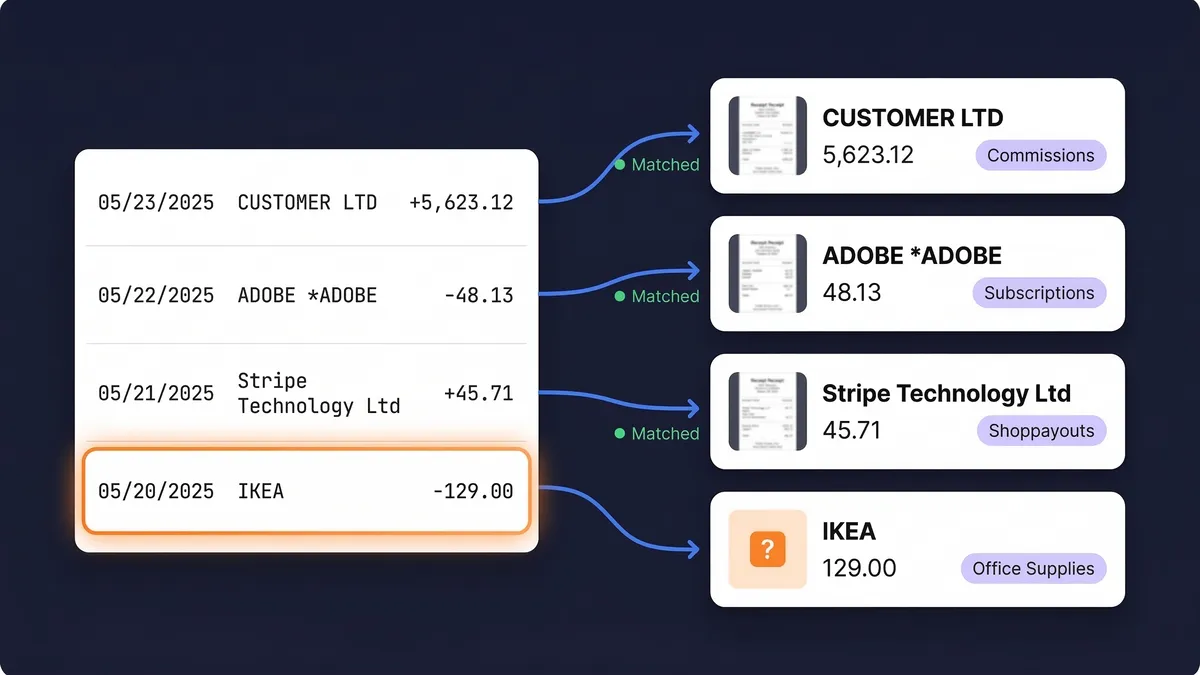
- You keep the books for your own business. The statement is only half of the job. The other half is the receipt behind each line, and that is where SparkReceipt starts: it captures receipts from your phone and inbox, reads your statements, and shows which bank lines still have no receipt.
- You need both. A bookkeeper can run DocuClipper for client conversions while each small-business client keeps receipts in SparkReceipt. Clients invite their bookkeeper at no cost, and the bookkeeper never takes one of their paid seats.
| DocuClipper | SparkReceipt |
|---|
| Built for | Accountants, bookkeepers, lenders, forensic accountants | Small business owners, freelancers and the accountant who works with them |
| Price | From $20/month billed annually ($29 monthly) for 60 pages | Pro from $5.75/month billed annually; Elite $10.75/month billed annually |
| What the price buys | Pages: every page of every PDF counts, so a 12-page statement uses 12 | Pro: 50 documents a month. Elite: unlimited documents (fair use). Statement lines use the monthly credits in the plan |
| Users | Unlimited, sharing the plan's pages | 1 included, more at a per-user rate; your accountant joins free |
| Documents | Bank, credit card and brokerage statements, invoices, receipts, checks, tax forms | Receipts, invoices, bank and credit card statements (PDF, CSV, Excel) |
| Documents come in by | Upload, email forwarding, Gmail, watched cloud folders, mobile, API | Mobile app, connected Gmail, Outlook or IMAP inbox (including past emails), upload |
| Matching | From an invoice, bill or receipt to bank transactions, with a suggested match when the project is connected to QuickBooks or Xero | From each bank line to its receipt, with unmatched lines flagged |
| Exports | Excel, CSV, Web Connect (.qbo), IIF, OFX, QFX, QIF; QuickBooks, Xero, Sage, NetSuite, Dynamics 365 | PDF, Excel, CSV and ZIP reports; QuickBooks Online and Xero; Zapier, Make, Pabbly, webhooks and API |
| Free trial | 14 days, up to 120 pages | 7 days, full access |
DocuClipper Pricing in 2026
DocuClipper charges by the page, with three plans and three page levels on each. All prices are in USD:
| Plan | Pages a month | Billed monthly | Billed annually |
|---|
| Starter | 60 | $29/month | $20/month |
| Starter | 120 | $39/month | $29/month |
| Starter | 300 | $79/month | $55/month |
| Business | 640 | $159/month | $111/month |
| Enterprise | 2,000 | $400/month | $360/month |
Business also comes in 1,000 and 1,500 pages and Enterprise in 3,000 and 5,000, and custom volumes go through DocuClipper's sales team. A few details matter when you compare DocuClipper cost with a flat plan:
- A page is a PDF page. A one-page receipt uses 1 page and a 12-page bank statement uses 12. Pages that fail to convert don't count.
- Monthly pages don't roll over. Unused pages on a monthly plan are gone at the end of the month. Annual plans hand you the whole year's pages up front, which helps if your volume comes in bursts.
- Users are free and share the pages. Adding a teammate costs nothing, but everyone draws from the same page allowance.
- Every plan converts and categorizes. Starter includes bank statements, invoices, receipts and CSVs to QuickBooks, Xero or Excel, automatic transaction categorization and API access. Business adds cash-flow analysis, fraud detection, a dedicated processing queue and phone support. Enterprise adds single sign-on, audit logs and an SLA.
- No contracts. You can cancel from your account settings at any time.
DocuClipper Cost vs SparkReceipt: A Worked Example
Take a sole proprietor with one checking account and one business credit card. Each statement runs to 4 pages, and the month brings 40 receipts and supplier invoices of one page each.
| What the month uses | List price |
|---|
| DocuClipper | 8 statement pages + 40 document pages = 48 of 60 pages | Starter: $20/month billed annually, or $29 billed monthly |
| SparkReceipt Pro | 40 of 50 documents; the statement lines use the monthly credits in the plan | $5.75/month billed annually |
| SparkReceipt Elite | Unlimited documents; the statement lines use the monthly credits in the plan | $10.75/month billed annually |
The two tools finish the month in different places. DocuClipper hands you a spreadsheet or a QuickBooks import of what the documents say. SparkReceipt hands you the month's transactions with each one linked to its receipt, and a short list of lines that still need one. The quickest way to see the difference is to try it free for 7 days on one month of your own statements.
Catching up on a whole year at once is where page pricing shows. Twelve months of the same paperwork comes to about 576 pages: most of an annual Starter plan's 720 pages, or a Business plan for that month. On SparkReceipt Elite the number of documents doesn't change the price (the statement lines still use credits), and email history extraction finds last year's receipts in your inbox so you don't have to upload them one by one.
How DocuClipper and SparkReceipt Differ
DocuClipper is a converter first. Its job is to turn a stack of PDFs into clean, structured data: every transaction on a statement, every field on an invoice, every holding on a brokerage statement. Its reconciliation check reads the opening and closing balance printed on a statement and confirms the extracted credits and debits add up to the difference, so you know nothing was dropped in conversion.
DocuClipper matches from the document side. You open an invoice, bill or receipt and match it to bank transactions in the same project. When the project is connected to QuickBooks or Xero, DocuClipper suggests the best match with a confidence score; without a connection you filter and pick transactions by hand.
SparkReceipt starts from the bank line. Upload a statement as PDF, CSV or Excel and the bank statement extractor reads every line, then looks for the receipt or invoice behind it by amount, date and merchant. The Transaction Manager shows how many lines are reconciled, how many need review and how many have no receipt yet, so month-end is a short list to finish.
SparkReceipt collects the receipts too. A converter can only read what you give it. SparkReceipt pulls receipts out of your connected inbox as they arrive, scans paper receipts with the receipt scanner in the mobile app, and goes back through past emails to find the receipts a statement line is missing.
When SparkReceipt Is the Better DocuClipper Alternative
- Every bank line matched to a receipt. Matching runs across the whole statement, and unmatched lines are flagged, so the gaps show up before your accountant asks. (How matching works)
- Receipts from your inbox, including old ones. Connect Gmail, Outlook or any IMAP inbox and new receipts come in on their own. Email history extraction searches past emails back to a date you choose, with the first 10,000 historical emails included. (Guide)
- A price that doesn't count pages. Pro covers 50 documents a month and Elite is unlimited under fair use. Statement extraction uses the monthly credits in your plan. (How statement credits work)
- Income as well as expenses. SparkReceipt tells a sales invoice from a purchase receipt and files each one on the right side of the books.
- Your accountant joins free. Invite your accountant or bookkeeper at no cost on every plan. Extra teammates are billed per user.
- Exports to Excel or CSV when you need them. Extracted statement transactions export straight to Excel or CSV, and reports export as PDF, Excel, CSV or ZIP. See how to convert a bank statement to Excel.
- Credit card statements too. Card statements go through the same extraction and matching, which helps when most business spending goes on one card.
- 190 currencies, each converted at the rate on the purchase date.
DocuClipper Review: What It Does Well
DocuClipper is a strong converter. It covers more document types than we do, including brokerage statements, checks and tax forms, and it exports the Web Connect (.qbo), IIF, OFX, QFX and QIF files that QuickBooks Desktop and Quicken-style imports expect. SparkReceipt doesn't produce those files. Unlimited users suit a firm where several staff convert documents for many clients, and the Business plan's cash-flow analysis and fraud detection are built for lenders and forensic accountants. DocuClipper's own site shows a 4.7 out of 5 rating from more than 120 G2 reviews.
If your work is converting other people's statements at volume, DocuClipper is likely the better fit. If you are keeping the records for your own business, or you want clients to arrive with receipts already matched to their bank lines, SparkReceipt covers the part a converter leaves to you.
Moving to a DocuClipper Alternative Without Losing Records
The IRS generally expects you to keep the records that support a tax return for at least 3 years after you file it, and longer in some cases (see how long to keep receipts). Changing tools doesn't change that. Before you cancel anything:
- Keep what you already converted. DocuClipper's output lives in your spreadsheets and your accounting software, so it stays where it is.
- Upload your statements and receipts to SparkReceipt. Mass upload takes up to 100 documents at once, and email history extraction brings in the receipts still sitting in your inbox.
- Leave your ledger alone. Anything already in QuickBooks Online or Xero stays there, and new documents sync across with the receipt image attached.
DocuClipper prices, plans and features come from DocuClipper's own pricing page, its reconciliation documentation and its invoice-to-bank-transaction matching guide, as of September 2026 (USD). Prices and features change, so check before you buy. SparkReceipt is not affiliated with or endorsed by DocuClipper.