Extract Bank Statements and Match Every Transaction to a Receipt
AI-Powered Bank Statement Extractor for Small Businesses
Bank statements tell you what you spent. Receipts prove why. SparkReceipt is the only bank statement extractor that does both — upload your PDF, CSV, or Excel bank statement, and AI extracts every transaction automatically. Then it matches each one to the right receipt or invoice from your archive. Unmatched transactions are flagged so you know exactly which receipts are missing.





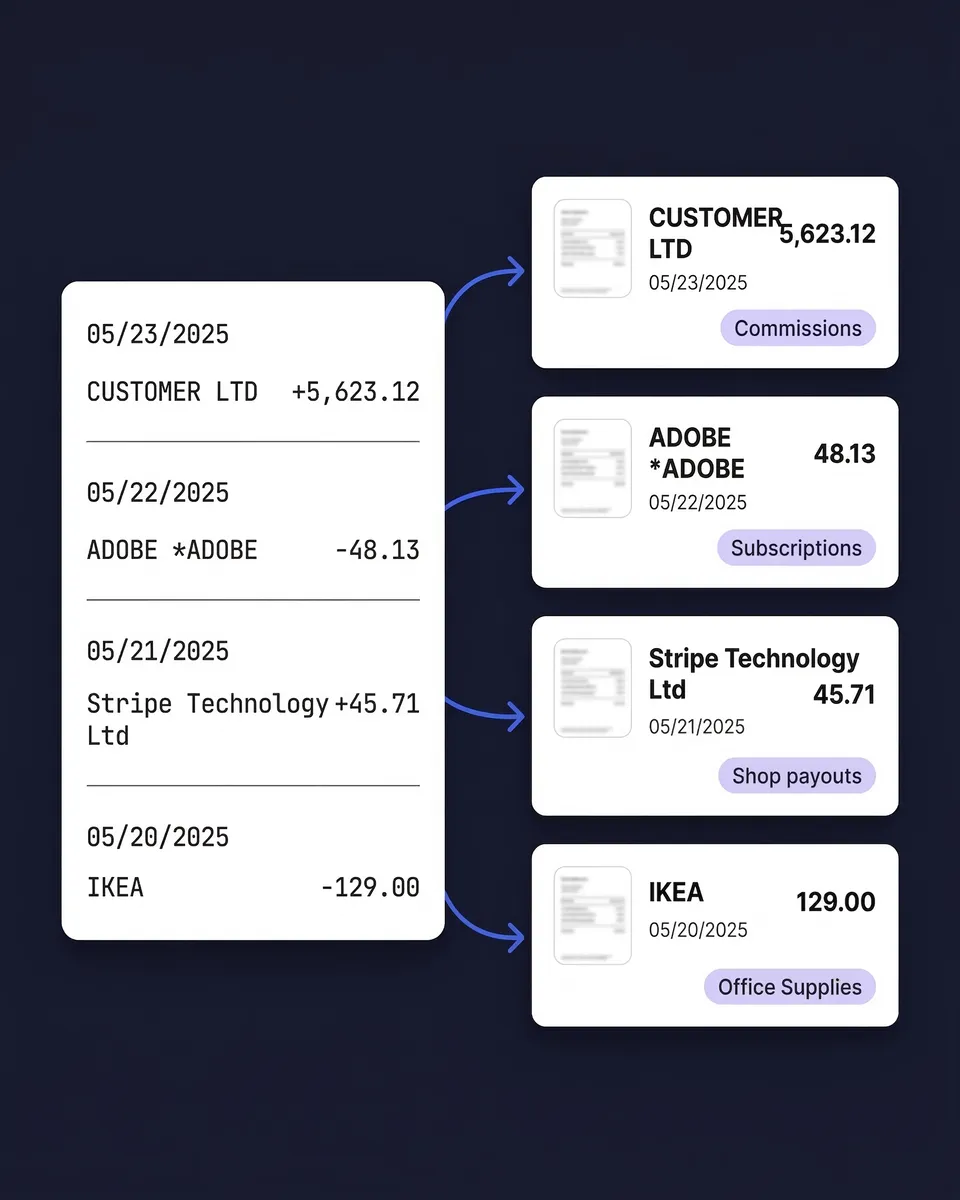
Bank Statement Reconciliation
See what changes when AI handles your bank statements

Without SparkReceipt
- Manually typing transaction details from PDF statements into spreadsheets
- Searching through email, folders, and shoeboxes for matching receipts
- Spending hours on month-end close or tax prep reconciliation
- Missing receipts that lead to incomplete records and compliance risks
- Paying $39–$239/month for tools that only extract — not match

With SparkReceipt
- Upload a PDF, CSV, or Excel statement — transactions extracted in seconds
- AI automatically matches each transaction to the right receipt or invoice
- Unmatched transactions flagged so you know exactly what's missing
- Export reconciled data to QuickBooks, CSV, or Excel in one click
- Simple, transparent pricing — $16.65/month, billed annually
How Bank Statement Extraction and Matching Works
Three steps from raw bank statement to fully reconciled records.
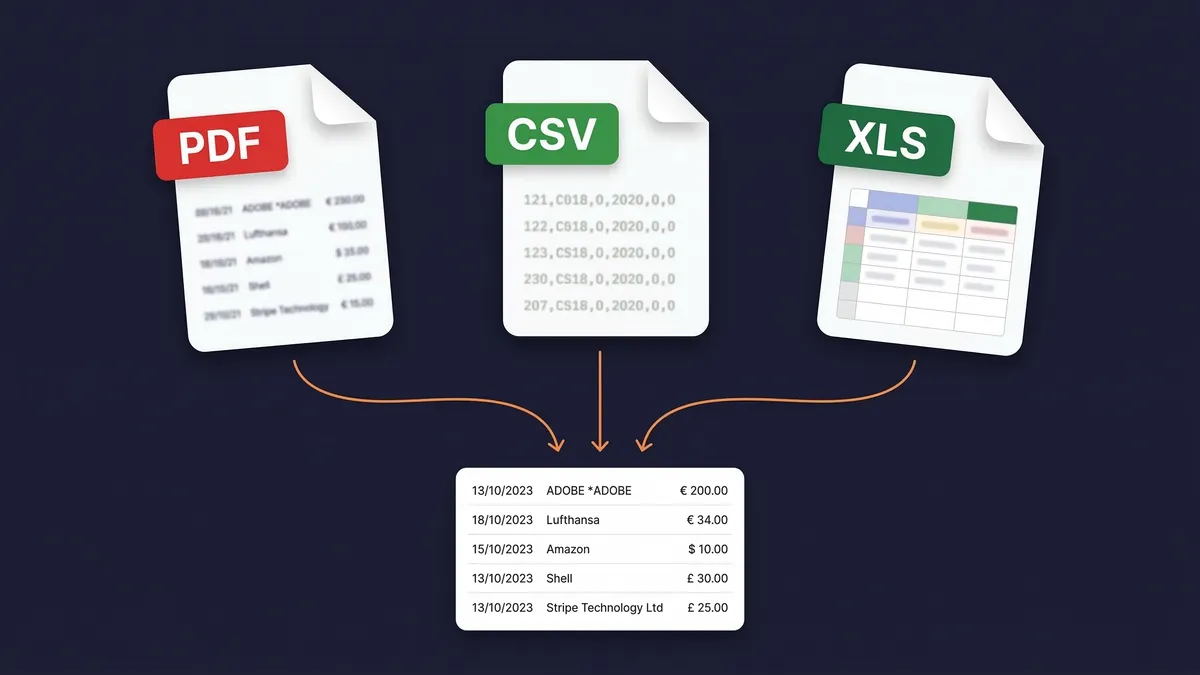
Upload Bank or Credit Card Statements in Any Format
Upload your bank or credit card statement as a PDF, CSV, or Excel file. SparkReceipt handles digital PDFs, scanned paper statements, and exported spreadsheets from any bank worldwide. The AI-powered OCR reads statements in almost any language and processes 150+ currencies.
Most bank statement extractors only accept PDFs. SparkReceipt also accepts the CSV and Excel files your bank already provides — meaning zero OCR uncertainty for digital exports. Upload one statement or batch upload an entire year.
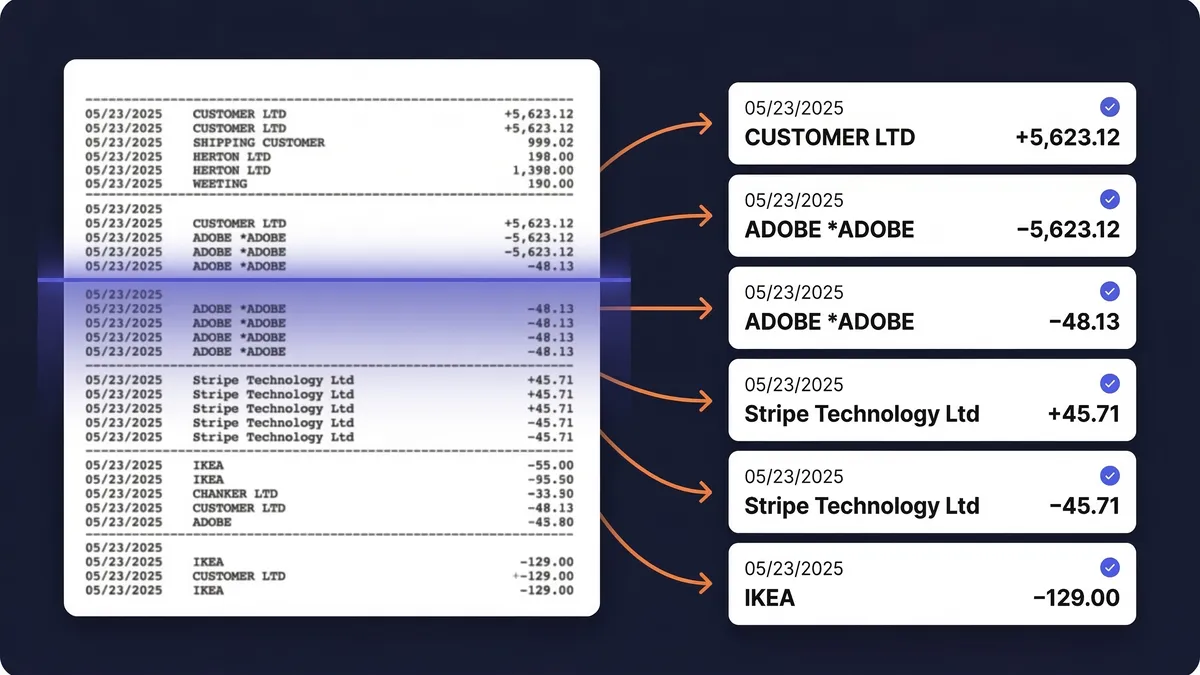
AI Extracts Every Transaction Automatically
SparkReceipt’s AI reads your bank statement and extracts every transaction — dates, amounts, payees, descriptions, and running balances. Each transaction becomes a structured, searchable record. No manual data entry. No copy-pasting into spreadsheets.
The extraction works with statements from any bank worldwide. Whether it’s a simple checking account statement or a detailed credit card statement with dozens of line items, the AI handles the formatting differences automatically.
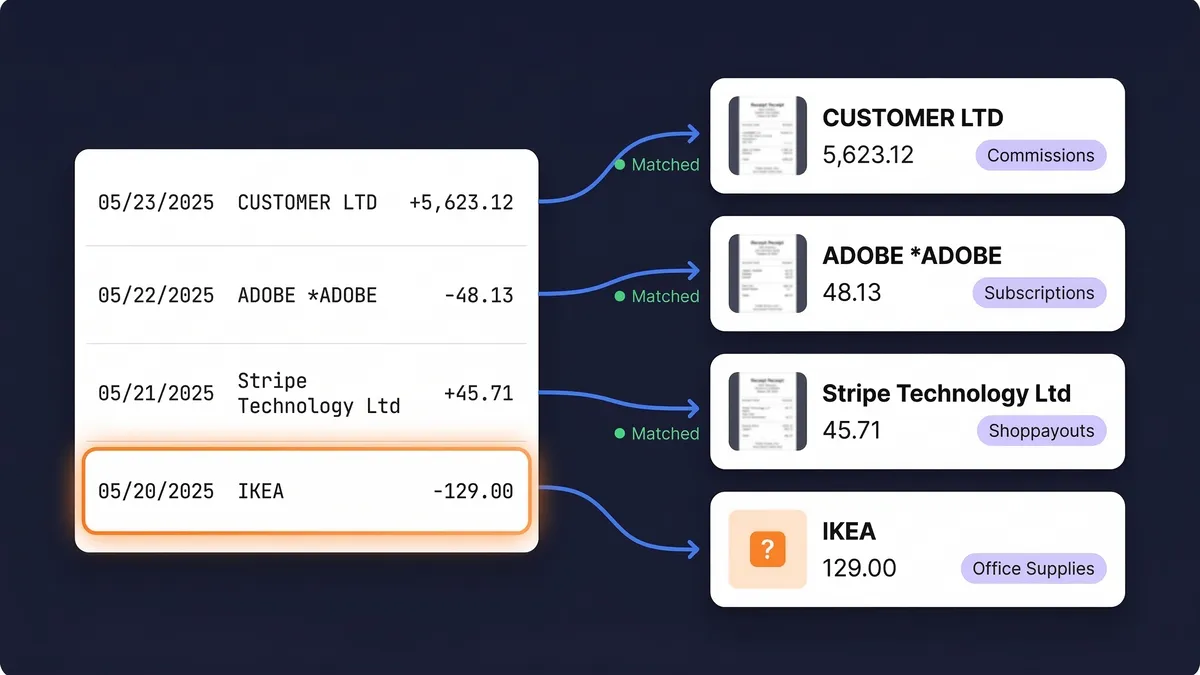
Transactions Matched to Receipts and Invoices Automatically
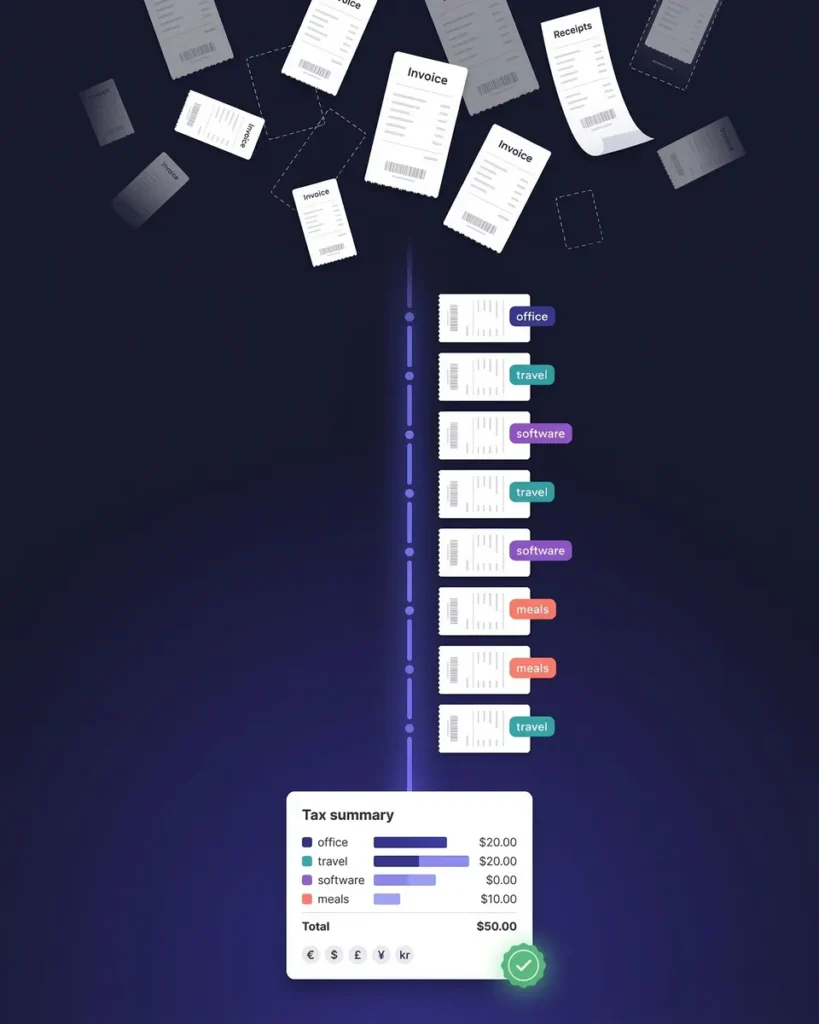
This is what makes SparkReceipt different from every other bank statement extractor. After extraction, the AI compares each transaction against every receipt and invoice in your SparkReceipt archive — matching by amount, date, and vendor name.
Matched transactions are linked to their source documents with a single click to view the original receipt. Unmatched transactions are flagged with an orange indicator so you can see exactly which receipts are missing. Upload the missing receipt, and it’s matched instantly. Your accountant or bookkeeper can review everything when invited to your account.
Not Just Extraction — Full Receipt Matching
The feature no other bank statement extractor offers
DocuClipper extracts bank statements. Parsio extracts bank statements. CapyParse extracts bank statements. None of them match transactions to receipts.
SparkReceipt does both. Upload your bank statement and your receipts — the AI connects them automatically. Every matched transaction links directly to its proof of purchase. Every unmatched transaction tells you exactly what’s missing from your records.
This is the difference between a converter tool and a complete reconciliation solution. QuickBooks community forums are full of users asking how to match bank transactions to receipts. With SparkReceipt, it happens automatically.

Upload PDF, CSV, or Excel — Any Bank, Any Format
The most flexible bank statement extractor on the market
Most bank statement extractors only accept PDF files. That means OCR processing, potential errors, and no support for the CSV or Excel exports your bank already provides.
SparkReceipt accepts all three formats. Upload a scanned PDF statement and the AI-powered OCR extracts every transaction. Upload a CSV or Excel export from your bank’s website and get perfect, instant extraction — no OCR needed. Upload credit card statements, savings account statements, or business account statements.
The OCR works in almost any language, so statements from international banks are processed just as accurately as local ones. Whether your bank is in Helsinki, Houston, or Hong Kong, your statements are supported from day one.
Extract Bank Statements in 150+ Currencies
Built for international businesses and freelancers
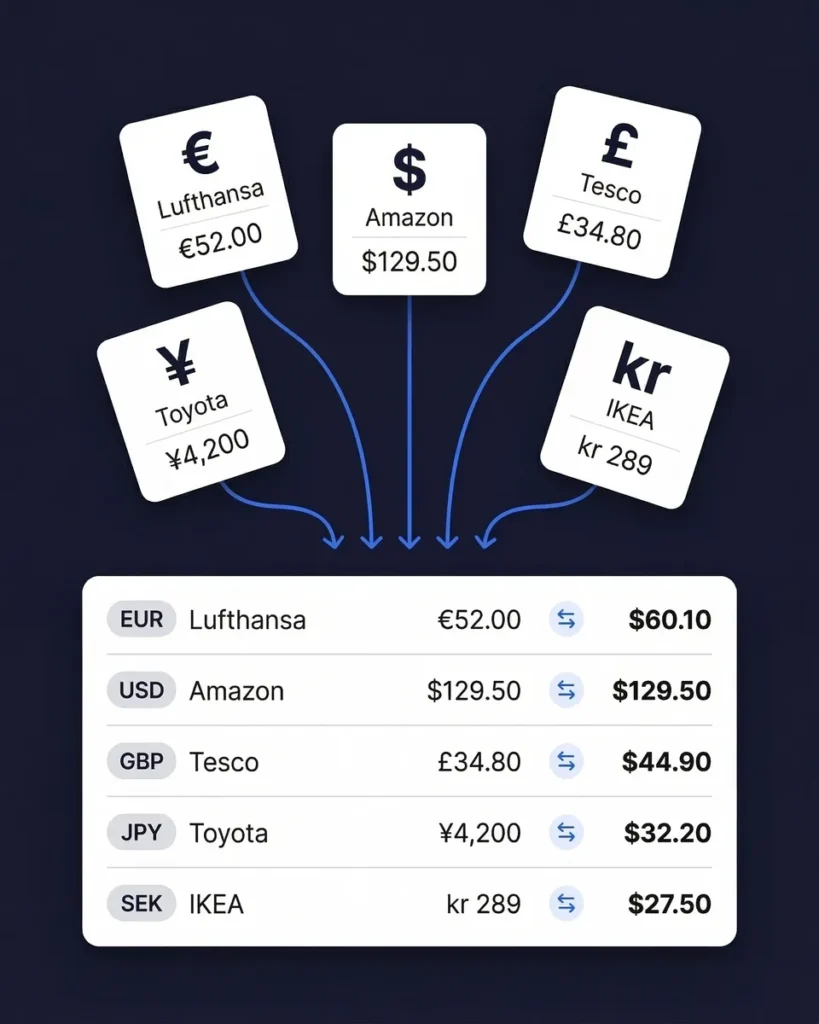
If your business operates across borders — billing in euros, receiving payments in pounds, paying suppliers in yen — you need a bank statement extractor that handles multiple currencies natively.
SparkReceipt processes statements in over 150 currencies. Each transaction is extracted with its original currency intact. Exchange rates are applied using the transaction date for accurate reporting in your home currency. Upload statements from different banks in different countries and see everything unified in one view.
This is particularly valuable for income tracking across international clients and for expense tracking with overseas suppliers.
Bank Statement Extraction From $199/Year
A fraction of the cost of DocuClipper, Parsio, or Dext
DocuClipper starts at $39/month for 200 pages. Parsio starts at $49/month. Dext charges $239+/month for practice plans. All of them extract bank statements — but none of them match transactions to receipts.
SparkReceipt gives you bank statement extraction, receipt-to-transaction matching, AI receipt scanning, automatic categorization, expense reports, QuickBooks integration, and invite-anyone team access — for $16.65/month, billed annually.
Simple, transparent pricing. No hidden fees, no surprise charges. Try the Elite plan with a 7-day free trial.

There's no risk in trying it
Try it for free for 7 days
Elite
For you, your accountant, and your partner.
$199.98/year
- Unlimited documents
- Automatic email receipt fetching (Gmail, Outlook, IMAP)
- Mass upload (up to 100 documents at once)
- Upload documents from anywhere
- Bank statement extraction
- Line-item categorization
- Expense reports (PDF, Excel, CSV)
- AI Automations
- Integrations (QuickBooks Online, Zapier, Make)
- Invite your accountant and partner
- Unlimited linked sub-accounts
7-Day Free Trial
- You Included
- Your accountant Included
- Your partner / co-founder / team member Included
Each additional user: $58/year
What Freelancers and Business Owners Say
Join thousands who stopped reconciling bank statements by hand
SparkReceipt is one of the very few software purchased that I have made that exceeded my expectations. It does much more than keeps copies of your business receipts, it provides great reports, with easy edit options - it is going to save me a lot of work when I do my annual tax returns - a great product.
SparkReceipt is an excellent alternative to full-fledged accounting software, saving you time and money!
I needed a solution to organize and process my personal and business receipts. I'm thrilled I found SparkReceipt. It saves me a lot of time!
Bank Statement Extractor FAQ
What is a bank statement extractor?
A bank statement extractor is a tool that reads your bank or credit card statements and automatically pulls out every transaction — dates, amounts, payee names, descriptions, and balances — into structured, searchable data. Instead of manually typing transactions into a spreadsheet, you upload the statement file and get organized data in seconds. SparkReceipt goes further than most extractors by also matching each extracted transaction to your receipts and invoices automatically.
What file formats can I upload?
SparkReceipt accepts bank and credit card statements in PDF, CSV, and Excel (XLSX) formats. This is more flexible than most competitors, which only handle PDFs. If your bank provides a CSV or Excel export from online banking, you can upload that directly for instant, perfect extraction — no OCR processing needed. For paper statements, scan them to PDF and upload the scanned file. The AI-powered OCR handles both digital and scanned PDFs.
How does receipt-to-transaction matching work?
After SparkReceipt extracts transactions from your bank statement, the AI compares each transaction against every receipt and invoice stored in your account. It matches based on amount, date, and vendor name. Matched transactions are linked directly to the source document — one click to view the original receipt. Unmatched transactions are flagged with an orange indicator, so you know exactly which receipts are missing. Upload the missing receipt later and it’s matched automatically.
How accurate is the extraction?
SparkReceipt’s AI delivers high accuracy across all supported formats. For CSV and Excel uploads, extraction is essentially perfect since the data is already structured. For PDF statements, the AI-powered OCR handles both digital PDFs (near-perfect accuracy) and scanned paper statements (which depend on scan quality). You can always review, edit, or add notes to any extracted transaction for complete control.
Does it work with statements from any bank?
Yes. SparkReceipt processes bank and credit card statements from financial institutions worldwide. The AI adapts to different statement layouts and formats automatically — there are no bank-specific templates to configure. The OCR works in almost any language, so statements from international banks are processed just as accurately as local ones. Over 150 currencies are supported with automatic exchange rate conversion.
Can I extract credit card statements too?
Yes. SparkReceipt handles both bank statements and credit card statements in the same way. Upload your credit card statement as a PDF, CSV, or Excel file, and the AI extracts every transaction. Credit card transactions are then matched to receipts just like bank transactions. This is particularly useful for businesses that use credit cards for most purchases — you can quickly identify which card charges have receipts attached and which don’t.
How is SparkReceipt different from DocuClipper or other bank statement converters?
Most bank statement extractors — including DocuClipper ($39+/mo), Parsio ($49+/mo), and CapyParse — only convert your statement into a spreadsheet. They extract data but don’t connect it to anything. SparkReceipt extracts your bank statement AND automatically matches each transaction to receipts and invoices in your archive. You also get AI receipt scanning, automatic categorization, expense reports, and QuickBooks integration — for $16.65/month, billed annually.
How much does SparkReceipt cost for bank statement extraction?
SparkReceipt’s Elite plan is $16.65/month, billed annually ($199/year), with a 7-day free trial. Compare this to DocuClipper at $39+/month, Parsio at $49+/month, and Dext at $239+/month for practice plans. SparkReceipt offers more features, including receipt matching that no other extractor provides. See pricing →
Can my accountant access my extracted bank data?
Yes. Invite your accountant or bookkeeper to your account at any time so they can view your extracted transactions, matched receipts, categorized expenses, and reports directly within the app. This makes month-end reconciliation and tax preparation significantly faster — your accountant sees organized, matched data instead of boxes of paper.
Can I export extracted transactions to QuickBooks?
Yes. SparkReceipt integrates with QuickBooks Online for seamless data transfer. You can also export your extracted and matched transaction data as CSV, Excel, or PDF reports. Whether you need the data in your accounting software, in a spreadsheet for your accountant, or as a formatted report for tax filing, SparkReceipt supports your workflow.
Stop Typing Transactions Into Spreadsheets. Upload and Match Automatically.
Start with a 7-day free trial. First statement extracted in 2 minutes.
Every hour you spend manually reconciling bank statements is an hour you could spend on your actual business. SparkReceipt’s AI extracts every transaction and matches it to the right receipt — so you always know exactly what’s accounted for and what’s missing.
Join thousands of freelancers and small business owners who’ve replaced manual data entry with AI-powered bank statement extraction. Simple, transparent pricing with no hidden fees.