Skip to content

AI Bookkeeping That Shows You Every Change

The AI reads every receipt and bank line, the Ledger turns them into double-entry books, and SparkAgent answers questions about them and prepares the fixes for you to approve.

Ask why an account holds what it holds and get the documents behind it. Ask what is left before the month can close. Ask for an accrual and get a balanced draft. Fixes, month closes and recurring entries wait for your yes.

7-day free trial. Cancel any time.

Business Owners in 175 Countries Trust SparkReceipt

Tracy DugganRobert ConnollyRafael RoaFrédéric ThériaultPierce Mooney
4.8on the App Store · 4.6 on Google Play · 2,700+ ratings
4,620,044Receipts Processed
38,283Businesses Worldwide
190Currencies Handled
175Countries

Bookkeeping by Hand vs. AI Bookkeeping in SparkReceipt

The same books, with the AI doing the reading, recording and digging

Business owner typing receipts into a spreadsheet ledger

By hand

  • Every receipt typed into the books, with the tax worked out by hand
  • An hour of scrolling to find out why one account looks wrong
  • Accruals and depreciation kept in a separate spreadsheet
  • The month stays open while you work out what is missing
  • Emails back and forth to explain why your figures differ from the accountant's
Business owner asking SparkAgent about a balance in the SparkReceipt Ledger

With SparkReceipt

  • Each document read by AI and recorded as balanced journal entries
  • Ask SparkAgent why a balance moved and see the documents behind it
  • Journal entries drafted from a sentence, using the Ledger's templates
  • SparkAgent lists what each month still waits on before it closes
  • A memo for your accountant with every difference explained

How AI Bookkeeping Works in SparkReceipt

1

The AI Reads Every Document

Scan receipts, forward invoices, connect your inbox and upload bank statements. The AI reads the vendor, date, amounts, tax and line items, picks a Category and proposes the receipt for each bank line.

2

The Ledger Records It

Every expense, income document, bank line and expense claim becomes a balanced journal entry on the right ledger account, with the tax split out. Checks look for anything booked twice, missing or unusual.

3

You Ask, SparkAgent Prepares, You Approve

Ask SparkAgent about your books in plain language. It reads the reports, explains balances and prepares fixes, journal entries and month closes. Each fix waits for your approval and can be undone for 90 days.

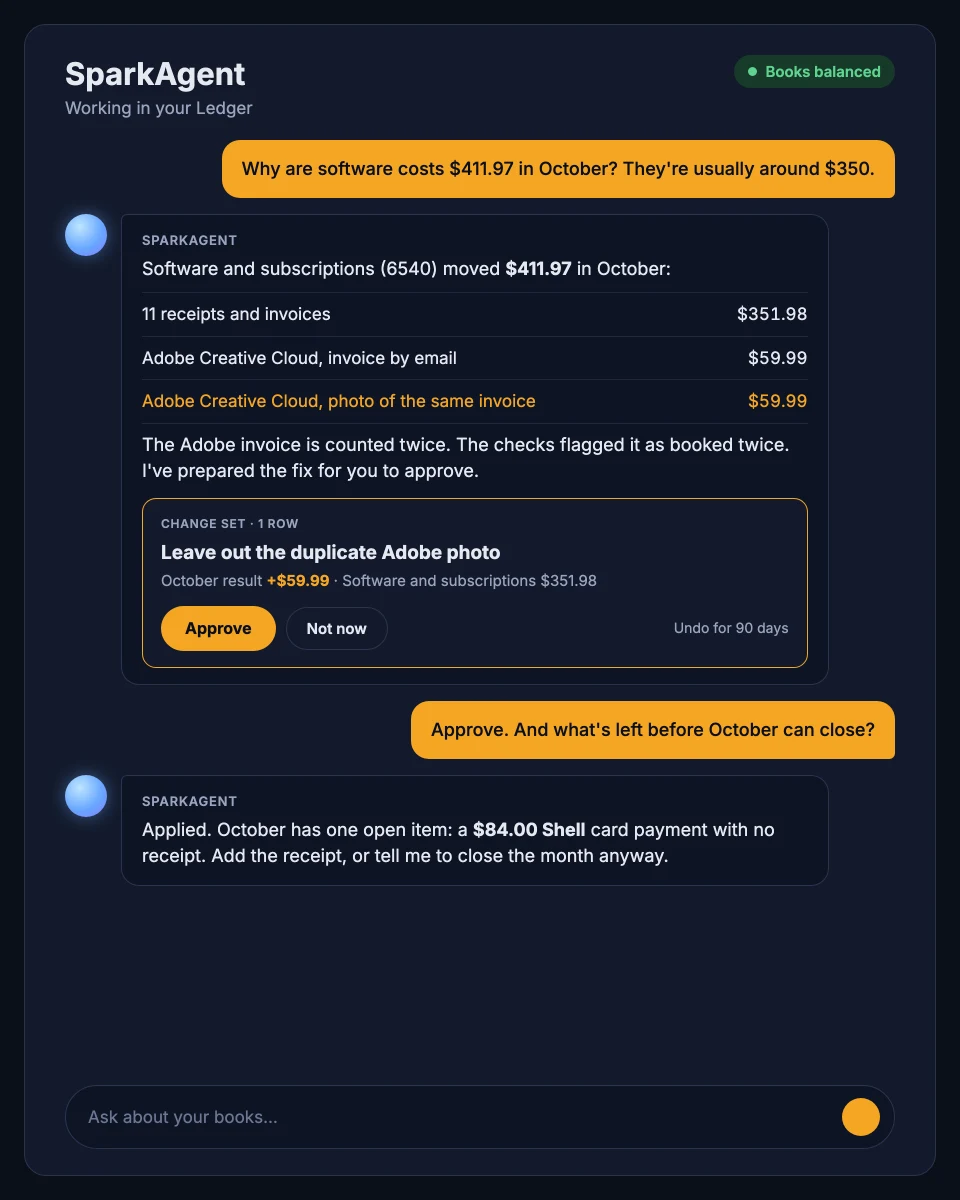
Ask why a number is what it is

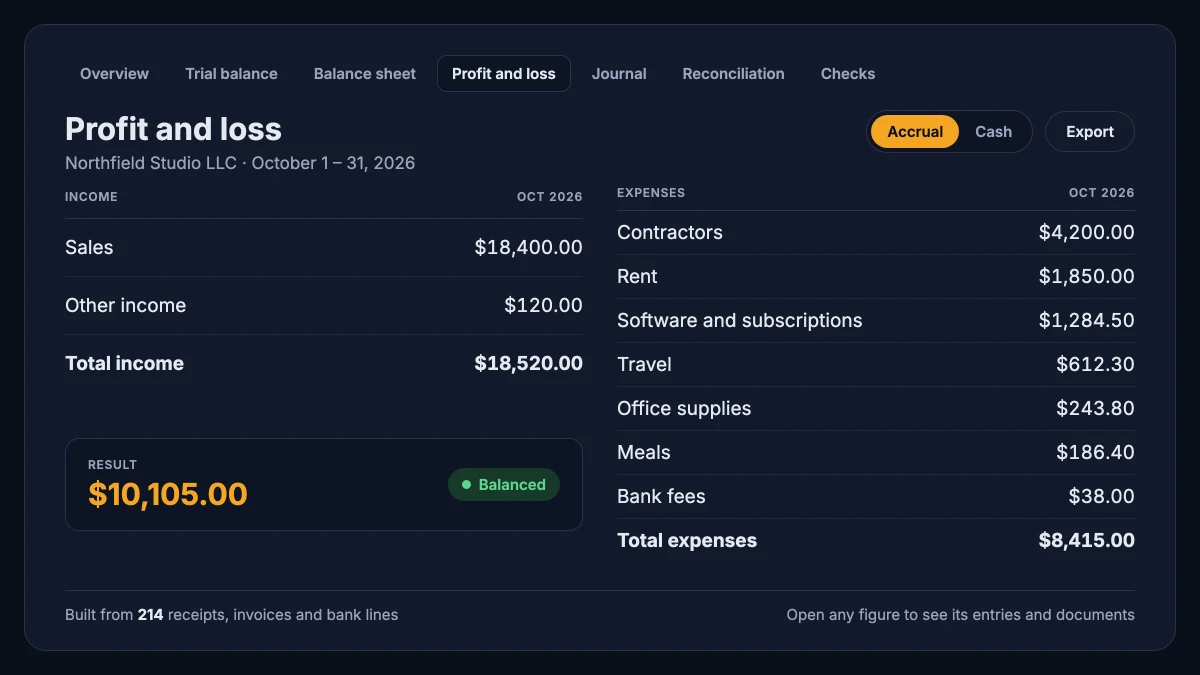
SparkAgent reads the same trial balance, balance sheet, profit and loss and account balances you see in the Ledger. Ask "what is on accounts payable at the end of September" or "why are software costs up this month" and it answers with figures from your books.

To explain a balance, it starts from the opening balance, groups the movements by what posted them (documents, bank lines, expense claims, manual entries, opening balances), names the documents that moved the account most with a link to each, and ends on the closing balance. You check its answer against the receipts themselves.

Profit and loss report in the SparkReceipt Ledger that SparkAgent reads to answer questions about the books

Fixes prepared for you, applied when you approve them

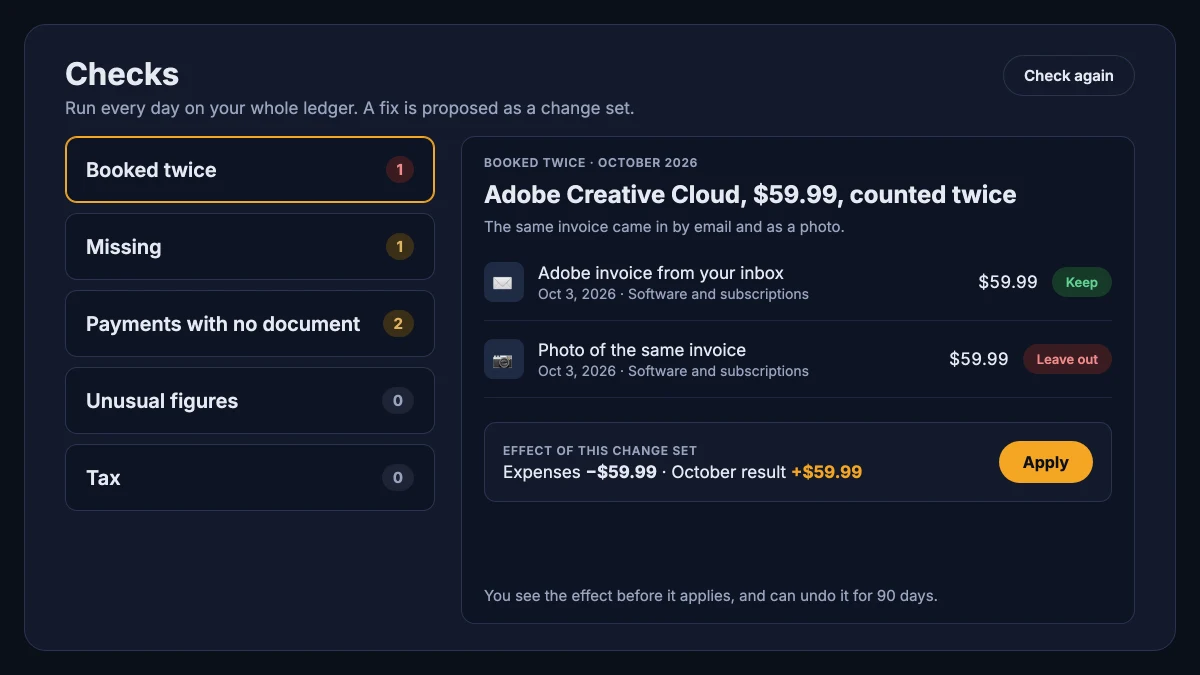
The Ledger's Checks look for costs booked twice, statements and documents that are missing, payments with no document, unusual figures and tax lines the return cannot place. Ask SparkAgent to run them and go through what they found.

When a check knows the fix, SparkAgent prepares it as a change set: a named list of changes with its effect on each month's result. It puts the set to you on an approval card, applies it only after you approve, and you can undo it for 90 days. It can also build a set of its own from your instructions, such as moving a group of documents to another Category.

Ledger checks listing an invoice booked twice, with a proposed change set and its effect on the month's result

Journal entries drafted from a sentence

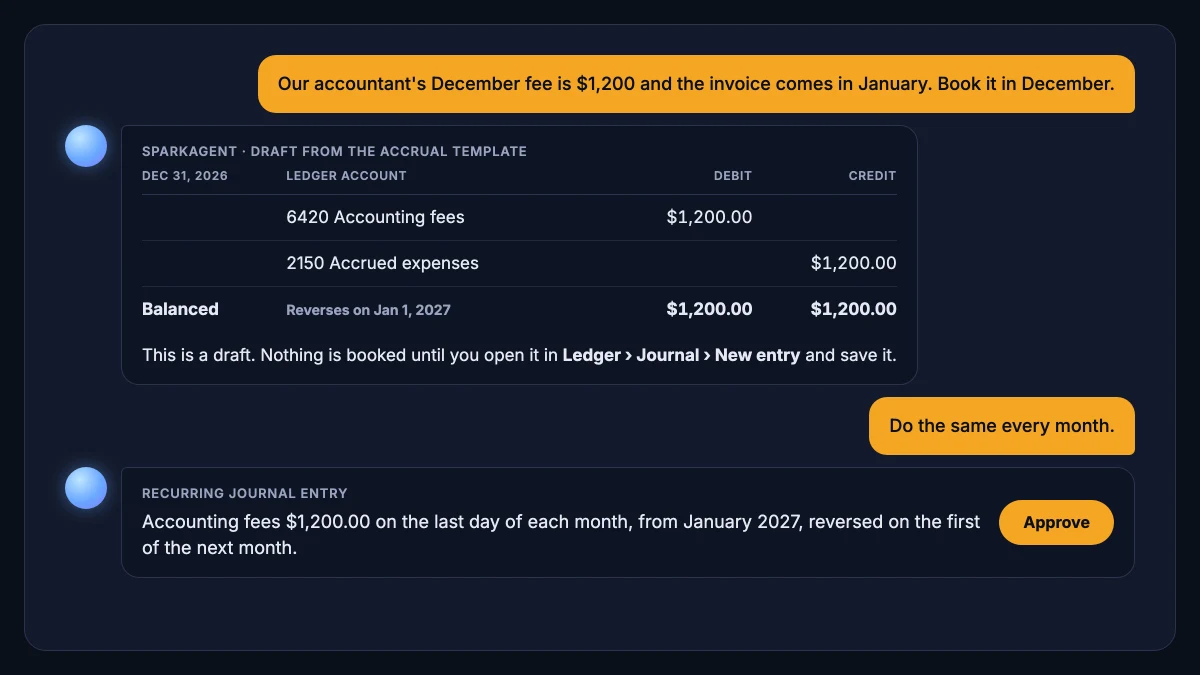
Some entries have no receipt behind them: an accrual for a bill that arrives next month, depreciation, a VAT settlement or a pay run. Describe it and SparkAgent drafts a manual journal entry from the Ledger's templates or from free lines, balanced and on your ledger accounts. A draft is a proposal: you open it in the Ledger's journal and book it yourself.

For entries that repeat, SparkAgent sets up a recurring journal entry monthly, quarterly or yearly, with an accrual taken back on the first day of the next month. It asks for your approval before the first one is booked.

SparkAgent drafting a balanced accrual journal entry with an automatic reversal, and proposing a monthly recurring entry

Month-end close and your accountant, handled in a conversation

Ask what a month still waits on and SparkAgent reads its checklist: missing statements, items to review, change sets not yet applied. When you are ready, it closes the month and locks its days against edits. If anything is still open, it tells you what and closes only if you still want to.

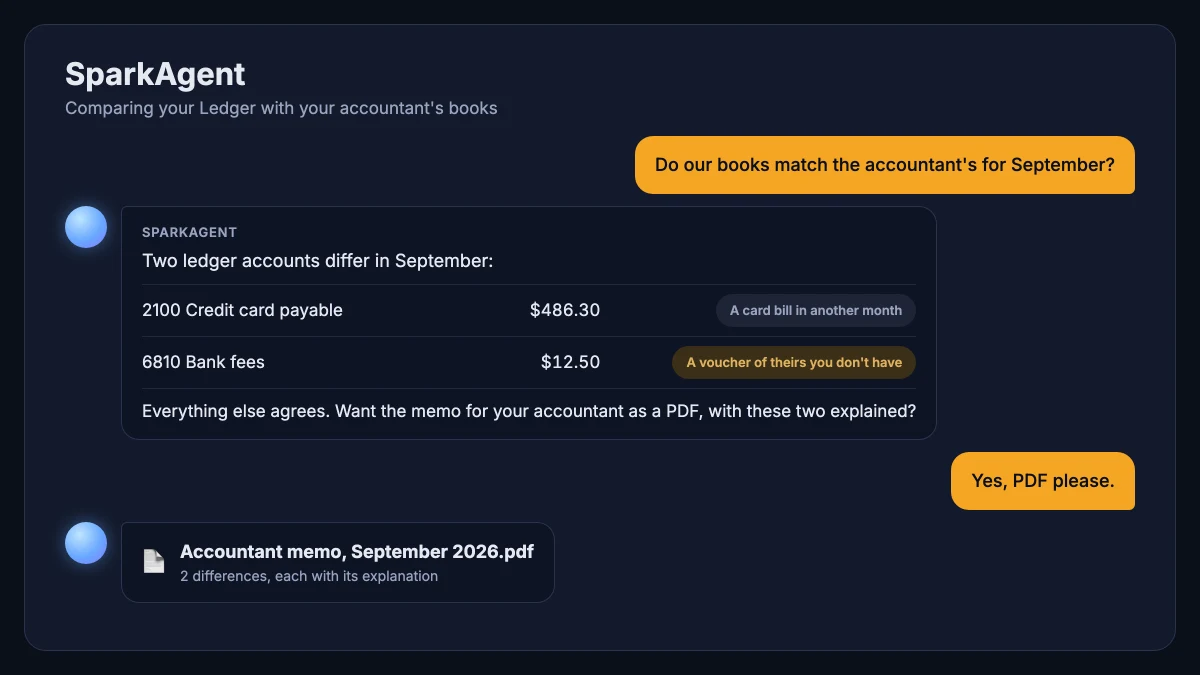
If your accountant keeps the official books, the Ledger compares their month-end balances with yours. SparkAgent lists the differences by month and ledger account, writes a note on one when you tell it why, in your words, and exports the memo for your accountant as a PDF or a CSV.

SparkAgent listing the differences between the SparkReceipt Ledger and the accountant's books and exporting a memo as a PDF

What AI bookkeeping means in SparkReceipt

Bookkeeping has two halves. The first is getting the transactions in: collecting receipts, reading them, categorizing each expense and matching it to its bank line. The second is keeping the books: recording each transaction as double-entry journal entries, checking them, closing each month and producing the reports.

Most AI bookkeeping software automates one half and leaves the other to you or to a second program. In SparkReceipt the AI does the first half, which the pre-accounting page covers in detail, and the Ledger does the second from the same documents. SparkAgent, the AI agent built into SparkReceipt, works across both.

What SparkAgent does in the Ledger:

  • Reads the reports. Trial balance, balance sheet, profit and loss, and any ledger account's balance on a date or over a period, on the accrual or the cash basis.
  • Explains balances. The opening balance, the movements grouped by source, the documents that moved it most and the closing balance.
  • Runs the checks. Booked twice, missing, payments with no document, unusual figures and tax lines, with the fix each check proposes.
  • Prepares change sets. From a check's fix or from your instructions, previewed with the effect on each month, applied after your approval and undone within 90 days if needed.
  • Drafts journal entries. Accruals with a reversal, depreciation of an asset you keep outside the fixed asset register, a VAT or sales tax settlement, a pay run, or free lines. Recurring entries on a schedule.
  • Books documents into the Ledger. It explains how a document posts, switches a Document to an Expense or an Income when it should count, and reads your country's bookkeeping guidance before it picks a Category or a tax treatment.
  • Closes months. It lists what is open and closes the month when you say so.
  • Asks the AI bookkeeper. The AI bookkeeper goes through your open months every night and proposes its fixes as one change set a month, named after the month. SparkAgent can ask it to look at a month now.
  • Keeps the loan register. It adds a loan and its rates, and links and splits loan payments into principal and interest, each after your approval.
  • Books bank lines. It answers SparkReceipt's questions about a bank line and books one as a tax, loan or owner payment, after your approval.
  • Works with your accountant's books. It lists the differences, writes the notes you give it, and exports the memo.

Where the AI stops and you decide

AI bookkeeping that changes your books without asking is guessing. In SparkReceipt the limits are built into the tools:

  • A change set waits for your approval. SparkAgent shows the set, its row count and its effect on each month's result on a card, and nothing applies until you approve it. Every change set can be undone for 90 days. The same card comes up before it closes a month or sets up a recurring entry.
  • A document edit you ask for is shown in the conversation. When you tell SparkAgent to recategorize a receipt or switch a Document to an Expense, it makes the change, shows it, and the Ledger records the document again. You can reverse it.
  • A manual journal entry is a draft. SparkAgent drafts it balanced; you book it in the Ledger.
  • A bank line booked as a tax, loan or owner payment waits for your yes. It counts in your books when it is booked, and you confirm or correct it in the Transaction Manager.
  • A month with open items is closed only after you have seen them.
  • A note on a difference from your accountant's books is yours. SparkAgent writes it only when you ask, with your reason.
  • Tax returns stay with you or your accountant. The Ledger works out the VAT, GST or HST return figures, or a sales tax summary in the United States, and SparkReceipt does not file the return.
  • Only the account owner, admins and your accountant can use SparkAgent in the Ledger. Members, Supervisors and Contributors cannot.

Use your own AI tool

Prefer Claude, ChatGPT or Cursor? Connect it to your account over MCP and it gets the same Ledger tools SparkAgent uses. It acts as you, within your role. Your AI tool shows no approval card, so SparkReceipt tells it to apply a change set, close a month or book a bank line only when you have asked for it or agreed to it in the conversation.

How to judge AI bookkeeping software

When you compare AI bookkeeping and AI accounting software, five questions separate the tools that save you time from the ones that create cleanup work:

  1. Can you see the documents behind every number? An answer you cannot check is a guess. SparkAgent links each balance to the receipts, bank lines and entries that make it up.
  2. Can you preview a change and take it back? In SparkReceipt every fix is a change set with its effect shown first and an undo for 90 days.
  3. Does it know your country's rules? SparkAgent reads bookkeeping guidance written for the United States, the United Kingdom, Canada, Australia and Finland before it picks a treatment, and the Ledger lays out the VAT, GST or HST figures box by box in the UK, Finland, Sweden, Germany, Austria, Australia and Canada, with a sales tax summary in the United States.
  4. Does it work with your accountant? Your accountant joins free with the Accountant role, sees the same Ledger and gets a memo of every difference from their books.
  5. Does it replace the typing or the judgement? The AI reads, records, checks and drafts. You and your accountant make the calls. Our guide to AI in accounting covers where that line sits across the industry.

How to start

Open the Ledger in the web app or the mobile app and a short setup asks a few questions once, such as your country, home currency and when your financial year starts. Then open SparkAgent and ask it about your books. The Ledger is on Pro and Elite, and SparkAgent works in it on both. Elite has the largest monthly message allowance.

AI Bookkeeping in One Subscription

Capture, the Ledger and SparkAgent in one account.

Your accountant joins free

Your first user is included. Each extra user: $1.00/month, billed $12 annually.

Your accountant joins free

Pro

For side hustles.

$5.75/mo

Total for 1 user · $69.00 billed annually

+ VAT/GST where applicable

Get Started

7-day free trial

50 documents / month

For receipts and invoices

  • AI scanning and categorization
  • One connected email inbox
  • One live bank feed connection
  • Bank statement extraction and matching
  • Mileage tracking and expense reports
  • QuickBooks Online, Xero and more
Recommended

Elite

For small businesses with 1 to 40 people.

$10.75/mo

Total for 1 user · $129.00 billed annually

+ VAT/GST where applicable

Get Started

7-day free trial

Unlimited documents*

Everything in Pro, plus:

  • Line-item extraction on every receipt
  • Several connected email inboxes
  • Several live bank feed connections
  • AI Fields for the details you need
  • AI rules for categorizing and filing
  • Schedule C and accounting templates
  • Trips start when your phone connects to your car

Founder-led setup

Joel Ojala

Joel Ojala, co-founder, sets up SparkReceipt with you, tailored to how you work.

$400one-time setup

+ Elite for 1 user: $10.75/mo, billed annually

$529.00 today, then $129.00 a year

+ VAT/GST where applicable

Get set up with Joel

Annual plan only · No free trial

Everything in Elite

Plus a 60-minute session with Joel and one follow-up. In the session:

  • Your process, mapped at a high level
  • Logins for your team, and any extra users you need
  • Set up inbox scanning for receipts and invoices
  • Connect bank / upload your first statement
  • The phone app for paper receipts
  • Expense categories and your accounting integration
  • Anything else you'd like to go through

Unlimited linked accounts on every plan.

Compare all features

Pro

  • 1 user included. Add teammates any time for a flat fee per user, your accountant joins free on top, unlimited linked accounts
  • 50 documents per month (receipts and invoices, mass upload up to 100 at once)
  • AI scanning and categorization
  • Automatic email receipt scanning from one connected inbox (Gmail, Outlook, IMAP)
  • Bank statement extraction and receipt matching (PDF, CSV, Excel)
  • The Ledger: double-entry books with profit and loss, balance sheet, month close and a sales tax summary
  • 100 credits a month per user. Bank statements use 1 credit per transaction
  • One live bank feed connection
  • Mileage tracker: GPS or manual trips, with per diem
  • Expense claims: submit receipts and trips, approve, mark paid
  • SparkAgent AI assistant, or connect your own AI over MCP
  • Integrations: QuickBooks Online, Xero, Zapier, Make, Pabbly, plus webhooks and API
  • Expense reports and exports: PDF, Excel, CSV, ZIP; 190 currencies

Elite

  • Everything in Pro, plus:
  • Unlimited documents: receipts and invoices, mass upload up to 100 at once
  • 200 credits a month per user. Bank statements use 1 credit per transaction
  • Line-item extraction on every receipt
  • Several connected email inboxes with automatic scanning
  • Several live bank feed connections
  • AI Fields: tell the AI exactly what to pull from every document
  • Plain-English AI rules: tell the AI how to categorize and file automatically
  • Schedule C export for US tax filing
  • Trips start when your phone connects to your car
  • Export templates for Sage 50, DATEV, Wave, and Sage 200

Founder-led setup

  • A 60-minute setup session with Joel, co-founder, plus one follow-up session
  • Together we set up your process, team logins, inboxes, bank statements, categories and integrations
  • Everything in Elite, billed annually
  • 1 user included. Add teammates any time for a flat fee per user

Unlimited document scanning on Elite is subject to fair use. Bank statement extraction uses monthly renewable credits. Historical email imports include a free allowance; larger imports use credits, with the cost shown before you start.

Frequently Asked Questions

AI bookkeeping uses AI to do bookkeeping work that used to be manual: reading receipts and invoices, categorizing transactions, matching them to bank lines, recording them in the books and finding mistakes. In SparkReceipt the AI reads and categorizes each document, the Ledger records it as double-entry journal entries, and SparkAgent answers questions about the books and prepares fixes for you to approve.

Yes. The AI captures, reads and categorizes your documents and matches them to your bank lines, the Ledger keeps the double-entry books from them, and SparkAgent works in the Ledger: it explains balances, runs the checks, prepares change sets, drafts journal entries and closes months when you tell it to.

Fixes wait for you. SparkAgent shows each change set on an approval card with its effect on each month and applies it only after you approve it, and it asks the same way before it closes a month or sets up a recurring entry. A manual journal entry is a draft you book yourself. Edits you ask it to make to a document, such as a new Category, are shown in the conversation and can be reversed. The AI bookkeeper's change sets wait until you apply them. One thing counts at once: a bank line SparkReceipt books as a tax, loan or owner payment, which then waits for your yes in the Transaction Manager. Every change set can be undone for 90 days.

It drafts them. Describe the entry and SparkAgent drafts a balanced manual journal entry from a template (an accrual with its reversal, depreciation, a VAT or sales tax settlement or a pay run) or from free lines. A purchase marked **Depreciate this purchase** needs no entry: SparkReceipt books its depreciation each financial year. You open the draft in the Ledger's journal and book it. Recurring entries are set up after your approval.

Before it picks one, it reads the bookkeeping guidance for your country. Guidance is written for the United States, the United Kingdom, Canada, Australia and Finland, and covers questions such as whether VAT on a purchase can be reclaimed or whether a purchase is an asset or a cost.

It replaces the typing and the digging: reading receipts, recording entries, finding duplicates and explaining balances. The judgement stays with you and your accountant, and your accountant joins your account free with the Accountant role to review the same Ledger.

Yes. Connect Claude, ChatGPT, Cursor or another MCP client to your account over MCP. It gets the same Ledger tools as SparkAgent and acts within your role. There is no approval card, so SparkReceipt tells your AI tool to apply a change set or close a month only when you have asked for it or agreed to it.

The account owner, admins and your accountant. Members, Supervisors and Contributors do not see the Ledger and cannot use its tools in SparkAgent.

No. The Ledger works out the VAT, GST or HST figures box by box for the return in the UK, Finland, Sweden, Germany, Austria, Australia and Canada, and a sales tax summary in the United States. You or your accountant file the return.

No, if you want receipts and books in one place: the Ledger keeps the books and SparkAgent works in it. If you keep QuickBooks Online or Xero, SparkReceipt still publishes each receipt there with the image attached, and the AI does the groundwork before it.

Let the AI Do the Bookkeeping. Keep the Final Say.

Get Started
Get Started