
SparkReceipt Year in Review: 12 Months, 12 Milestones
 Written by Joel Ojala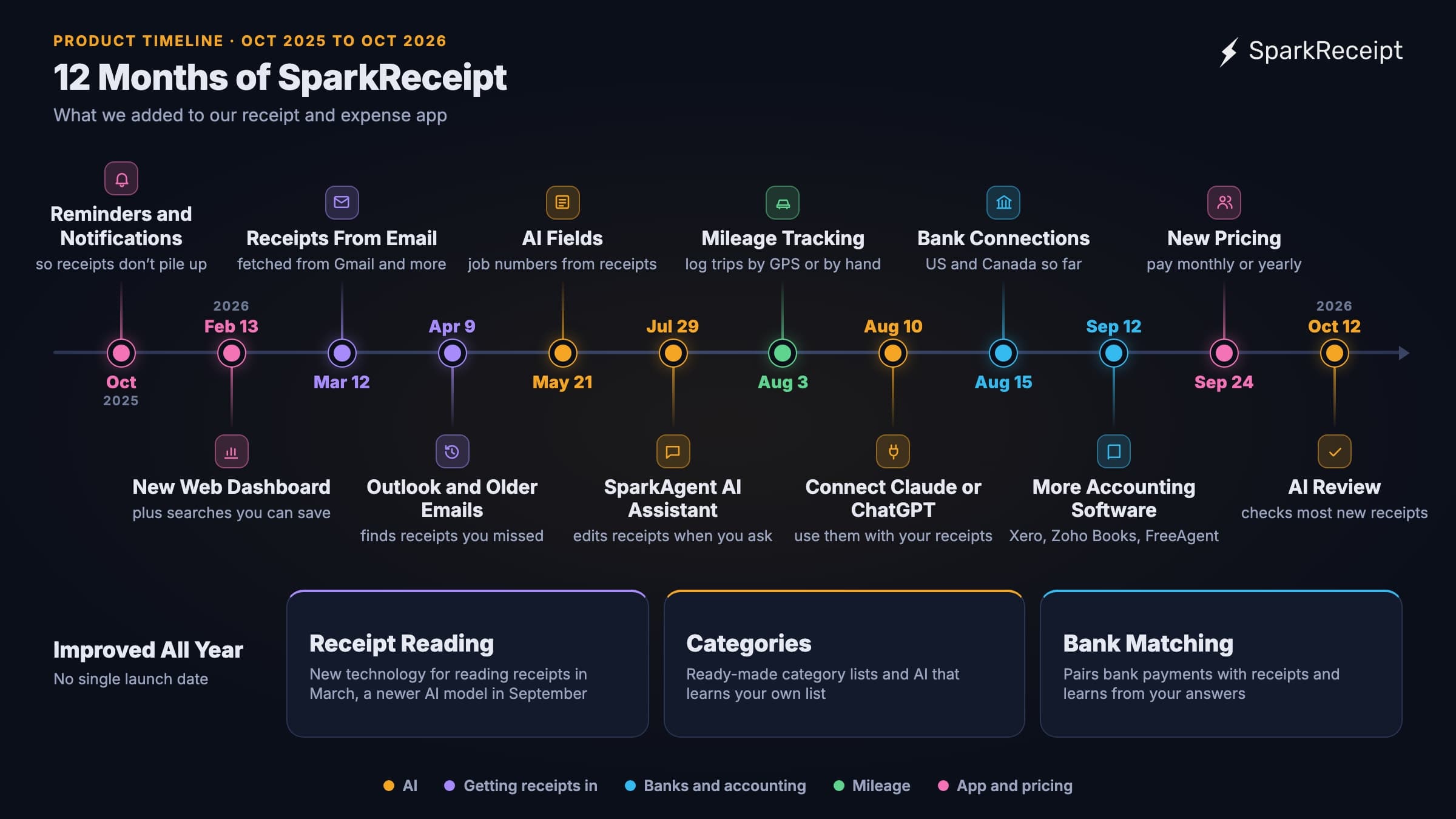
SparkReceipt is an app that reads your receipts and invoices, sorts each cost into a category, and gets everything ready for your accountant or your tax return. In October 2025, you still had to bring each receipt to it, by taking a photo, uploading a file, or forwarding an email. Twelve months later, SparkReceipt fetches receipts from your inbox, pulls in payments from your bank, and logs the miles you drive for work. For most new receipts, it also checks its own work before you look. SparkReceipt runs on iPhone, Android, and the web, and has users in 175 countries.
The timeline at the top of this page shows the 12 biggest new features in SparkReceipt from October 2025 to October 2026. We dated each one by the day it was switched on for all customers. Some features depend on your plan or your country, and the pricing page shows which plan includes what.
October 2025: Reminders and Notifications
The SparkReceipt mobile app for iPhone and Android started sending push notifications in October, with a switch in your settings to turn them off. A daily reminder followed a week later. Soon after, you could choose which messages reach you as a push notification and which by email. The reminders help you add a receipt while you still remember what it was for.
February 2026: A New Web Dashboard and Saved Searches
The web app got a new dashboard, called Overview, and a new Documents view that lists all your receipts and invoices. In Documents you can filter the list the way you need, save that filter as a search, and open it again with one click.
New web accounts also got a short checklist, the SparkReceipt Academy, that walks you through adding and checking your first receipt.
March 2026: Receipts Straight From Your Inbox
Many receipts only exist as emails, from online stores, software subscriptions, and travel bookings. Since March 12, you can connect your Gmail account once, and most other email accounts through IMAP (Internet Message Access Protocol), a standard connection most email providers offer. SparkReceipt then reads new emails for receipts and invoices and files them for you. You can approve each one before it's saved. When a store sends both an order email and a receipt, SparkReceipt pairs them, so the same purchase isn't saved twice.
In September 2026 alone, inbox scanning filed more than 68,000 documents, more than any other feature on this timeline. The Email Receipts page shows how it works.
Also in March:
- SparkReceipt flags possible duplicates for you to check.
- You can comment on a receipt and @mention a teammate or your accountant.
- You can lock a past month or year, so records your accountant has already used stay as they are.
April 2026: Outlook and Older Emails
On April 9, inbox scanning reached Microsoft email accounts, including Outlook and Microsoft 365. A day earlier, we launched email history extraction. You pick a start date, and SparkReceipt goes back through your older emails and pulls out the receipts you didn't save at the time. The first 10,000 older emails on each SparkReceipt account are included. After that, it uses credits. Each plan includes some every month, and you can buy more. The help center explains how credits work.
Also in April, you could start from a ready-made list of categories. A business's full list of categories is called its chart of accounts. The new lists include the categories on Schedule C, the IRS form a US sole proprietor (a one-person business) files with their tax return, and a Finnish chart of accounts.
May 2026: AI Fields
Many businesses need one more detail from each receipt. A builder needs the job number, an agency needs the client's project code, and an importer in Europe needs the supplier's VAT (value-added tax) number. With AI Fields, you name the detail you want and describe it in one sentence, and the AI reads it from every new document. The values appear in the spreadsheets and reports you download, so the detail your accountant asks for is already filled in.
Also in May, the app became available in Swedish and Turkish.
July 2026: SparkAgent, Our AI Assistant, Does More of the Work
SparkAgent is the AI assistant inside SparkReceipt. You type what you need in plain language, and it works with your own receipts and expenses. The July version knows which page you're on. It also does more of the work itself: ask it to fix a receipt, change a category, or match bank payments to receipts. It makes small changes you can undo, and it asks your permission for anything else.
August 2026: Mileage, AI Assistants, and US Bank Connections
Mileage tracking
Business driving is often tax deductible, as long as you keep a record of each trip. The Mileage Tracker opened to all accounts on August 3. Record a trip with GPS in the mobile app, or add one by hand on the web. A trip can have several stops, a vehicle with its own mileage rate (the amount you claim per mile or kilometer), and a purpose the AI suggests from where you went. You see the route on a map.
Claude and ChatGPT
Claude and ChatGPT are AI chat assistants. If you use one of them, you can connect it to your SparkReceipt account and ask it to find, sort, or upload your receipts. Claude could connect from August 10 and ChatGPT from August 20. You sign in on SparkReceipt's own page, so the assistant doesn't get your password, and you choose what it may see and do. The connection uses MCP (Model Context Protocol), an open standard, and the MCP page has the setup steps.
Bank connections for US banks
A big part of month-end bookkeeping is matching each bank payment to its receipt. Before August, SparkReceipt could only do this from a bank statement you uploaded as a PDF, CSV, or Excel file. Since August 15, customers in the US can connect their bank and card accounts directly. SparkReceipt calls this the bank feed. New payments come in by themselves, and SparkReceipt suggests the receipt or invoice that belongs to each one. You check them on the Transaction Manager screen. Outside the US and Canada, statement uploads are still the way to bring in bank data. More on the bank feed page.
September 2026: More Accounting Software and New Pricing
Xero, Zoho Books, and FreeAgent for every account
If you or your accountant use accounting software, SparkReceipt can publish your expenses and income to it. That means it sends them over, so you don't type them in twice. QuickBooks Online has worked this way since 2024. Xero had been in a small test since April, and on September 12 it opened to every account. Zoho Books and FreeAgent followed the next week, and SimplBooks, bookkeeping software from Estonia, at the end of the month.
US accounts can also download a Schedule C summary for their tax return.
New pricing
On September 24, we changed how SparkReceipt is priced. The two plans, Pro and Elite, each include one user, and you pay a small monthly fee for each extra person. You can pay monthly or yearly, and your accountant joins free. The pricing update post explains what changed and why, and the pricing page shows the current plans.
October 2026: AI Review
Since October 12, AI review double-checks most new receipts before you open them, starting with the category. When it fixes something, you can see what it changed and undo it. When it isn't sure, it asks you a short question, and the person who uploaded the receipt gets a notification. It follows guidebooks we wrote from tax rules and accounting practice in the US, Canada, the UK, Australia, and Finland.
Also in October:
- Bank connections reached banks in Canada.
- Procountor, accounting software from Finland, opened to every account.
- A new page lists the stores you buy from and the customers who pay you (Merchants & Payers). There you can set a rule such as “everything from Adobe goes to Software”.
Improved All Year
The band at the bottom of the timeline covers improvements that came in small steps over the year, so they have no single date.
Better receipt reading
In March, every account moved to new technology for reading the text on receipts, and in September to a newer AI model. Bank statements are now checked to the cent against the balances printed on them, and a line that doesn't add up gets read again.
We haven't put a number on how much more accurate this made SparkReceipt, because we don't yet have a fair way to measure it.
Categories that fit your books
A category is the group a cost belongs to, such as Travel or Software. In March, categories could get subcategories, and in April came the ready-made lists. Since October, SparkReceipt follows your own rules for each store or supplier and learns from your past choices. If your list of categories is long, the AI also writes itself a short guide to what each one is for, so it can tell similar ones apart. 2,515 accounts had one by October 17.
Bank matching that learns
Matching means pairing each bank payment with its receipt. Since August, matching learns from each suggestion you accept or turn down, and it now also matches the amount you paid, tip and shipping included. From mid-August to October 17, people accepted 7,329 suggested matches and turned down 2,551.
Fewer stuck scans
A scan that fails for a moment now retries by itself. If we update SparkReceipt while a scan is running, the scan starts again within minutes. If a scan of a photo or upload does fail, you get a push notification and an email, and the receipt has a Retry button.
What's Next
Expense claims are almost here. They are for paying back someone who covered a business cost with their own money. You put the expenses they paid and their mileage trips into a claim, send it for approval, and mark it paid when the money goes out. We'll tell you the day it switches on.
If you already use SparkReceipt and something is missing, send it from the feature request button in the app. It comes straight to us.
If you're new here, Pro starts at $5.75 a month on yearly billing, and both plans come with a 7-day free trial. Compare the plans and start your trial.
Joel, co-founder